
.svg)


%201.svg)

Key Takeaways
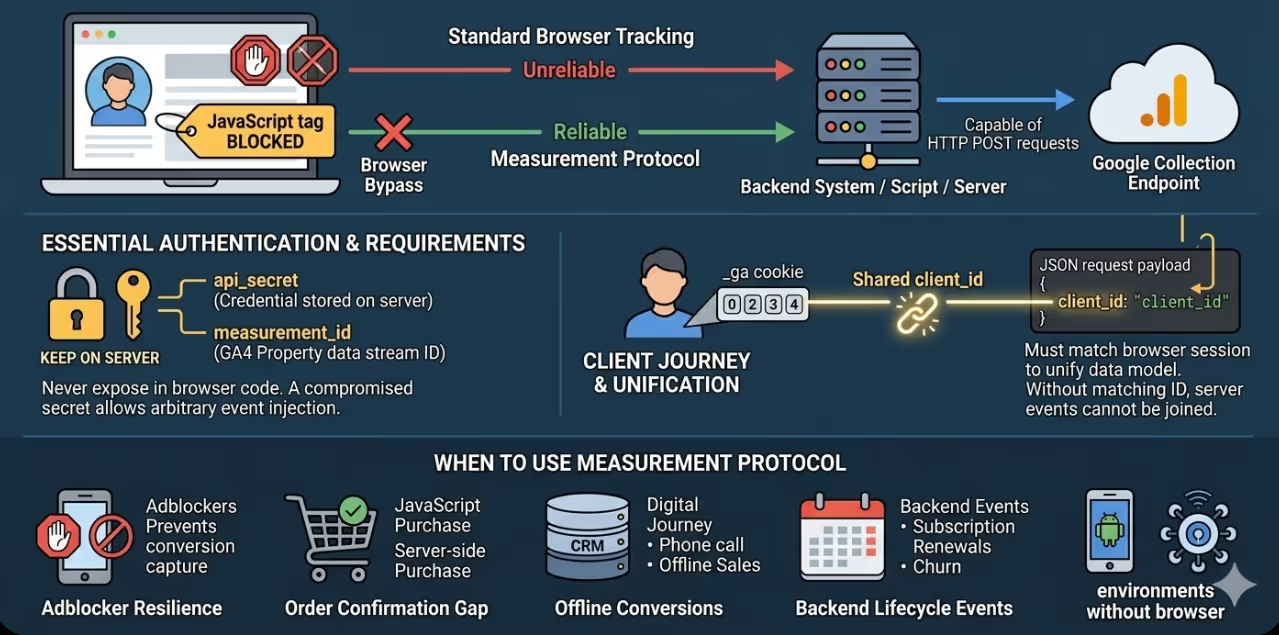
- The GA4 Measurement Protocol sends events via HTTP POST requests directly to Google's collection endpoint, bypassing the browser. Any server, script, or backend system capable of making an HTTP request can implement it.
- Every Measurement Protocol request requires a
measurement_id(the GA4 property's data stream ID) and anapi_secret(a secret key generated in the GA4 interface). Theapi_secretmust be kept on the server and never exposed in code that runs in the browser. - Events sent via the Measurement Protocol must include a
client_idthat matches the_gacookie value of the user whose session the event should be attributed to. Without a matchingclient_id, the event sent from the server cannot be joined to the user's session data in GA4 gathered from the browser. - The Measurement Protocol does not return validation errors in production mode. All request validation should be performed against the Measurement Protocol Validation Server endpoint before deploying to production.
- Tracking events from the server is the appropriate solution for offline conversion imports, order confirmation events sent from the payment processor, subscription lifecycle events from a billing system, and any other event that occurs in a backend system after the browser session has ended.
- GA4's Measurement Protocol does not support all event types and parameters available in the JavaScript SDK. Events sent via the protocol are limited to the standard event schema and will not automatically populate report dimensions that rely on session or user context the protocol cannot provide.
- The combination of standard JavaScript tracking for browser events and Measurement Protocol tracking for events sent from the server produces the most complete data model, with the two streams unified in GA4 under the shared
client_id.
When to Use the Measurement Protocol
The GA4 Measurement Protocol is the appropriate tracking mechanism for specific situations where JavaScript tracking running in the browser cannot be relied upon. Understanding when to use it prevents unnecessary complexity and ensures the implementation effort is applied where it produces meaningful data quality improvements.
Adblocker and tracking prevention resilience. For Australian businesses in categories with high adblocker adoption, including technology, media, finance, and professional services, a meaningful proportion of conversions may not be captured by the JavaScript tag because adblockers prevent the tag from firing. Moving the conversion event to the server, where it is sent from the business's own infrastructure rather than from the user's browser, removes the adblocker from the equation.
Order confirmation and payment events. The standard practice of firing a purchase event from a JavaScript tag on the order confirmation page creates a gap: if the user closes the browser before the page fully loads, the tag does not fire and the purchase is not recorded. Sending the purchase event from the server after the order is written to the database guarantees that every completed transaction is captured regardless of what the user's browser does after the payment is processed.
Offline conversions. When a digital journey leads to a phone call, a visit to the physical store, or a quote that converts days later outside the digital channel, the conversion event can be sent to GA4 via the Measurement Protocol from the CRM or sales system at the moment the conversion occurs, with the original client_id from the user's digital session used to attribute the conversion back to the digital touchpoint.
Backend and lifecycle events. Subscription renewals, trial-to-paid conversions, churn events, and other lifecycle milestones that occur in a billing system weeks or months after the initial acquisition are events that matter to the business but cannot be captured by a browser tag. The Measurement Protocol allows these events to be sent to GA4 from the billing system at the time they occur.
Mobile and environments without a browser. For native mobile applications not using the Firebase SDK, for Internet of Things devices, for integrations between servers, and for any environment where a JavaScript SDK cannot be deployed, the Measurement Protocol is the tracking mechanism of choice.
Authentication and Endpoint
The GA4 Measurement Protocol endpoint is:
POST https://www.google-analytics.com/mp/collect?measurement_id=G-XXXXXXXX&api_secret=YOUR_API_SECRET
The measurement_id is the GA4 data stream ID for the property, in the format G-XXXXXXXX. It is visible in the GA4 interface under Admin → Data Streams → [stream name] → Measurement ID.
The api_secret is generated in the GA4 interface under Admin → Data Streams → [stream name] → Measurement Protocol API Secrets. Multiple secrets can be created for different systems or environments. Secrets can be revoked without affecting others.
The api_secret is a credential stored on the server. It must never appear in JavaScript running in the browser, mobile app bundles, or any other code that could be extracted by a third party. A compromised api_secret allows arbitrary event injection into the GA4 property.
For the validation endpoint used during development, the URL changes to:
POST https://www.google-analytics.com/debug/mp/collect?measurement_id=G-XXXXXXXX&api_secret=YOUR_API_SECRET
The validation endpoint returns a JSON response identifying any malformed or invalid parameters in the request without sending the event to the production GA4 property.
Request Structure
Every Measurement Protocol request is a POST request with a JSON body. The minimum required structure is:
json
{
  "client_id": "1234567890.1234567890",
  "events": [
    {
      "name": "purchase",
      "params": {
        "currency": "AUD",
        "value": 149.00,
        "transaction_id": "ORDER-12345",
        "items": [
          {
            "item_id": "SKU-001",
            "item_name": "Product Name",
            "price": 149.00,
            "quantity": 1
          }
        ]
      }
    }
  ]
}
The client_id field is the most critical element of the request for data quality. This value must match the _ga cookie value from the user's browser session. The _ga cookie has the format GA1.1.XXXXXXXXXX.XXXXXXXXXX, and the client_id value used in the Measurement Protocol request should be the two numeric components after the GA1.1. prefix, in the format XXXXXXXXXX.XXXXXXXXXX.
For events sent from the server that need to be attributed to a specific user's session, the client_id must be captured from the browser at the time of the original interaction and passed to the server through the transaction or order record, so it is available when the event is sent from the server.
The events array can contain up to 25 events per request. Each event has a name and a params object containing the event parameters.
Implementing a Server-Side Purchase Event
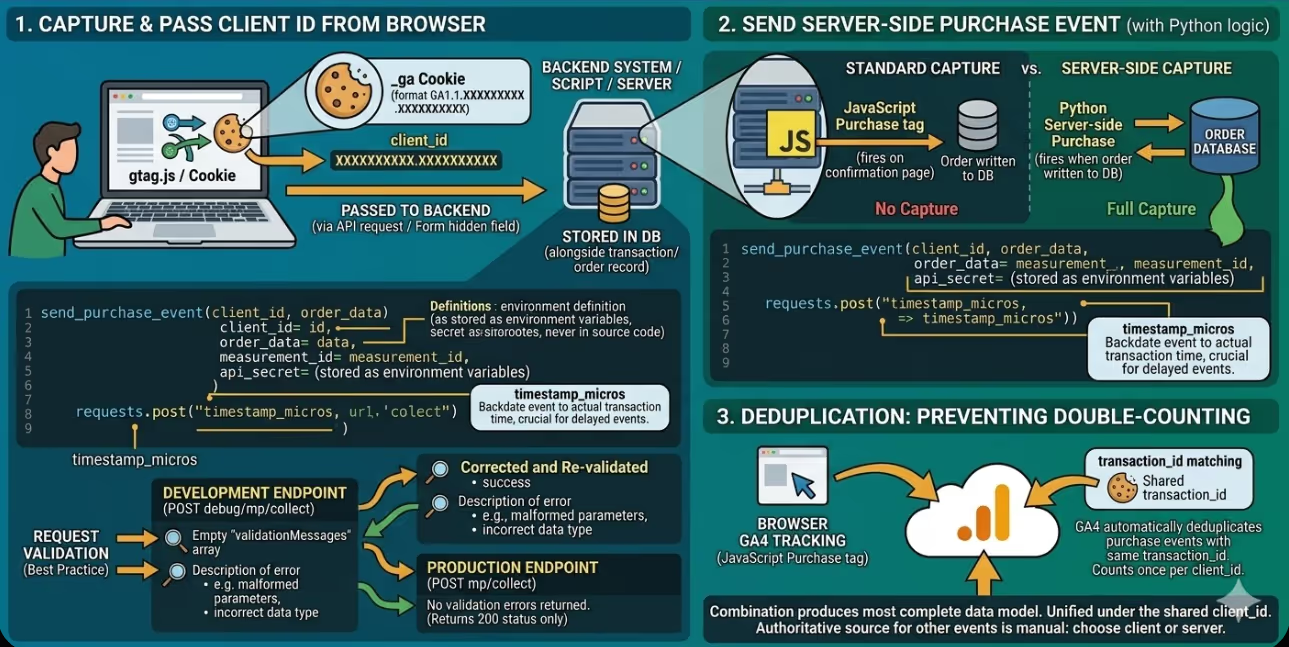
The most common Measurement Protocol implementation for Australian ecommerce businesses is a purchase event sent from the server that fires when the order is written to the database rather than relying on the JavaScript tag firing on the confirmation page. The following example shows the implementation in Python using the requests library:
python
import requests
import json

def send_purchase_event(client_id, order_data):
    """
    Send a GA4 purchase event via the Measurement Protocol.

    Args:
        client_id: The GA1.1 client ID from the user's _ga cookie
        order_data: Dictionary containing order details
    """
    measurement_id = "G-XXXXXXXXXX"  # Store in environment variables
    api_secret = "YOUR_API_SECRET"   # Store in environment variables, never in source code

    endpoint = f"https://www.google-analytics.com/mp/collect"
    params = {
        "measurement_id": measurement_id,
        "api_secret": api_secret
    }

    payload = {
        "client_id": client_id,
        "timestamp_micros": str(int(order_data["order_timestamp"] * 1_000_000)),
        "events": [
            {
                "name": "purchase",
                "params": {
                    "currency": "AUD",
                    "value": order_data["order_total"],
                    "transaction_id": order_data["order_id"],
                    "affiliation": "Online Store",
                    "items": [
                        {
                            "item_id": item["sku"],
                            "item_name": item["name"],
                            "item_category": item["category"],
                            "price": item["unit_price"],
                            "quantity": item["quantity"]
                        }
                        for item in order_data["line_items"]
                    ]
                }
            }
        ]
    }

    response = requests.post(
        endpoint,
        params=params,
        data=json.dumps(payload),
        headers={"Content-Type": "application/json"}
    )

    return response.status_code
The timestamp_micros parameter allows the event to be backdated to the actual transaction time rather than the time the HTTP request is made, which is important for events that are sent with a delay after the original transaction.
Capturing and Passing the Client ID
For events sent from the server to be attributed to the correct user session in GA4, the client_id from the user's browser must be captured and stored alongside the transaction record in the database. The capture must happen while the user's browser session is active.
The _ga cookie value can be read in JavaScript and sent to the server with the order data:
javascript
function getClientId() {
  // Read the _ga cookie value
  const gaCookie = document.cookie
    .split('; ')
    .find(row => row.startsWith('_ga='));

  if (!gaCookie) return null;

  // Extract the client ID portion (after GA1.1.)
  const parts = gaCookie.split('=')[1].split('.');
  return parts.slice(2).join('.');
}

// Include client_id in the form submission or API request
const clientId = getClientId();
Alternatively, the gtag.js function can retrieve the client ID directly:
javascript
gtag('get', 'G-XXXXXXXXXX', 'client_id', (clientId) => {
  // Store clientId in a hidden form field or send with the API request
  document.getElementById('ga_client_id').value = clientId;
});
Once captured, the client_id should be stored in the order record in the database so it is available when the event is sent from the server after order processing.
Validating Requests Before Production Deployment
The Measurement Protocol Validation Server provides immediate feedback on whether a request is correctly formed before it is sent to the production GA4 property. A validation request returns a JSON response indicating any errors in the event name, parameter types, or required field structure.
python
def validate_measurement_protocol_request(client_id, events):
    """Validate a Measurement Protocol payload before sending to production."""
    measurement_id = "G-XXXXXXXXXX"
    api_secret = "YOUR_API_SECRET"

    validation_endpoint = "https://www.google-analytics.com/debug/mp/collect"
    params = {
        "measurement_id": measurement_id,
        "api_secret": api_secret
    }

    payload = {
        "client_id": client_id,
        "events": events
    }

    response = requests.post(
        validation_endpoint,
        params=params,
        data=json.dumps(payload),
        headers={"Content-Type": "application/json"}
    )

    validation_result = response.json()

    if validation_result.get("validationMessages"):
        for message in validation_result["validationMessages"]:
            print(f"Validation error: {message['description']}")
        return False

    return True
A response with an empty validationMessages array indicates the request is correctly formed. Common validation errors include invalid event names (names using characters other than letters, numbers, and underscores), parameter values of the wrong type (passing a string where an integer is expected), and exceeding the maximum number of parameters per event.
Deduplication With JavaScript Tracking
For businesses running both JavaScript GA4 tracking and Measurement Protocol for sending the same events from the server (for example, a purchase event fired from both the confirmation page JavaScript tag and the order processor running on the server), GA4 provides a deduplication mechanism using the transaction_id parameter for purchase events.
When two purchase events with the same transaction_id are received for the same client_id within a short window, GA4 deduplicates them and counts the purchase only once. This prevents counting the purchase twice when both the JavaScript tag and the event from the server fire successfully for the same order.
For events other than purchases that require deduplication across JavaScript and tracking from the server, GA4 does not provide automatic deduplication based on a parameter. For these cases, the recommended approach is to choose one source (client or server) as the authoritative source for each event type and disable or conditionally suppress the other rather than attempting to deduplicate manually.
FAQs
Can the GA4 Measurement Protocol be used to backfill historical event data into a GA4 property?
The Measurement Protocol can send events with a timestamp_micros value set to a time in the past, using the timestamp_micros parameter in the request body. However, GA4 only processes events within a 72-hour window relative to the current time: events with timestamps more than 72 hours in the past will be rejected silently (the request returns a 204 status code with no error, but the event is not processed). This limitation means the Measurement Protocol is useful for sending events that occurred within the last three days but cannot be used for genuine historical data backfill. For bulk historical import of event data, BigQuery is the appropriate tool: events can be imported directly into the GA4 linked BigQuery dataset, bypassing the collection endpoint entirely.
How should Australian development teams handle the case where the client_id is not available when an event needs to be sent from the server?
If the client_id was not captured and stored at the time of the original browser interaction, the event cannot be attributed to the user's browser session in GA4. In this situation, the options are to generate a synthetic client_id (which will create a new user record in GA4 unconnected to the original session), to omit the event (losing the conversion data entirely), or to implement user_id tracking alongside the Measurement Protocol. If the GA4 property has user_id tracking enabled and the user is authenticated, the user_id can be used in place of or alongside the client_id to attribute the event to the authenticated user's record rather than to a specific browser session. The most robust implementation captures the client_id at the earliest opportunity in the user journey and stores it alongside any data that will later trigger an event to be sent from the server.
Does the GA4 Measurement Protocol work with GA4 properties that have Google Signals enabled, and does it affect reporting across devices?
Events sent via the Measurement Protocol contribute to the GA4 data model in the same way as events sent via the JavaScript SDK, but they are limited by the information available in the request. If the request includes a user_id that matches a Google account associated with the user, Google Signals can use that association for reporting across devices. Without a user_id, events sent from the server are attributed to the client_id device and cannot contribute to identity resolution across devices. For Australian businesses where attribution across devices is a priority, implementing both the Measurement Protocol and user_id tracking for authenticated users produces the most complete attribution picture, as the user_id allows GA4 to associate events from different browsers and devices with the same user when those devices are signed in to the same Google account.
The Browser Is Not the Boundary of Your Data
Standard JavaScript tracking captures what happens in the browser with fidelity proportional to how many browsers are executing it cleanly. Tracking via the Measurement Protocol from the server captures what happens in the business with fidelity proportional to how well the implementation on the server is built. For Australian businesses where a meaningful share of conversions occur outside the browser, or where adblocker adoption is reducing the accuracy of conversion data from JavaScript tracking, the Measurement Protocol is not an advanced implementation option. It is the mechanism that restores the accuracy that browser constraints have eroded.
Maven Marketing Co supports Australian businesses with GA4 Measurement Protocol implementation, including purchase event setup from the server, client ID capture patterns, and validation frameworks for backend event tracking.
Talk to the team at Maven Marketing Co →

Table of contents
read more blogs

Is Google Ads Better Than SEO for My Business
One of the biggest questions business owners ask when they are planning online growth is whether they should invest in Google Ads or SEO. Both are strong marketing plays that help your company show up in Google search results, but they do things in separate lanes. Google Ads gives quicker visibility and can bring in leads fast, whereas SEO more or less focuses on slow, steady organic traffic that tends to grow the longer you keep building it. Picking the right direction depends on what you want to achieve, how much money you can spend, how crowded the market is, and how quickly you need results, like sooner rather than later. The good news is you don’t always have to choose one or the other; it’s not exactly a black-and-white situation. If you take time to understand the strongest points of both, you can put together a more sensible digital marketing plan that supports consistent expansion. In this guide, we’ll compare Google Ads vs SEO, explain the main differences, and help you figure out what option makes the most sense for your business.

When Should I Hire a Digital Marketing Agency
Growing a business today takes more than just having a website or throwing a post on social media; customers usually search around online, compare providers, skim reviews, and basically expect the brand to show up with a solid digital presence before they even think about buying. Many businesses try to run their marketing themselves, but there comes a point when “doing it all in-house” becomes clunky and hard to manage, all at once. Knowing when to hire a digital marketing agency can end up making a big, real difference for your growth. If you’re not getting enough leads, or your online visibility feels stuck, or sales are just not moving, the right agency can bring the know-how, plus a clear plan, to help you get noticeably better outcomes. In this guide, we’ll dig into what a digital marketing agency actually does, the usual signs it’s time to bring one on, and how picking the right marketing partner can help your business move forward at a faster pace.

Why Is My Google Ads Budget Running Out So Quickly
Running a successful Google Ads budget isn’t only about throwing more money at it. It’s more like making every dollar, doing a bit extra. A lot of businesses start a Google Ads campaign with big hopes, then find out their daily budget is gone within a few hours, and that feels weird, right? After that, your ads stop showing effectively, new leads slip away, and your return on investment dips. So if your Google Ads budget is running out too fast, don’t stress. It’s a fairly common issue, and in most situations, it can be repaired with the right approach. There are multiple little things that can drain your advertising money quicker than you expected, from costly keywords to audience targeting that just doesn’t quite fit. In this guide, we’ll walk through why your budget disappears so quickly, how to cut wasteful spend, and the most reliable ways to boost your Google Ads ROI, even if your budget stays the same.


