
.svg)


%201.svg)
Key Takeaways
- GA4 dashboard setup should prioritise metrics directly connected to business outcomes (leads, sales, revenue) over vanity metrics (page views, sessions) that generate activity without revealing commercial performance
- Custom reports and explorations within GA4 surface insights relevant to specific business models—service businesses need lead generation metrics whilst e-commerce requires transaction and revenue reporting
- Conversion tracking configuration is the most critical GA4 setup task—without properly defined conversions, GA4 cannot reveal which marketing activities actually generate business results versus merely attracting traffic
- Audience and acquisition reporting reveals which channels, campaigns, and content types attract customers worth having rather than simply maximising visitor volume regardless of quality
- Regular dashboard review cycles (weekly tactical, monthly strategic, quarterly planning) transform analytics from passive data collection into active business intelligence driving continuous improvement decisions
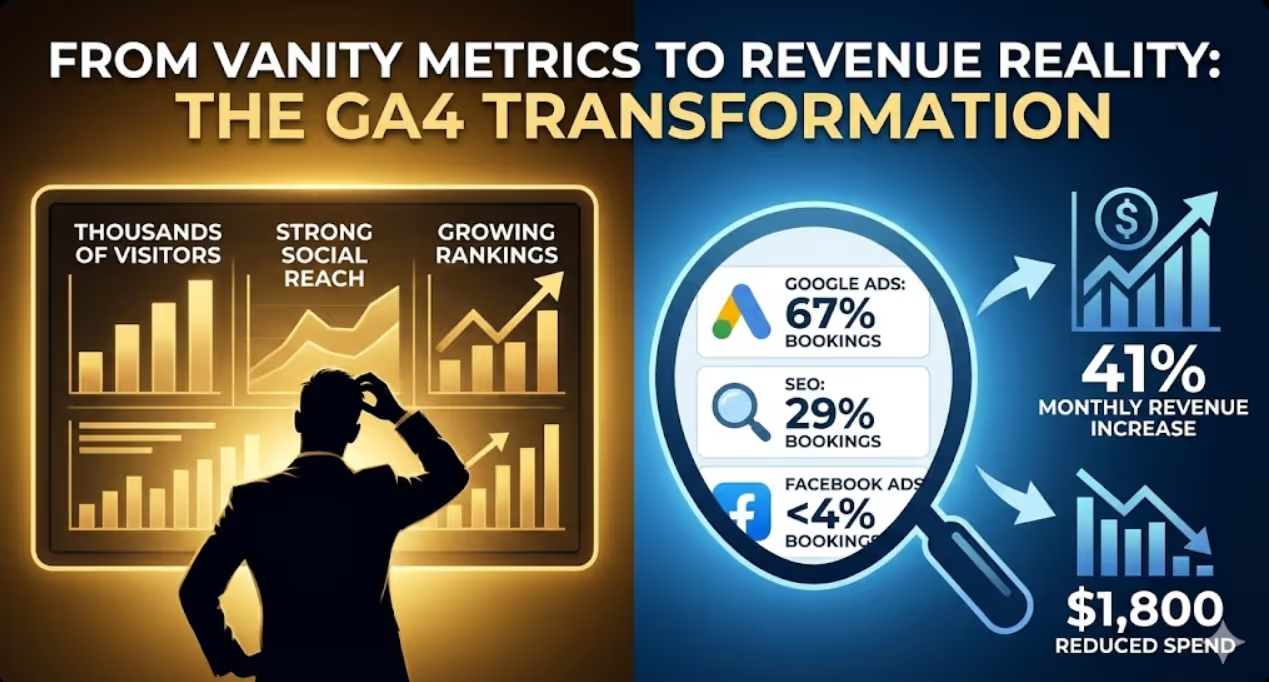
A Gold Coast tourism business spent $8,500 monthly across Google Ads, Facebook Ads, and SEO services. The marketing agency provided monthly reports showing impressive numbers—thousands of website visitors, strong social media reach, growing organic rankings. The business owner felt reassured by the activity but couldn't answer a fundamental question: which of these investments was actually generating bookings?
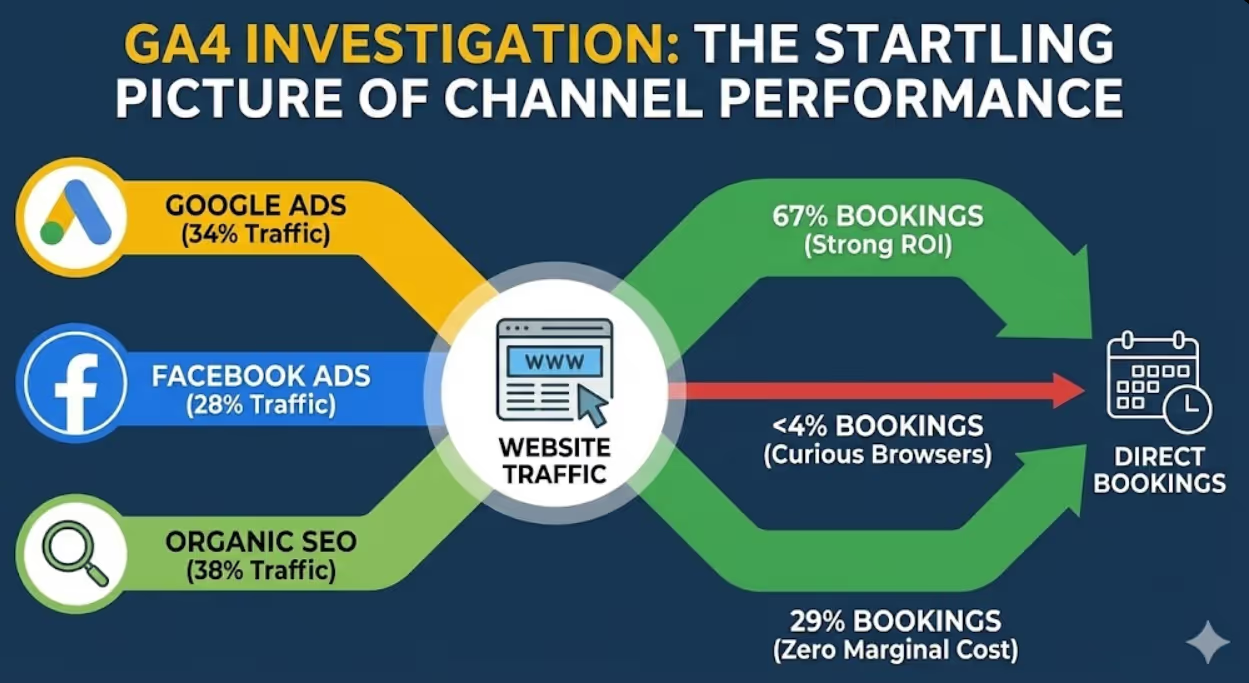
GA4 investigation revealed a startling picture. Google Ads generated 34% of website traffic but accounted for 67% of direct online bookings. Facebook Ads generated 28% of traffic but less than 4% of bookings—essentially sending curious browsers with no purchase intent. Organic SEO traffic generated 38% of visits and 29% of bookings, representing strong ROI through zero marginal cost per visitor.
Armed with actual conversion data, the business reallocated budget—increasing Google Ads investment, dramatically reducing Facebook Ads spend, and maintaining SEO investment. Monthly booking revenue increased 41% whilst total marketing spend decreased by $1,800. The transformation required no new marketing channels, creative campaigns, or service improvements—just accurate measurement revealing what was actually working.
According to research from Google, businesses using GA4 with properly configured conversion tracking make 2.5x better marketing investment decisions than those relying on traffic metrics alone, demonstrating measurement accuracy's direct commercial value.
Understanding GA4's Architecture and Key Differences
Google Analytics 4 represents fundamental platform redesign rather than incremental update, requiring conceptual understanding before dashboard configuration delivers meaningful insights.
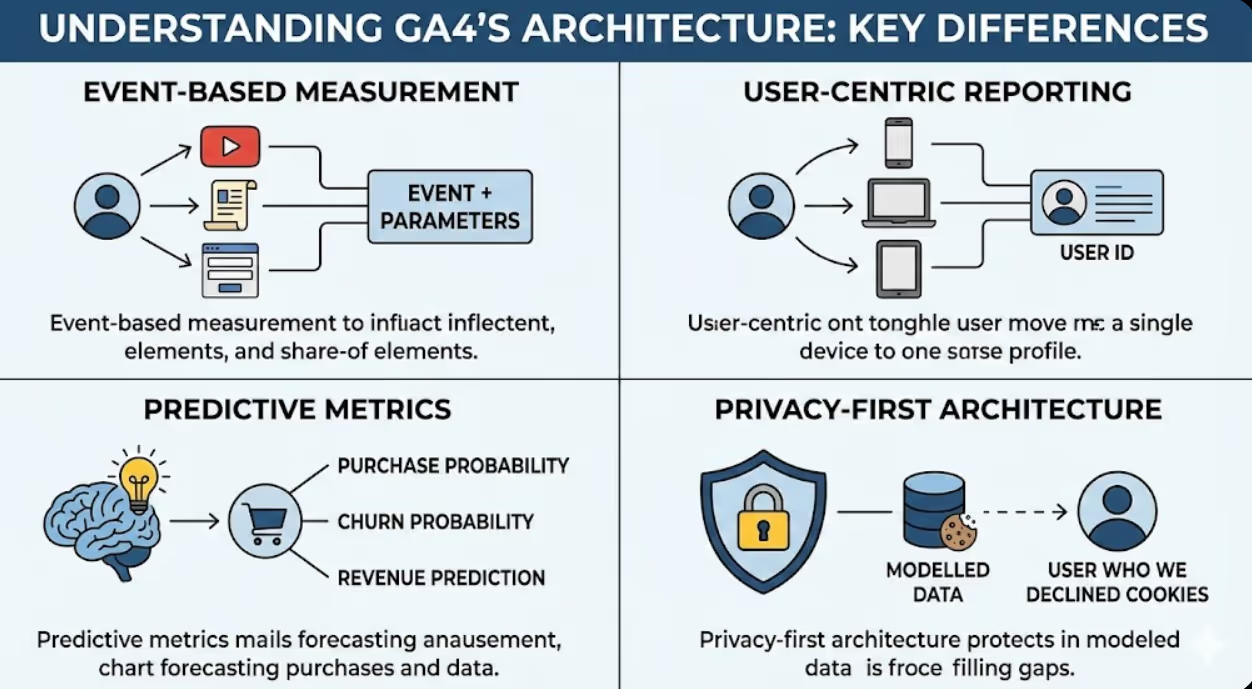
Event-based measurement model replaces Universal Analytics' session-based approach. Every interaction—page view, scroll, click, form submission, video play, purchase—is recorded as an individual event with associated parameters providing context. This architecture enables more granular behaviour tracking whilst requiring different analytical thinking than session-based models. Understanding event-based measurement prevents misinterpreting GA4 metrics through Universal Analytics frameworks that no longer apply.
User-centric reporting tracks individuals across sessions and devices rather than counting sessions independently. GA4 attempts to recognise same users across multiple visits and devices through Google Signals and User ID features, enabling more accurate customer journey analysis. User-centric reporting reduces double-counting active customers across sessions whilst revealing actual customer behaviour patterns obscured by session-based counting that treats each visit independently.
Predictive metrics leverage Google's machine learning to forecast future behaviour. Purchase probability predicts likelihood of specific users completing transactions within seven days. Churn probability identifies users likely to stop engaging. Revenue prediction estimates potential revenue from user segments. These predictive capabilities enable proactive marketing interventions targeting high-probability converters before they defect to competitors—functionality previously requiring sophisticated data science capabilities.
Privacy-first architecture addresses increasing data privacy requirements affecting Australian businesses under Privacy Act obligations. GA4 uses modelled data filling gaps from users declining cookies, provides consent mode integration for GDPR and Australian privacy compliance, and reduces reliance on third-party cookies increasingly blocked by browsers. Privacy-compliant measurement architecture protects Australian businesses from regulatory risk whilst maintaining measurement capability despite cookie deprecation.
Exploration reports provide advanced analysis capabilities beyond standard reporting. Funnel exploration visualises conversion path drop-off points. Path exploration reveals actual navigation sequences users take through your site. Segment overlap analysis compares audience characteristics. Cohort analysis tracks user group behaviour over time. These analytical capabilities enable deep diagnostic investigation impossible within Universal Analytics standard reporting.
Data retention settings affect historical analysis availability. GA4 default data retention is two months, but settings allow extension to 14 months—critically important for year-over-year comparison analysis that marketing decision-making requires. Configure data retention immediately after GA4 setup in Admin > Data Settings > Data Retention—this is one of the most commonly overlooked configuration steps creating significant analytical limitations discovered months later when historical comparison becomes necessary.
Essential Conversion Configuration
Conversion tracking represents GA4's most critical configuration element—without properly defined conversions, all other reporting reveals activity without connecting it to business outcomes.
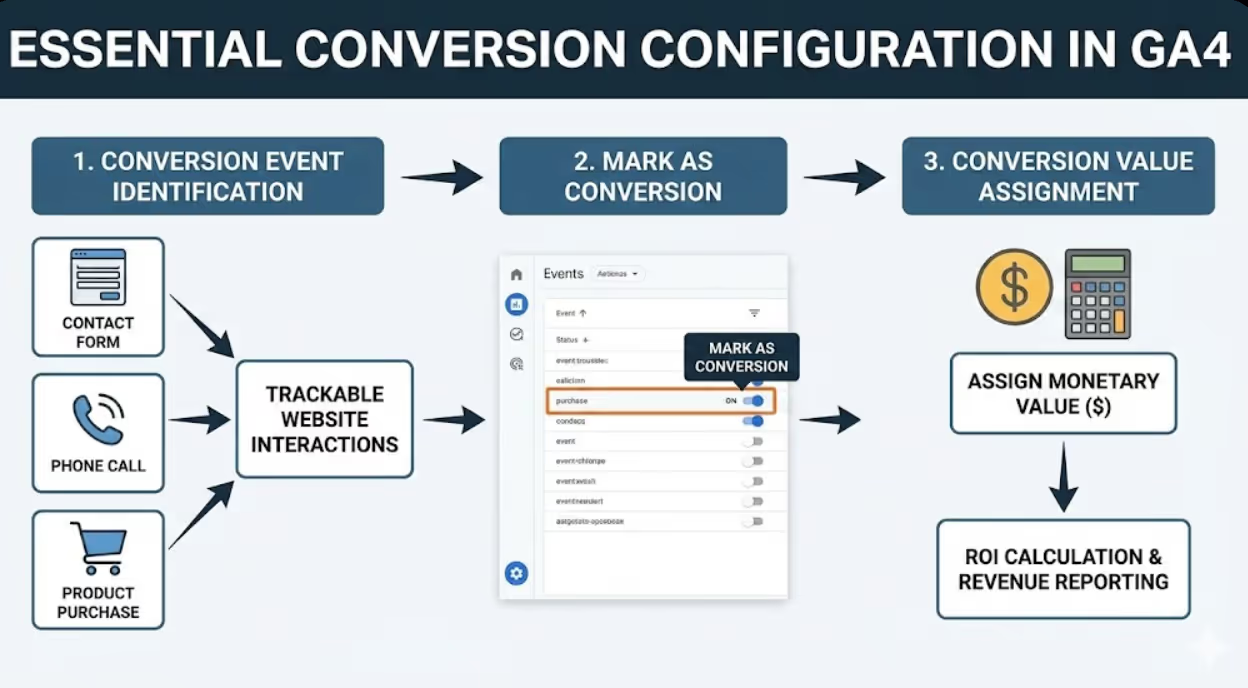
Conversion event identification maps business objectives to trackable website interactions. Common conversion events for Australian SMEs include contact form submissions (lead generation), phone call clicks (service inquiries), quote request completions (sales pipeline entry), product purchases (e-commerce revenue), email newsletter signups (audience building), appointment bookings (service businesses), file downloads (content engagement), and live chat initiations (customer service). Every conversion event should represent meaningful business progress—not merely interesting engagement that doesn't advance commercial relationships.
Goal configuration in GA4 marks specific events as conversions within the platform. Navigate to Admin > Events to view automatically collected and custom events, then toggle "Mark as conversion" for events representing genuine business outcomes. GA4 automatically collects certain events (first_visit, session_start, page_view) but these rarely represent meaningful conversions—configure custom events reflecting your specific business model. Ensure conversion events fire only upon genuine completion rather than initiation—form submission conversion should fire on confirmation page, not form page load.
E-commerce tracking implementation provides revenue attribution essential for product-based Australian SMEs. GA4's enhanced e-commerce implementation tracks product views, add-to-cart events, checkout stages, and completed purchases with revenue values, enabling full purchase funnel analysis. Implementation requires developer assistance for most platforms (custom code for bespoke sites, plugin configuration for WooCommerce, Shopify GA4 integration). The investment in proper e-commerce tracking pays immediate returns through revenue attribution revealing which marketing channels generate profitable customers rather than merely traffic.
Form tracking configuration captures lead generation events for service businesses. Options include Google Tag Manager triggers firing on form submission confirmation, GA4 event snippets on thank-you pages, or integration through form platforms (Gravity Forms GA4 integration, HubSpot GA4 connector). Test form tracking thoroughly—incomplete tracking that misses some form submissions produces misleading conversion data affecting marketing investment decisions based on inaccurate attribution.
Phone call tracking captures offline conversion important for Australian service businesses where phone remains primary inquiry channel. Options include dynamic number insertion services (CallRail, WhatConverts) replacing displayed phone numbers with trackable alternatives, click-to-call event tracking (tracking intent rather than completed calls), and call recording services providing conversation quality data beyond volume metrics. Phone call attribution reveals channel performance that click-based tracking alone misses for businesses where phone inquiries represent significant revenue.
Conversion value assignment enables ROI calculation across marketing channels. Assign monetary values to conversion events based on average customer value—contact form submission might be assigned $200 value based on historical lead-to-client conversion rates and average project values. Value assignment enables revenue-equivalent reporting even for non-e-commerce SMEs, transforming abstract conversion counts into dollar-value metrics justifying marketing investment comparisons across channels. Review and update conversion values periodically as business economics evolve.
Building Your Core SME Dashboard
Strategic dashboard configuration surfaces business-critical metrics whilst filtering the data noise obscuring actionable insights within GA4's comprehensive but overwhelming default reporting.
Acquisition overview dashboard reveals which channels bring valuable visitors. Configure channel performance report showing sessions, engaged sessions, conversion rate, and conversions by default channel group (organic search, paid search, direct, referral, email, social). Add secondary dimensions comparing new versus returning users identifying channels attracting first-time versus repeat visitors. Include cost data by connecting Google Ads to GA4 enabling cost-per-conversion comparison across paid channels. This dashboard answers the fundamental question: where are my best customers coming from?
Content performance dashboard identifies which pages and topics serve audience needs effectively. Configure landing page report showing entrances, engagement rate, average engagement time, and conversions by landing page. Add exit rate data identifying pages where visitors leave without converting. Include scroll depth data revealing whether visitors consume full page content or abandon early. Content performance data directly informs editorial calendar decisions—scaling content types performing well whilst discontinuing consistently underperforming approaches.
Conversion funnel dashboard visualises where prospects drop out of purchase or inquiry processes. Use GA4's funnel exploration (Explore > Funnel Exploration) configuring funnel steps from initial site visit through conversion completion. Identify steps with highest abandonment rates—typically the most impactful optimisation opportunities. For service businesses, typical funnel might include landing page > service page > contact page > form submission > confirmation page. For e-commerce: product page > add to cart > checkout initiation > payment > confirmation. Funnel visualisation transforms vague "we need more conversions" into specific "we're losing 73% of visitors at the checkout payment step" actionable insights.
Audience demographics dashboard reveals who your actual visitors are versus who you're trying to attract. Configure demographics report showing age, gender, location, interests, and device categories with conversion rates overlaid. Compare demographic conversion rates identifying highest-value visitor segments deserving increased marketing investment. Geographic data is particularly valuable for Australian SMEs—understanding city-level visitor distribution informs geographic campaign targeting, local SEO investment, and content localisation decisions. Audience demographics frequently reveal surprises—businesses targeting 35-50 year old professionals discovering actual converters are 25-35 year olds requiring strategy recalibration.
Search performance dashboard combines GA4 organic data with Google Search Console integration revealing SEO performance. Connect Search Console to GA4 in Admin > Property Settings > Search Console Links. Combined reporting shows search queries driving traffic alongside on-site behaviour after arrival—identifying high-impression/low-click queries needing title optimisation, and high-click/low-conversion queries needing landing page improvement. Search performance dashboard bridges SEO activity with conversion outcomes, making organic search investment justification measurable rather than theoretical.
Campaign performance dashboard tracks specific marketing initiative effectiveness. Create custom report filtering by campaign parameters (UTM-tagged campaigns) showing traffic, engagement, and conversion performance by campaign name and medium. This dashboard makes marketing campaign ROI calculation straightforward—comparing campaign cost against tracked conversions and assigned conversion values reveals which campaigns justify continued investment. Ensure all digital marketing activities use consistent UTM parameter conventions enabling reliable campaign attribution in GA4.
Configuring Custom Reports for Australian SME Contexts
GA4's standard reports rarely perfectly match Australian SME reporting needs—custom report configuration addresses specific business model requirements and local market context.
Custom report builder (Reports > Library > Create New Report) enables tailored reporting beyond standard dimensions. Build reports combining dimensions and metrics not available in standard reporting, save custom reports to Reports navigation for regular access, and create report collections grouping related custom reports for different team members. Custom reports represent GA4's most powerful but underutilised feature for SMEs—investing time in initial configuration produces permanently improved reporting without ongoing effort.
Local area performance reporting serves Australian SMEs targeting specific geographic markets. Configure region and city dimension reports showing conversion rates by Australian state and major city. Identify geographic markets generating disproportionately high or low conversion rates, informing localised marketing investment decisions. A Brisbane-based tradesperson discovering 40% of inquiries come from Gold Coast might consider dedicated Gold Coast marketing investment. Geographic performance data enables intelligent local market expansion decisions rather than assumption-based geographic targeting.
Device category performance reveals mobile versus desktop conversion disparities common for Australian businesses where mobile traffic dominates but conversion rates often lag desktop. Build device category comparison showing sessions, engagement rate, conversion rate, and revenue by device type (mobile, desktop, tablet). Significant mobile conversion rate gaps typically indicate mobile user experience problems—slow loading, poor form design, navigation issues—that conversion rate optimisation investment can address. Device performance reporting transforms vague "our mobile site needs work" into specific conversion rate gaps justifying UX investment.
Returning visitor behaviour analysis reveals customer loyalty and repeat purchase patterns. Configure user type comparison (new versus returning users) showing engagement depth, conversion rates, and revenue contribution by user type. Businesses discovering returning visitors convert at 3-4x new visitor rates have strong justification for email marketing and retargeting investment maintaining returning visitor relationships. Returning visitor analysis also identifies retention problems—declining returning visitor rates signal customer satisfaction or competitive issues warranting investigation beyond purely marketing responses.
Time-based performance patterns identify when Australian audiences engage most actively. Configure hour-of-day and day-of-week reports overlaying conversion rates onto traffic patterns. These patterns inform content publishing timing, advertising schedule optimisation, and customer service staffing decisions. Australian B2B businesses typically see Tuesday-Thursday business hours peaks for high-intent traffic, whilst B2C often peaks on weekend afternoons. Time-based optimisation of advertising delivery and content publishing improves campaign efficiency without budget increases.
Referral traffic quality analysis assesses third-party website traffic value. Build referral source report showing sessions and conversion rates by referral domain, identifying which external websites send high-quality converting visitors versus traffic without commercial intent. Referral analysis reveals partnership and PR investment returns—businesses discovering specific industry publication referrals convert at premium rates have strong justification for increased editorial relationship investment with those publications.
Integrating GA4 with Australian Business Tools
GA4 data becomes significantly more valuable when integrated with other business systems connecting digital behaviour to revenue outcomes.
Google Ads integration enables full-funnel performance visibility from ad impression through revenue. Link Google Ads account in Admin > Google Ads Links, importing cost data enabling ROAS (return on ad spend) calculation by campaign and keyword. Bidding strategy optimisation using GA4 conversion data improves Google Ads performance beyond click-through metrics—smart bidding strategies optimising for actual conversions rather than clicks typically improve conversion volume and reduce cost per acquisition. Integration is straightforward but requires Google Ads admin access alongside GA4 admin access for configuration.
Google Search Console integration bridges organic search performance with on-site behaviour. Connected Search Console data reveals which search queries drive visitors and how those visitors behave after arrival. Identify queries generating impressions but poor click-through rates indicating title and meta description optimisation opportunities. Discover queries driving traffic but poor engagement or conversion suggesting content-intent misalignment. Search Console integration makes SEO investment outcomes measurable within GA4 rather than requiring separate platform analysis.
CRM integration connects digital behaviour to sales pipeline outcomes. Businesses using HubSpot, Salesforce, or Australian CRM platforms can import offline conversion data back into GA4 through Measurement Protocol, enabling full customer journey visibility from first digital touchpoint through closed revenue. CRM integration is technically complex but provides most complete marketing attribution available—identifying which digital channels attract customers who ultimately purchase rather than simply converting on website without becoming long-term clients.
Email marketing platform connection reveals email campaign contribution to website conversions. Ensure all email campaign links include UTM parameters (utm_source=email, utm_medium=newsletter, utm_campaign=campaign-name) enabling GA4 to attribute website visits and conversions to specific email campaigns. Analyse email-driven traffic quality by comparing email visitor conversion rates against other channels. Email attribution reveals actual revenue contribution of email marketing investment that open rate and click rate metrics alone cannot demonstrate.
Call tracking integration captures offline conversion completions for service businesses. Connect call tracking platforms (CallRail, WhatConverts) to GA4 via Measurement Protocol or native integrations, importing call conversions as GA4 events. This integration provides complete conversion picture for service businesses where phone inquiries represent substantial revenue—without call tracking, GA4 attribution systematically undervalues channels generating phone rather than digital conversions. Complete attribution including calls typically produces dramatically different channel performance rankings than digital-only conversion tracking.
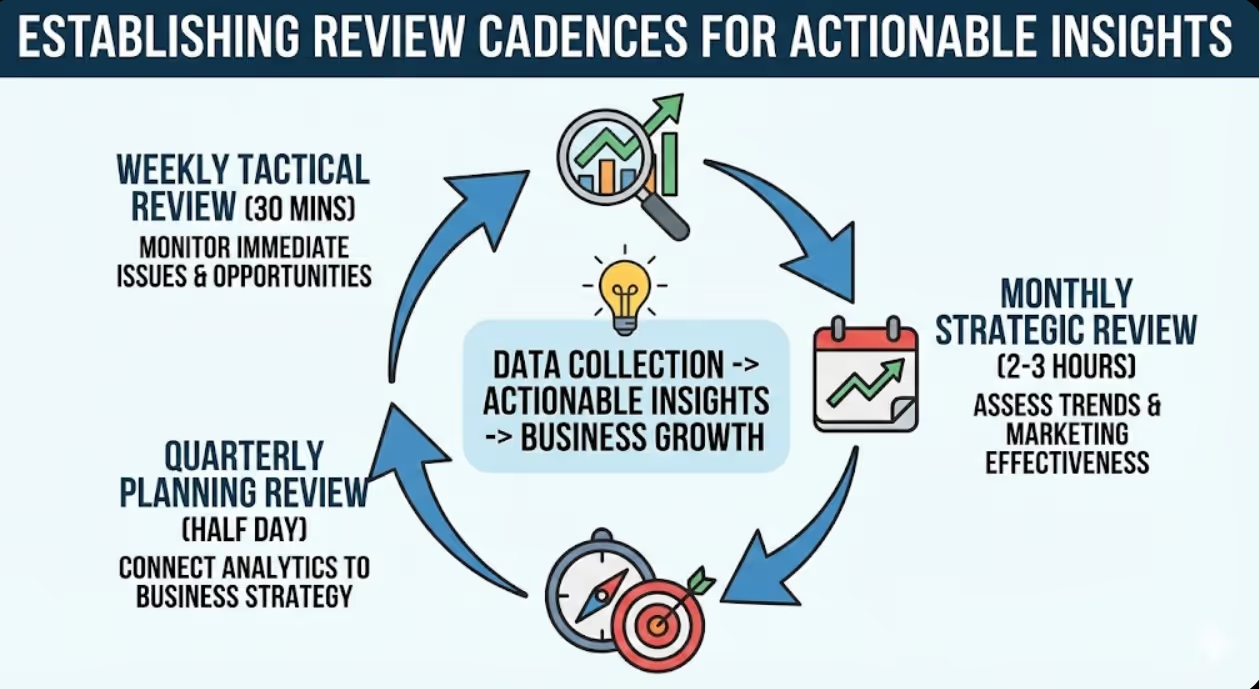
Establishing Review Cadences and Actionable Insights
Data collection without systematic review produces no business value—structured review cadences transform GA4 from passive measurement system into active business intelligence driving decisions.
Weekly tactical review (30 minutes) monitors recent performance identifying immediate issues and opportunities. Review previous week's sessions, conversions, and conversion rates comparing to prior week and same period last year. Identify unusual traffic spikes or drops requiring investigation. Check campaign performance for paid advertising ensuring budgets are performing efficiently. Flag technical issues—sudden traffic drops often indicate indexing problems, site errors, or tracking code failures requiring immediate attention. Weekly review prevents small problems compounding into significant business impacts through early detection.
Monthly strategic review (2-3 hours) assesses trend performance and marketing effectiveness. Evaluate channel performance trends identifying channels gaining or losing effectiveness. Review content performance identifying top-performing pieces warranting repurposing and promotion versus underperformers needing improvement or retirement. Assess conversion funnel changes identifying optimisation opportunities and A/B testing priorities. Compare actual performance against monthly business objectives, investigating significant variances. Monthly review provides strategic direction for content, campaigns, and optimisation investment decisions.
Quarterly planning review (half day) connects analytics insights to business strategy. Assess quarterly performance against business objectives, review customer acquisition cost trends across channels, identify highest-value customer segments deserving increased acquisition investment, evaluate content themes performing consistently well informing editorial calendar planning, and set performance targets for upcoming quarter based on trend analysis. Quarterly review transforms GA4 from marketing tool into business planning resource connecting digital performance to commercial strategy.
Anomaly investigation protocols standardise responses to unexpected performance changes. Sudden traffic drops investigate: search console for manual actions, crawl errors, or significant ranking losses; hosting uptime for site availability issues; tracking code integrity for measurement failures. Sudden conversion rate drops investigate: form functionality for technical failures; landing page changes for accidental optimisation reversals; traffic quality changes for bot traffic or irrelevant audience acquisition. Documented investigation protocols enable faster diagnosis reducing time between anomaly detection and resolution.
Frequently Asked Questions
How should Australian SMEs configure GA4 when they're starting fresh without historical Universal Analytics data to compare against?
Starting fresh with GA4 without Universal Analytics history is actually advantageous—clean configuration without legacy data migration complications or metric comparison confusion between platforms with fundamentally different measurement approaches. Configure GA4 immediately with correct conversion tracking, extended data retention (14 months), and Google Search Console integration to begin accumulating clean historical data. Accept that first-year analysis will lack year-over-year comparison capability, focusing instead on month-over-month trend analysis establishing performance baselines. Document all configuration decisions creating institutional knowledge enabling consistent future interpretation. Within 12-14 months of properly configured GA4, sufficient historical data enables meaningful trend analysis and seasonal comparison that newly configured platforms initially lack.
What are the most important GA4 metrics Australian e-commerce businesses should prioritise differently from service-based businesses?
E-commerce and service businesses require fundamentally different metric prioritisation reflecting distinct conversion models and customer value patterns. E-commerce priority metrics include e-commerce conversion rate (transactions divided by sessions), revenue per session (total revenue divided by sessions), average order value, cart abandonment rate (add-to-cart events versus purchase completions), product performance by revenue and conversion rate, and customer lifetime value through repeat purchase analysis. Service business priority metrics include lead conversion rate (form submissions, phone clicks divided by sessions), cost per lead by channel, lead quality indicators (engagement depth, pages consumed before inquiry), geographic inquiry distribution, and inquiry-to-client conversion rates when offline data is imported. Both business types share channel attribution importance but weight metrics differently reflecting revenue model distinctions.
How can Australian SMEs use GA4 audience data to improve their Google Ads targeting without requiring sophisticated technical knowledge?
GA4 audience segments export directly to Google Ads enabling targeting improvement without technical complexity beyond initial configuration. Create GA4 audiences for high-value visitor segments—users who visited specific service pages without converting (remarketing), users who completed purchases (lookalike targeting), users who engaged deeply with content (interest-based targeting). Export these audiences to Google Ads in Admin > Audience Manager > Audiences, then apply within Google Ads campaign targeting settings. The most impactful application for Australian SMEs is remarketing to non-converting visitors who demonstrated genuine interest—these audiences consistently deliver lower cost-per-conversion than cold audience targeting because they've already demonstrated relevant intent. Configuration requires linking GA4 and Google Ads accounts, enabling Google Signals in GA4 settings, and creating specific audience definitions in GA4 before Google Ads export becomes available.
What technical knowledge do Australian SME owners need to set up GA4 properly, and when should they engage professional help?
Basic GA4 setup (account creation, tracking code installation, standard report access) requires minimal technical knowledge—most SME owners can complete initial configuration following Google's documentation or watching tutorial videos. However, several critical configurations benefit significantly from professional assistance. Conversion event configuration through Google Tag Manager requires understanding of triggers, tags, and variables that non-technical users frequently misconfigure, producing inaccurate conversion data that misleads rather than informs decisions. E-commerce tracking implementation requires developer involvement for custom-coded sites. CRM and call tracking integrations require API knowledge beyond typical SME owner capabilities. Engage professional analytics configuration when: conversion tracking isn't working reliably, e-commerce revenue attribution is needed, custom event tracking beyond standard interactions is required, or initial DIY setup has produced obviously incorrect data. Professional GA4 configuration typically costs $500-$2,000 for SME implementations—worthwhile investment considering marketing budget decisions the data informs.
How should Australian SMEs interpret significant discrepancies between GA4 data and figures reported by advertising platforms like Google Ads and Meta Ads Manager?
Discrepancies between GA4 and advertising platform reporting are normal and expected due to fundamentally different measurement approaches rather than indicating errors. Advertising platforms count conversions using their own tracking pixels and attribution models, often claiming credit for conversions that GA4 attributes to other channels. Common discrepancy sources include attribution window differences (Google Ads default 30-day click attribution versus GA4's data-driven attribution), cross-device measurement gaps where GA4 loses user identity between sessions, ad blocker impacts reducing GA4 tracking whilst platform pixels fire differently, and view-through conversion counting in advertising platforms that GA4 doesn't recognise as channel-attributed conversions. Use GA4 as independent measurement providing less biased attribution than self-reporting advertising platforms—when GA4 and platform data disagree significantly, investigate methodology differences rather than assuming one source is correct and the other wrong.
Can Australian SMEs use GA4 for competitor analysis, and what insights about competitive positioning can the platform provide?
GA4 doesn't provide direct competitor website data—it only measures your own property. However, several GA4 features provide indirect competitive intelligence. Benchmark reports (when enabled) compare your performance metrics against industry averages, revealing whether your conversion rates, engagement metrics, and acquisition patterns align with or diverge from industry norms. Organic search performance analysis through Search Console integration reveals queries where you rank and receive clicks versus queries where competitors capture visibility you're missing. Referral traffic analysis identifies industry publications, directories, and websites sending traffic to your site versus competitors appearing more prominently in those channels. Audience interest data reveals what else your visitors are interested in, suggesting competitor categories your audience is researching. For direct competitor digital performance data, third-party tools including SimilarWeb, Ahrefs, and SEMrush provide estimated competitive metrics that GA4's self-measurement approach cannot capture.
How should Australian businesses configure GA4 to comply with Australian Privacy Act requirements and ensure they're collecting data legally?
Australian businesses must configure GA4 in compliance with Privacy Act 1988 and Australian Privacy Principles governing personal information collection and use. Essential compliance configurations include implementing a privacy policy clearly disclosing analytics data collection, providing cookie consent mechanisms for Australian visitors (particularly important for businesses also serving EU visitors subject to GDPR), configuring GA4's consent mode to respect user consent choices by reducing data collection when consent is declined, enabling IP anonymisation (enabled by default in GA4 but worth verifying in Admin settings), and limiting data retention to minimum necessary periods. Avoid enabling Google Signals features that build advertising profiles without explicit user consent beyond basic analytics consent. For businesses unsure about compliance requirements, the Office of the Australian Information Commissioner provides guidance on privacy obligations applicable to digital data collection. Consider consulting a privacy lawyer for businesses handling sensitive personal information or serving highly regulated industries.
GA4 Transforms SME Marketing Decision-Making
Google Analytics 4, properly configured with meaningful conversion tracking and strategic dashboard design, transforms Australian SMEs from marketing activity managers into data-driven business decision-makers who understand precisely which investments generate revenue and which consume budget without commercial return.
The configuration frameworks outlined in this guide—conversion setup, custom dashboard development, tool integration, and structured review cadences—provide practical foundation for GA4 implementations delivering genuine business intelligence rather than impressive-looking data that informs nothing.
Australian SMEs investing in proper GA4 configuration consistently discover marketing realities diverging significantly from assumptions—revealing which channels, content, and campaigns actually drive business results versus which generate activity metrics masking underperformance.
Ready to configure GA4 dashboards that reveal what's actually driving your Australian business results? Maven Marketing Co. provides comprehensive GA4 setup, conversion tracking configuration, custom dashboard development, and ongoing analytics support ensuring your measurement infrastructure delivers actionable business intelligence. Let's transform your website data into decisions that drive measurable growth.

Table of contents
read more blogs

Is Google Ads Better Than SEO for My Business
One of the biggest questions business owners ask when they are planning online growth is whether they should invest in Google Ads or SEO. Both are strong marketing plays that help your company show up in Google search results, but they do things in separate lanes. Google Ads gives quicker visibility and can bring in leads fast, whereas SEO more or less focuses on slow, steady organic traffic that tends to grow the longer you keep building it. Picking the right direction depends on what you want to achieve, how much money you can spend, how crowded the market is, and how quickly you need results, like sooner rather than later. The good news is you don’t always have to choose one or the other; it’s not exactly a black-and-white situation. If you take time to understand the strongest points of both, you can put together a more sensible digital marketing plan that supports consistent expansion. In this guide, we’ll compare Google Ads vs SEO, explain the main differences, and help you figure out what option makes the most sense for your business.

When Should I Hire a Digital Marketing Agency
Growing a business today takes more than just having a website or throwing a post on social media; customers usually search around online, compare providers, skim reviews, and basically expect the brand to show up with a solid digital presence before they even think about buying. Many businesses try to run their marketing themselves, but there comes a point when “doing it all in-house” becomes clunky and hard to manage, all at once. Knowing when to hire a digital marketing agency can end up making a big, real difference for your growth. If you’re not getting enough leads, or your online visibility feels stuck, or sales are just not moving, the right agency can bring the know-how, plus a clear plan, to help you get noticeably better outcomes. In this guide, we’ll dig into what a digital marketing agency actually does, the usual signs it’s time to bring one on, and how picking the right marketing partner can help your business move forward at a faster pace.

Why Is My Google Ads Budget Running Out So Quickly
Running a successful Google Ads budget isn’t only about throwing more money at it. It’s more like making every dollar, doing a bit extra. A lot of businesses start a Google Ads campaign with big hopes, then find out their daily budget is gone within a few hours, and that feels weird, right? After that, your ads stop showing effectively, new leads slip away, and your return on investment dips. So if your Google Ads budget is running out too fast, don’t stress. It’s a fairly common issue, and in most situations, it can be repaired with the right approach. There are multiple little things that can drain your advertising money quicker than you expected, from costly keywords to audience targeting that just doesn’t quite fit. In this guide, we’ll walk through why your budget disappears so quickly, how to cut wasteful spend, and the most reliable ways to boost your Google Ads ROI, even if your budget stays the same.


