
.svg)


%201.svg)

Key Takeaways
- GA4's BigQuery export uses an data model based on events where each row represents a single event. Reconstructing sessions, users, and conversion paths from this model requires understanding how to group, filter, and aggregate at the appropriate grain.
- The
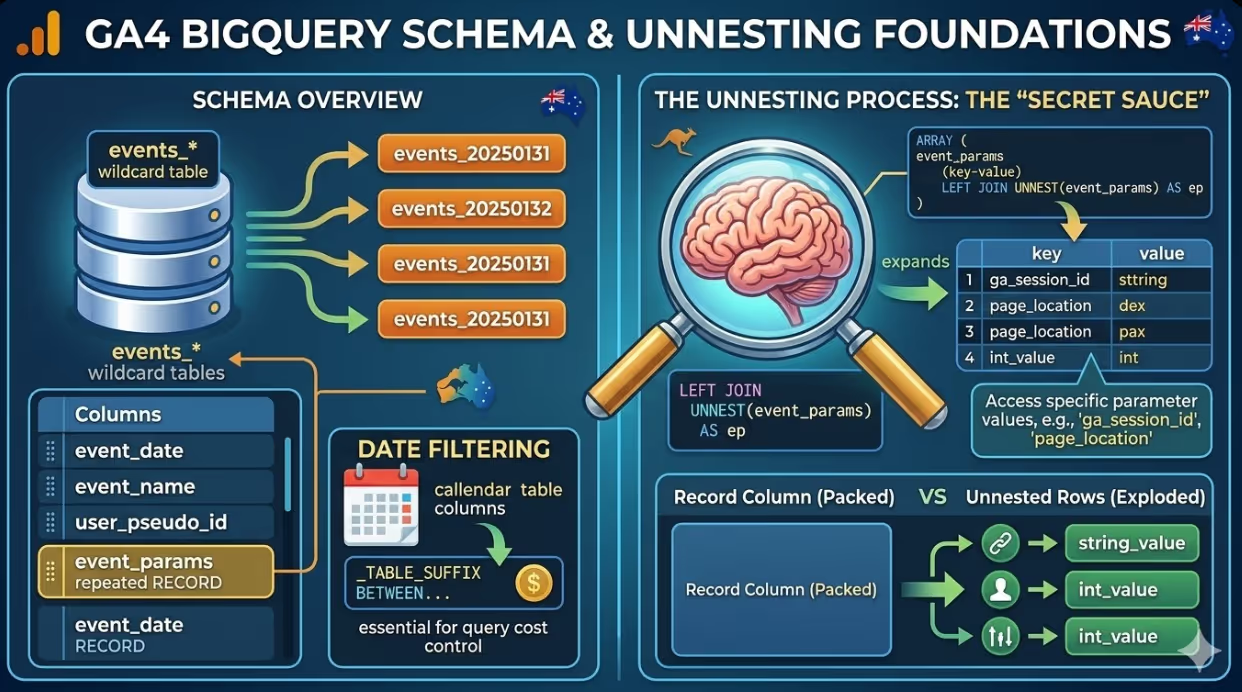
events_*wildcard table pattern allows queries to span multiple days of data without specifying individual daily tables. Date filtering using_TABLE_SUFFIXis essential for query cost control when working with large datasets. - Event parameters in GA4 are stored in a repeated RECORD column called
event_params, which requires unnesting before the parameter values can be accessed in a WHERE clause or SELECT list. - User properties and items (for ecommerce) follow the same repeated RECORD structure as event parameters and require the same unnesting approach to access their values in queries.
- Session reconstruction from GA4 event data requires grouping on both
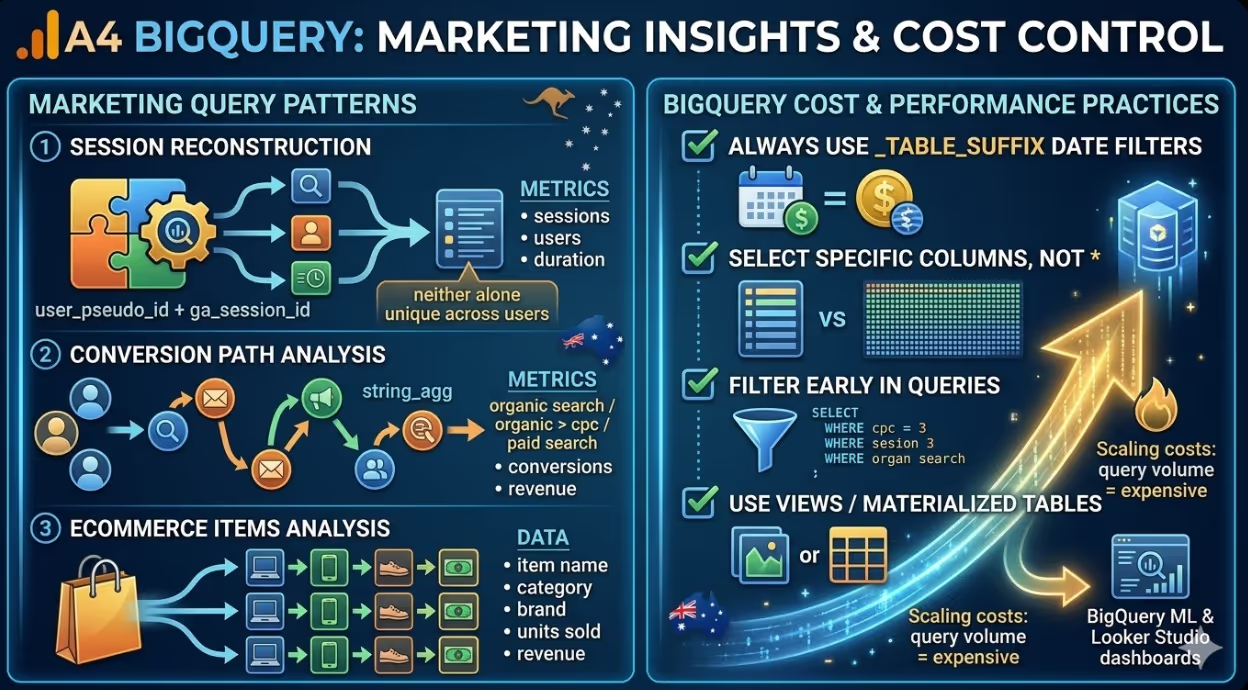
user_pseudo_idand thega_session_idevent parameter, since neither alone uniquely identifies a session across users. - BigQuery ML and Looker Studio are the two primary downstream consumers of GA4 BigQuery data for Australian marketing teams: BigQuery ML for predictive modelling, and Looker Studio for dashboards that combine GA4 data with paid media, CRM, and revenue data from other sources.
- Query costs in BigQuery scale with the volume of data scanned. Using daily table suffix date filters, selecting only the columns needed rather than using
SELECT *, and storing intermediate results as views or materialised tables are the primary cost control strategies for regular reporting queries.
Understanding the GA4 BigQuery Schema
Before writing queries against GA4 BigQuery data, understanding the schema is necessary. GA4 exports data to BigQuery in a flat event table structure where each row represents a single event fired by a single user in a single session.
The primary table in a GA4 BigQuery export is named events_YYYYMMDD, with a new table created each day. The events_intraday_YYYYMMDD table contains events from the same day that have not yet been fully processed. Most queries should target the events_YYYYMMDD tables rather than the intraday tables for accuracy.
The most important columns in the schema for marketing analysis are:
event_date: The date the event was recorded, in YYYYMMDD formatevent_timestamp: The event timestamp in microsecondsevent_name: The name of the event (page_view, session_start, purchase, etc.)user_pseudo_id: A pseudonymous identifier for the device or browseruser_id: The ID provided by the user if user ID tracking has been implementedga_session_id: Available viaevent_params, the session identifierga_session_number: Available viaevent_params, the session count for this userevent_params: A repeated RECORD containing all parameters associated with the eventuser_properties: A repeated RECORD containing properties scoped to the useritems: A repeated RECORD containing ecommerce item data (for purchase and product events)traffic_source: The source, medium, and campaign for the first session that acquired the usercollected_traffic_source: The source, medium, and campaign for the individual session
The repeated RECORD structure of event_params, user_properties, and items is the most important structural feature to understand. These columns cannot be accessed with a simple dot notation. They must be unnested before their values can be filtered or selected.
Foundational Query Patterns
Unnesting Event Parameters
The unnesting pattern is the foundation of almost every GA4 BigQuery query of any complexity. Event parameters are stored as an array of records of key and value pairs, and accessing a specific parameter requires either a LEFT JOIN UNNEST or a subquery with a value extraction function.
The most common pattern uses a subquery to extract a specific parameter value:
sql
SELECT
  event_date,
  event_name,
  user_pseudo_id,
  (SELECT value.string_value
   FROM UNNEST(event_params)
   WHERE key = 'page_location') AS page_location,
  (SELECT value.int_value
   FROM UNNEST(event_params)
   WHERE key = 'ga_session_id') AS session_id,
  (SELECT value.string_value
   FROM UNNEST(event_params)
   WHERE key = 'source') AS source
FROM `project.dataset.events_*`
WHERE _TABLE_SUFFIX BETWEEN '20250101' AND '20250131'
  AND event_name = 'page_view'
The value field in each event parameter record has four component fields: string_value, int_value, float_value, and double_value. The appropriate component field to access depends on the data type of the parameter. Session ID is an integer, so int_value is used. Page location is a string, so string_value is used.
Session Reconstruction
GA4 does not store session level data in the BigQuery export. Sessions must be reconstructed from event level data by grouping on the combination of user_pseudo_id and the ga_session_id event parameter. Neither alone is sufficient: user_pseudo_id is tied to the device rather than the session, and ga_session_id values are not globally unique across users.
The following query reconstructs sessions with key session level metrics:
sql
WITH session_events AS (
  SELECT
    user_pseudo_id,
    (SELECT value.int_value FROM UNNEST(event_params) WHERE key = 'ga_session_id') AS session_id,
    (SELECT value.int_value FROM UNNEST(event_params) WHERE key = 'ga_session_number') AS session_number,
    event_name,
    event_timestamp,
    collected_traffic_source.source AS session_source,
    collected_traffic_source.medium AS session_medium,
    collected_traffic_source.campaign AS session_campaign
  FROM `project.dataset.events_*`
  WHERE _TABLE_SUFFIX BETWEEN '20250101' AND '20250131'
)
SELECT
  user_pseudo_id,
  session_id,
  MIN(session_number) AS session_number,
  MIN(event_timestamp) AS session_start_timestamp,
  MAX(event_timestamp) AS session_end_timestamp,
  TIMESTAMP_DIFF(
    TIMESTAMP_MICROS(MAX(event_timestamp)),
    TIMESTAMP_MICROS(MIN(event_timestamp)),
    SECOND
  ) AS session_duration_seconds,
  COUNTIF(event_name = 'page_view') AS pageviews,
  COUNTIF(event_name = 'purchase') AS purchases,
  MAX(session_source) AS source,
  MAX(session_medium) AS medium,
  MAX(session_campaign) AS campaign
FROM session_events
GROUP BY user_pseudo_id, session_id
Marketing-Specific Query Patterns
Channel Performance Analysis
The following query calculates key performance metrics by channel, using the collected_traffic_source column to attribute sessions to their acquisition source:
sql
SELECT
  collected_traffic_source.source AS source,
  collected_traffic_source.medium AS medium,
  COUNT(DISTINCT CONCAT(user_pseudo_id, CAST(
    (SELECT value.int_value FROM UNNEST(event_params) WHERE key = 'ga_session_id')
    AS STRING))) AS sessions,
  COUNT(DISTINCT user_pseudo_id) AS users,
  COUNTIF(event_name = 'purchase') AS purchases,
  SUM(IF(event_name = 'purchase',
    (SELECT value.double_value FROM UNNEST(event_params) WHERE key = 'value'),
    0)) AS revenue,
  SAFE_DIVIDE(
    COUNTIF(event_name = 'purchase'),
    COUNT(DISTINCT CONCAT(user_pseudo_id, CAST(
      (SELECT value.int_value FROM UNNEST(event_params) WHERE key = 'ga_session_id')
      AS STRING)))
  ) AS conversion_rate
FROM `project.dataset.events_*`
WHERE _TABLE_SUFFIX BETWEEN '20250101' AND '20250131'
GROUP BY source, medium
ORDER BY revenue DESC
Conversion Path Analysis
GA4's standard attribution reports show last touch attribution by default. BigQuery allows the construction of conversion paths showing all the channels a user interacted with before converting. The following query builds a conversion path for each converting user:
sql
WITH user_sessions AS (
  SELECT
    user_pseudo_id,
    (SELECT value.int_value FROM UNNEST(event_params) WHERE key = 'ga_session_id') AS session_id,
    MIN(event_timestamp) AS session_timestamp,
    MAX(IF(event_name = 'purchase', 1, 0)) AS converted,
    MAX(IF(event_name = 'purchase',
      (SELECT value.double_value FROM UNNEST(event_params) WHERE key = 'value'), 0)) AS revenue,
    collected_traffic_source.source AS source,
    collected_traffic_source.medium AS medium
  FROM `project.dataset.events_*`
  WHERE _TABLE_SUFFIX BETWEEN '20250101' AND '20250131'
  GROUP BY user_pseudo_id, session_id, source, medium
),
converting_users AS (
  SELECT DISTINCT user_pseudo_id, SUM(revenue) AS total_revenue
  FROM user_sessions
  WHERE converted = 1
  GROUP BY user_pseudo_id
)
SELECT
  cu.user_pseudo_id,
  cu.total_revenue,
  STRING_AGG(
    CONCAT(us.source, ' / ', us.medium),
    ' > ' ORDER BY us.session_timestamp
  ) AS conversion_path
FROM converting_users cu
JOIN user_sessions us ON cu.user_pseudo_id = us.user_pseudo_id
GROUP BY cu.user_pseudo_id, cu.total_revenue
ORDER BY cu.total_revenue DESC
LIMIT 1000
Cohort Analysis
Cohort analysis at the user level is one of the most powerful analyses the GA4 BigQuery export enables that the standard interface does not support at the required granularity. The following query builds a retention cohort by acquisition week:
sql
WITH first_sessions AS (
  SELECT
    user_pseudo_id,
    DATE_TRUNC(PARSE_DATE('%Y%m%d', MIN(event_date)), WEEK) AS cohort_week
  FROM `project.dataset.events_*`
  WHERE _TABLE_SUFFIX BETWEEN '20250101' AND '20250630'
    AND event_name = 'session_start'
  GROUP BY user_pseudo_id
),
subsequent_sessions AS (
  SELECT
    e.user_pseudo_id,
    DATE_TRUNC(PARSE_DATE('%Y%m%d', e.event_date), WEEK) AS activity_week
  FROM `project.dataset.events_*` e
  WHERE _TABLE_SUFFIX BETWEEN '20250101' AND '20250630'
    AND event_name = 'session_start'
)
SELECT
  fs.cohort_week,
  DATE_DIFF(ss.activity_week, fs.cohort_week, WEEK) AS weeks_since_acquisition,
  COUNT(DISTINCT ss.user_pseudo_id) AS retained_users,
  COUNT(DISTINCT fs.user_pseudo_id) AS cohort_size,
  SAFE_DIVIDE(
    COUNT(DISTINCT ss.user_pseudo_id),
    COUNT(DISTINCT fs.user_pseudo_id)
  ) AS retention_rate
FROM first_sessions fs
JOIN subsequent_sessions ss ON fs.user_pseudo_id = ss.user_pseudo_id
GROUP BY fs.cohort_week, weeks_since_acquisition
ORDER BY fs.cohort_week, weeks_since_acquisition
Ecommerce Analysis With Item Data
For Australian ecommerce businesses, the items array in the GA4 BigQuery export contains data at the product level for purchase events. Unnesting this array produces one row per item per event, enabling analysis at the product level.
sql
SELECT
  event_date,
  items.item_name,
  items.item_category,
  items.item_brand,
  SUM(items.quantity) AS units_sold,
  SUM(items.item_revenue) AS item_revenue,
  COUNT(DISTINCT user_pseudo_id) AS unique_purchasers
FROM `project.dataset.events_*`,
  UNNEST(items) AS items
WHERE _TABLE_SUFFIX BETWEEN '20250101' AND '20250131'
  AND event_name = 'purchase'
GROUP BY event_date, items.item_name, items.item_category, items.item_brand
ORDER BY item_revenue DESC
Note that the FROM clause uses a cross join unnest (the comma syntax) rather than a LEFT JOIN UNNEST here. This is appropriate for the items column because rows without item data (events that are not purchases) have been filtered out by the event_name = 'purchase' condition. For columns where the absence of data is meaningful, LEFT JOIN UNNEST should be used to preserve rows where the array is empty.
Cost Control and Performance Best Practices
BigQuery charges for queries based on the volume of data scanned. A query that scans 30 days of GA4 data for a site with high traffic can process several terabytes if not written carefully. The following practices keep query costs manageable for regular marketing reporting.
Always use _TABLE_SUFFIX date filters. The WHERE _TABLE_SUFFIX BETWEEN '20250101' AND '20250131' pattern tells BigQuery to read only the specified daily partitions. Without this filter, every query reads the entire history of the dataset.
Select only the columns you need. Using SELECT * on GA4 tables forces BigQuery to read every column for every event, including the large repeated RECORD columns. Selecting only the specific columns and event parameters needed reduces scan volume significantly.
Create views or materialised tables for common query patterns. If a session reconstruction query is used as the base for multiple downstream analyses, storing it as a view or a materialised table avoids scanning the raw event data again each time.
Filter early. Applying event_name and event_date filters as early as possible in the query, particularly before any joins or aggregations, reduces the row count the query processes at each subsequent step.
Use the BigQuery sandbox or estimation before running large queries. The BigQuery console shows the estimated scan volume before executing a query. For unfamiliar query patterns on large datasets, using the estimation feature before running the query prevents unexpected cost spikes.
FAQs
How does the GA4 BigQuery export differ from the GA4 Data API for Australian marketing analysis?The GA4 Data API returns aggregated, metrics calculated in advance from Google's analytical infrastructure, subject to the same sampling and aggregation thresholds as the standard GA4 interface. The BigQuery export provides the raw event data before any aggregation occurs, with no sampling and no restrictions on the dimensions and metrics that can be combined. The Data API is appropriate for building automated dashboards that reproduce standard GA4 metrics in external tools. BigQuery is appropriate for analysis that requires granularity at the user or session level, custom attribution logic, joins to data sources outside Google, or query patterns that the Data API's dimensional model cannot support. For most Australian marketing teams, the right approach is to use the Data API for standard reporting and BigQuery for analytical questions that cannot be answered by the aggregated data the API provides.
What is the most common mistake Australian marketing analysts make when first working with GA4 BigQuery data?The most common mistake is treating user_pseudo_id as a stable user identifier that persists over the long term and drawing conclusions about returning users based on it. user_pseudo_id is a device and browser identifier generated by the GA4 JavaScript SDK. It is reset when a user clears their cookies, changes browsers, moves from mobile to desktop, or uses private browsing mode. For sites that implement user ID tracking, the user_id column is a more stable identifier across devices, but it is only populated when the user is authenticated. The second most common mistake is using the traffic_source column (which contains acquisition data from the first session, attributed at the user level) when the intent is to analyse session level attribution. traffic_source records the source, medium, and campaign of the first session that ever acquired that device and browser combination, not the source of the current session. For session level attribution, collected_traffic_source is the correct column.
What BigQuery permissions and costs should Australian businesses expect when setting up GA4 BigQuery export for the first time?Enabling the GA4 BigQuery export requires a Google Cloud project, a BigQuery dataset created in the same region (Australia Southeast 1 for Australian data residency), and the appropriate IAM permissions connecting the GA4 property to the BigQuery project. The export itself generates no BigQuery costs: data ingestion into BigQuery is free. Query costs depend on the volume of data scanned and BigQuery's standard pricing charged on demand, which is billed per terabyte of data processed. For an Australian website with medium traffic generating 100,000 daily events, the raw export table will grow to approximately 30 gigabytes per month. A typical marketing analysis query scanning 30 days of data will process roughly 1 gigabyte and cost a fraction of a US dollar at standard pricing. The first terabyte of queries per month is free under BigQuery's free tier, meaning most Australian businesses of small and medium scale running marketing analysis queries will incur no query costs in the early months of using the export. Storage costs are also minimal: BigQuery charges approximately US$0.02 per gigabyte per month for active storage.
Raw Data Is Where the Real Analysis Lives
The GA4 standard interface answers the questions Google anticipated marketers would ask. BigQuery answers the questions the business actually has, whether that means understanding exactly which channel combination drives the highest lifetime value customers, building a custom attribution model that weights assisted conversions from organic search differently from those from paid social, or joining GA4 data to the CRM to understand how digital behaviour predicts commercial outcomes. For Australian marketing teams ready to move beyond what the interface provides, the BigQuery export is one of the most valuable tools available, and the SQL patterns in this article provide the foundation for building on it.
Maven Marketing Co supports Australian businesses with GA4 implementation, BigQuery export configuration, and custom marketing analytics development that goes beyond what the standard interface provides.
Talk to the team at Maven Marketing Co →

Table of contents
read more blogs

Is Google Ads Better Than SEO for My Business
One of the biggest questions business owners ask when they are planning online growth is whether they should invest in Google Ads or SEO. Both are strong marketing plays that help your company show up in Google search results, but they do things in separate lanes. Google Ads gives quicker visibility and can bring in leads fast, whereas SEO more or less focuses on slow, steady organic traffic that tends to grow the longer you keep building it. Picking the right direction depends on what you want to achieve, how much money you can spend, how crowded the market is, and how quickly you need results, like sooner rather than later. The good news is you don’t always have to choose one or the other; it’s not exactly a black-and-white situation. If you take time to understand the strongest points of both, you can put together a more sensible digital marketing plan that supports consistent expansion. In this guide, we’ll compare Google Ads vs SEO, explain the main differences, and help you figure out what option makes the most sense for your business.

When Should I Hire a Digital Marketing Agency
Growing a business today takes more than just having a website or throwing a post on social media; customers usually search around online, compare providers, skim reviews, and basically expect the brand to show up with a solid digital presence before they even think about buying. Many businesses try to run their marketing themselves, but there comes a point when “doing it all in-house” becomes clunky and hard to manage, all at once. Knowing when to hire a digital marketing agency can end up making a big, real difference for your growth. If you’re not getting enough leads, or your online visibility feels stuck, or sales are just not moving, the right agency can bring the know-how, plus a clear plan, to help you get noticeably better outcomes. In this guide, we’ll dig into what a digital marketing agency actually does, the usual signs it’s time to bring one on, and how picking the right marketing partner can help your business move forward at a faster pace.

Why Is My Google Ads Budget Running Out So Quickly
Running a successful Google Ads budget isn’t only about throwing more money at it. It’s more like making every dollar, doing a bit extra. A lot of businesses start a Google Ads campaign with big hopes, then find out their daily budget is gone within a few hours, and that feels weird, right? After that, your ads stop showing effectively, new leads slip away, and your return on investment dips. So if your Google Ads budget is running out too fast, don’t stress. It’s a fairly common issue, and in most situations, it can be repaired with the right approach. There are multiple little things that can drain your advertising money quicker than you expected, from costly keywords to audience targeting that just doesn’t quite fit. In this guide, we’ll walk through why your budget disappears so quickly, how to cut wasteful spend, and the most reliable ways to boost your Google Ads ROI, even if your budget stays the same.


