
.svg)


%201.svg)
Key Takeaways
- WordPress security requires layered defense combining secure hosting, regular updates, strong authentication, and proactive monitoring to protect against automated attacks and targeted threats
- Access control through strong passwords, two-factor authentication, and limited user permissions prevents unauthorized entry that enables 81% of hacking-related breaches
- Regular backups stored off-site enable rapid recovery from security incidents, with daily automated backups representing minimum standard for active business websites
- Security plugins provide essential protection including firewalls, malware scanning, and brute force prevention, but must be properly configured and regularly updated to remain effective
- Compliance with Australian Privacy Principles and data protection regulations requires specific security measures including encrypted connections, secure data handling, and breach notification procedures
A Melbourne accounting firm discovered their WordPress site was hacked when clients started receiving emails directing them to fake login pages designed to steal credentials. The attack had been active for three weeks, compromising client data and destroying years of trust-building. Total recovery costs exceeded $85,000 including security remediation, legal consultation, client notification, and lost business.
The firm had never been hacked before. They assumed their website, being "just a small business site," wouldn't attract attention. They used default WordPress settings, hadn't updated plugins in months, and used "admin" as the username with a password they'd been using since 2018.
This scenario plays out across Australian businesses weekly. WordPress powers 43% of all websites globally and over 60% of sites using content management systems. This popularity makes it a prime target. Automated bots continuously scan the internet for vulnerable WordPress installations, exploiting known security gaps regardless of business size or industry.
Understanding the WordPress Security Threat Landscape
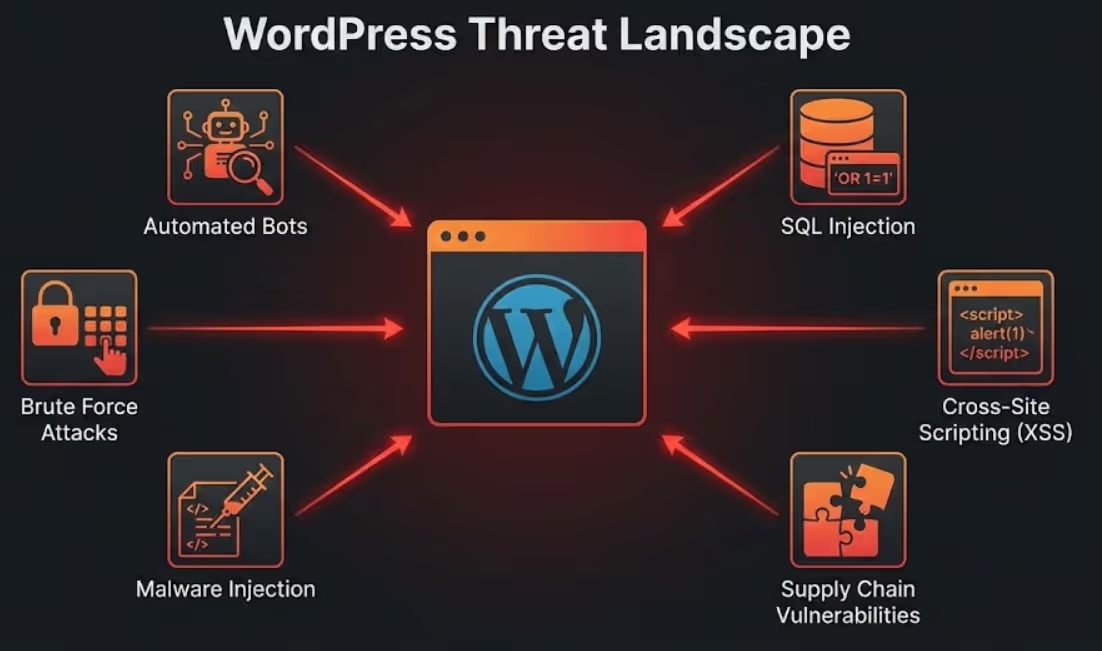
Recognizing what threatens WordPress sites reveals why comprehensive security measures are essential rather than optional.
Automated bot attacks represent the highest volume threat facing WordPress sites. Bots systematically scan IP addresses looking for WordPress installations, then attempt common vulnerabilities including outdated software with known security holes, default usernames and weak passwords, and unpatched themes or plugins. These attacks are indiscriminate—bots don't care about business size or industry. They exploit any vulnerability discovered. Australian websites face millions of automated attack attempts monthly.
Brute force attacks involve systematic password guessing until attackers gain access. Bots try thousands of common username and password combinations rapidly. Default usernames like "admin" are primary targets. Common passwords like "password123" or "companyname2024" are tested immediately. Without rate limiting or login attempt restrictions, brute force attacks eventually succeed against weak credentials.
Malware injection installs malicious code into WordPress sites, enabling various harmful activities. Malware might redirect visitors to phishing sites, inject spam links damaging SEO, steal form submissions including customer data, or create backdoors enabling future access even after initial vulnerability is patched. According to Sucuri's Website Threat Research, WordPress represents 96% of all infected CMS platforms they cleaned in 2023, though this largely reflects WordPress's dominant market share rather than inherent insecurity.
SQL injection attacks exploit poorly coded plugins or themes to manipulate database queries. Successful SQL injection enables attackers to extract sensitive data, modify or delete content, create administrative accounts, or take complete site control. Modern WordPress core includes protection against basic SQL injection, but third-party plugins sometimes introduce vulnerabilities.
Cross-site scripting (XSS) injects malicious scripts that execute in visitor browsers. XSS attacks can steal session cookies enabling account hijacking, redirect users to malicious sites, or deface pages. Again, WordPress core protects against many XSS attacks, but plugin and theme vulnerabilities create risk.
DDoS attacks overwhelm sites with traffic from multiple sources, making sites unavailable to legitimate visitors. While DDoS attacks affect hosting infrastructure more than WordPress specifically, business impact includes lost revenue from downtime, damaged reputation from unavailability, and potential ransom demands to stop attacks.
Supply chain vulnerabilities emerge when plugins, themes, or dependencies contain security flaws or are abandoned by developers. WordPress's ecosystem of thousands of plugins creates extensive attack surface. Popular plugins with millions of installations become high-value targets. When vulnerabilities are discovered in widely-used plugins, thousands of sites become vulnerable simultaneously.
Selecting Secure WordPress Hosting for Australian Businesses
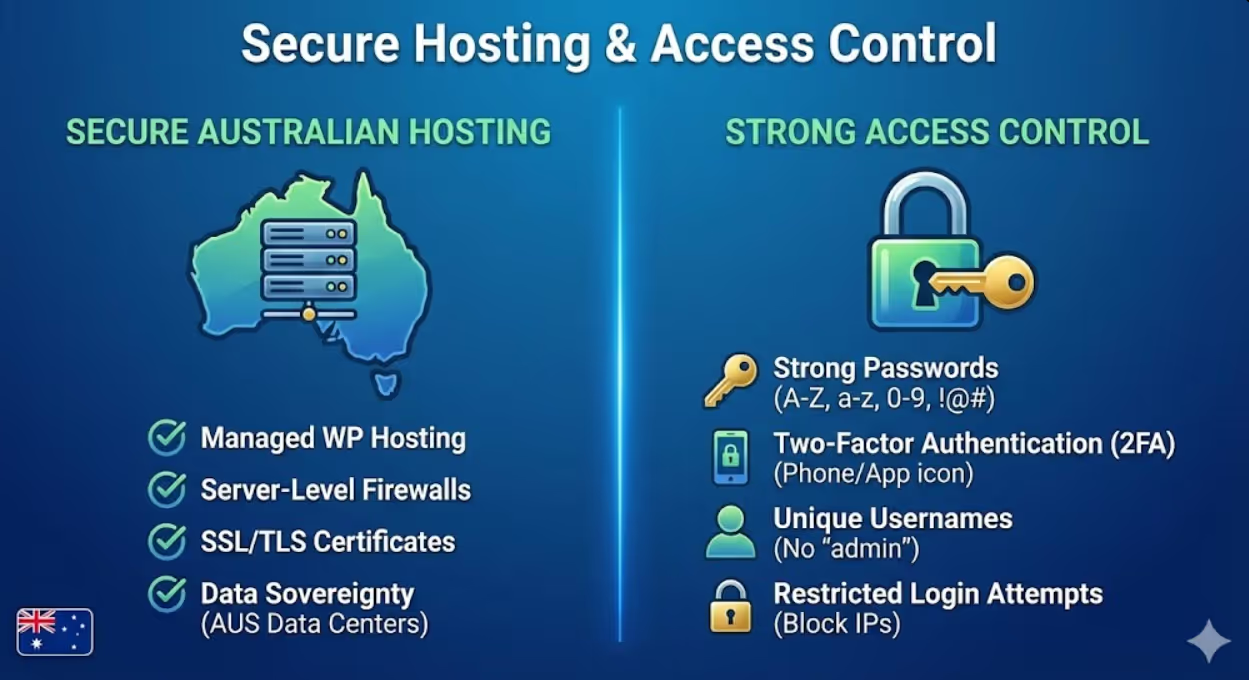
Security starts with hosting infrastructure. Quality hosting providers implement server-level protections that no WordPress configuration can replicate.
Australian hosting location provides specific advantages for Australian businesses. Data sovereignty keeps customer information within Australian jurisdiction under Australian privacy laws. Lower latency improves site speed for Australian visitors. Australian-based support operates in compatible time zones. Hosting providers like VentraIP, Digital Pacific, Panthur, and Crazy Domains offer Australia-based WordPress hosting with security focus.
Managed WordPress hosting provides security advantages over generic shared hosting. Managed hosts implement WordPress-specific security measures including automatic WordPress core updates, plugin and theme scanning for known vulnerabilities, server-level firewalls optimized for WordPress, and specialized support teams understanding WordPress security. Managed WordPress hosts like WP Engine, Kinsta, and Flywheel (all with Australian data centers available) handle many security essentials automatically.
Server security features separate quality hosts from budget providers. Essential hosting security includes server-level firewalls blocking malicious traffic before reaching WordPress, intrusion detection systems monitoring for attack patterns, malware scanning at server level, regular server software updates and security patches, isolated account structures preventing cross-contamination between hosted sites, and DDoS protection handling traffic floods.
SSL/TLS certificates encrypt data transmitted between visitor browsers and your server, essential for protecting form submissions, login credentials, and any sensitive data. Quality hosts provide free SSL certificates through Let's Encrypt or similar services. Proper SSL implementation requires not just certificate installation but also forcing HTTPS across entire site and updating mixed content.
Backup infrastructure provided by hosts varies dramatically in quality. Minimum standards include daily automated backups, retention for at least 30 days, off-server backup storage, and easy restoration processes. Premium hosts offer point-in-time restoration and one-click rollback. Verify backup policies before selecting hosts—some budget providers offer minimal or no backup protection.
Security track record reveals hosting provider reliability. Research whether hosts have suffered significant breaches, how they responded to security incidents, whether they proactively notify customers of vulnerabilities, and what security certifications or audits they maintain. Australian hosting providers should ideally demonstrate compliance with Australian privacy standards and security frameworks.
Staging environments enable safe testing of updates, new plugins, or configuration changes before applying to live sites. Security updates sometimes cause compatibility issues. Staging environments let you verify updates won't break your site before pushing to production. Many managed hosts include staging as standard feature.
Implementing Strong Access Control and Authentication
Unauthorized access enables the majority of WordPress security breaches. Robust authentication prevents most attacks before they can compromise your site.
Strong password requirements form the foundation of access security. Enforce passwords minimum 12 characters combining uppercase, lowercase, numbers, and symbols. Ban common passwords and dictionary words. Require regular password changes (every 90-180 days). WordPress supports password strength meters during creation, but doesn't enforce strength requirements without plugins. Security plugins like Wordfence or iThemes Security can enforce password policies.
Two-factor authentication (2FA) adds crucial security layer beyond passwords. Even if passwords are compromised, attackers need second authentication factor. 2FA options include time-based one-time passwords (TOTP) through apps like Google Authenticator or Authy, SMS codes sent to registered phones, or hardware security keys. Plugins like Two Factor Authentication or Wordfence Login Security implement 2FA for WordPress. Research from Microsoft shows that 2FA blocks 99.9% of automated attacks, making it one of the most effective security measures available. Require 2FA for all users with administrative access.
Unique usernames prevent half the brute force battle. Never use "admin" as username—it's the first username attackers try. Create unique, non-obvious usernames for all accounts. During WordPress installation, specify custom admin username rather than accepting "admin" default. For existing sites using "admin", create new administrative user with unique username, transfer all content, then delete "admin" account.
Limited user roles follow principle of least privilege. WordPress offers several user roles with different capabilities: Administrator has complete site control, Editor can publish and manage all posts, Author can publish own posts, Contributor can write posts but can't publish, and Subscriber can only manage profile. Assign users minimum role necessary for their responsibilities. Don't make everyone administrator for convenience—this creates unnecessary risk.
Restricted login access prevents brute force attempts from succeeding. Limit login attempts through plugins like Limit Login Attempts Reloaded. After specified failed attempts (typically 3-5), temporarily block that IP address. Implement CAPTCHA on login pages to prevent automated attempts. Consider IP whitelisting for administrative access if you work from consistent locations.
Login URL changes provide security through obscurity. WordPress login defaults to yoursite.com/wp-admin or yoursite.com/wp-login.php, which attackers know. Changing login URL makes site harder to find for automated bots. Plugins like WPS Hide Login enable custom login URLs. This isn't foolproof security but reduces automated attack volume significantly.
Session management prevents session hijacking. Implement automatic logout after inactivity periods. Invalidate sessions when users log out. Force re-authentication for sensitive actions like password changes or user deletion. Monitor active sessions and provide users ability to terminate sessions from unknown devices.
Admin area access restrictions limit administrative function exposure. Consider IP-based restrictions for wp-admin area if administrators work from known IP addresses. Implement separate authentication for admin area beyond standard login. Use plugins to prevent admin area access during off-hours if your business operates standard hours.
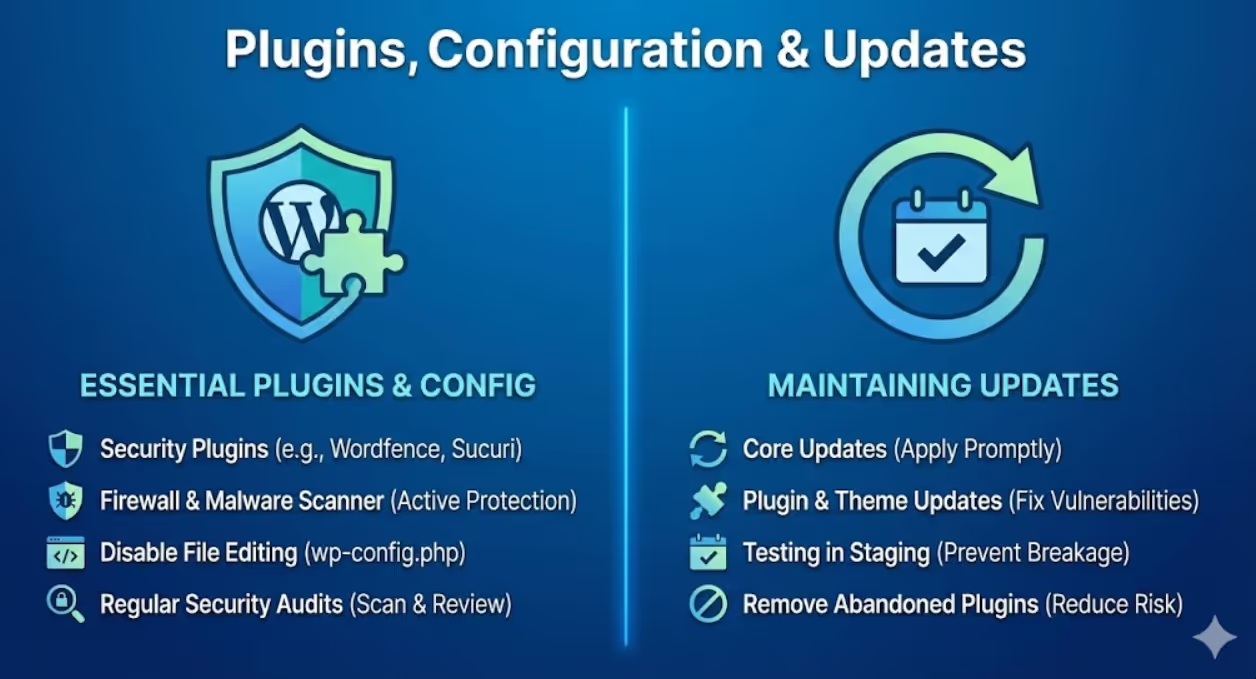
Essential WordPress Security Plugins and Configuration
Security plugins extend WordPress core security with active protection, monitoring, and response capabilities.
Wordfence Security provides comprehensive free security including firewall blocking malicious traffic, malware scanner checking files for infections, login security with 2FA support, live traffic monitoring showing real-time attacks, and security notifications alerting to issues. Premium version adds real-time firewall rule updates and country blocking. Wordfence is actively maintained and widely used across Australian WordPress sites.
Sucuri Security offers similar comprehensive protection with emphasis on website monitoring and incident response. Features include security activity auditing, file integrity monitoring, remote malware scanning, blacklist monitoring, and security hardening. Sucuri's premium services include professional malware removal and DDoS protection. Particularly valuable for businesses needing guaranteed malware cleanup support.
iThemes Security (formerly Better WP Security) focuses on hardening WordPress installations through automated security checks, brute force protection, strong password enforcement, two-factor authentication, and malware scanning. The pro version adds scheduled malware scans and version management. iThemes provides particularly good security hardening for WordPress beginners through automated configuration.
All In One WP Security & Firewall delivers enterprise-level security through user-friendly interface. Features include login lockdown, firewall protection, database security, file system security, and backup functionality. The plugin rates security on graded scale helping you understand current protection level and what improvements would increase security.
Jetpack Security bundles multiple security features including automatic malware scanning, spam protection through Akismet, brute force attack protection, downtime monitoring, and activity logs. Being developed by Automattic (WordPress.com parent company) ensures tight WordPress integration and reliable updates. Particularly suitable for businesses using other Jetpack features like performance optimization.
Security plugin selection should consider your technical expertise, specific security needs, budget for premium features, compatibility with other plugins, and performance impact. Install only one comprehensive security plugin to avoid conflicts—running multiple security plugins simultaneously often creates problems rather than enhanced protection. Configure chosen plugin properly rather than just installing with default settings.
Core WordPress security settings require manual configuration beyond plugins. Disable file editing through WordPress admin by adding define('DISALLOW_FILE_EDIT', true); to wp-config.php. This prevents attackers from modifying theme/plugin files through WordPress dashboard. Change database table prefix from default wp_ to something unique during installation or through plugins for existing sites. This makes SQL injection attacks slightly harder. Remove WordPress version information from public areas to prevent targeting known version-specific vulnerabilities.
Regular security audits using plugin scanning features identify vulnerabilities. Run full malware scans weekly minimum. Review security logs for suspicious activity patterns. Monitor login attempts and block persistent attackers. Check file integrity to detect unauthorized modifications. Address flagged issues immediately rather than deferring action.
Maintaining WordPress Through Regular Updates
Outdated software represents the single largest WordPress vulnerability. Systematic update management prevents exploitation of known security flaws.
WordPress core updates patch security vulnerabilities discovered in WordPress itself. WordPress releases major updates every few months and minor security updates as needed. Enable automatic updates for minor versions through settings or wp-config.php. Major updates should be tested in staging before production deployment. Check compatibility with critical plugins/themes before major updates. Security updates should be applied within 48 hours of release.
Plugin updates fix plugin-specific vulnerabilities that attackers actively exploit. Monitor plugin updates through WordPress dashboard notifications. Research update contents before applying—understand whether updates address security issues or just add features. Test plugin updates in staging when possible, particularly for plugins central to site functionality. According to WPScan's WordPress Vulnerability Database, plugin vulnerabilities account for approximately 52% of all known WordPress vulnerabilities, making plugin updates critical to security. Remove unused plugins entirely rather than simply deactivating—inactive plugins still create security risk if exploited.
Theme updates patch theme vulnerabilities and maintain compatibility with WordPress updates. Use reputable theme sources (WordPress.org repository, established theme developers like StudioPress or Elegant Themes) that maintain themes actively. Custom themes require developer maintenance for security updates. Consider child themes when using customized themes so parent theme can update without losing customizations.
Update testing process prevents updates from breaking sites. Create staging environment duplicating production site. Apply updates to staging first. Test critical functionality thoroughly after staging updates. Verify forms submit properly, checkout processes work, navigation functions correctly, and custom features operate normally. Only after confirming staging stability should updates apply to production.
Backup before updates enables rollback if updates cause problems. Even with staging testing, production updates occasionally reveal unforeseen issues. Backup immediately before applying updates creates safe restoration point. Most managed hosts provide one-click pre-update snapshots. Alternatively, use backup plugins like UpdraftPlus or BackupBuddy to create manual backups before major updates.
Update notification monitoring ensures you're aware of available updates. WordPress dashboard shows available updates, but regular dashboard checking is reactive. Enable email notifications for available updates through security plugins. Many managed hosts provide proactive update monitoring and notification. Set calendar reminders for monthly update checks even with notification systems.
Abandoned plugin management addresses special security risk. Plugins no longer maintained by developers don't receive security updates when vulnerabilities are discovered. Check plugin last update dates—plugins unchanged for 12+ months warrant evaluation. Research whether developers abandoned plugins or just have stable code. If plugins are abandoned, find actively maintained alternatives. Never keep abandoned plugins with known vulnerabilities.
Implementing Comprehensive Backup Strategies
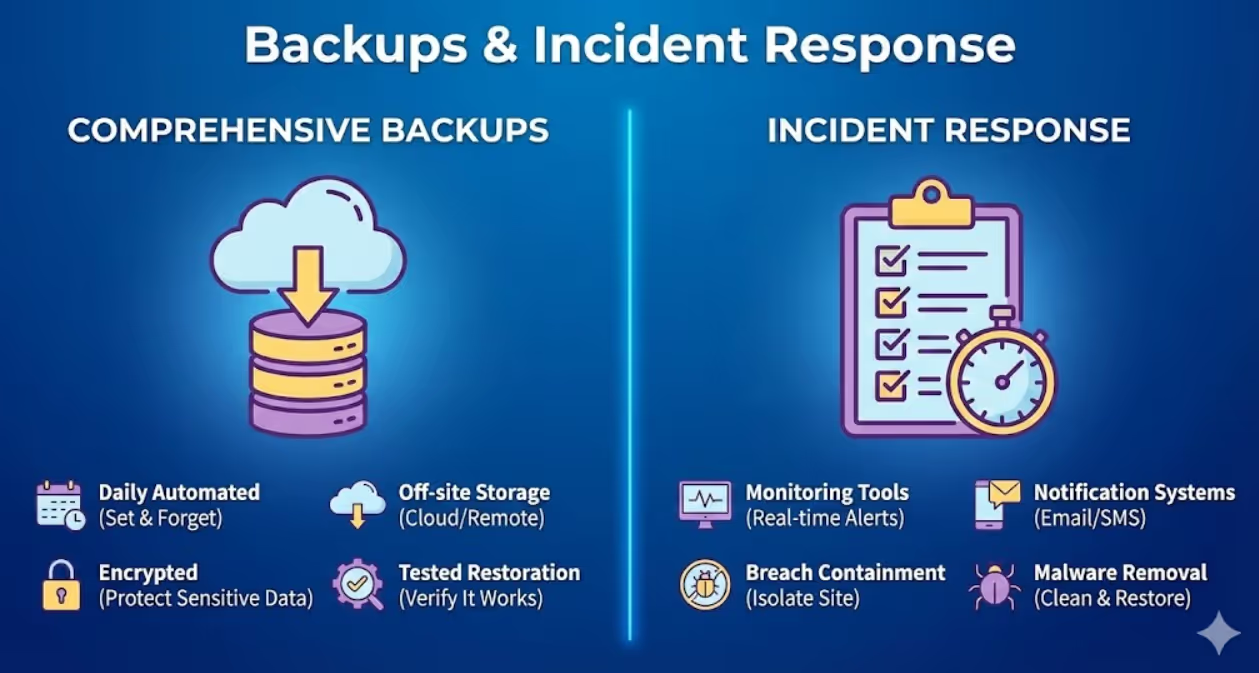
Backups enable recovery from security incidents, hosting failures, or human errors. Comprehensive backup strategies minimize downtime and data loss.
Backup frequency should match site update frequency and data value. Active business sites with daily content changes require daily backups minimum. E-commerce sites processing transactions need more frequent backups (multiple daily). Static corporate sites might backup weekly. Database backups should occur more frequently than file backups since databases change more often. Incremental backups between full backups balance thoroughness with storage efficiency.
Backup components must include database, WordPress files, uploads/media library, theme files, and plugin files. Some backup solutions separate database from files, which is acceptable if both are backed up regularly. Configuration files like .htaccess and wp-config.php are critical to include. Email these backups separately for additional redundancy.
Off-site backup storage protects against server failures, hosting provider issues, or ransomware affecting server. Storing backups only on the same server as your site provides zero protection if server is compromised. Store backups in cloud storage (Google Drive, Dropbox, Amazon S3) separate from your hosting. Multiple backup locations provide additional security—keeping copies in two separate cloud services and local storage ensures data survival.
Automated backup systems eliminate human error and forgetfulness. Manual backups fail when you forget or postpone. Use backup plugins like UpdraftPlus, BackupBuddy, or VaultPress (Jetpack) for automated scheduling. Configure backups during low-traffic periods to minimize performance impact. Verify automated backups run successfully through email notifications or dashboard checks.
Backup retention policies balance storage costs against recovery needs. Keep daily backups for 30 days minimum. Maintain weekly backups for 3-6 months. Store monthly backups for one year or longer. This tiered retention enables recovery from recently discovered issues while providing long-term restoration options. E-commerce sites might extend retention for compliance with financial record keeping requirements.
Backup testing validates that backups actually work when needed. Quarterly minimum, test restoration process by restoring backup to staging environment. Verify all functionality works post-restoration. Check that databases restore completely, media files are accessible, and plugins/themes function properly. Untested backups provide false confidence—many businesses discover backup failures only when desperately needing restoration.
Backup security protects backups themselves from unauthorized access. Encrypt backups particularly if they contain customer data or sensitive business information. Store backups in password-protected cloud storage. Limit backup access to essential personnel. Regularly audit who has backup access and remove unnecessary permissions.
Documentation of backup procedures ensures anyone can execute recovery when primary administrator is unavailable. Document where backups are stored, how to access backup storage, step-by-step restoration procedures, and who to contact for assistance. Keep documentation accessible outside your WordPress site since you need it when site is unavailable.
Monitoring and Responding to Security Incidents
Proactive monitoring detects security issues early when they're easier to resolve. Effective incident response minimizes damage from successful attacks.
Security monitoring tools provide real-time visibility into site security. Wordfence and Sucuri offer live traffic monitoring showing attack attempts. Uptime monitors like UptimeRobot or Pingdom alert to site availability issues potentially indicating attacks. File integrity monitoring detects unauthorized file changes. Login activity logs reveal suspicious access patterns. Google Search Console shows security issues Google detects.
Attack pattern recognition helps identify security threats from normal traffic anomalies. Sudden traffic spikes from single countries might indicate DDoS attempts. Multiple failed login attempts from distributed IPs suggest brute force attacks. Unusual database queries might signal SQL injection attempts. Increased 404 errors could indicate vulnerability scanning. Unexpected new admin accounts signal potential compromise.
Notification systems alert administrators to security events requiring immediate attention. Configure email alerts for failed login attempts exceeding thresholds, new plugin/theme installations, user account changes, file modifications in core WordPress directories, and malware detection. Balance notification sensitivity—too many alerts create noise that leads to ignored warnings, too few miss critical issues.
Incident response planning prepares for security breaches before they occur. Document response procedures including who to contact (hosting provider, security consultant, legal counsel), how to isolate compromised sites, backup restoration procedures, and customer communication protocols. Assign clear responsibilities so team members know their roles during incidents. Practice response procedures through tabletop exercises.
Breach containment limits damage when compromise is discovered. Immediately take affected sites offline to prevent further malware distribution or data theft. Change all passwords for WordPress admin, hosting control panel, FTP, and database. Review all user accounts for unauthorized additions. Scan all websites on shared hosting as compromise might spread. Document everything for potential legal or insurance requirements.
Malware removal requires thorough cleaning to prevent reinfection. Use security plugin malware scanners to identify infected files. Compare current files against clean WordPress installation to find modifications. Remove malicious code from infected files or replace with clean versions. Check database for injected content in posts, comments, or options. Remove backdoors attackers created for future access. Many businesses hire security professionals for thorough malware removal.
Post-incident analysis identifies how breaches occurred and prevents recurrence. Review security logs to determine attack vector. Identify which vulnerability enabled compromise—outdated plugin, weak password, or other issue. Implement additional security measures addressing identified weaknesses. Update security policies and procedures based on lessons learned. Document incident for future reference and team training.
Recovery verification ensures sites are truly clean before returning to production. Run multiple malware scans from different tools. Check all core files against clean installations. Review all database entries for injected content. Monitor closely for several days after restoration watching for reinfection signs. Consider professional security audit after significant breaches.
Australian Compliance and Legal Considerations
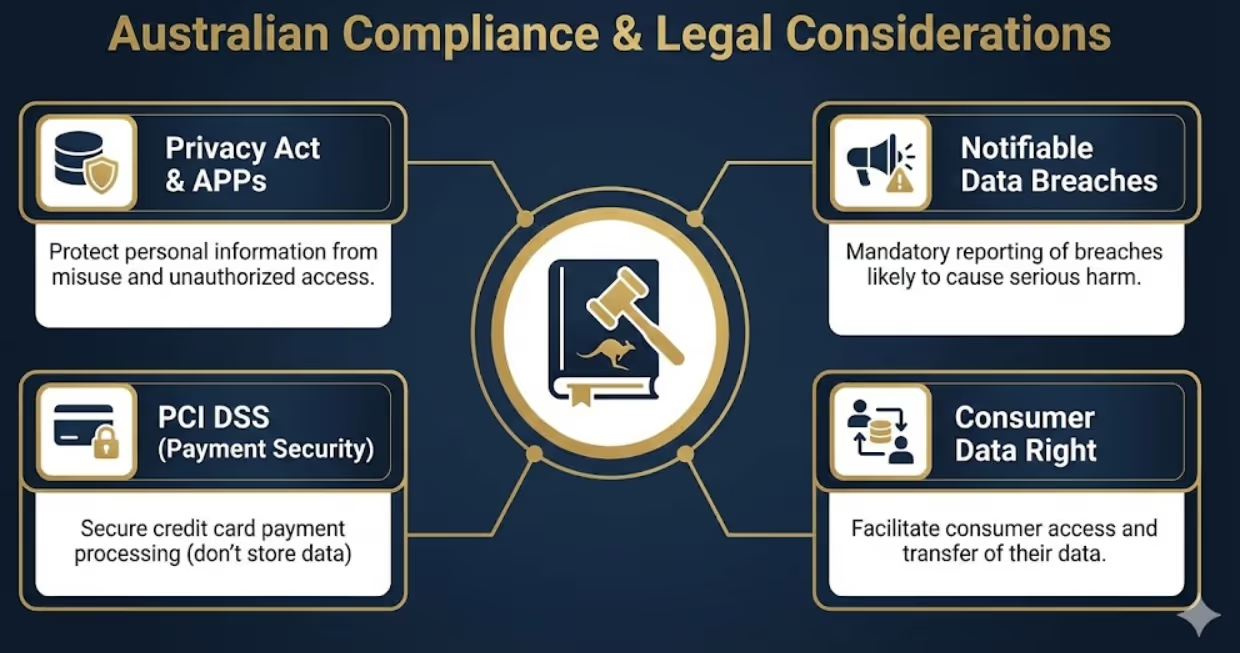
Australian businesses face specific legal obligations regarding website security and data protection that WordPress configurations must address.
Australian Privacy Principles under the Privacy Act 1988 require businesses to protect personal information from misuse, interference, loss, unauthorized access, modification, or disclosure. WordPress sites collecting customer data through forms, accounts, or transactions must implement reasonable security measures. This includes encrypted connections, secure data storage, access controls limiting who can view data, and prompt breach notification.
Notifiable Data Breaches scheme requires businesses to notify affected individuals and the Office of the Australian Information Commissioner when data breaches likely result in serious harm. According to the OAIC's Notifiable Data Breaches Report, human error and cyber incidents account for the vast majority of reported breaches, with malicious or criminal attacks representing 67% of all breaches. WordPress sites collecting personal information must have procedures for detecting breaches, assessing breach severity, and executing notifications within 30 days. Backup and logging systems facilitating breach detection and assessment become compliance necessities.
Payment Card Industry Data Security Standard (PCI DSS) applies to businesses processing credit card payments. WordPress e-commerce sites must never store credit card data directly. Use payment gateways like Stripe, PayPal, or Australian providers handling PCI compliance. Implement SSL certificates encrypting payment data transmission. Regular security testing and vulnerability scanning align with PCI requirements.
Consumer Data Right legislation enables consumers to access their data and transfer between service providers. WordPress sites should facilitate data portability through user data export functionality. WordPress core includes personal data export tools, but verification that exports include all collected data is necessary.
Website accessibility under Disability Discrimination Act 1992 requires reasonable adjustments enabling people with disabilities to access online services. While primarily accessibility rather than security issue, security implementations shouldn't inadvertently create accessibility barriers. For instance, CAPTCHA systems should include audio alternatives for visually impaired users.
Cookie consent requirements under Privacy Act require notice when sites use cookies or similar technologies tracking visitors. Security plugins using cookies for session management or tracking attack patterns need cookie consent mechanisms. European GDPR influences Australian businesses serving European customers, requiring explicit consent before non-essential cookie usage.
Data retention and destruction obligations vary by industry. Financial services, healthcare, and legal sectors have specific data retention requirements. WordPress sites should implement data lifecycle policies including secure deletion of data no longer required for business or legal purposes. Database cleaning and media file purging reduce data breach risk by minimizing stored information.
Frequently Asked Questions
What are the most critical security measures Australian small business WordPress sites must implement immediately to prevent common attacks?
Immediate implementation of five critical security measures prevents the majority of successful WordPress attacks. First, implement strong passwords and two-factor authentication for all user accounts, particularly administrators. Create unique usernames (never "admin") with passwords minimum 12 characters using uppercase, lowercase, numbers, and symbols. Enable 2FA through free plugins like Wordfence Login Security or Google Authenticator. This single measure prevents 81% of hacking-related breaches according to recent cybersecurity statistics. Second, install and properly configure comprehensive security plugin (Wordfence, Sucuri, or iThemes Security). Enable firewall protection, malware scanning, and brute force prevention. Configure email alerts for security events. Run initial full malware scan and schedule weekly scans. Security plugins provide automated protection requiring minimal technical knowledge. Third, establish automated daily backup system storing backups off-site in cloud storage separate from hosting. Use plugins like UpdraftPlus or BackupBuddy configuring automatic backups to Google Drive, Dropbox, or Amazon S3. Verify backups run successfully and test restoration quarterly. Backups enable rapid recovery minimizing damage from any security incident. Fourth, implement immediate update schedule for WordPress core, all plugins, and themes. Enable automatic updates for WordPress minor versions and security releases. Check weekly for plugin and theme updates applying within 48 hours. Remove all unused plugins and themes entirely—don't just deactivate. Outdated software represents the largest WordPress vulnerability with automated bots specifically targeting known security flaws in old versions. Fifth, install SSL certificate enabling HTTPS encryption across entire site. Most quality hosting providers offer free SSL through Let's Encrypt. Implement SSL, force HTTPS in WordPress settings, and fix any mixed content warnings. SSL encrypts data transmission protecting login credentials, form submissions, and customer information. These five measures—strong authentication, security plugin, backups, regular updates, and SSL encryption—create layered defense preventing vast majority of successful attacks. Implementation requires minimal technical expertise and can be completed in single afternoon for most sites. Beyond these fundamentals, additional measures like login URL changes, CAPTCHA implementation, and advanced firewall rules provide incremental security improvements. However, start with these five essentials before advancing to more sophisticated measures. Many Australian small businesses operating WordPress sites have implemented none of these basics, leaving themselves highly vulnerable to attacks that are completely preventable through straightforward security measures.
How can Australian businesses balance WordPress security requirements with website performance since security plugins and measures sometimes slow site loading speeds?
Balance security and performance through strategic security measure selection and optimization rather than sacrificing either requirement. Modern security plugins have improved dramatically in performance efficiency, with properly configured security creating minimal measurable performance impact. Start by selecting lightweight security plugins optimized for performance. Wordfence offers high-performance scanning modes that minimize resource usage. Sucuri provides cloud-based firewall offloading security processing from your server. iThemes Security focuses on hardening rather than resource-intensive active scanning. Test plugin performance impact using tools like GTmetrix or Pingdom before and after security plugin installation, measuring actual speed differences rather than assuming impacts. Configure security features strategically to minimize performance costs. Schedule malware scans during low-traffic periods (typically 2-4 AM) rather than peak hours. Enable firewall caching reducing repeated processing of identical requests. Use moderate rather than maximum security settings unless specific threats justify resource-intensive protection. Disable security features you don't need—if your site doesn't accept user registrations, disable user enumeration protection features. Optimize WordPress broadly for performance so security measures operate within fast-loading site. Implement caching through plugins like WP Rocket or W3 Total Cache. Optimize images using compression plugins. Use Content Delivery Network (CDN) distributing static files geographically. Enable lazy loading for images and videos. Minimize plugin count overall—more plugins whether security-focused or feature-focused slow sites. These performance optimizations create headroom allowing security plugins to operate without noticeable speed impact. Choose managed WordPress hosting providing server-level security reducing need for resource-intensive plugin features. Managed hosts implement firewalls, malware scanning, and intrusion detection at infrastructure level before traffic reaches WordPress. This shifts security processing away from WordPress application layer improving both security and performance. Monitor site performance continuously through uptime monitoring and speed testing services. Establish performance baselines, then track whether security implementations degrade speeds meaningfully. Most properly configured security setups create less than 100-200ms additional load time—imperceptible to users and insignificant for SEO. If specific security features create substantial slowdowns, evaluate alternatives. For instance, if plugin-based firewall causes issues, consider DNS-level firewall through Cloudflare. If malware scanning impacts performance, switch to scheduled scanning rather than real-time. Prioritize security measures by threat likelihood and business impact. E-commerce sites processing payments require more aggressive security justified by financial risk. Brochure sites with minimal sensitive data might use lighter security approaches. Match security intensity to actual risk rather than implementing maximum security universally. Regular performance audits identify whether security measures or other factors cause speed issues. Many businesses blame security plugins for slowdowns actually caused by poorly optimized themes, excessive media files, or inadequate hosting. Systematic testing isolates actual causes enabling targeted optimization. The reality is that security and performance are complementary rather than contradictory when properly implemented. Secure sites experience less downtime from attacks, avoid malware that injects resource-intensive malicious code, and prevent compromises that damage search rankings through blacklisting. Performance and security both contribute to user experience and business success.
What should Australian businesses do immediately after discovering their WordPress site has been hacked and what are realistic recovery timeframes and costs?
Immediate hack response requires systematic steps minimizing damage and enabling recovery. First (within minutes of discovery), take site offline immediately preventing further malware distribution, protecting visitors from infection, and stopping data theft. Enable maintenance mode through plugin or hosting control panel displaying maintenance message rather than infected content. This protects brand reputation while addressing breach. Second (within first hour), change all passwords including WordPress admin accounts, hosting control panel access, FTP credentials, database passwords, and any integrated service accounts. Use completely new complex passwords bearing no similarity to previous credentials. Attackers often steal passwords during breaches enabling future access even after initial vulnerabilities are patched. Third (within 2-4 hours), notify your hosting provider about breach. Quality hosts provide security expertise, can identify attack vectors from server logs, may isolate your account preventing spread to other hosted sites, and might have automated tools accelerating malware removal. Document everything for potential insurance claims, legal requirements under Australian data breach notification laws, and internal post-incident analysis. Fourth (within 4-8 hours), assess breach scope determining what data was accessed, whether customer information was stolen, if financial data was compromised, and whether other sites on shared hosting were affected. This assessment determines notification obligations under Notifiable Data Breaches scheme. If personal information was stolen and breach likely causes serious harm, prepare breach notifications to affected individuals and Office of the Australian Information Commissioner. Fifth (within 24 hours), initiate malware removal either through security plugin automatic cleaning, manual removal if you have expertise, or engaging security professionals for thorough remediation. Professional malware removal from Australian specialists like WP Hacked Help, Sucuri, or local WordPress security consultants costs $300-$2,000 depending on infection severity. DIY removal is free but risks incomplete cleaning leaving backdoors enabling reinfection. Sixth (1-3 days), restore from clean backup if recent backup predates infection or rebuild site from clean WordPress installation if backups are unavailable or also infected. Restoration from backup takes hours if backups are clean and restoration procedures are documented. Site rebuilding takes days or weeks depending on complexity. Seventh (ongoing), implement security measures preventing recurrence including security plugin installation, strong password enforcement, regular update schedules, and monitoring systems. Realistic recovery timeframes vary dramatically by breach severity and preparation. Well-prepared businesses with clean recent backups, documented procedures, and professional security support restore functionality within 24-48 hours. Unprepared businesses without backups might require 1-4 weeks rebuilding sites, longer for complex custom sites. Cost ranges vary from $500-$5,000 for straightforward breaches with professional malware removal and minor restoration, to $10,000-$50,000+ for severe breaches requiring site rebuilding, legal consultation, customer notification, credit monitoring services, and addressing business disruption. Average Australian small business WordPress breach costs approximately $8,000-$15,000 including immediate remediation, lost business during downtime, and reputation damage. Prevention through basic security measures costing hundreds annually dramatically outperforms incident response costing thousands. After recovery, conduct post-incident analysis identifying how breach occurred, what security gaps enabled compromise, and what additional measures prevent recurrence. Many businesses discover breaches resulted from postponed updates, weak passwords, or abandoned plugins—preventable vulnerabilities. Use incident as catalyst implementing comprehensive security rather than just addressing immediate vulnerability. Finally, consider cyber insurance covering WordPress security incidents. Policies typically cost $1,000-$3,000 annually for small businesses and cover breach response costs, legal expenses, customer notification, and business interruption. Insurance doesn't prevent breaches but mitigates financial impact when incidents occur.
WordPress Security Protects Business Continuity
WordPress security isn't technical checkbox exercise—it's business continuity essential protecting revenue, reputation, and customer trust. Australian businesses depending on WordPress for online presence, customer acquisition, or e-commerce face existential threats from security breaches.
The security measures outlined in this guide represent minimum standards, not aspirational goals. Strong hosting, access controls, regular updates, backups, and monitoring form foundation protecting against overwhelming majority of attacks targeting Australian WordPress sites.
Security incidents aren't questions of "if" but "when." Prepared businesses with comprehensive security and response procedures survive incidents with minimal disruption. Unprepared businesses face devastating consequences from preventable attacks.
Ready to implement comprehensive WordPress security protecting your Australian business website? Maven Marketing Co. provides WordPress security audits, implementation services, and ongoing monitoring ensuring your business website remains secure against evolving threats. Let's protect your digital presence.

Table of contents
read more blogs

Is Google Ads Better Than SEO for My Business
One of the biggest questions business owners ask when they are planning online growth is whether they should invest in Google Ads or SEO. Both are strong marketing plays that help your company show up in Google search results, but they do things in separate lanes. Google Ads gives quicker visibility and can bring in leads fast, whereas SEO more or less focuses on slow, steady organic traffic that tends to grow the longer you keep building it. Picking the right direction depends on what you want to achieve, how much money you can spend, how crowded the market is, and how quickly you need results, like sooner rather than later. The good news is you don’t always have to choose one or the other; it’s not exactly a black-and-white situation. If you take time to understand the strongest points of both, you can put together a more sensible digital marketing plan that supports consistent expansion. In this guide, we’ll compare Google Ads vs SEO, explain the main differences, and help you figure out what option makes the most sense for your business.

When Should I Hire a Digital Marketing Agency
Growing a business today takes more than just having a website or throwing a post on social media; customers usually search around online, compare providers, skim reviews, and basically expect the brand to show up with a solid digital presence before they even think about buying. Many businesses try to run their marketing themselves, but there comes a point when “doing it all in-house” becomes clunky and hard to manage, all at once. Knowing when to hire a digital marketing agency can end up making a big, real difference for your growth. If you’re not getting enough leads, or your online visibility feels stuck, or sales are just not moving, the right agency can bring the know-how, plus a clear plan, to help you get noticeably better outcomes. In this guide, we’ll dig into what a digital marketing agency actually does, the usual signs it’s time to bring one on, and how picking the right marketing partner can help your business move forward at a faster pace.

Why Is My Google Ads Budget Running Out So Quickly
Running a successful Google Ads budget isn’t only about throwing more money at it. It’s more like making every dollar, doing a bit extra. A lot of businesses start a Google Ads campaign with big hopes, then find out their daily budget is gone within a few hours, and that feels weird, right? After that, your ads stop showing effectively, new leads slip away, and your return on investment dips. So if your Google Ads budget is running out too fast, don’t stress. It’s a fairly common issue, and in most situations, it can be repaired with the right approach. There are multiple little things that can drain your advertising money quicker than you expected, from costly keywords to audience targeting that just doesn’t quite fit. In this guide, we’ll walk through why your budget disappears so quickly, how to cut wasteful spend, and the most reliable ways to boost your Google Ads ROI, even if your budget stays the same.


