
.svg)


%201.svg)

Key Takeaways
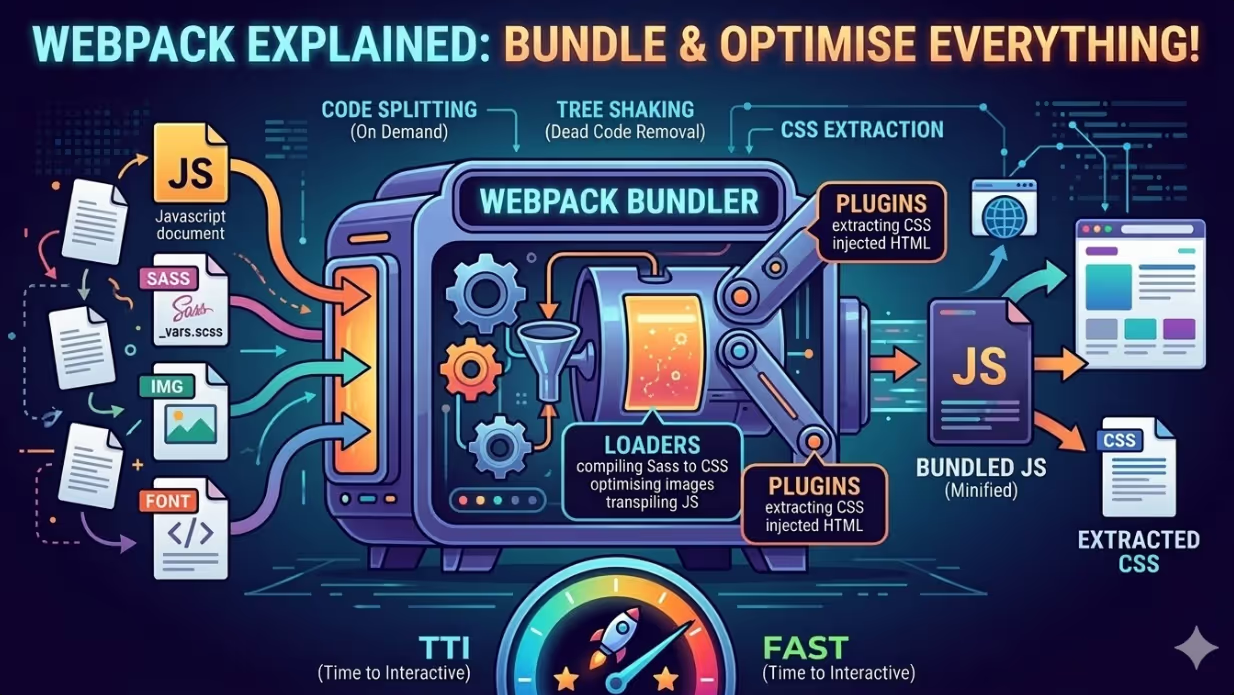
- Webpack treats every file in a project as a module, allowing JavaScript, CSS, images, and fonts to be processed, transformed, and bundled according to a configuration that the development team controls entirely.
- Loaders are the mechanism through which Webpack processes files that are not native JavaScript modules, enabling Sass compilation, PostCSS transforms, image optimisation, and font file handling within a single build pipeline.
- Plugins extend what Webpack can do beyond individual file transformation, handling tasks such as HTML template injection, CSS file extraction, bundle analysis, and build behaviour specific to each environment.
- Code splitting divides a JavaScript bundle into smaller chunks that load on demand rather than all at once, reducing the initial JavaScript payload delivered to the browser and improving Time to Interactive for Australian website visitors.
- Tree shaking removes unused code from JavaScript bundles by analysing the import and export structure of ES modules, eliminating dead code that would otherwise inflate bundle size and slow execution.
- The MiniCssExtractPlugin extracts compiled CSS into separate files that can be loaded independently of the JavaScript bundle, enabling browser caching of CSS independently from JavaScript and supporting Critical CSS workflows.
- Production build configuration in Webpack should be explicitly separated from development configuration, with minification, source map handling, asset hashing for cache busting, and environment variable injection all configured specifically for the production output.
Why Custom WordPress Themes Need a Build Pipeline
WordPress development has a long history of themes built by enqueueing individual CSS and JavaScript files through functions.php, relying on the browser to request each file separately and the developer to manually manage the processing of those files before deployment. On small themes with minimal assets, this approach is workable. On commercial Australian WordPress themes with complex JavaScript functionality, multiple Sass partials, third party libraries, icon fonts, and image assets, it produces an asset delivery pattern that fails modern performance expectations in several predictable ways.
Each separately enqueued file requires its own HTTP request. On an HTTP/1.1 connection, parallel request limits make this directly costly. On HTTP/2, request multiplexing reduces this overhead but does not eliminate the cost of transferring many small files instead of fewer larger ones. Unminified JavaScript and CSS files contain whitespace, comments, and variable names that serve the developer but add no value in production. Sass and modern CSS features require compilation before browsers can process them. ES module syntax and modern JavaScript features may need transpilation for compatibility with certain browser versions.
A Webpack build pipeline addresses all of these issues in a single automated pass. When the developer runs the build command, Webpack reads the entry point files, follows the dependency graph to discover every imported module, applies the configured transformations through loaders, and outputs a set of optimised production files ready for deployment. The process is deterministic and repeatable, producing consistent output regardless of which developer runs it or on which machine.
For Australian development agencies managing multiple custom WordPress theme projects simultaneously, a thoroughly configured Webpack setup also means that performance best practices are enforced by the build process rather than relying on individual developer discipline. Minification happens automatically. Unused CSS and JavaScript are removed automatically. Asset hashes are applied automatically. The build does the work.
Project Structure for WordPress Webpack Integration
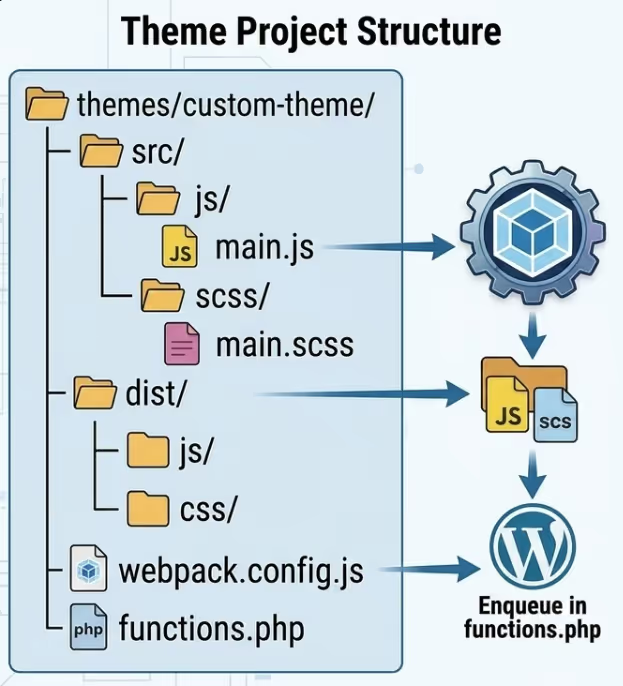
Integrating Webpack into a custom WordPress theme requires a clear understanding of the relationship between the Webpack build output and the files WordPress enqueues. Webpack does not replace WordPress's asset enqueueing system. It produces the optimised files that WordPress then enqueues.
A typical project structure places source files in a src directory within the theme and points Webpack's output configuration at a dist directory that WordPress's functions.php file references when enqueueing assets:
themes/custom-theme/
├── src/
│   ├── js/
│   │   └── main.js
│   ├── scss/
│   │   └── main.scss
│   └── images/
├── dist/
│   ├── js/
│   ├── css/
│   └── images/
├── webpack.config.js
├── package.json
└── functions.php
WordPress's functions.php enqueues the files from the dist directory:
php
function theme_enqueue_assets() {
    wp_enqueue_style(
        'theme-styles',
        get_template_directory_uri() . '/dist/css/main.css',
        [],
        '1.0.0'
    );
    wp_enqueue_script(
        'theme-scripts',
        get_template_directory_uri() . '/dist/js/main.js',
        ['jquery'],
        '1.0.0',
        true
    );
}
add_action( 'wp_enqueue_scripts', 'theme_enqueue_assets' );
Asset versioning through Webpack's content hash, discussed later in this article, requires the version strings in the wp_enqueue calls to be updated dynamically rather than hardcoded, which is handled through a manifest file approach that maps the hashed filenames to their logical names.
Core Webpack Configuration
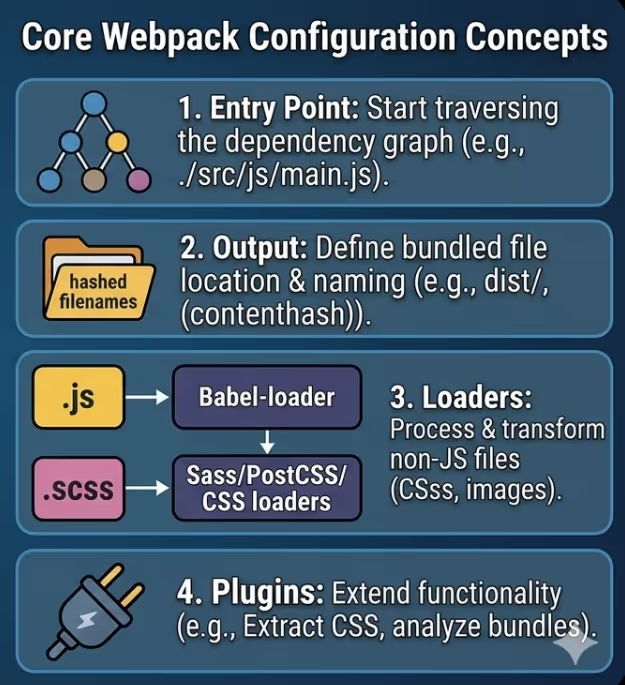
The Webpack configuration file at its most fundamental defines the entry point, output location, mode, and the module rules that govern how different file types are processed.
javascript
const path = require('path');
const MiniCssExtractPlugin = require('mini-css-extract-plugin');

module.exports = {
  entry: './src/js/main.js',
  output: {
    path: path.resolve(__dirname, 'dist'),
    filename: 'js/[name].[contenthash].js',
    clean: true,
  },
  mode: 'production',
  module: {
    rules: [
      {
        test: /\.js$/,
        exclude: /node_modules/,
        use: {
          loader: 'babel-loader',
          options: {
            presets: ['@babel/preset-env'],
          },
        },
      },
      {
        test: /\.(scss|css)$/,
        use: [
          MiniCssExtractPlugin.loader,
          'css-loader',
          'postcss-loader',
          'sass-loader',
        ],
      },
    ],
  },
  plugins: [
    new MiniCssExtractPlugin({
      filename: 'css/[name].[contenthash].css',
    }),
  ],
};
The entry point is the JavaScript file from which Webpack begins traversing the dependency graph. For a WordPress theme with a single main script that imports all other modules, this is typically the theme's primary JavaScript file. For themes with distinct scripts for different contexts, such as a separate bundle for WooCommerce pages, multiple entry points can be defined.
The contenthash token in the output filename generates a unique hash based on the file's content. When the file content changes, the hash changes and the browser treats the file as a new resource, bypassing any cached version. When the file content does not change between deployments, the hash stays the same and browsers serve the cached version without a network request. This is the correct cache busting mechanism for production assets.
Babel Configuration for JavaScript Transpilation
Modern JavaScript syntax including arrow functions, template literals, optional chaining, and ES module imports is fully supported in current browsers but may require transpilation for compatibility with older browser versions that still represent a portion of Australian web traffic.
Babel, integrated into the Webpack build through babel-loader, transpiles modern JavaScript to a syntax compatible with the target browser range. The target range is specified in the project's browserslist configuration, which can be defined in the package.json file or a separate .browserslistrc file:
json
"browserslist": [
  "> 1% in AU",
  "last 2 versions",
  "not dead"
]
The "greater than 1% in AU" query instructs Babel to target browsers that represent more than one percent of Australian web traffic, which ensures transpilation is calibrated to the actual Australian audience rather than a global browser population that may include browser versions with negligible Australian usage.
@babel/preset-env, the standard Babel preset for application development, reads the browserslist configuration and generates only the transpilation transforms actually required for the target browsers, avoiding unnecessary transforms that add bundle weight without providing compatibility benefit for the Australian audience.
Sass and PostCSS Processing
The CSS loader chain in the Webpack configuration processes stylesheets through multiple transformations in sequence, from right to left as they appear in the use array. For a chain of sass-loader, postcss-loader, and css-loader followed by MiniCssExtractPlugin, the processing order is: Sass compilation, PostCSS transforms, CSS module resolution, and finally CSS file extraction.
sass-loader compiles .scss files into standard CSS, enabling the full Sass feature set including variables, nesting, mixins, and partials to be used in development while producing standard CSS for the browser.
postcss-loader applies PostCSS transforms after Sass compilation. The most useful PostCSS plugin for Australian WordPress theme development is Autoprefixer, which reads the browserslist configuration and adds vendor prefixes to CSS properties that require them for the target browsers, eliminating the need to manually write or maintain prefixed CSS rules.
The PostCSS configuration in postcss.config.js:
javascript
module.exports = {
  plugins: [
    require('autoprefixer'),
    require('cssnano')({
      preset: 'default',
    }),
  ],
};
cssnano minifies the final CSS output, removing whitespace, comments, and redundant rules, and applying safe small optimisations that reduce file size without altering the visual output. The combination of Autoprefixer and cssnano in the PostCSS chain gives the CSS output of the Webpack build the vendor prefix coverage and file size optimisation appropriate for production deployment.
Code Splitting for WordPress Themes
Code splitting in Webpack divides the JavaScript output into multiple chunks rather than a single large bundle. For WordPress themes, the most useful forms of code splitting are entry point splitting for distinct page contexts, and dynamic imports for functionality that is not needed on every page load.
Entry point splitting defines multiple entry points in the Webpack configuration, each producing its own output bundle. A WordPress theme might define separate entry points for the main frontend script, the interactions specific to WooCommerce, and any block editor extensions, ensuring that WooCommerce JavaScript is only loaded on pages where it is relevant:
javascript
entry: {
  main: './src/js/main.js',
  woocommerce: './src/js/woocommerce.js',
  editor: './src/js/editor.js',
},
WordPress's conditional enqueueing in functions.php then loads each bundle only on the pages where it is needed, using is_woocommerce() or is_singular() checks to restrict which bundles are enqueued per request.
Dynamic imports enable JavaScript modules to be loaded on demand rather than included in the initial bundle. In theme JavaScript, this pattern is useful for heavy functionality that is triggered by user interaction rather than required immediately:
javascript
document.getElementById('open-modal').addEventListener('click', async () => {
  const { initModal } = await import('./modal.js');
  initModal();
});
The modal module is not included in the initial bundle. Webpack creates a separate chunk for it, and the browser only requests it when the user clicks the element that triggers the import. On pages where the user never triggers the interaction, the modal code is never downloaded.
Tree Shaking and Dead Code Elimination
Tree shaking is Webpack's mechanism for removing code that is imported but never actually called or used. It works by analysing the static import and export structure of ES modules to identify exports that are never referenced anywhere in the dependency graph, then excluding those exports from the final bundle.
For tree shaking to function correctly, the code being shaken must use ES module syntax (import and export statements) rather than CommonJS (require and module.exports). CommonJS modules cannot be statically analysed in the same way and are excluded from tree shaking optimisation.
The practical impact of tree shaking is most significant when importing from large utility libraries. If a theme imports only two functions from a library that exports fifty, tree shaking ensures only those two functions are included in the bundle. Without tree shaking, the entire library would be bundled regardless of how much of it is actually used.
For Australian WordPress theme development, the most common tree shaking benefit comes from utility libraries such as Lodash, animation libraries, and icon libraries. The Lodash library in particular has historically been a significant source of unnecessary bundle weight in WordPress themes that import the entire library for a handful of functions. Tree shaking resolves this automatically when ES module imports are used correctly.
Separate Configurations for Development and Production
Running the same Webpack configuration for development and production creates a tradeoff between development convenience and production optimisation. Source maps, hot module replacement, and unminified output are useful in development but inappropriate in production. Minification, content hashing, and bundle analysis output are appropriate for production but slow down the development feedback cycle unnecessarily.
The standard pattern separates configuration into three files: a common configuration shared between both environments, a development configuration that merges with the common settings, and a production configuration that adds optimisations specific to the production environment:
javascript
// webpack.prod.js
const { merge } = require('webpack-merge');
const common = require('./webpack.common.js');
const CssMinimizerPlugin = require('css-minimizer-webpack-plugin');

module.exports = merge(common, {
  mode: 'production',
  devtool: 'source-map',
  optimization: {
    minimizer: [
      '...',
      new CssMinimizerPlugin(),
    ],
  },
});
The package.json scripts section defines separate commands for development and production builds, referencing the appropriate configuration file:
json
"scripts": {
  "build": "webpack --config webpack.prod.js",
  "dev": "webpack --config webpack.dev.js --watch"
}
The development command runs with --watch, causing Webpack to monitor source files for changes and rebuild automatically. The production command runs a single optimised build and exits.
Webpack's official documentation on configuration covers every available configuration option in detail and is the authoritative reference for Australian development teams building and extending their Webpack configurations, including the full range of optimisation options available in the production build.
Bundle Analysis and Ongoing Optimisation
Building a Webpack configuration is not a task done once and revisited. As a theme grows and dependencies accumulate, bundle size can grow without any individual change appearing significant. Bundle analysis tools provide visibility into what is actually inside the bundles Webpack produces.
The webpack-bundle-analyzer plugin generates an interactive visualisation of the bundle contents, showing each module as a sized block proportional to its contribution to the total bundle weight. Running the analyser on a production build reveals which modules are the largest contributors, which third party libraries are included, and whether any unexpected duplicates exist in the bundle.
javascript
const BundleAnalyzerPlugin = require('webpack-bundle-analyzer').BundleAnalyzerPlugin;

// Added to the plugins array for an analysis build
new BundleAnalyzerPlugin()
For Australian development teams working on commercial WordPress themes, running a bundle analysis report before and after any significant dependency addition or refactoring provides assurance that the bundle size remains appropriate and that no unexpected large dependencies have been introduced.
The webpack-bundle-analyzer documentation on npm provides configuration options for generating static HTML reports rather than the interactive server, which is useful for including bundle analysis output in code review processes or deployment documentation.
FAQs
Should custom WordPress themes use Webpack or a newer tool such as Vite?
Both are viable choices for custom WordPress theme development in 2026, and the correct answer depends on the specific project context. Webpack has the longer history in WordPress theme development, broader plugin availability, more extensive documentation specific to WordPress integration patterns, and is the build tool underlying the official @wordpress/scripts package used by WordPress block development. Vite is significantly faster for development builds due to its use of native ES modules during development rather than bundling, which produces a noticeably more responsive development experience on large projects. For teams maintaining existing themes with established Webpack configurations, there is no compelling reason to migrate. For new theme projects, evaluating Vite alongside Webpack is worthwhile, particularly if development build speed is a priority for the team. The SEO and performance outcomes of the production build are comparable between the two tools when configured equivalently.
How should content hashed filenames be handled in WordPress's wp_enqueue functions?
When Webpack outputs files with content hashes in their filenames, WordPress's enqueueing functions cannot reference those filenames with static strings because the hash changes with each build. The standard solution is the WebpackManifestPlugin, which generates a manifest.json file mapping logical asset names to their hashed output filenames. A PHP helper function in functions.php reads this manifest and resolves the correct filename at enqueue time:
php
function get_asset_path( $asset ) {
    static $manifest = null;
    if ( $manifest === null ) {
        $manifest_path = get_template_directory() . '/dist/manifest.json';
        $manifest = file_exists( $manifest_path )
            ? json_decode( file_get_contents( $manifest_path ), true )
            : [];
    }
    return isset( $manifest[ $asset ] )
        ? get_template_directory_uri() . '/dist/' . $manifest[ $asset ]
        : '';
}
This function can then be called within wp_enqueue_style and wp_enqueue_script to resolve the correct hashed filename dynamically on each page request.
Does Webpack configuration need to change when WordPress is updated?
WordPress core updates do not directly affect Webpack configuration, since Webpack operates entirely on the theme's source files and has no dependency on WordPress's PHP layer. However, updates to WordPress that change the block editor version or the @wordpress/scripts toolchain may require adjustments if the theme's build pipeline interacts with block editor assets or is built on top of the official WordPress scripts package. For themes using a custom Webpack configuration independent of @wordpress/scripts, WordPress updates are unlikely to require build configuration changes. The dependencies more likely to require periodic attention are the Webpack plugins and loaders themselves, as major version updates to tools such as Babel, PostCSS, and sass-loader occasionally introduce breaking changes that require configuration adjustments.
Build Once, Deploy Optimised Every Time
A Webpack configuration is an investment that compounds. The work done to configure Babel transpilation, Sass compilation, PostCSS transforms, code splitting, tree shaking, and content hashing pays forward into every file saved, every feature added, and every production deployment the theme undergoes. For Australian development teams building custom WordPress themes intended to perform well across Core Web Vitals, serve diverse audiences across device and connection types, and scale without accumulating technical debt, a solid Webpack build pipeline is not optional infrastructure. It is the foundation on which performant theme development is built.
Maven Marketing Co helps Australian businesses bridge the gap between technically ambitious web development and the performance outcomes that drive search rankings and conversion rates.
Talk to the team at Maven Marketing Co →

Table of contents
read more blogs

How to Choose the Right Digital Marketing Channels for Your Business
Choosing digital marketing channels is one of the easiest places for businesses to lose clarity. There are more options than ever, every platform promises reach and results, and it is easy to assume that the best strategy is simply to be everywhere. In reality, most businesses do better when they choose channels with intention rather than spreading budget and effort too thinly.The right channel mix depends on where your audience spends time, how they search or discover solutions, what your business is trying to achieve and how much resource you actually have to support execution properly. A channel is only useful if it helps move the right people towards a commercial outcome that matters to the business.This is why strong digital marketing strategy is not really about finding one perfect platform. It is about understanding the role each channel can play across awareness, demand capture, conversion and retention. SEO might build long-term visibility, Google Ads might capture active intent, social media might support familiarity and reach, while email may help nurture prospects and strengthen customer value over time.This guide explains what digital marketing channels are, how to assess them properly and how to build a balanced channel mix for your business. The focus is practical. Rather than chasing every new platform, the goal is to help you choose the channels that fit your audience, goals, budget and internal capability.

How to Build a Customer Journey Map for Your Digital Marketing Strategy
A strong digital marketing strategy is not just about channels, creative or traffic. It is about understanding how real people move from first awareness through to enquiry, purchase and ongoing loyalty. That is exactly why customer journey mapping matters.Without a clear view of the journey, businesses often optimise in fragments. They improve the website without thinking about the ad that drove the visit, produce content without considering where the audience is in the decision process, or judge conversion performance without understanding the friction points that sit earlier in the experience.A customer journey map helps you step back and see the bigger picture. It shows the stages people move through, the touchpoints they interact with, the questions they ask, the barriers they face and the moments where your marketing can either help or lose them.This guide explains how to build a practical customer journey map for your digital marketing strategy, what information to include, how to use the map to improve performance and which common mistakes to avoid. The goal is not to create a pretty workshop artefact that gets forgotten. It is to build a working tool that improves messaging, user experience, channel decisions and conversion outcomes.

Why Your Google Ads Campaign Is Not Getting Results: Common Mistakes and Solutions
If your Google Ads campaign is getting impressions or clicks but not producing enough enquiries, sales, or qualified leads, the problem is usually not Google Ads itself. It is more often a strategy, tracking, or conversion issue somewhere in the system.That matters because paid search can look busy without being commercially effective. You can have traffic coming in, a reasonable click-through rate and money leaving the account every day, yet still have very little to show for it if your keywords are weak, your ad copy is misaligned, your landing pages do not convert or your tracking is incomplete.A strong campaign works as one connected chain. Search intent, keyword targeting, ad relevance, bidding, landing-page experience, and conversion tracking all need to support the same commercial outcome. If one link breaks, results usually suffer quickly.This guide explains the most common reasons a Google Ads campaign is not getting results, what those issues normally look like in practice and how to fix them without relying on guesswork. The focus is not on vanity metrics. It is on improving lead quality, conversion rate, and return on spend.


