
.svg)


%201.svg)
Key Takeaways
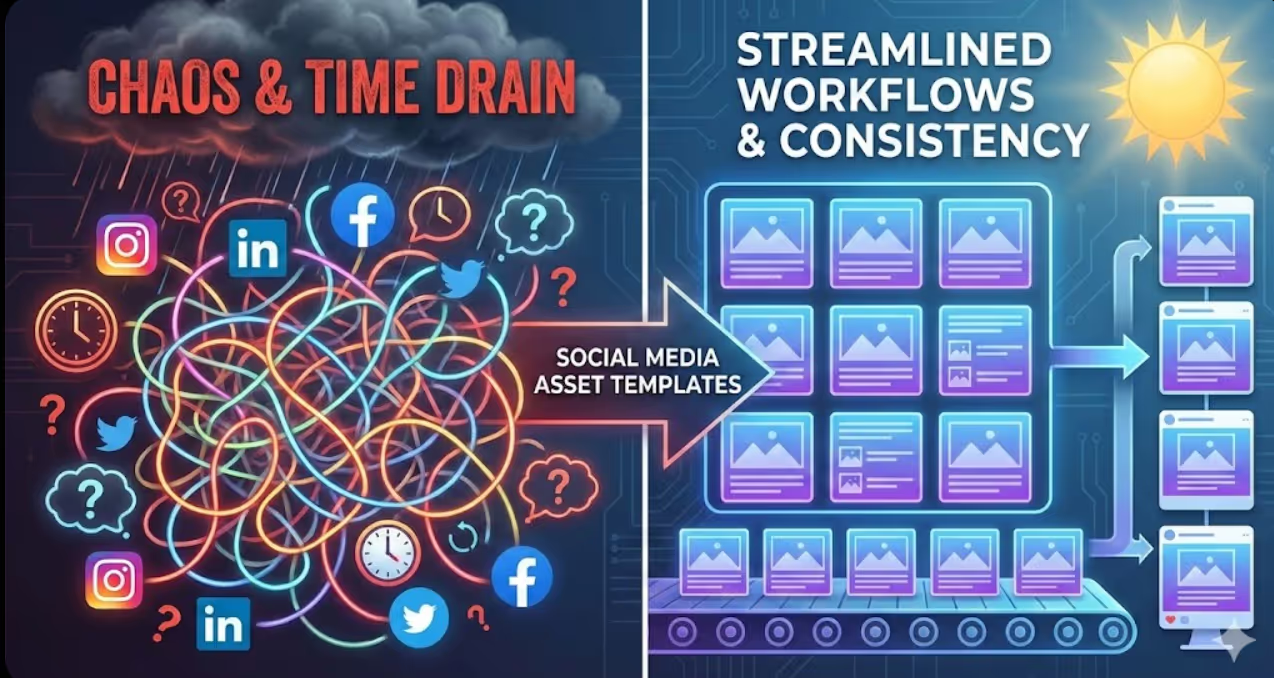
- Social media asset templates reduce content creation time by up to 70% while maintaining brand consistency across all platforms, team members, and campaign types through standardized design frameworks
- Effective template systems balance flexibility with consistency by providing structured layouts, defined colour palettes, and typography hierarchies while allowing customization for specific messages, audiences, and content types
- Strategic template libraries cover core content categories including promotional posts, educational content, testimonials, event announcements, and platform-specific formats optimized for Instagram, LinkedIn, Facebook, and emerging channels
- Implementation success requires clear brand guidelines, accessible template storage, team training on customization parameters, and defined approval workflows that maintain quality without bottlenecking production
- Template effectiveness improves through regular audits, performance analysis, team feedback, and systematic updates that reflect platform changes, audience preferences, and evolving brand identity
Your social media manager just spent three hours designing five Instagram posts. They look beautiful. They're on-brand. But tomorrow, they'll start from scratch again, recreating similar layouts for different content. Next week, another team member will unknowingly design completely different-looking posts for the same campaign because they don't have access to the original files.
This scenario plays out daily across Australian businesses. Talented people waste hours on repetitive design tasks that templates could reduce to minutes. Brand consistency suffers as different team members interpret visual identity differently. Content calendars fall behind because design bottlenecks slow production.
Social media asset templates aren't about cutting corners or sacrificing creativity. They're about building systems that free your team from repetitive mechanical work so they can focus on strategic thinking, compelling messaging, and genuine audience engagement. Templates provide the foundation that makes consistency effortless and speed sustainable.
Why Template-Based Workflows Transform Social Media Production
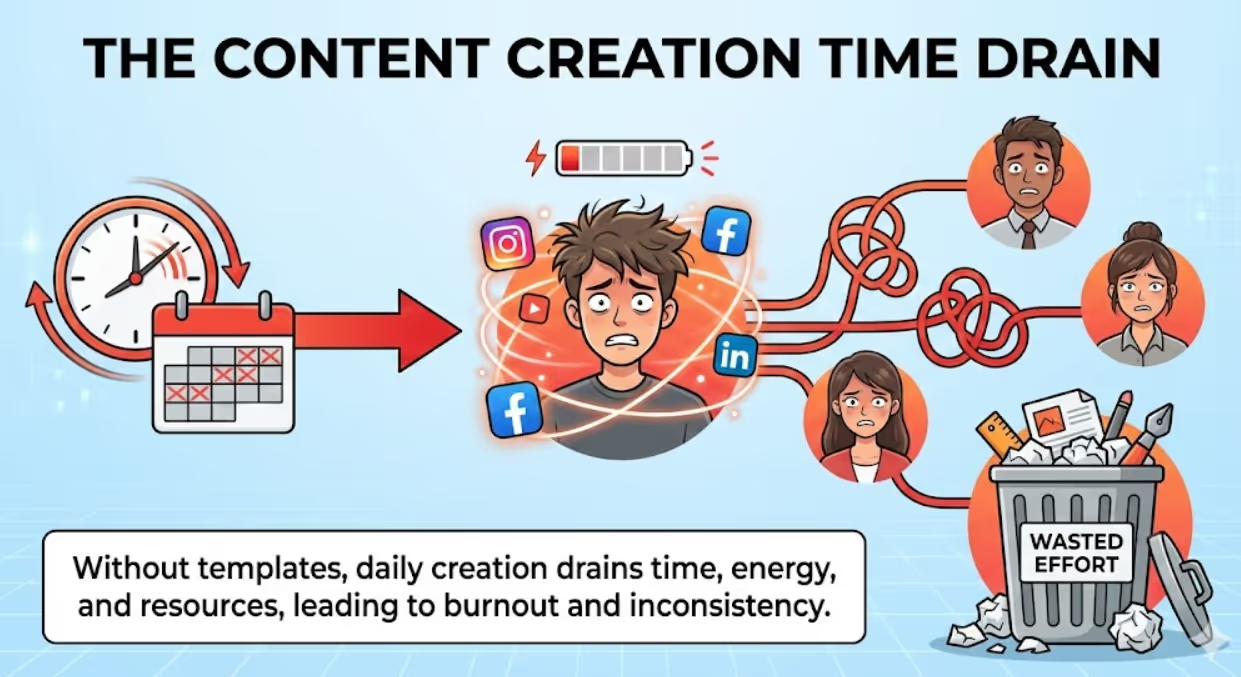
The mathematics of social media content creation are brutal. Posting once daily across three platforms requires 90+ assets monthly. Maintaining quality and consistency at that volume without systems leads inevitably to burnout, inconsistency, or both.
Research from the Content Marketing Institute found that content creation consumes the largest portion of marketing budgets, with design and production representing significant time investments. Australian businesses report spending 8-12 hours weekly on social media content creation alone, with much of that time dedicated to design rather than strategy.
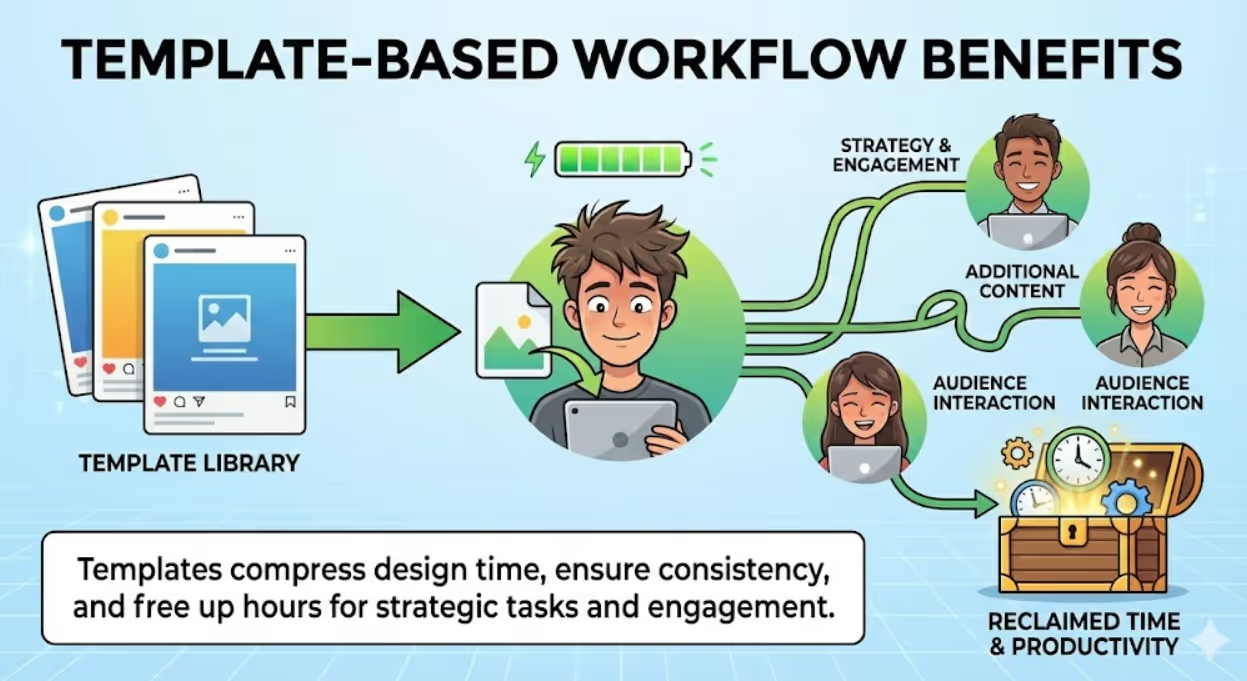
Templates address multiple pain points simultaneously. They compress design time by eliminating decisions already made during template creation. They ensure consistency by encoding brand guidelines directly into reusable frameworks. They enable delegation by providing clear parameters for what can be customized and what remains fixed. They reduce approval cycles because templates pre-approved by stakeholders require only content review, not design critique.
Consider the ROI calculation. If templates reduce average post creation time from 45 minutes to 15 minutes, that's 30 minutes saved per post. At 20 posts weekly, you've reclaimed 10 hours—more than a full workday returned to your team for strategy, engagement, or additional content creation. Over a year, that compounds into 520 hours of recovered productivity.
Beyond efficiency, templates solve the consistency challenge that undermines brand recognition. When every post looks distinctly different, audiences must work harder to recognize your content. Templates create visual consistency that builds immediate recognition, strengthens brand recall, and presents professional polish that elevates perceived brand quality.
Building Your Template Design System Foundation
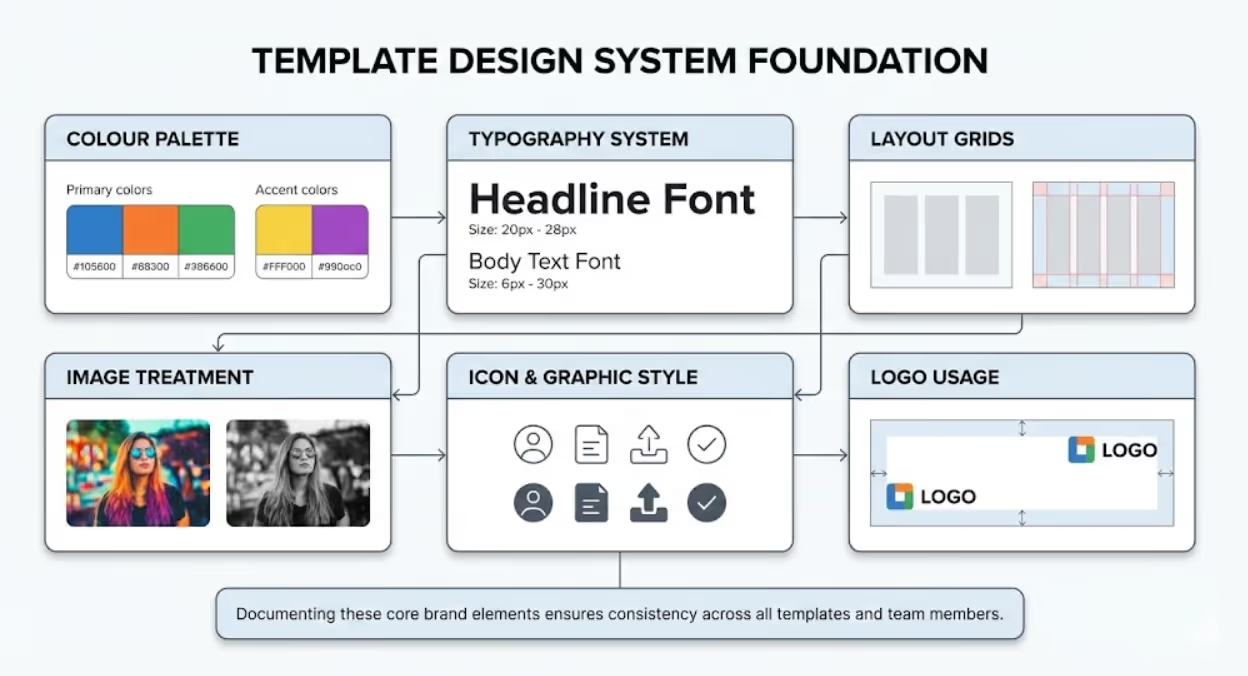
Effective templates don't exist in isolation—they flow from comprehensive design systems that define your visual brand identity across all applications. Start by documenting your core brand elements that every template must incorporate.
Colour palette forms your template foundation. Define primary colours (typically 2-3) used for backgrounds, major elements, and brand consistency. Establish accent colours (1-2) for highlights, calls-to-action, and visual interest. Specify neutral colours for text, borders, and supporting elements. Provide exact colour values in both RGB (for digital) and HEX codes. Create simple guidelines for when to use each colour—primary colours dominate, accents highlight, neutrals support.
Typography system determines readability and hierarchy. Select 2-3 font families maximum—one for headlines, one for body text, and optionally one for special elements like statistics or quotes. Define font sizes for each content level: main headlines, subheadings, body text, captions, and fine print. Specify font weights and styles (bold, italic) and when to use them. Ensure chosen fonts are available across your design tools or provide web-safe alternatives. According to typography research, consistent typography hierarchies improve content comprehension by up to 40%.
Layout grids provide structural consistency. Establish column systems (typically 3, 4, or 6 columns for social posts) that guide element placement. Define margins and padding standards—how much space around edges, between elements, and within content blocks. Create alignment rules so elements consistently align left, centre, right, or to grid lines. These invisible structures create visual harmony even when specific content varies.
Image treatment guidelines ensure photographic consistency. Define whether images should be full-colour, filtered, black-and-white, or tinted with brand colours. Specify image styles—vibrant and saturated versus soft and muted, high-contrast versus low-contrast. Establish composition preferences and subject matter guidelines. Determine whether images get borders, shadows, or remain flat against backgrounds.
Icon and graphic style maintains consistency in visual elements. Choose between outlined versus filled icons, geometric versus organic shapes, illustrated versus photographic approaches. Define stroke weights, corner radius (sharp versus rounded), and detail levels. Create or source icon sets that maintain stylistic consistency.
Logo usage requires specific parameters. Determine logo size minimums and maximums relative to post dimensions. Establish clear space requirements around logos. Specify which logo variations (full colour, reversed, monochrome) suit different template backgrounds. Define standard logo placement—corner positions, centred headers, or footer locations.
Creating Platform-Specific Template Libraries
Different social platforms have distinct technical requirements, audience expectations, and content consumption patterns. Your template library should accommodate these variations while maintaining brand consistency.
Instagram templates must address multiple content types. Feed posts work at 1080x1080 pixels (square) or 1080x1350 pixels (portrait). Create templates for product showcases, quote graphics, educational carousels, behind-the-scenes content, and promotional announcements. Instagram Stories require 1080x1920 pixels (9:16 ratio) and different design considerations—larger text for legibility on mobile, interactive elements positioned for thumb-friendly tapping, and awareness that the top and bottom portions may be obscured by interface elements. Reels covers need bold, attention-grabbing designs that work as both video thumbnails and standalone graphics.
LinkedIn templates emphasize professional polish. Standard post dimensions of 1200x627 pixels suit business content. Templates should project authority through clean layouts, professional photography, and data-driven content. Create templates for thought leadership posts, industry insights, company updates, event promotions, and employee spotlights. LinkedIn's professional audience appreciates substantive content over flashy design—templates should enhance credibility rather than distract.
Facebook templates serve diverse content types and audience demographics. Recommended dimensions of 1200x630 pixels work across desktop and mobile. Facebook audiences span wider age ranges than Instagram, requiring clear, easily readable designs that work for various demographics. Templates for community engagement, local business updates, event invitations, and longer-form content with multiple text blocks suit Facebook's platform characteristics.
Twitter templates must communicate quickly. While Twitter displays various image sizes, 1200x675 pixels ensures quality across contexts. Tweet graphics compete in fast-scrolling feeds, requiring bold headlines, high contrast, and immediate visual impact. Templates should work for quote graphics, data visualizations, announcement posts, and thread header images.
Platform-agnostic templates maintain consistent messaging across channels. Create core templates in square format (1080x1080) that can adapt to platform-specific dimensions through minimal cropping or layout adjustment. This approach reduces design workload when content needs to appear on multiple platforms simultaneously.
Template Categories for Comprehensive Content Coverage
A functional template library addresses your recurring content needs. Categorize templates by content purpose rather than creating one-off designs for each post.
Promotional templates announce sales, special offers, limited-time deals, and product launches. These templates require clear hierarchy emphasizing the offer, prominent calls-to-action, and urgent design elements that encourage immediate response. Create variations for different promotion types—percentage discounts, dollar-off offers, free shipping, bundle deals, and early access announcements.
Educational and value-driven templates present tips, how-to content, industry insights, and informational posts. These templates need clear typography for readability, organized layouts that sequence information logically, and supportive graphics that enhance comprehension without overwhelming content. Variations might include single-tip posts, numbered lists, step-by-step processes, and data visualization formats.
Testimonial and social proof templates showcase customer reviews, case study highlights, success stories, and user-generated content. Design these templates to clearly distinguish quoted content from attribution, include trust indicators like star ratings or verified badges, and feature customer photos when available. Variations accommodate different quote lengths and attribution details.
Announcement templates share company news, event information, partnership announcements, and milestone celebrations. These templates balance excitement with clarity, providing space for headline news and supporting details. Create variations for different announcement types—event invitations need date/time/location prominence, while award announcements emphasize achievement badges or credentials.
Engagement and community-building templates facilitate conversation through questions, polls, fill-in-the-blank prompts, and interactive content. These templates use inviting design language, leave space for responses, and create visual intrigue that stops scrolling. Variations include question posts, this-or-that choices, caption contests, and tag-a-friend prompts.
Storytelling and brand narrative templates share behind-the-scenes content, team member spotlights, origin stories, and values-driven messaging. These templates feel more personal and authentic, often incorporating candid photography, handwritten-style typography, or warmer colour palettes. Variations accommodate different story structures—before-and-after, day-in-the-life, and employee features.
Seasonal and holiday templates address recurring calendar moments—Australian holidays, industry events, awareness days, and seasonal themes. Create templates for major occasions like Christmas, Australia Day, EOFY, and industry-specific events. Design these with festive elements that can be toned up or down based on brand personality and audience preferences.
Implementing Templates in Design Tools and Workflows
Template effectiveness depends on accessibility and ease of use. Choose tools and storage systems that match your team's technical capabilities and workflow requirements.
Canva dominates Australian small business template implementation through its Brand Kit functionality and template-sharing features. Upload brand colours, fonts, and logos to automatically apply them across templates. Create templates saved to team folders where any member can duplicate and customize. Canva's drag-and-drop simplicity requires minimal training, enabling quick team adoption. The platform works across desktop and mobile, facilitating content creation from anywhere.
Adobe Creative Cloud Libraries serve businesses with existing Adobe subscriptions and design expertise. Create templates in Photoshop or Illustrator, then save reusable elements (colour swatches, character styles, graphic objects) to Creative Cloud Libraries accessible across applications and team members. This approach offers maximum customization power but requires design software proficiency.
Later, Buffer, and Hootsuite social media management platforms increasingly offer template functionality within their scheduling interfaces. Create visual templates alongside captions and hashtag sets for truly comprehensive content templates. This integration streamlines workflow by combining design and scheduling in single platforms, though design capabilities may be more limited than dedicated design tools.
Google Drive or Dropbox provide straightforward template storage for businesses using various design tools. Create folder structures organizing templates by platform, category, or campaign. Include PDF guides showing template usage examples and customization parameters. This approach offers maximum flexibility regarding design tools but requires more manual template management.
Figma enables collaborative template design and version control. Design systems with components and styles ensure consistency when team members create variations. Real-time collaboration allows simultaneous template customization and immediate feedback. Figma's browser-based functionality eliminates software installation requirements.
Template naming conventions prevent confusion as libraries grow. Use consistent structures like "[Platform] - [Category] - [Variation]" (e.g., "Instagram - Testimonial - Photo" or "LinkedIn - Promotion - Event"). Include version numbers or dates if templates undergo regular updates. Clear naming enables quick location of appropriate templates when creating content.
Establishing Customization Guidelines and Brand Guardrails
Templates must balance consistency with flexibility. Too rigid, and they feel limiting and repetitive. Too flexible, and brand consistency disappears. Clear guidelines define what can change and what must remain constant.
Fixed elements maintain brand recognition. Logo placement, brand colours, core fonts, and layout structure typically remain constant across all template uses. These non-negotiable elements create visual consistency that builds recognition. Document these clearly: "Logo always appears in bottom right corner at this specific size" or "Primary brand blue always appears as background colour."
Flexible elements allow content customization. Headlines, body text, images, accent colours (within approved palette), and supporting graphics can change based on specific content needs. Define parameters for these elements: "Headline text can be 1-2 lines maximum, 40 characters per line" or "Replace placeholder image with brand-approved photography following composition guidelines."
Approval requirements clarify when template customizations need review. Simple text swaps within existing templates might not require approval, while colour changes or layout modifications do. Create tiered approval structures—junior team members customize within strict parameters, senior team members have broader flexibility, design leads approve template modifications.
Quality standards maintain professionalism across all template uses. Establish image resolution minimums (typically 1080 pixels minimum for social media), text readability requirements (minimum font sizes, contrast ratios), and grammar/spelling review processes. Templates can't compensate for poor-quality source materials or careless execution.
Usage examples demonstrate proper template application. For each template, provide 3-5 examples showing correct usage across different content scenarios. Show both ideal executions and common mistakes to avoid. Visual examples communicate standards more effectively than written descriptions alone.
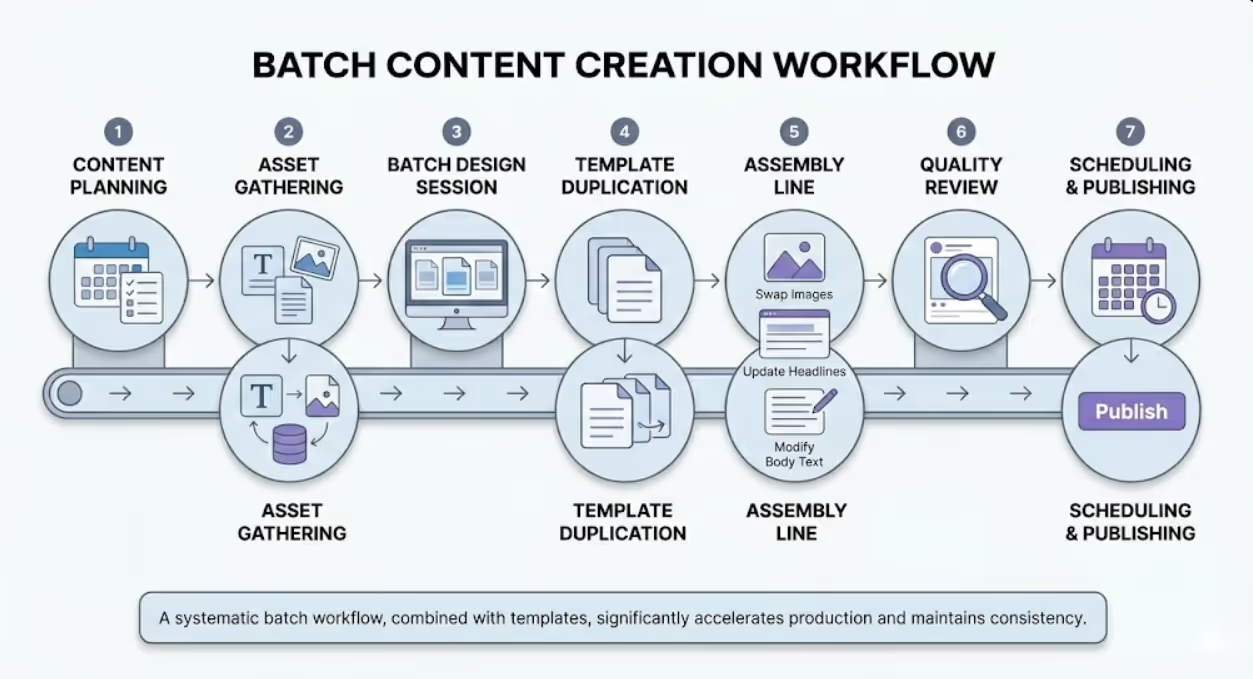
Batch Creation Workflows That Maximize Template Efficiency
Templates deliver maximum value when combined with batch creation workflows that produce multiple assets in single focused sessions.
Content planning precedes batch creation. Develop content calendars outlining post topics, types, and platforms for upcoming weeks or months. This planning phase identifies how many of each template type you'll need, enabling efficient batch production.
Asset gathering assembles all required materials before design begins. Collect final copy for all posts, source and edit all photographs, compile statistics or data for information posts, and gather testimonials or quotes. Having materials ready prevents interruption-driven context switching that kills efficiency.
Batch design sessions focus on creating similar content types in sequence. Design all testimonial posts for the month in one session, then all promotional posts, then educational content. This approach maintains mental context and enables rapid production as you stay in the template's design logic. Research from the American Psychological Association shows that task-switching reduces productivity by up to 40%—batching eliminates this efficiency loss.
Template duplication starts each new asset. Rather than opening templates and exporting finished posts individually, duplicate templates for all needed variations at the session start. This creates your working files ready for customization, streamlining the production process.
Assembly line approach customizes elements systematically. First pass: swap all images across all posts. Second pass: update all headlines. Third pass: modify body text. This systematic approach is significantly faster than completing posts individually from start to finish.
Quality review happens after batch completion. Review all created assets together, checking for consistency, errors, and brand alignment. Batch review is more efficient than individual post approval and enables identification of consistency issues across the set.
Scheduling and publishing concludes the workflow. Upload batch-created content to scheduling tools, add captions and hashtags, and schedule across your posting calendar. Many Australian businesses find that monthly batch creation sessions produce better results than daily content scrambles.
Measuring Template Effectiveness and Optimizing Performance
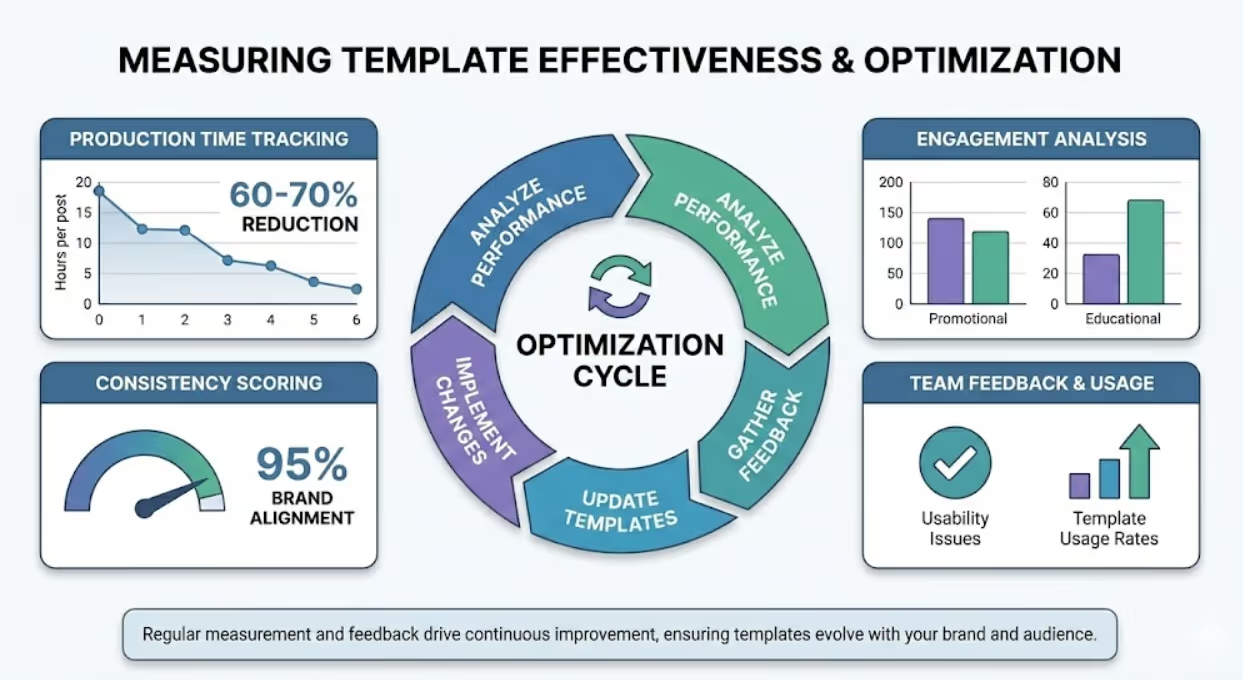
Templates should evolve based on performance data and team feedback. Establish metrics and review processes that drive continuous improvement.
Production time tracking quantifies efficiency gains. Measure average time to create posts before template implementation, then track time per post using templates. Calculate time savings monthly and annually to demonstrate ROI. Most Australian businesses implementing template systems report 60-70% reduction in per-post creation time within three months.
Engagement analysis reveals which template types resonate with audiences. Compare engagement rates (likes, comments, shares, saves) across different template categories. If educational templates consistently outperform promotional templates, adjust your content mix and template priorities accordingly. Platform analytics reveal which visual styles drive strongest performance.
Consistency scoring assesses brand cohesion. Periodically audit your social feeds for visual consistency. Do posts feel like they belong to the same brand? Are colour, typography, and layout standards maintained? Inconsistency indicates template guidelines need clarification or enforcement needs improvement.
Team feedback identifies usability issues. Regular check-ins with team members using templates reveal pain points—which templates are difficult to customize, where guidelines are unclear, what content types lack adequate templates. This qualitative feedback drives practical improvements.
Template usage rates show which templates serve real needs versus which gather digital dust. If certain templates see heavy use while others remain untouched, your library may not align with actual content needs. Retire unused templates and create new ones addressing gaps.
Version control tracks template evolution. When updating templates based on performance insights or brand refreshes, maintain version history. This enables rollback if new versions don't perform well and documents template evolution over time.
Quarterly reviews ensure templates remain current. Social platform requirements change, brand identities evolve, and audience preferences shift. Scheduled reviews assess whether templates still serve strategic needs and meet current standards. Update, retire, or create templates based on these assessments.
Frequently Asked Questions
How many social media templates should Australian small businesses create initially and how do you prevent template libraries from becoming overwhelming or underutilized?
Start with a focused core library of 12-20 templates rather than attempting comprehensive coverage immediately. Prioritize templates for your highest-frequency content types across your most active platforms. For most Australian small businesses, this means 4-5 templates for Instagram (feed post variations, Story templates), 3-4 LinkedIn templates (company updates, thought leadership, event promotion), 2-3 Facebook templates, and 2-3 versatile templates that work across platforms. Analyze your content calendar from the past three months to identify which post types you create most frequently—testimonials, product highlights, tips, promotions, or announcements. Create templates for these recurring needs first. Avoid creating templates for one-off content or rare occasions until your core library is established and utilized consistently. Preventing overwhelm requires thoughtful organization and documentation. Create a simple template guide showing thumbnail previews of each template with brief descriptions of intended use and customization parameters. Organize templates into clearly labeled folders by platform and category. Implement a naming convention that makes templates instantly identifiable. Schedule quarterly reviews to retire templates that see no usage—unused templates clutter libraries without adding value. Introduce new templates gradually (2-3 per month maximum) based on identified gaps rather than creating batches of templates that may not serve actual needs. Track template usage through simple spreadsheets noting which templates get used for which posts, revealing patterns that guide library optimization. Many successful Australian small businesses grow their template libraries organically from 15 initial templates to 30-40 over 12-18 months, expanding only as proven needs emerge rather than speculating about future requirements.
What approach works best for Australian businesses with multiple team members or external contractors creating social content to ensure everyone uses templates correctly and maintains brand consistency?
Multi-creator template consistency requires three elements: accessible centralized template storage, clear usage guidelines, and defined approval workflows. First, establish a single source of truth for approved templates using tools like Canva Team folders, shared Adobe Creative Cloud Libraries, or organized Google Drive structures with view-only master templates that team members duplicate for use. Avoid scattered template storage across individual computers or multiple cloud services—this guarantees version confusion and inconsistent usage. Second, create a concise brand and template guide (2-4 pages maximum) showing each template, its intended use, and specific customization parameters. Include visual examples of correct and incorrect usage. For external contractors, provide this guide during onboarding along with template access. Many Australian businesses create simple video walkthroughs (5-10 minutes) demonstrating template customization, which contractors can reference when questions arise. Third, implement a tiered approval workflow based on team member experience and template complexity. New team members and external contractors submit all template customizations for approval before posting. Experienced internal team members might have approval authority for simple text-swap templates but require review for layouts involving colour changes or extensive modifications. Use project management tools like Asana, Monday, or Trello to manage approval workflows, ensuring nothing gets posted without appropriate review. According to workflow management research, clear approval processes reduce revision cycles by 50% while maintaining quality standards. Schedule monthly template training refreshers for internal teams and quarterly check-ins with regular contractors to address questions and reinforce guidelines. Most importantly, make template usage easy—complicated processes get circumvented. When templates are readily accessible, guidelines are clear, and approval is straightforward, compliance becomes natural rather than burdensome.
How should Australian businesses handle template updates when rebranding or refreshing visual identity without losing content production momentum or creating confusion about which versions to use?
Brand refreshes require systematic template migration that maintains production continuity while preventing version confusion. Begin the transition with a planned cutover date rather than gradual migration. Continuing to use old templates while introducing new ones creates inconsistent social feeds that confuse audiences and complicate approval. Instead, prepare all new templates completely before switching, then execute a clean transition. Four to six weeks before cutover, finalize your refreshed brand identity including updated colour palettes, typography, logo variations, and any layout modifications. Create your new template library during this preparation period, mirroring the structure and categories of your existing library. Test new templates thoroughly with sample content to ensure they're production-ready. Two weeks before cutover, introduce new templates to your team through training sessions or video walkthroughs. Let team members experiment with new templates for internal-only content or schedule posts in advance so they're comfortable before go-live. Create side-by-side comparison documents showing old versus new templates with clear labeling. On cutover date, archive old templates in clearly labeled "DO NOT USE - Archived [date]" folders but don't delete them—you may need reference files or have scheduled content created in old formats. Move new templates into your active template locations with clear "CURRENT VERSION - Use for all new content as of [date]" labeling. Update your template guide document with new examples and modified usage instructions. For already-scheduled content created in old templates, either recreate in new templates if time permits or allow those posts to publish with a notation in your scheduling tool that they're legacy content. Most Australian businesses find that batching 2-3 weeks of content in new templates immediately after cutover builds team confidence and creates consistent refresh presence on social feeds. Expect a temporary productivity dip during the transition week as team members adjust to new templates—plan content calendars accordingly, potentially reducing posting frequency slightly during the transition period. Schedule follow-up training sessions 2-4 weeks post-cutover to address questions that emerged during actual usage. Monitor your social feeds carefully during the first month after transition to catch any accidental use of old templates and provide immediate corrective feedback to prevent pattern establishment.
Transform Content Creation From Chaos to Strategic System
Social media asset templates represent far more than design shortcuts—they're strategic infrastructure that separates sustainable social media presence from exhausting content treadmills. When templates encode your brand standards, streamline production, and free your team from repetitive design decisions, content creation shifts from constant crisis to controlled system.
Australian businesses investing in template systems consistently report not just time savings but quality improvements, brand consistency strengthening, and team morale increases as frustration gives way to productivity. Templates transform social media content creation from overwhelming obligation into manageable process.
Your audience deserves consistent, quality content that reflects your brand professionally. Your team deserves systems that respect their time and enable their best work. Templates deliver both.
Ready to build a template system that streamlines your social media content creation while maintaining brand excellence? Maven Marketing Co. specializes in creating comprehensive template libraries and implementing workflows that scale with Australian business growth. Let's transform your content production.

Table of contents
read more blogs

Is Google Ads Better Than SEO for My Business
One of the biggest questions business owners ask when they are planning online growth is whether they should invest in Google Ads or SEO. Both are strong marketing plays that help your company show up in Google search results, but they do things in separate lanes. Google Ads gives quicker visibility and can bring in leads fast, whereas SEO more or less focuses on slow, steady organic traffic that tends to grow the longer you keep building it. Picking the right direction depends on what you want to achieve, how much money you can spend, how crowded the market is, and how quickly you need results, like sooner rather than later. The good news is you don’t always have to choose one or the other; it’s not exactly a black-and-white situation. If you take time to understand the strongest points of both, you can put together a more sensible digital marketing plan that supports consistent expansion. In this guide, we’ll compare Google Ads vs SEO, explain the main differences, and help you figure out what option makes the most sense for your business.

When Should I Hire a Digital Marketing Agency
Growing a business today takes more than just having a website or throwing a post on social media; customers usually search around online, compare providers, skim reviews, and basically expect the brand to show up with a solid digital presence before they even think about buying. Many businesses try to run their marketing themselves, but there comes a point when “doing it all in-house” becomes clunky and hard to manage, all at once. Knowing when to hire a digital marketing agency can end up making a big, real difference for your growth. If you’re not getting enough leads, or your online visibility feels stuck, or sales are just not moving, the right agency can bring the know-how, plus a clear plan, to help you get noticeably better outcomes. In this guide, we’ll dig into what a digital marketing agency actually does, the usual signs it’s time to bring one on, and how picking the right marketing partner can help your business move forward at a faster pace.

Why Is My Google Ads Budget Running Out So Quickly
Running a successful Google Ads budget isn’t only about throwing more money at it. It’s more like making every dollar, doing a bit extra. A lot of businesses start a Google Ads campaign with big hopes, then find out their daily budget is gone within a few hours, and that feels weird, right? After that, your ads stop showing effectively, new leads slip away, and your return on investment dips. So if your Google Ads budget is running out too fast, don’t stress. It’s a fairly common issue, and in most situations, it can be repaired with the right approach. There are multiple little things that can drain your advertising money quicker than you expected, from costly keywords to audience targeting that just doesn’t quite fit. In this guide, we’ll walk through why your budget disappears so quickly, how to cut wasteful spend, and the most reliable ways to boost your Google Ads ROI, even if your budget stays the same.


