
.svg)


%201.svg)

Key Takeaways
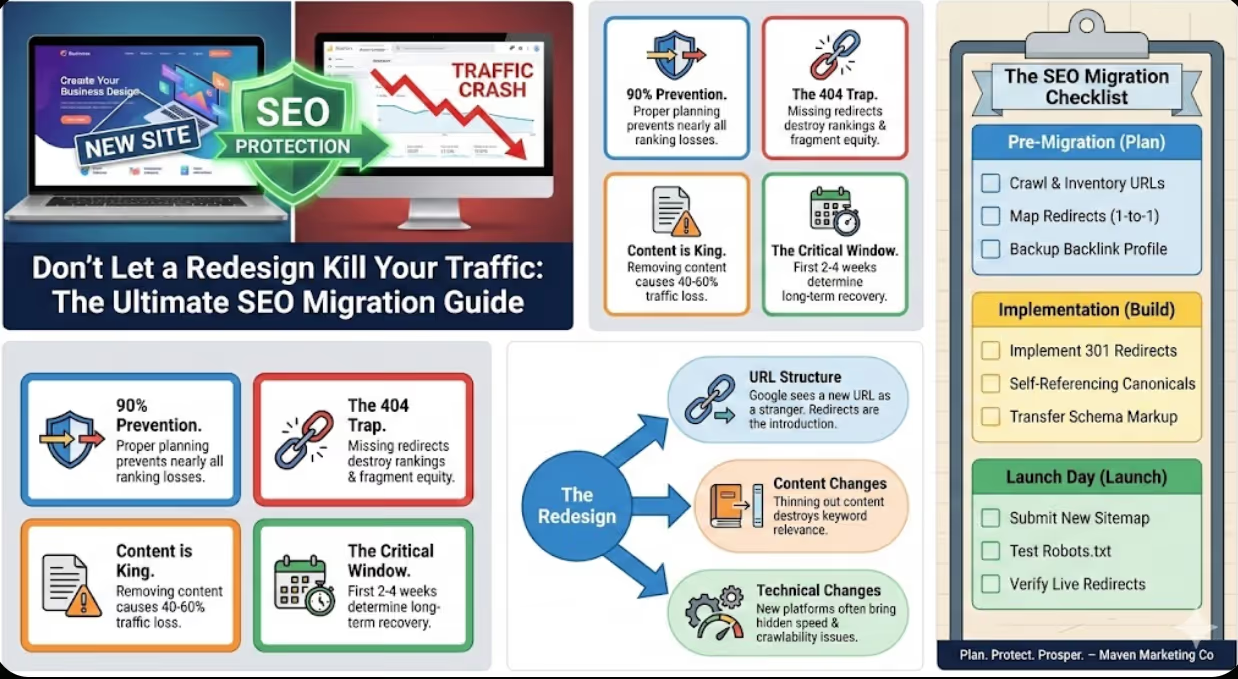
- Proper pre-migration SEO planning prevents 85-90% of ranking losses, with comprehensive URL mapping, redirect implementation, and technical preparation protecting organic traffic during transitions
- The first 2-4 weeks post-migration are critical for traffic preservation, requiring daily monitoring, rapid issue correction, and proactive search engine communication to minimize ranking disruption
- 301 redirects must be implemented for every changed URL without exception, as missing redirects create 404 errors that destroy rankings while fragmenting link equity across orphaned pages
- Content preservation during redesigns is non-negotiable, with businesses removing or substantially changing ranking content losing 40-60% of organic traffic for affected pages
- Platform migrations carry higher SEO risk than design-only updates, requiring additional technical considerations around schema, site speed, and crawlability
The excitement around website redesigns is understandable. Your current site feels dated, competitors' sites look more professional, and a redesign promises to solve these problems.
Then launch day arrives. Initial excitement transforms to panic as Google Analytics shows organic traffic plummeting. Rankings that took years to build vanish overnight. Revenue from organic search collapses.
This scenario plays out constantly across Australian businesses. Agencies promise beautiful redesigns but lack SEO expertise. Developers focus on functionality ignoring search implications. Business owners assume rankings will transfer automatically. They don't—at least not without deliberate protection.
The good news: site migration SEO is completely solvable. With proper planning, meticulous implementation, and vigilant monitoring, you can redesign while protecting—even improving—organic performance.
Understanding Migration Risk
URL structure changes represent the primary risk. If yoursite.com/services/accounting becomes yoursite.com/our-services/tax-accounting, Google sees these as completely different pages. Without proper redirects, old URLs return 404 errors while new URLs start with zero ranking history.
Content changes during redesigns frequently destroy rankings. Businesses "clean up" content, removing detailed service descriptions for brief copy. Google has spent years understanding that your comprehensive 800-word page ranks well—replace it with 150 words and those rankings disappear.
Technical infrastructure changes affect how search engines crawl and rank your site. Slow, bloated platforms destroy page speed rankings. Changes to architecture or internal linking fragment link equity.
Platform-specific issues arise when migrating between different CMS or e-commerce systems. Each platform handles redirects, schema, URLs, and technical SEO differently.
Pre-Migration SEO Audit
Comprehensive URL inventory forms your foundation. Export every URL from your existing site using Screaming Frog, Sitemap Generator, or platform exports.
This inventory becomes your source of truth. Every URL needs either preservation (keeping the same URL) or redirection (sending traffic to appropriate new URL).
Traffic and ranking analysis identifies which pages actually matter. Use Google Analytics to identify your top 50-100 organic landing pages. Use Search Console for pages ranking for valuable keywords. Tag these priority pages—they require extra attention.
Backlink profile documentation maps your link equity. Export your backlink profile from Search Console, Ahrefs, or Moz. Pages with dozens of quality backlinks must maintain URLs or receive perfect redirects.
Technical baseline establishment documents current performance:
- Page speed metrics
- Mobile usability status
- Crawl error counts
- Index status
- Core Web Vitals
- Schema markup implementation
Content inventory determines what survives the redesign. Document all content, flagging content that must be preserved exactly versus content that can change. Default should be preservation unless you have specific strategic reasons to change.
URL Mapping: The Critical Document
URL mapping creates your migration blueprint—a spreadsheet listing every old URL alongside its new URL or redirect destination.
Mapping scenarios:
- 1-to-1 mappings: Old URL → identical new URL (ideal, no redirect needed)
- 1-to-1 redirects: Old URL → new URL different structure, same content
- Many-to-1 redirects: Multiple old URLs → consolidated new URL
- 1-to-0 redirects: Old URL removed → redirect to most relevant page
Mapping principles:
Preserve URL structure when possible. The best redirect is no redirect—if your new site can maintain existing URLs, do so.
Map to most relevant equivalent. Don't default to redirecting everything to homepage—this wastes link equity and frustrates users.
Avoid redirect chains. Direct A→C redirect, not A→B→C chain.
Document reasoning. Include notes explaining redirect decisions.
Technical Implementation
301 redirects for every URL that changes, using your URL mapping as source of truth. Implementation methods vary:
- .htaccess redirects (Apache)
- WordPress plugins (Redirection, Yoast)
- Server-level redirects (Nginx, IIS)
- Platform-native tools (Shopify redirects)
Test every redirect before launch.
Canonical tags prevent duplicate content. Ensure every page has proper self-referencing canonicals.
XML sitemap generation helps search engines discover your new structure. Generate fresh sitemap, submit to Search Console immediately post-launch.
Robots.txt verification ensures you're not blocking important content. Common disaster: staging robots.txt blocking all crawlers accidentally goes live.
Schema markup preservation maintains rich snippet eligibility. Ensure identical or improved schema carries over.
Internal linking must reference new URLs directly, not old URLs that redirect.
Page speed should match or exceed old site. Don't sacrifice speed for design.
Pre-Launch Testing
Staging environment testing identifies issues before they affect live traffic:
- Redirect testing: Verify every redirect works correctly
- Crawl testing: Run Screaming Frog against staging to identify issues
- Content verification: Manually review top 50 priority pages
- Mobile testing: Test on actual mobile devices
- Speed testing: Run PageSpeed Insights, address performance issues
Launch Day Protocol
Immediate post-launch actions:
- Submit new sitemap to Search Console
- Request immediate recrawl of key pages
- Verify redirects live by testing sample URLs
- Monitor real-time analytics
- Check Search Console for crawl errors
Post-Launch Monitoring
Daily monitoring requirements (first 2-4 weeks):
- Google Analytics: Monitor organic traffic, bounce rates, conversions
- Search Console: Check Coverage report for errors, Performance for ranking shifts
- Ranking tracking: Monitor top 20-30 keywords daily
- 404 errors: Review and create redirects for URLs generating errors
- Site speed: Confirm performance hasn't degraded
Common issues and solutions:
- Traffic drop 15-25%: Usually temporary; typically recovers within 2-4 weeks
- Specific page ranking drops: Check content wasn't changed, redirect works, internal linking intact
- 404 error spike: Missing redirects—implement immediately
- Index drop: Check for robots.txt blocking, noindex tags, canonical issues
Case Study: Brisbane E-commerce Platform Migration Disaster (and Recovery)
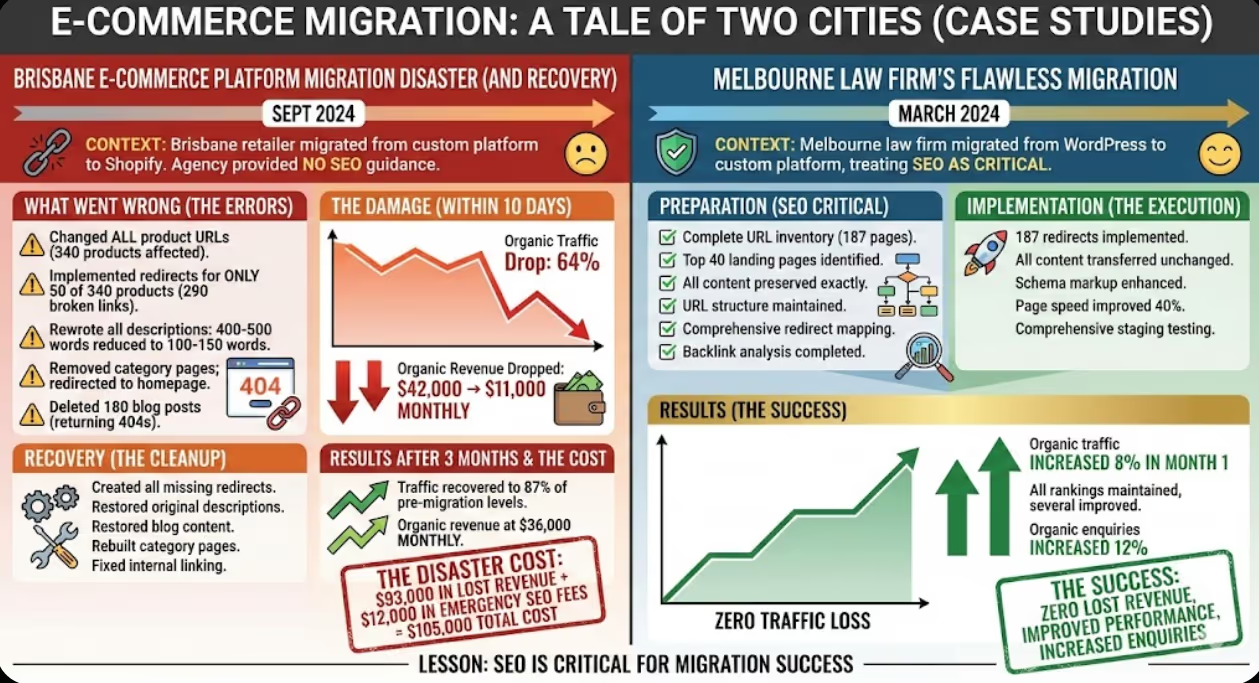
A Brisbane retailer migrated from custom platform to Shopify in September 2024. Their agency provided no SEO guidance.
What went wrong: Changed all product URLs, implemented redirects for only 50 of 340 products, rewrote all descriptions (400-500 words → 100-150 words), removed category pages redirecting to homepage, deleted 180 blog posts returning 404s.
The damage: Within 10 days, organic traffic dropped 64%. Revenue from organic dropped from $42,000 to $11,000 monthly.
Recovery: Created all missing redirects, restored original descriptions, restored blog content, rebuilt category pages, fixed internal linking.
Results after 3 months: Traffic recovered to 87% of pre-migration levels, organic revenue at $36,000 monthly. The disaster cost $93,000 in lost revenue plus $12,000 in emergency SEO fees.
Case Study: Melbourne Law Firm's Flawless Migration
A Melbourne law firm migrated from WordPress to custom platform in March 2024, treating SEO as critical.
Preparation: Complete URL inventory (187 pages), top 40 landing pages identified, all content preserved exactly, URL structure maintained, comprehensive redirect mapping, backlink analysis completed.
Implementation: 187 redirects implemented, all content transferred unchanged, schema markup enhanced, page speed improved 40%, comprehensive staging testing.
Results: Zero traffic loss—organic traffic increased 8% in month 1. All rankings maintained, several improved. Organic enquiries increased 12%.
The Essential Migration Checklist
Pre-Migration:☐ Complete URL inventory☐ Top landing pages identified☐ Backlink profile documented☐ Technical baseline recorded☐ URL mapping completed☐ Redirect plan finalized
Implementation:☐ All redirects implemented☐ Canonical tags on all pages☐ XML sitemap generated☐ Robots.txt verified☐ Schema preserved/enhanced☐ Internal links updated☐ Page speed optimized
Pre-Launch Testing:☐ All redirects tested☐ Full site crawl completed☐ Top pages manually verified☐ Mobile functionality tested☐ Page speed tested
Launch Day:☐ Sitemap submitted☐ Key pages recrawl requested☐ Redirects verified live☐ Analytics monitored☐ Search Console checked
Post-Launch:☐ Daily traffic monitoring☐ Daily error checking☐ Daily ranking checks☐ 404 reviews and fixes☐ Index status verification
Frequently Asked Questions
How long does it take for rankings to stabilize after migration?
Properly executed migrations typically stabilize within 2-4 weeks, with full recovery by 6-8 weeks. Larger sites (500+ pages) may require 8-12 weeks. Improperly executed migrations can take 3-6 months to recover if issues are corrected promptly, or may never fully recover if fundamental problems aren't addressed. Expect minor ranking fluctuations during the first month as Google re-crawls your site—this is normal and typically resolves without intervention if migration was executed properly.
Should I migrate blog content or start fresh?
Always migrate existing blog content unless posts are genuinely outdated or irrelevant. Each blog post represents SEO equity—rankings, backlinks, topical authority. Starting fresh wastes accumulated value. Even if design looks dated, preserve content and improve presentation on new platform. Update outdated information, but maintain URLs or implement proper redirects. The only scenario justifying abandonment is complete business pivot making all content irrelevant—and even then, redirect old posts to preserve some link equity.
Can I change my domain during a redesign without losing SEO value?
Domain changes carry higher risk but can succeed with proper planning: implement 301 redirects from every old URL to new domain equivalent, keep old domain redirects active minimum 12 months, use Search Console's Change of Address tool, update all citations you control, and maintain identical content/structure. Expect 2-4 weeks volatility with typical 10-20% temporary traffic drops recovering within 6-8 weeks. Treat domain changes as separate from redesigns—change domain first, allow stabilization, then redesign if needed. Combining both simultaneously multiplies risk.
Protect Your SEO Investment
Website redesigns represent opportunities—but only when they preserve SEO equity you've spent years building. A beautiful new site generating half the organic traffic isn't an upgrade; it's an expensive mistake.
At Maven Marketing Co, we've guided dozens of Australian businesses through successful migrations—protecting SEO while achieving redesign objectives. We actively manage technical SEO ensuring your migration preserves rankings.
Contact Maven Marketing Co today if you're planning a redesign, platform migration, or domain change. We'll develop your comprehensive migration plan, implement technical protections, and monitor your transition ensuring your SEO investment survives and thrives on your new platform.

Table of contents
read more blogs

Is Google Ads Better Than SEO for My Business
One of the biggest questions business owners ask when they are planning online growth is whether they should invest in Google Ads or SEO. Both are strong marketing plays that help your company show up in Google search results, but they do things in separate lanes. Google Ads gives quicker visibility and can bring in leads fast, whereas SEO more or less focuses on slow, steady organic traffic that tends to grow the longer you keep building it. Picking the right direction depends on what you want to achieve, how much money you can spend, how crowded the market is, and how quickly you need results, like sooner rather than later. The good news is you don’t always have to choose one or the other; it’s not exactly a black-and-white situation. If you take time to understand the strongest points of both, you can put together a more sensible digital marketing plan that supports consistent expansion. In this guide, we’ll compare Google Ads vs SEO, explain the main differences, and help you figure out what option makes the most sense for your business.

When Should I Hire a Digital Marketing Agency
Growing a business today takes more than just having a website or throwing a post on social media; customers usually search around online, compare providers, skim reviews, and basically expect the brand to show up with a solid digital presence before they even think about buying. Many businesses try to run their marketing themselves, but there comes a point when “doing it all in-house” becomes clunky and hard to manage, all at once. Knowing when to hire a digital marketing agency can end up making a big, real difference for your growth. If you’re not getting enough leads, or your online visibility feels stuck, or sales are just not moving, the right agency can bring the know-how, plus a clear plan, to help you get noticeably better outcomes. In this guide, we’ll dig into what a digital marketing agency actually does, the usual signs it’s time to bring one on, and how picking the right marketing partner can help your business move forward at a faster pace.

Why Is My Google Ads Budget Running Out So Quickly
Running a successful Google Ads budget isn’t only about throwing more money at it. It’s more like making every dollar, doing a bit extra. A lot of businesses start a Google Ads campaign with big hopes, then find out their daily budget is gone within a few hours, and that feels weird, right? After that, your ads stop showing effectively, new leads slip away, and your return on investment dips. So if your Google Ads budget is running out too fast, don’t stress. It’s a fairly common issue, and in most situations, it can be repaired with the right approach. There are multiple little things that can drain your advertising money quicker than you expected, from costly keywords to audience targeting that just doesn’t quite fit. In this guide, we’ll walk through why your budget disappears so quickly, how to cut wasteful spend, and the most reliable ways to boost your Google Ads ROI, even if your budget stays the same.


