
.svg)


%201.svg)

Key Takeaways
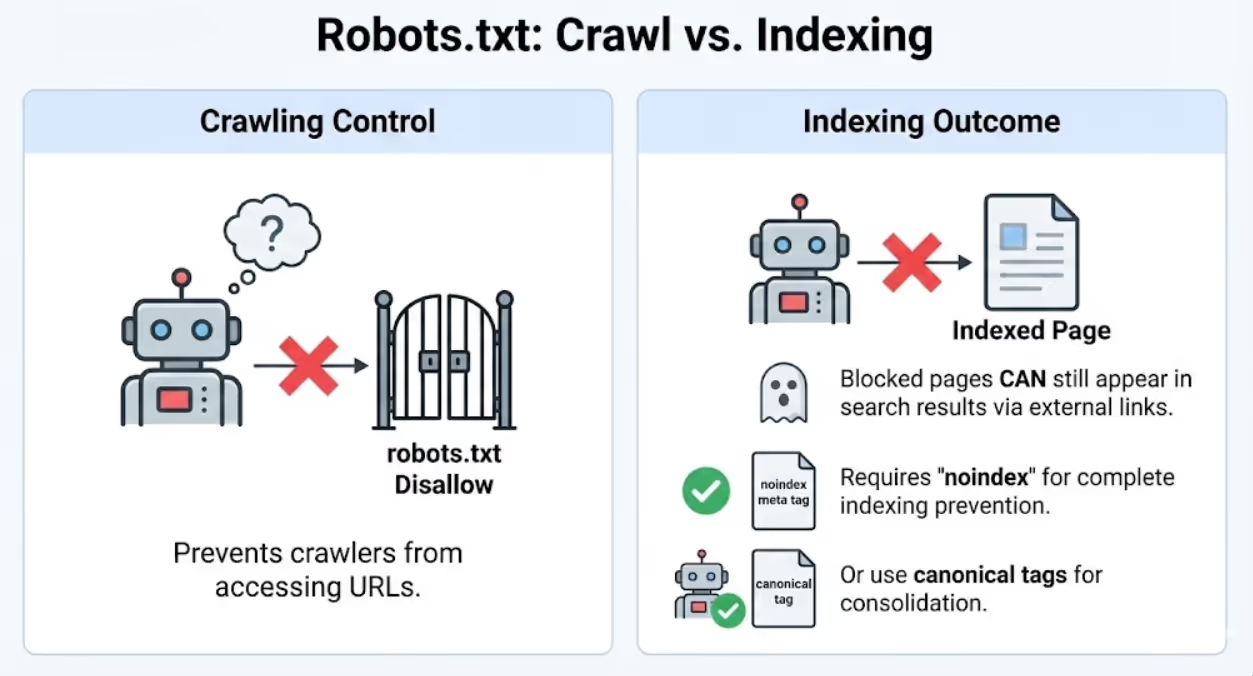
- Robots.txt prevents crawling but doesn't prevent indexing because pages blocked from crawling can still appear in search results through external links, requiring strategic noindex meta tags or canonical tags for complete indexing prevention
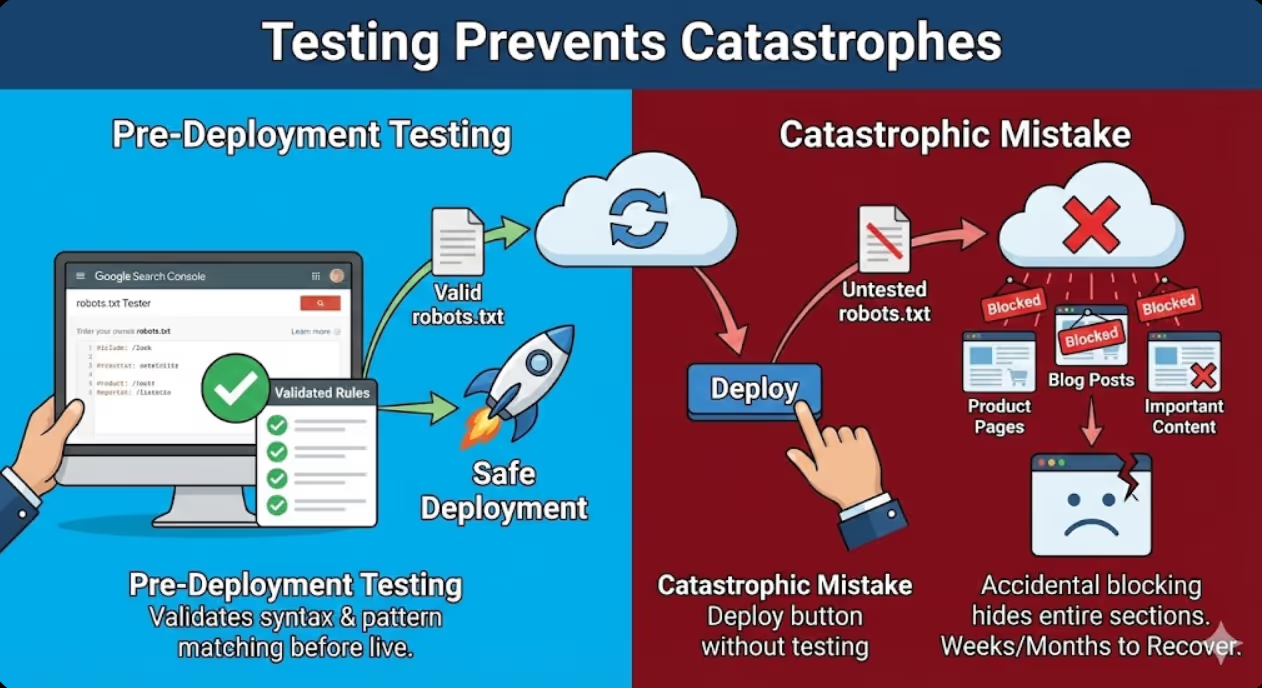
- Testing robots.txt changes before deployment through Google Search Console robots.txt tester prevents catastrophic blocking mistakes that accidentally hide entire website sections from search engines requiring weeks or months to recover indexing
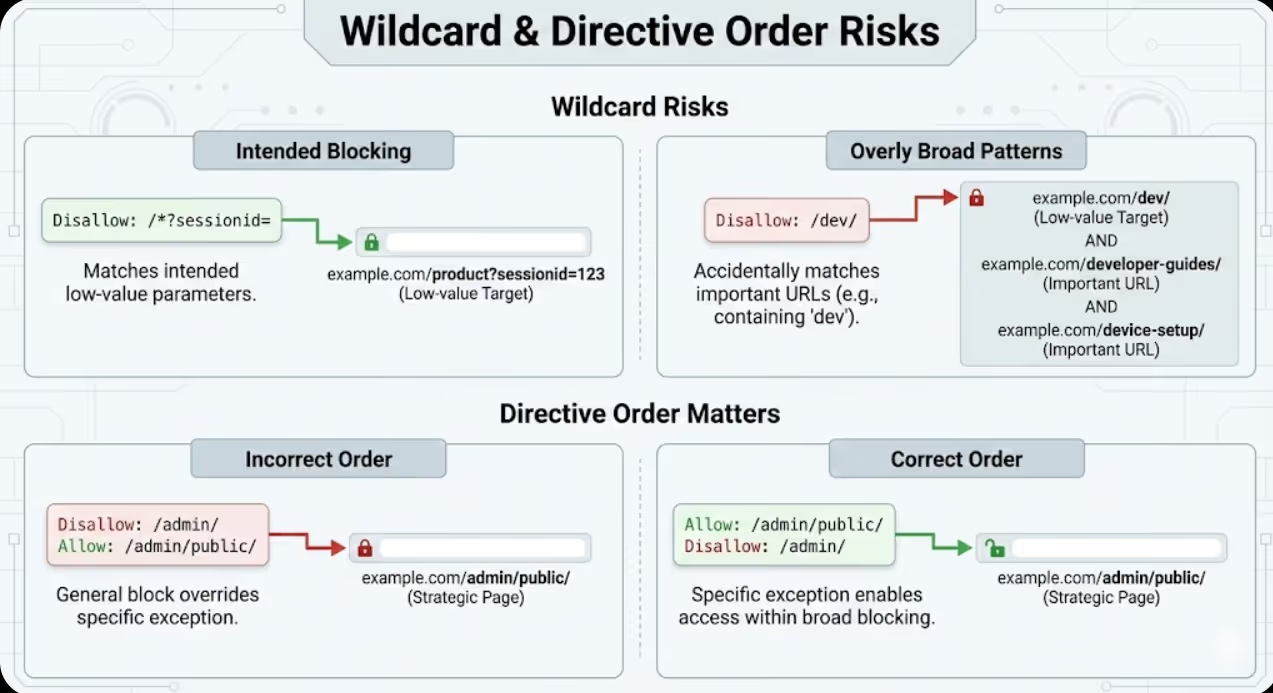
- Wildcard patterns including asterisks and dollar signs enable sophisticated URL pattern blocking but create significant error risks when overly broad patterns accidentally match important URLs alongside intended low-value targets
- Allow and Disallow directive order matters because more specific rules can override general patterns when properly sequenced, enabling exceptions to broad blocking rules that strategic pages require
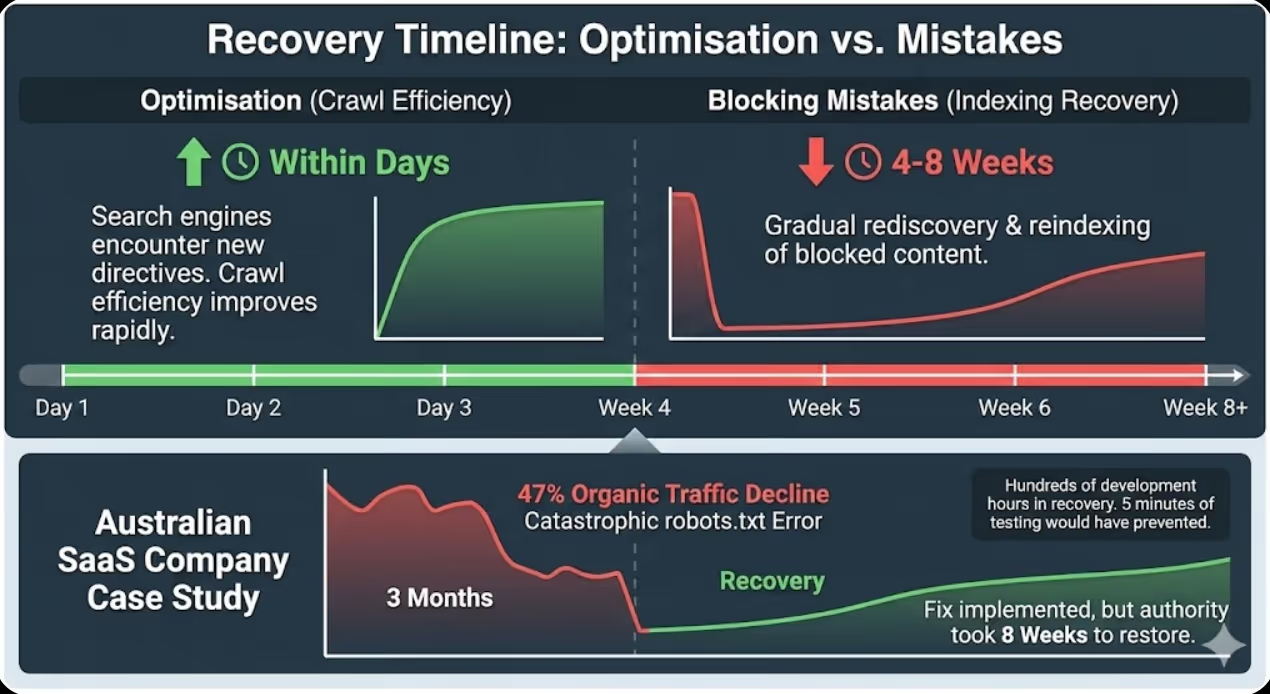
- Robots.txt optimisation delivers crawl efficiency improvements within days as search engines encounter new directives, but indexing recovery from blocking mistakes requires 4-8 weeks as search engines gradually rediscover and reindex previously blocked content
An Australian SaaS company with 15,000 help documentation pages implemented robots.txt blocking to prevent search engines from crawling their development and staging environments accessible through dev.domain.com and staging.domain.com subdomains. The implementation appeared straightforward with a single line: Disallow: /dev/ blocking the development directory.
Three months later, organic traffic had declined 47% despite no other obvious problems. Investigation revealed the catastrophic robots.txt error. The intended blocking of dev.domain.com subdomain had been implemented incorrectly as Disallow: /dev/ in the main domain robots.txt file. Because many of their documentation URLs contained "dev" within the path structure including /developer-guides/, /device-setup/, /development-best-practices/, the broad pattern accidentally blocked hundreds of high-value documentation pages from crawling.
According to research from Search Engine Journal, approximately 38% of websites have robots.txt errors that negatively impact SEO performance, with blocking mistakes being the most common category of errors affecting organic visibility.
Google Search Console coverage reports showed 3,847 pages with "Submitted URL blocked by robots.txt" status that had been indexable months earlier but were now excluded. Those pages had generated substantial organic traffic including 31% of total help documentation visits before the blocking mistake eliminated them from search results. Rankings for important documentation queries had completely disappeared as Google deindexed the blocked pages over subsequent weeks.
Maven Marketing Co. diagnosed the problem within minutes of robots.txt review but recovery required systematic remediation. The fix included correcting robots.txt to properly block subdomains through separate robots.txt files in subdomain roots rather than path-based blocking in main domain file, implementing explicit Allow directives for critical documentation paths that previous overly broad blocking had affected, submitting corrected pages through Google Search Console URL inspection tool accelerating reindexing, and monitoring index coverage weekly tracking recovery progress as Google rediscovered previously blocked content.
Recovery timeline extended eight weeks before organic traffic fully restored to pre-error levels. The three-month blocking period had eliminated accumulated ranking authority requiring time to rebuild despite technically correct implementation being restored quickly. The painful lesson demonstrated that robots.txt testing before deployment would have prevented the entire problem consuming hundreds of development hours in recovery effort that five minutes of pre-deployment testing would have avoided.
Understanding Robots.txt Fundamentals
Effective robots.txt optimisation requires foundational understanding of what robots.txt actually does, how search engines interpret directives, and critical distinctions between blocking crawling versus blocking indexing.
Robots.txt file purpose controls search engine crawler access to website resources by specifying which URLs crawlers should not request. The robots.txt file must be located at domain root accessible at https://example.com.au/robots.txt to be recognised by search engines. Crawlers check robots.txt before crawling websites, respecting directives from compliant crawlers whilst malicious bots frequently ignore robots.txt entirely. The file uses simple text syntax with User-agent lines specifying which crawlers directives apply to and Disallow/Allow lines specifying URL patterns to block or explicitly permit.
Blocking crawling versus blocking indexing represents the critical distinction that robots.txt misunderstanding creates. Robots.txt Disallow directives prevent crawlers from accessing URLs but do not prevent URLs from appearing in search results. Pages blocked by robots.txt can still be indexed if search engines discover them through external links, sitemaps, or previous crawl knowledge, appearing in search results with generic descriptions like "A description for this result is not available because of this site's robots.txt." Complete indexing prevention requires combining robots.txt blocking with noindex meta tags, though this creates the paradox that robots.txt blocking prevents crawlers from seeing noindex tags. Google's robots.txt documentation explicitly states that preventing indexing requires allowing crawling so search engines can see noindex directives rather than blocking with robots.txt.
Robots.txt syntax basics follow straightforward rules that minor errors can violate causing directive failure. User-agent lines specify which crawler rules apply to using format User-agent: Googlebot for Google or User-agent: * for all crawlers. Disallow lines specify URL patterns to block like Disallow: /admin/ preventing crawling of anything in /admin/ directory. Allow lines explicitly permit crawling of patterns within broader Disallow rules like Allow: /admin/public/ creating exception. Sitemap declarations point crawlers to XML sitemaps using format Sitemap: https://example.com/sitemap.xml. Comments begin with # symbol providing human-readable context ignored by crawlers. Critical syntax requirements include case sensitivity where User-agent, Disallow, and Allow must use exact capitalization, blank lines separating different user-agent sections, and precise URL pattern matching without fuzzy interpretation that some administrators expect.
Wildcard pattern matching enables sophisticated URL blocking through asterisk and dollar sign special characters. Asterisk wildcard * matches any sequence of characters enabling patterns like Disallow: /*?sessionid= blocking all URLs containing sessionid parameter regardless of parameter position or value. Dollar sign $ matches end of URL enabling patterns like Disallow: /*.pdf$ blocking PDF files whilst allowing /catalog.pdf-description.html that contains .pdf within URL but doesn't end with it. Combined wildcards create powerful patterns like Disallow: /*?*sort= blocking any URL with sort parameter after any other parameter. Wildcard patterns require careful testing because overly broad patterns accidentally match unintended URLs whilst overly specific patterns fail to block intended targets.
Common robots.txt misconceptions cause implementation mistakes that proper understanding prevents. Misconception that robots.txt improves security by hiding admin pages ignores reality that malicious actors ignore robots.txt while legitimate search engines respect it, potentially hiding admin pages from search whilst advertising their location to attackers. Misconception that robots.txt prevents content scraping overlooks that scrapers ignore robots.txt making blocking ineffective for content protection requiring other technical measures. Misconception that blocking pages in robots.txt removes them from search index confuses crawl blocking with indexing prevention requiring noindex for actual removal. Misconception that robots.txt blocking improves page speed by reducing crawler load ignores that compliant crawlers already throttle requests preventing server overload whilst aggressive blocking may hide important pages from search without performance benefit justifying the traffic loss.
Robots.txt versus noindex versus canonical clarifies when to use each duplicate content and crawl management tool. Use robots.txt when preventing crawl budget waste on pages that provide no SEO value including admin panels, duplicate parameter variations, and infinite scroll endpoints. Use noindex meta tags when allowing crawling but preventing indexing including thank-you pages, filtered category duplicates valuable for internal linking but not indexing, and user-generated content requiring quality filtering. Use canonical tags when allowing both crawling and indexing but consolidating ranking signals to preferred versions including paginated sequences, product URLs with multiple category paths, and parameter variations with legitimate user access requirements. Australian businesses should understand that robots.txt is crawl budget protection tool rather than indexing control mechanism requiring combination with other directives for complete duplicate content and crawl management.
Strategic Robots.txt Blocking Decisions
Determining what to block requires balancing crawl budget efficiency against indexing completeness with different blocking priorities for different website types and business contexts.
Low-value administrative content blocking prevents wasteful crawling of pages providing no search visibility value. Block admin dashboards and login pages like Disallow: /admin/ and Disallow: /wp-admin/ for WordPress that waste crawl budget without ranking opportunity. Block checkout and shopping cart pages like Disallow: /cart/ and Disallow: /checkout/ that users access during purchase but shouldn't appear in search results. Block internal search result pages like Disallow: /*?s= and Disallow: /search? that create infinite crawl spaces through search query variations. Block development and staging environments through separate robots.txt files in subdomain roots preventing testing content from consuming crawl budget or appearing in search results. Administrative blocking is universally appropriate across all website types because these pages provide no SEO value whilst consuming crawl budget that product, category, and content pages require.
Parameter and filter blocking addresses e-commerce faceted navigation creating millions of duplicate URL combinations. Block sorting parameters like Disallow: /*?sort= and Disallow: /*?order= that change display sequence without creating unique content. Block pagination parameters beyond reasonable limits like Disallow: /*?page=1* paired with Allow: /*?page=[1-5]$ allowing first five pages whilst blocking deeper pagination creating diminishing returns. Block session ID parameters like Disallow: /*?sessionid= and Disallow: /*PHPSESSID= creating user-specific duplicates. Block filter combinations cautiously because some filters create legitimate landing pages deserving indexing whilst others create pure duplicates requiring blocking decision based on keyword research revealing which filtered categories users actually search. Australian e-commerce businesses should implement filter blocking conservatively testing impact rather than aggressive blanket blocking potentially hiding valuable category combinations.
Duplicate content pattern blocking prevents multiple URL variations serving identical content from fragmenting crawl budget. Block print versions like Disallow: /*?print= and Disallow: /print/ that duplicate standard pages. Block email sharing URLs like Disallow: /email-friend/ and Disallow: /*?share= that create parameter variations. Block AMP duplicates through allowing crawling but implementing canonical consolidation rather than robots.txt blocking because blocking prevents Google from seeing canonical directives. Block mobile subdomain duplicates when maintaining m.domain.com through implementing responsive design eliminating duplicates rather than managing ongoing robots.txt blocking between desktop and mobile versions. Duplicate blocking requires careful analysis ensuring blocked variations don't receive external backlinks or direct traffic that blocking would eliminate rather than consolidating through canonical tags.
User-generated content blocking manages quality control for forums, comments, and review platforms where not all user contributions deserve indexing. Block low-quality forum sections like Disallow: /forum/off-topic/ and Disallow: /forum/spam-reports/ that don't provide search value. Block user profile pages except for high-authority contributors like blocking Disallow: /user/*/profile/ whilst allowing specific valuable profiles through explicit Allow directives. Block comment pagination like Disallow: /comments/page/ when comment value doesn't justify indexing complete comment threads. Block user-uploaded files requiring manual review before search exposure. User-generated content blocking requires ongoing adjustment as quality patterns emerge and community sections evolve making one-time configuration insufficient for long-term effectiveness.
Development and testing content blocking prevents non-production content from appearing in search results whilst maintaining staging visibility for internal teams. Block staging subdomains through separate robots.txt files in staging.domain.com and dev.domain.com roots with Disallow: / blocking complete subdomains rather than path-based blocking in main domain that often fails. Block testing directories like Disallow: /test/ and Disallow: /_test/ containing experimental implementations. Block version directories like Disallow: /v1/ and Disallow: /old/ containing deprecated content. Implement password protection on development environments rather than relying exclusively on robots.txt that malicious actors ignore. Development blocking protects crawl budget whilst preventing customer confusion from duplicate versions and testing content appearing in search results.
Media and resource file blocking manages crawling of images, PDFs, and other media when appropriate for specific contexts. Generally avoid blocking images because Google Image Search provides valuable traffic opportunity and images contribute to page content understanding. Block PDFs only when they duplicate webpage content better accessed through HTML versions using Disallow: /*.pdf$ whilst allowing PDFs that represent unique valuable content through explicit Allow exceptions. Block video files served directly through site rather than embedded from YouTube or Vimeo when video hosting platform handles search exposure. Block downloadable assets like Disallow: /downloads/*.zip$ and Disallow: /assets/*.exe$ that provide no search preview value. Resource blocking requires understanding traffic contribution from media search results before implementing blocks that might eliminate valuable specialised search visibility.
Advanced Robots.txt Patterns and Techniques
Sophisticated robots.txt implementation uses advanced patterns, specific user-agent targeting, and directive sequencing creating precise crawl control that basic blocking approaches cannot achieve.
Wildcard pattern sophistication combines multiple special characters creating precise URL matching. Pattern Disallow: /*?*&color= blocks URLs with color parameter when it appears after other parameters like /products?category=shoes&color=blue whilst allowing /products?color=blue where color is first parameter that might represent valuable color-specific category. Pattern Disallow: /*?*&*&*& blocks URLs with three or more parameters indicating deep filtering combinations whilst allowing one or two parameter combinations. Pattern Disallow: /*.php$ blocks PHP files accessible as URLs whilst allowing .php within URL path that doesn't end with .php extension. Pattern Disallow: /*/page-[0-9][0-9][0-9] blocks pagination pages 100 and higher whilst allowing lower pagination that contains more valuable content. Advanced patterns require extensive testing through robots.txt tester validating they match intended URLs without accidentally matching important pages sharing partial pattern characteristics.
Allow directive exceptions create controlled access within broader blocking rules through directive order priority. When Google encounters conflicting Allow and Disallow rules matching the same URL, the most specific rule takes precedence. Implementation pattern combines broad blocking with specific exceptions like:
User-agent: *
Disallow: /admin/
Allow: /admin/public-resources/
Disallow: /*?
Allow: /*?page=
Disallow: /user/
Allow: /user/top-contributors/
This pattern blocks all admin pages except public resources subdirectory, blocks all parameter URLs except pagination parameters, and blocks all user profiles except top contributors directory. Exception patterns require careful testing because specificity rules aren't always intuitive and rule order affects interpretation creating situations where intended exceptions don't function when rules are ordered incorrectly.
User-agent specific directives enables different crawling rules for different search engines and bots. Separate user-agent sections apply different rules to different crawlers:
User-agent: Googlebot
Disallow: /search-results/
Allow: /admin/public/

User-agent: Bingbot
Disallow: /admin/
Disallow: /search-results/

User-agent: *
Disallow: /
This configuration allows Googlebot to crawl everything except search results whilst permitting admin public section, allows Bingbot to crawl everything except admin and search results, and blocks all other crawlers completely. User-agent targeting enables optimising crawl budget allocation for crawlers providing most traffic value whilst restricting resource consumption from less valuable crawlers. Common user-agents include Googlebot for Google, Bingbot for Microsoft, and specific bot names for social media platforms, AI scrapers, and other specialised crawlers.
Crawl-delay directive manages crawler request frequency though Google ignores this directive preferring Search Console crawl rate settings whilst Bing and others respect it. Implementation format Crawl-delay: 10 requests 10-second delays between requests slowing crawler access without blocking entirely. Crawl-delay is useful for managing server load from aggressive crawlers on sites with limited hosting resources but risks slowing indexing of new content when delays are too aggressive. Australian businesses should use Google Search Console for Google-specific crawl rate management whilst implementing crawl-delay in robots.txt for other crawlers requiring throttling to prevent server overload during peak crawling periods.
Sitemap declaration integration points crawlers to XML sitemaps through robots.txt enabling discovery without requiring manual sitemap submission. Format Sitemap: https://example.com.au/sitemap.xml can be repeated multiple times for different sitemap files including:
Sitemap: https://example.com.au/sitemap-products.xml
Sitemap: https://example.com.au/sitemap-categories.xml
Sitemap: https://example.com.au/sitemap-blog.xml
Sitemap: https://example.com.au/sitemap-index.xml
Sitemap declarations in robots.txt supplement Search Console sitemap submission providing redundant discovery mechanism whilst enabling crawlers from search engines other than Google to automatically discover sitemaps. Sitemap URLs must be absolute complete URLs rather than relative paths, and sitemaps declared in robots.txt should be accessible returning 200 status codes rather than errors that prevent crawler access.
Regular expression limitations clarify what robots.txt cannot do versus what administrators sometimes expect. Robots.txt does not support regular expressions despite resemblance to regex patterns. The asterisk wildcard matches any sequence but doesn't support regex quantifiers like + or ?. Character classes like [0-9] are not standard robots.txt syntax though some crawlers may interpret them. Negative lookahead and other advanced regex features are completely unsupported requiring conversion to simpler wildcard patterns or acceptance that desired pattern cannot be expressed in robots.txt syntax. Australian businesses with complex blocking requirements exceeding robots.txt pattern capabilities should implement blocking through server configuration, canonical tags, or noindex meta tags rather than attempting regex-style robots.txt patterns that won't function as intended.
Testing and Validation
Comprehensive testing before deployment prevents the blocking mistakes that robots.txt's unforgiving syntax and powerful blocking capability create when errors reach production.
Google Search Console robots.txt tester provides authoritative validation showing exactly how Googlebot interprets directives. The tester interface accessible in Search Console under Legacy tools and reports allows entering URLs to test whether they're blocked by current robots.txt file, shows specific blocking rules matching tested URLs, enables editing robots.txt and testing changes before deployment, and validates syntax identifying formatting errors. Testing workflow should include testing all critical URL types including homepage, product pages, category pages, blog posts, and any other important templates confirming none are accidentally blocked, testing intended blocked URLs including admin pages, filter combinations, and parameters confirming blocking works correctly, testing edge cases including URLs at blocking rule boundaries to verify pattern matching works as intended, and testing exception URLs that Allow directives should permit within broader Disallow rules.
Robots.txt syntax validators catch formatting errors that prevent proper directive interpretation. Online validators including technical SEO tool validators check for common syntax errors including incorrect capitalization of directives, missing colons after directive names, invalid characters in URL patterns, and misplaced or duplicate User-agent sections. Validation should occur before testing because syntax errors prevent testing tools from properly interpreting directives leading to false test results. Basic syntax requirements include beginning each directive line with proper capitalization (User-agent, Disallow, Allow, Sitemap), colons immediately following directive names without spaces, URL patterns following colons with single space, and blank lines separating different user-agent sections. Australian businesses should validate syntax first through automated tools before manual testing preventing wasted effort testing syntactically invalid robots.txt that won't function as intended.
Crawling simulation tools reveal how complete websites are affected by robots.txt changes rather than testing individual URLs. Tools including Screaming Frog SEO Spider and Sitebulb can crawl websites respecting robots.txt directives showing which pages would be accessible versus blocked. Simulation workflow includes configuring tools to respect robots.txt, crawling staging environment or production site with test robots.txt, analysing crawl results identifying which pages tools accessed versus blocked, comparing blocked pages against intended blocking patterns, and identifying accidental blocking of important pages requiring pattern refinement. Simulation testing scales beyond individual URL testing revealing pattern effects across thousands of pages that manual URL-by-URL testing could never efficiently validate.
Before and after comparison validates that robots.txt changes produce intended effects without unintended consequences. Comparison methodology includes documenting current indexed page counts through Search Console and site: searches before deployment, implementing robots.txt changes in staging environment first testing thoroughly, deploying to production with immediate post-deployment validation, monitoring Search Console coverage reports daily tracking indexing changes, and analysing organic traffic in Google Analytics identifying any unexpected declines indicating blocking problems. Before-and-after tracking enables rapid detection of blocking mistakes allowing quick rollback before extensive deindexing occurs if changes prove problematic.
Common testing oversights that robots.txt validators miss require manual review awareness. Testing oversights include failing to test URLs with parameters that patterns intend to block, not considering mixed case URLs when patterns assume lowercase, overlooking that blocking parent directories also blocks subdirectories, forgetting that blocking resources like CSS and JavaScript prevents proper page rendering, neglecting to test sitemap URLs declared in robots.txt confirming accessibility, and assuming that desktop testing covers mobile when mobile URLs might differ. Australian businesses should create comprehensive test URL lists covering all pattern variations, edge cases, and exception scenarios rather than limited testing of obvious cases that might miss subtle blocking problems affecting specific URL structures.
Emergency rollback procedures enable rapid correction when production robots.txt creates unexpected blocking. Rollback procedures include maintaining robots.txt version history enabling quick restoration of previous working version, documenting change dates and content enabling identification of which changes caused problems, implementing monitoring alerts detecting sudden indexed page declines or coverage issues, preparing communication templates for Search Console help requests when indexing problems require Google intervention, and establishing decision thresholds determining when rollback is warranted versus waiting to observe change impacts. Fast rollback minimizes damage from robots.txt mistakes preventing extensive deindexing that weeks of incorrect blocking creates whilst slow rollback allowing problems to persist compounds recovery difficulty and extends recovery timelines.
Industry-Specific Robots.txt Considerations
Different website types face distinct crawl management challenges requiring tailored robots.txt strategies reflecting their specific technical architectures and business priorities.
E-commerce robots.txt strategy addresses product catalogs, filtering systems, and shopping cart functionality. E-commerce blocking typically includes blocking checkout process URLs, shopping cart pages, internal search results, filter parameter combinations beyond strategically valuable categories, sorting and pagination parameters, session ID parameters, and product comparison URLs that create duplicate content. E-commerce Allow exceptions include strategic filter combinations that keyword research reveals customers actually search like /category?brand=nike or /products?color=blue that justify separate indexing, pagination page 1 through 3 or 5 providing reasonable content access, and public user review pages contributing valuable content. E-commerce robots.txt requires ongoing adjustment as catalog grows, new filter combinations are added, and URL structure evolves requiring quarterly review rather than set-and-forget configuration.
News and publisher robots.txt strategy manages article archives, author pages, and date-based navigation creating potential duplicate content. Publisher blocking typically includes blocking print versions of articles, email sharing URLs, article feed parameters, deep archive pagination, low-value author archive pages for occasional contributors, and tag page variations creating thin content duplicates. Publisher Allow exceptions include authoritative author pages for regular columnists and star writers, recent date-based archives like current year and previous year, and strategic tag pages for major topics driving substantial organic traffic. Publisher robots.txt must balance blocking duplicate content against preserving archive accessibility for historical content that continues generating long-tail traffic.
SaaS and software robots.txt strategy addresses documentation, user dashboards, and trial/demo environments. SaaS blocking typically includes blocking user account dashboards, application interface URLs meant for logged-in users, development and staging environments, API documentation that's publicly available but low search value, and dynamically generated support tickets and private content. SaaS Allow exceptions include public-facing documentation, onboarding guides and tutorials, integration guides frequently referenced by users, and API reference documentation that developers seek through search. SaaS robots.txt requires careful attention to authentication-required content ensuring robots.txt blocking supplements but doesn't replace authentication preventing public access to private customer data.
Directory and marketplace robots.txt strategy manages user profiles, listing pages, and search result variations. Directory blocking typically includes blocking low-quality user profiles, advanced search result URLs with multiple filter combinations, saved search URLs creating user-specific variations, map-based search interfaces creating infinite geographic variations, and listing sort variations. Directory Allow exceptions include high-quality verified business profiles, category landing pages with substantial unique content, geographic city and region pages with local content, and featured listings or sponsored content providing value beyond typical listings. Directory robots.txt must prevent the infinite crawl spaces that user-generated content and geographic filtering create whilst preserving valuable community-contributed content that drives organic traffic.
Forum and community robots.txt strategy addresses user-generated content quality variability and conversation threading. Forum blocking typically includes blocking user profile pages except moderators and top contributors, private message systems, off-topic and spam report sections, member-only content areas, and deep thread pagination. Forum Allow exceptions include high-value discussion threads generating ongoing traffic, author pages for recognised experts and frequent contributors, category landing pages with substantial original content, and sticky threads containing reference content. Forum robots.txt requires active community management involvement identifying valuable versus low-value sections based on content quality rather than traffic alone.
Common Robots.txt Mistakes and Recovery
Understanding frequent errors enables proactive avoidance whilst knowing recovery procedures minimizes damage when mistakes inevitably occur despite testing precautions.
Blocking JavaScript and CSS resources represents the most damaging common mistake preventing proper page rendering. Google requires access to JavaScript and CSS for rendering pages as users see them, using rendered content for ranking and understanding. Blocking resources through patterns like Disallow: /*.js$ or Disallow: /*.css$ prevents rendering causing Google to see pages as broken or incomplete. Recovery requires removing resource blocking immediately, requesting reindexing through Search Console for affected pages, and monitoring rendering in Mobile-Friendly Test and Rich Results Test confirming pages render correctly. Australian businesses should never block JavaScript or CSS unless absolutely certain they're blocking only resources that don't affect page rendering, with testing via rendering tools validating blocking doesn't break page display.
Overly aggressive wildcard blocking accidentally matches important URLs sharing patterns with intended blocking targets. Pattern Disallow: /dev intended to block /development/ accidentally blocks /device-setup/ and /developer-guides/ through substring matching rather than directory-specific blocking that Disallow: /dev/ provides with trailing slash. Pattern Disallow: /*? intended to block parameters accidentally blocks all URLs containing question marks including properly structured URLs requiring parameter retention. Recovery requires narrowing patterns to specifically match intended targets, testing refined patterns thoroughly, and resubmitting blocked URLs through Search Console accelerating reindexing. Prevention requires understanding that robots.txt patterns match substrings requiring precise pattern construction preventing accidental overmatch.
Blocking content instead of duplicates confuses preventing indexing with preventing crawling causing valuable content to disappear from search. Implementing Disallow: /blog/ to prevent duplicate blog archive indexing also blocks all individual blog post URLs under /blog/ path preventing their indexing entirely. Proper approach uses canonical tags for duplicate consolidation whilst allowing crawling or moves duplicates to separate path that blocking can target without affecting individual posts. Recovery requires removing blocking immediately and implementing proper duplicate management through canonical tags or noindex on duplicate variations rather than robots.txt blocking affecting both duplicates and originals.
Syntax errors breaking entire files cause complete robots.txt failure with search engines ignoring all directives when syntax errors prevent proper parsing. Common syntax errors include missing colons after directives, incorrect capitalisation of directive names, special characters in URL patterns that robots.txt doesn't support, and malformed User-agent specifications. Recovery requires syntax validation through robots.txt validators, immediate correction of identified errors, and testing through Search Console validator confirming proper parsing. Prevention requires automated syntax validation before every robots.txt deployment catching errors before they reach production.
Accidental allow-all or block-all creates catastrophic indexing impacts through simple typos. Empty Disallow: directive with nothing following the colon acts as allow-all enabling crawling of everything including intended blocked content. Disallow: / under User-agent: * blocks complete website from all crawlers preventing indexing entirely. Recovery from accidental block-all requires immediate correction, Search Console resubmission of affected URLs, and patience as Google gradually rediscovers and reindexes previously blocked content over weeks rather than instantly recovering. Prevention requires always testing robots.txt changes before deployment catching allow-all or block-all mistakes that testing immediately reveals whilst production deployment might take weeks to notice.
Blocking while trying to deindex attempts using robots.txt to remove pages from index that paradoxically prevents Google from seeing noindex directives. Blocking URLs in robots.txt prevents crawlers from accessing pages to see noindex meta tags, causing pages to remain indexed with generic descriptions despite intent to deindex. Proper deindexing requires temporarily allowing crawling so Google can see noindex tags, waiting for deindexing to complete, then optionally blocking crawling after deindexing if desired. Recovery from blocking-during-deindexing requires allowing crawling, implementing noindex tags, monitoring Search Console for deindexing, and only then blocking if ongoing crawl prevention is needed for crawl budget protection.
Frequently Asked Questions
Should Australian businesses block their entire website during development before launch, and how should they transition to allowing crawling when ready to go live?
Pre-launch blocking requires careful implementation ensuring that blocking actually works whilst planning proper transition to crawling when launching. Best pre-launch approach implements password authentication at server level preventing public access entirely rather than relying only on robots.txt that malicious actors ignore. If using robots.txt, implement Disallow: / under User-agent: * blocking all crawlers whilst maintaining accessible staging environment at separate subdomain for client review. Critically, ensure staging environment has separate robots.txt file also blocking crawling preventing staging content from being indexed if discovered. Launch transition requires removing robots.txt blocking completely or replacing with production robots.txt containing only strategic specific blocking, submitting XML sitemaps through Search Console immediately after launching, requesting indexing through URL Inspection tool for critical pages accelerating discovery, and monitoring index coverage reports daily confirming pages are being discovered and indexed rather than remaining blocked through cached robots.txt that search engines haven't refreshed. Australian businesses should plan launch transitions carefully rather than assuming that simply removing robots.txt blocking immediately makes content indexable given that search engine discovery and indexing takes days to weeks after blocking removal.
How should Australian businesses handle robots.txt for international websites with different language/regional versions, and should each version have separate robots.txt?
International robots.txt strategy depends on URL structure with different approaches for subdirectories, subdomains, and country code top-level domains. For subdirectory structure like example.com/en/ and example.com/au/, single robots.txt at domain root applies to all language versions requiring patterns that accommodate all variations without accidentally blocking specific languages. For subdomain structure like en.example.com and au.example.com, each subdomain requires separate robots.txt file in subdomain root enabling region-specific blocking rules. For ccTLD structure like example.com.au and example.co.uk, each domain requires separate robots.txt file enabling country-specific rules. International blocking might include blocking languages from specific Googlebots using user-agent specific rules, blocking duplicate cross-language content, or blocking regional staging environments. However, most international sites shouldn't need substantially different robots.txt between versions, instead using hreflang tags for language/region relationships and canonical tags for duplicate management rather than robots.txt blocking. Australian businesses with international sites should implement consistent blocking rules across regions unless specific regional requirements justify different approaches.
What should Australian businesses do when Google Search Console shows that important pages are blocked by robots.txt despite testing showing they shouldn't be blocked?
Discrepancies between robots.txt testing and Search Console reports typically indicate outdated cached robots.txt, testing wrong file, or pattern matching complexities that testing missed. First, verify which robots.txt file Google is actually reading by checking https://example.com.au/robots.txt in browser confirms the file you believe is active is actually serving. Second, use Search Console robots.txt tester entering exact URLs Search Console reports as blocked confirming whether current robots.txt blocks them. Third, check Search Console fetch date on robots.txt determining when Google last fetched the file potentially revealing cached outdated version containing different blocking rules. Fourth, force Google to refresh robots.txt by making any change to the file triggering recrawl or requesting revalidation through Search Console. Fifth, examine URL patterns carefully because partial matching might block URLs in ways testing didn't reveal, particularly with wildcard patterns matching broader variations than anticipated. If investigation confirms current robots.txt shouldn't block reported URLs, request indexing through URL Inspection tool forcing Google to recrawl and reassess blocking status. Australian businesses should maintain robots.txt version history enabling comparison of current versus historical versions that might have blocked URLs before recent changes.
Can Australian businesses use robots.txt to protect their content from being scraped by AI companies and content aggregators?
Robots.txt provides extremely limited content protection because malicious scrapers ignore robots.txt entirely whilst compliant AI crawlers respect blocking but represent small subset of content collection activities. Major AI companies including OpenAI, Anthropic, and others provide specific user-agent identifiers in robots.txt enabling blocking through patterns like User-agent: GPTBot followed by Disallow: /. However, this only prevents crawling by specifically identified compliant crawlers whilst countless unlabeled scrapers and those intentionally ignoring robots.txt continue scraping regardless. More effective content protection requires technical measures including rate limiting to detect and block rapid scraping, IP blocking of known scraper addresses, requiring login authentication for valuable content, implementing CAPTCHA challenges on suspicious traffic patterns, and legal protections through terms of service and copyright notices. Australian businesses should not rely primarily on robots.txt for content protection whilst recognizing that blocking specific AI crawlers through robots.txt is appropriate when businesses don't want their content used for AI training but this addresses only the compliant minority of content collection not the broader scraping ecosystem.
How should Australian businesses coordinate robots.txt with other crawl management tools including canonical tags, noindex meta tags, and XML sitemaps to avoid conflicting signals?
Coordinated crawl management ensures tools complement rather than contradict each other creating clear consistent signals search engines can reliably follow. Coordination principles include using robots.txt exclusively for crawl budget protection blocking content that doesn't need crawling not as indexing prevention tool, implementing noindex meta tags for indexing prevention while allowing crawling so search engines can see the noindex directives, using canonical tags for duplicate consolidation whilst allowing crawling of all variations so search engines can verify relationships, and ensuring XML sitemaps include only URLs that robots.txt allows and that don't have noindex tags. Common conflicts to avoid include submitting URLs in XML sitemaps that robots.txt blocks creating "Submitted URL blocked by robots.txt" errors in Search Console, blocking URLs with robots.txt whilst trying to deindex them through noindex preventing search engines from seeing noindex tags, canonicalizing to URLs that robots.txt blocks preventing consolidation, and blocking resources like JavaScript that pages need for rendering whilst expecting proper indexing. Australian businesses should audit coordination systematically ensuring robots.txt, meta robots, canonical tags, and sitemaps all align consistently rather than implementing each tool independently without considering interactions that might create conflicting signals confusing search engines about intended crawl and indexing treatment.
Should Australian businesses block low-quality user-generated content through robots.txt or use noindex meta tags, and what factors determine the right approach?
Choosing between robots.txt blocking and noindex for low-quality user-generated content depends on whether content needs ongoing crawling for quality assessment or should be completely ignored. Use robots.txt blocking when content is permanently low-value providing no benefit from crawling including spam report sections, user profile templates with minimal information, automated generated pages lacking human contribution, and test or sandbox areas where users experiment. Use noindex meta tags when content might improve warranting future indexing including new user contributions requiring quality evaluation period before indexing, discussion forums where quality varies by thread requiring individual assessment, and user profiles that might gain value as members contribute more content. The critical difference is that noindex requires ongoing crawling to check tag presence consuming crawl budget whilst robots.txt blocking prevents crawling entirely saving budget. For high-volume user-generated content platforms, crawl budget efficiency from robots.txt blocking outweighs flexibility of noindex when content quality can be predetermined. However, robots.txt blocking cannot be dynamically applied per page requiring path patterns or subdirectories separating low-quality content whilst noindex provides page-by-page control through programmatic tag generation based on quality signals. Australian businesses should analyse whether user-generated content quality correlates with structural patterns that robots.txt can target or requires individual page assessment that noindex enables through dynamic quality scoring.
How long after fixing robots.txt blocking mistakes should Australian businesses expect to see indexing and traffic recovery?
Recovery timing depends on blocking duration and content quality with gradual improvement over 4-8 weeks rather than instant restoration. Week 1-2 shows minimal visible recovery as search engines encounter corrected robots.txt during regular crawling but haven't yet reprocessed previously blocked URLs. Week 3-4 shows indexing beginning to recover with Search Console coverage reports indicating previously blocked pages transitioning to indexable status as Google recrawls and discovers they're now accessible. Week 5-6 shows significant indexing recovery with substantial percentage of previously blocked pages reindexed and beginning to appear in search results. Week 7-8 shows traffic recovery approaching pre-problem levels as reindexed pages regain rankings though full ranking recovery might take longer if blocking duration allowed competitors to capture ranking positions. Longer blocking periods require proportionally longer recovery because rankings decay during blocking requiring rebuilding not just reindexing. Australian businesses can accelerate recovery through submitting affected URLs via URL Inspection tool, updating and resubmitting XML sitemaps, and potentially acquiring fresh backlinks to critical pages signaling renewed importance. However, recovery cannot be instant regardless of technical interventions because indexing and ranking are iterative processes requiring multiple crawl and ranking update cycles to fully restore pre-problem status.
Strategic Robots.txt Optimisation Protects Crawl Budget
Robots.txt optimisation transforms crawl management from risky blocking exercise fraught with accidental deindexing dangers into strategic crawl budget protection that enables complete important page indexing whilst preventing wasteful crawling of duplicates, parameters, and low-value content that efficient crawling requires eliminating.
The implementation frameworks outlined in this guide including strategic blocking decisions, advanced pattern techniques, comprehensive testing methodologies, and industry-specific considerations provide foundation for Australian businesses to implement robots.txt optimisation that protects crawl budget without the blocking mistakes that turn robots.txt from valuable tool into organic visibility destroyer.
Australian businesses working with Maven Marketing Co. benefit from professional robots.txt audits identifying blocking opportunities and preventing catastrophic mistakes, technical implementation ensuring proper syntax and pattern matching, comprehensive testing validating changes before production deployment, and ongoing monitoring confirming robots.txt continues functioning correctly as websites evolve.
Ready to optimise robots.txt protecting crawl budget whilst avoiding blocking mistakes that accidentally hide important content from search engines? Maven Marketing Co. provides comprehensive robots.txt optimisation services including strategic blocking analysis, pattern implementation, testing validation, and ongoing monitoring ensuring your crawl management directives improve search engine efficiency without eliminating pages from indexes through blocking errors.

Table of contents
read more blogs

6 Ways Digital Marketing Can Boost B2B Lead Generation
B2B lead generation is not about filling a CRM with as many names as possible. The real objective is to attract businesses that fit your offer, give the right people a reason to engage and create enough confidence for a genuine sales conversation to start.That distinction matters because B2B buying is usually more targeted than consumer marketing and often involves several people influencing the decision. Current LinkedIn lead-generation guidance makes the same point: more leads do not automatically mean better results if only a small proportion are genuinely relevant or likely to progress.Digital marketing helps by creating multiple paths into the business. Search can capture active demand. Paid media can put an offer in front of a tightly defined audience. Content can build authority before a buyer is ready to talk. Social media can keep the brand visible across a long decision cycle. Your website turns interest into action, while email helps nurture that interest over time.The strongest B2B digital marketing strategies do not treat these as six separate activities. They use them as one connected system designed to generate quality B2B leads, support sales and build a more dependable pipeline

How to Build a Brand Positioning Strategy That Sets Your Business Apart
Most businesses can explain what they sell. Far fewer can explain, in a sentence or two, why the right customer should choose them instead of another credible option. That gap is where brand positioning matters.A strong brand positioning strategy gives your business a clear place in the market and a clear place in the customer's mind. It helps your team decide who you are speaking to, what you want to be known for, which benefits deserve the most attention and how your marketing should sound and look across every channel.It is not a slogan exercise and it is not something reserved for large consumer brands. For an Australian service business, e-commerce brand, professional firm, or growing B2B company, positioning can make everyday decisions easier, from website copy and campaign messaging to pricing, sales conversations, and brand identity. The goal is not to look different for the sake of it. The goal is to be meaningfully different in a way the right customers understand and value.

The Role of Digital PR in Long Term SEO Growth
Building a solid online presence is basically more than just posting content now and then or sprinkling keywords across your website. Search engines such as Google tend to point users toward businesses that feel trustworthy, useful, and backed up by others online, even if it’s not always obvious at first. When a company puts together a well-thought-out digital PR strategy, it can bring in solid media mentions, earning high-quality backlinks and stronger brand awareness, all of which feed long-term SEO progress. Rather than obsessing solely over rankings, digital PR helps you build credibility plus authority, so your site looks more appealing to search engines and also to real people who might become customers. In this guide, we’ll walk through how digital PR supports SEO, what makes it such a key part of modern marketing, and the most effective approaches for sustainable growth in search results.


