
.svg)


%201.svg)

Key Takeaways
- WordPress generates database queries for almost every aspect of page rendering. On complex sites, a single page load can trigger hundreds of queries, making database performance the primary bottleneck.
- Redis is a data store held in server memory that caches the results of WordPress database queries, allowing subsequent requests to retrieve cached data at memory speed rather than querying the database again.
- Redis operates as WordPress's object cache, a native caching layer in WordPress's architecture that by default does not persist between requests. Redis makes this cache persistent and dramatically more effective.
- Object caching through Redis is separate from whole page caching. Both can and should be used together for maximum performance, with Redis handling dynamic components that whole page caching cannot address.
- Australian WordPress hosting environments vary in Redis availability. Managed WordPress hosts including Kinsta, WP Engine, and Cloudways offer Redis as a native feature or an optional extra. Shared hosting typically does not.
- The Redis Object Cache plugin by Till Krüss is the most widely used and thoroughly maintained WordPress integration for Redis, and provides the drop in configuration that connects WordPress to a Redis server.
- Monitoring query performance before and after implementation using tools such as Query Monitor confirms that Redis is functioning correctly and quantifies the actual performance improvement achieved.
Why WordPress Has a Database Performance Problem
WordPress was designed around a architecture driven by database queries where content, settings, user data, plugin configuration, and almost every other piece of information the site needs is stored in a MySQL database and retrieved on demand. This design made WordPress flexible and editable without touching files, and it is part of why the platform became so widely adopted. It also means that every page load involves a sequence of database queries to assemble the information needed to render the page.
On a simple WordPress installation with a handful of plugins and a basic theme, this query overhead is not a significant performance concern. A straightforward page might require twenty to thirty database queries, which a modern server handles quickly enough that the overhead is not perceptible to users.
The problem scales with site complexity. A WordPress ecommerce site running WooCommerce with a large product catalogue, multiple filtering options, currency and tax logic, and several performance and marketing plugins can generate hundreds of database queries per page load. An editorial site running a complex theme with dynamic sidebars, related content modules, and advertisement management can be similarly similarly heavy on queries. A membership site requiring user authentication, content access checking, and personalisation on each request adds further layers.
At these query volumes, database performance becomes the primary bottleneck limiting how quickly WordPress can respond to requests. Adding more server CPU or memory does not solve a database query problem. The solution requires either reducing the number of queries or making the results available faster, and Redis accomplishes the latter at a fundamental level.
What Redis Actually Does in a WordPress Context
Redis (Remote Dictionary Server) is an open source data structure store held entirely in server memory. Unlike a traditional relational database that writes data to disk and reads it from disk on each access, Redis holds its data in RAM, making reads and writes orders of magnitude faster than database operations that rely on disk access.
In a WordPress context, Redis functions as a persistent object cache. WordPress has a native object caching API that is designed to cache database query results and other expensive operations during a single page request, preventing the same data from being queried multiple times within one request. By default, this cache is transient: it exists only for the duration of the request and is discarded when the request completes.
When Redis is connected to WordPress as the object cache backend, this native cache becomes persistent. The first time a database query is executed and cached, the result is stored in Redis's memory rather than discarded at the end of the request. When the next request requires the same data, WordPress checks the Redis cache first. If the data is there, it is returned directly from memory without touching the database at all. The database query is effectively skipped.
The performance impact is most significant for queries that are repeated frequently across requests and are expensive to compute. WordPress site options, user data, navigation menus, and the results of complex product or content queries are all typically cached in Redis and served from memory on most requests. The database load reduction on a moderately complex WordPress site implementing Redis caching can be 70 to 90 percent for cached query types, which translates directly into faster response times and reduced server resource consumption.
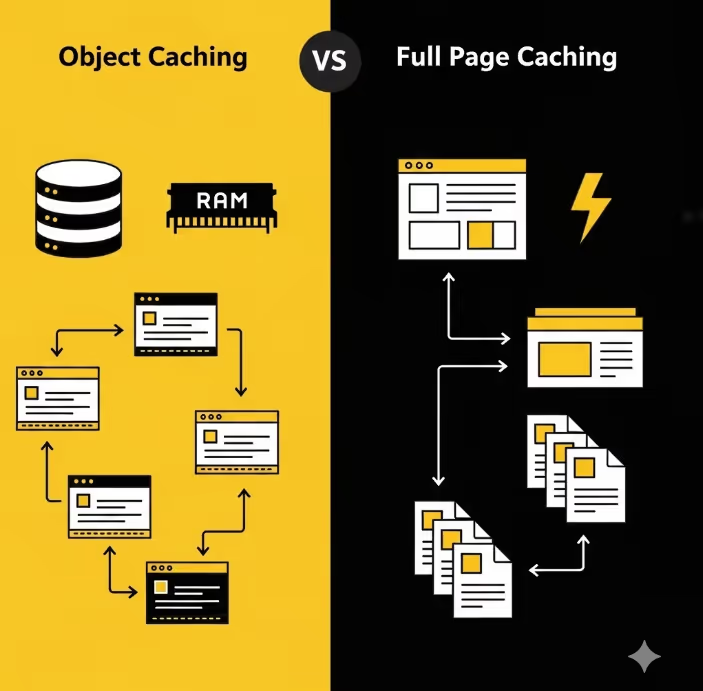
Object Caching vs Full Page Caching: Understanding the Difference
A common point of confusion in WordPress performance optimisation is the distinction between object caching and whole page caching, and how they relate to each other. Both are valuable, they address different aspects of performance, and they are complementary rather than competing approaches.
Whole page caching stores a complete rendered version of a page and serves that cached version to subsequent visitors without executing any PHP or database queries at all. It is the most effective form of caching for pages that are the same for every visitor, such as static content pages, blog posts, and category archives. Tools such as WP Rocket, W3 Total Cache, and LiteSpeed Cache implement whole page caching.
The limitation of whole page caching is that it cannot be used for pages that vary by visitor. Users who are logged in, cart pages in WooCommerce, pages with personalised content, and pages dependent on query parameters typically cannot be served from a whole page cache without serving incorrect content to users with different contexts.
Redis object caching addresses these dynamic scenarios. Even when a whole page cache cannot be used because the page content must be generated fresh for the specific visitor, Redis ensures that the individual database queries required to generate that page are served from memory rather than executed against the database again. A WooCommerce cart page that cannot be whole page cached can still benefit enormously from having its component queries cached in Redis.
For most Australian commercial WordPress sites, the optimal configuration uses both: whole page caching for all publicly accessible static content, and Redis object caching to improve the performance of pages that cannot be whole page cached and to provide a performance foundation for the entire site's database interactions.
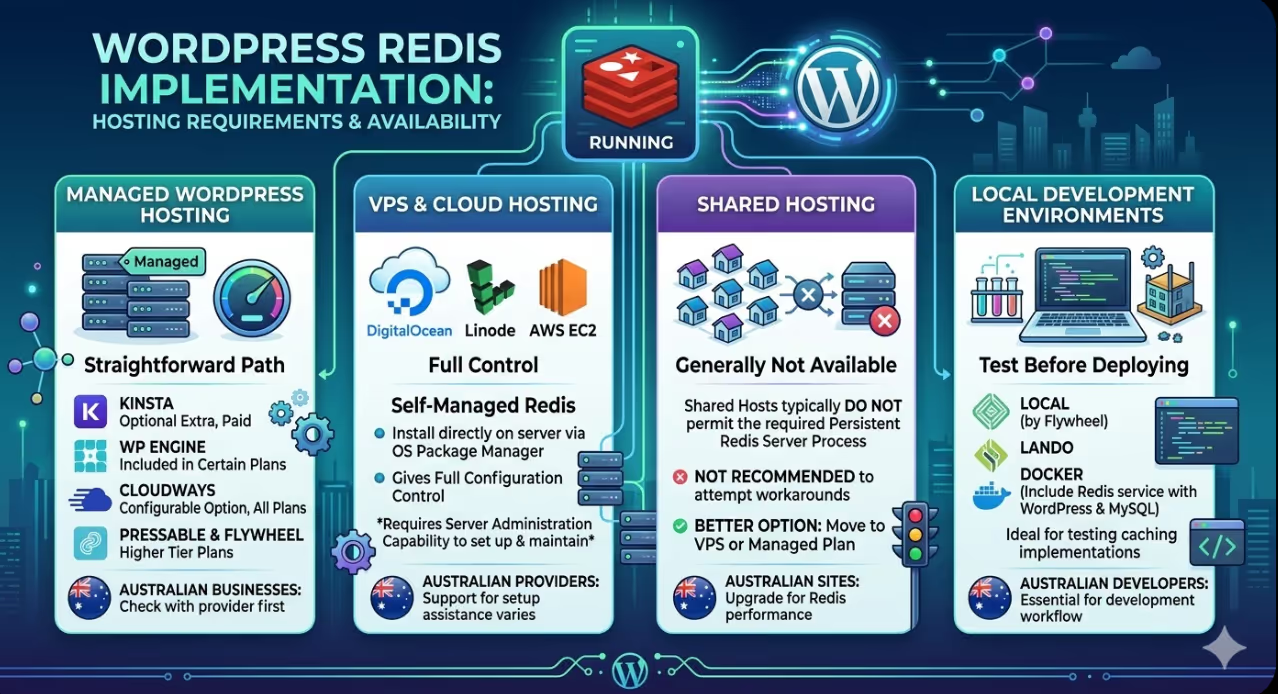
Hosting Requirements and Redis Availability
Before implementing Redis on a WordPress site, confirming that the hosting environment supports it is essential. Redis requires a running Redis server process on or accessible to the web server, which is not available on all hosting configurations.
Managed WordPress hosting. Managed WordPress hosting providers typically offer the most straightforward Redis implementation path. Kinsta provides Redis as an optional extra at an additional monthly cost. WP Engine includes Redis as part of certain plans. Cloudways includes Redis as a configurable option on all their cloud hosting plans. Pressable and Flywheel offer Redis on higher tier plans. For Australian businesses on managed WordPress hosting, checking with the hosting provider about Redis availability is the first step.
VPS and cloud hosting. WordPress installations on VPS platforms such as DigitalOcean, Linode, or AWS EC2 can have Redis installed directly on the server, typically through the operating system's package manager. This gives full control over Redis configuration but requires server administration capability to set up and maintain. Australian web hosting providers offering VPS solutions vary in how much Redis setup assistance they provide.
Shared hosting. Redis is generally not available on shared hosting environments because it requires a persistent server process that shared hosts do not typically permit. Australian websites on shared hosting that need Redis are typically better served by moving to a VPS or managed WordPress hosting plan rather than attempting workarounds.
Local development environments. For Australian developers testing Redis caching implementations before deploying to production, Local (by Flywheel) and Lando both support Redis as a development service. Development environments built on Docker can also include Redis as a service alongside WordPress and MySQL.
Implementation: Connecting WordPress to Redis
With a Redis server available and running, connecting WordPress to use it as the object cache involves two steps: installing a Redis integration plugin and activating the object cache drop in.
The Redis Object Cache plugin by Till Krüss is the standard choice for this integration. It is actively maintained, widely used in Australian and international WordPress environments, and available in the WordPress plugin repository.
After installing and activating the plugin, the connection to the Redis server needs to be configured. For most managed hosting environments, the host will provide the Redis server details including the hostname, port, and any authentication credentials required. These details are typically added to the site's wp-config.php file:
php
define( 'WP_REDIS_HOST', '127.0.0.1' );
define( 'WP_REDIS_PORT', 6379 );
define( 'WP_REDIS_PASSWORD', 'your-redis-password' );
define( 'WP_REDIS_DATABASE', 0 );
Once the connection is configured, the plugin's settings page in the WordPress dashboard shows the connection status and allows the object cache drop in to be enabled. The drop in file called object-cache.php that is placed in the wp-content directory, replacing WordPress's default transient object cache with the version connected to Redis.
After enabling the drop in, the Redis dashboard within the plugin provides statistics in real time on cache hits, cache misses, memory usage, and connected clients. A high cache hit ratio, typically above 85 percent for an established site with consistent traffic, confirms the cache is operating effectively.
Cache Invalidation: The Most Important Configuration Detail
Redis caching only improves performance when the cached data is valid. Serving stale cached data, content that has been updated but is still being served from the cache, is worse than not caching at all. Cache invalidation is the process of removing or updating cached data when the underlying data changes, and it is the aspect of Redis implementation most likely to cause problems if not handled correctly.
WordPress's object cache API includes cache invalidation by default for many standard operations. When a post is updated, its cached version is cleared. When a menu is edited, its cached version is invalidated. When a site option changes, the cached option value is updated. These native invalidation mechanisms cover most standard WordPress content management operations.
The gap emerges with plugins that store data using their own caching logic rather than the WordPress object cache API, or with custom code that updates data without triggering the appropriate cache invalidation hooks. WooCommerce, in particular, manages some of its own caching logic alongside the WordPress object cache, and complex WooCommerce configurations may require additional attention to ensure cached product data, pricing, and inventory information stays current.
For Australian ecommerce sites where pricing and inventory accuracy is commercially critical, testing the cache invalidation behaviour after implementation is essential. Adding a product, changing a price, updating stock levels, and checking that the changes are immediately visible to site visitors after the update confirms the invalidation is working correctly. If stale data appears after updates, investigating whether the relevant operation is triggering the appropriate cache flush is the diagnostic starting point.
Monitoring and Measuring the Impact
Quantifying the performance improvement from Redis implementation is important both for validating that the implementation is working correctly and for making the case internally for the infrastructure investment.
Query Monitor is a WordPress plugin that provides detailed information about every database query executed during a page load, including query count, total query time, and which components are generating the most database activity. Running Query Monitor on key pages before Redis implementation establishes a baseline. Running it again after implementation shows the reduction in queries reaching the database and the overall query time improvement.
New Relic and other application performance monitoring tools available on higher tier hosting plans provide more comprehensive Redis performance visibility, showing cache hit rates, memory usage over time, and the correlation between Redis performance and overall application response times.
According to the Redis documentation on performance benchmarks, Redis can handle over one million operations per second on modest server hardware, with response times under a millisecond for typical cache read operations. This performance headroom means Redis is rarely itself a bottleneck for WordPress sites, even at significant traffic volumes.
Google PageSpeed Insights and Core Web Vitals data will reflect improvements in Time to First Byte after Redis implementation, since faster database query resolution reduces the time the server takes to begin generating its response. For Australian websites where TTFB is currently a failing or borderline metric, Redis implementation is one of the most direct interventions available.
FAQs
How much does Redis cost for an Australian WordPress site?
The cost depends on the hosting arrangement. On managed WordPress hosting, Redis is typically an optional extra ranging from around AUD 25 to 100 per month depending on the provider and the allocated memory. On a VPS managed independently, Redis itself is free and open source software. The only cost is the additional server memory it consumes, which may require a VPS plan with more RAM than the baseline. For most Australian commercial WordPress sites, the performance improvement from Redis delivers value well in excess of the additional hosting cost, particularly when reduced server load is considered alongside improved user experience metrics.
Can Redis be used alongside existing caching plugins?
Yes, and this is the recommended approach. Redis handles object caching and improves the performance of dynamic operations driven by database queries. Whole page caching plugins such as WP Rocket, W3 Total Cache, LiteSpeed Cache, and others handle HTML caching at the page level and additional optimisations including CSS and JavaScript minification, lazy loading, and CDN integration. Using Redis alongside a whole page caching plugin provides complementary coverage: whole page caching serves static content without executing any PHP or database queries, while Redis improves the performance of all requests that do require PHP and database execution. Many whole page caching plugins are aware of Redis and will explicitly support or recommend it as the object cache backend.
What happens to the WordPress site if the Redis server becomes unavailable?
WordPress falls back to its default behaviour gracefully when Redis is unavailable. The object cache drop in includes logic to detect when the Redis connection fails and revert to serving requests without object caching. Pages will load more slowly due to increased database query load, but they will continue to function correctly. The Redis Object Cache plugin also provides visibility into connection failures through the WordPress dashboard and optionally through email alerts. For Australian websites where availability is critical, running Redis on the same server as WordPress (rather than a separate server) minimises the risk of network connectivity issues between the application and the cache.
Database Queries Should Not Decide How Fast Your Site Is
Every database query that WordPress skips because Redis returned the cached result is a small but cumulative performance win. At the scale of a commercial Australian website, those wins compound into measurably faster pages, more stable performance under traffic spikes, and a user experience that does not degrade as site complexity grows.
Maven Marketing Co helps Australian businesses audit their WordPress performance and implement the technical improvements that turn technical optimisation into commercial advantage.
Talk to the team at Maven Marketing Co →

Table of contents
read more blogs

How to Choose the Right Digital Marketing Channels for Your Business
Choosing digital marketing channels is one of the easiest places for businesses to lose clarity. There are more options than ever, every platform promises reach and results, and it is easy to assume that the best strategy is simply to be everywhere. In reality, most businesses do better when they choose channels with intention rather than spreading budget and effort too thinly.The right channel mix depends on where your audience spends time, how they search or discover solutions, what your business is trying to achieve and how much resource you actually have to support execution properly. A channel is only useful if it helps move the right people towards a commercial outcome that matters to the business.This is why strong digital marketing strategy is not really about finding one perfect platform. It is about understanding the role each channel can play across awareness, demand capture, conversion and retention. SEO might build long-term visibility, Google Ads might capture active intent, social media might support familiarity and reach, while email may help nurture prospects and strengthen customer value over time.This guide explains what digital marketing channels are, how to assess them properly and how to build a balanced channel mix for your business. The focus is practical. Rather than chasing every new platform, the goal is to help you choose the channels that fit your audience, goals, budget and internal capability.

How to Build a Customer Journey Map for Your Digital Marketing Strategy
A strong digital marketing strategy is not just about channels, creative or traffic. It is about understanding how real people move from first awareness through to enquiry, purchase and ongoing loyalty. That is exactly why customer journey mapping matters.Without a clear view of the journey, businesses often optimise in fragments. They improve the website without thinking about the ad that drove the visit, produce content without considering where the audience is in the decision process, or judge conversion performance without understanding the friction points that sit earlier in the experience.A customer journey map helps you step back and see the bigger picture. It shows the stages people move through, the touchpoints they interact with, the questions they ask, the barriers they face and the moments where your marketing can either help or lose them.This guide explains how to build a practical customer journey map for your digital marketing strategy, what information to include, how to use the map to improve performance and which common mistakes to avoid. The goal is not to create a pretty workshop artefact that gets forgotten. It is to build a working tool that improves messaging, user experience, channel decisions and conversion outcomes.

Why Your Google Ads Campaign Is Not Getting Results: Common Mistakes and Solutions
If your Google Ads campaign is getting impressions or clicks but not producing enough enquiries, sales, or qualified leads, the problem is usually not Google Ads itself. It is more often a strategy, tracking, or conversion issue somewhere in the system.That matters because paid search can look busy without being commercially effective. You can have traffic coming in, a reasonable click-through rate and money leaving the account every day, yet still have very little to show for it if your keywords are weak, your ad copy is misaligned, your landing pages do not convert or your tracking is incomplete.A strong campaign works as one connected chain. Search intent, keyword targeting, ad relevance, bidding, landing-page experience, and conversion tracking all need to support the same commercial outcome. If one link breaks, results usually suffer quickly.This guide explains the most common reasons a Google Ads campaign is not getting results, what those issues normally look like in practice and how to fix them without relying on guesswork. The focus is not on vanity metrics. It is on improving lead quality, conversion rate, and return on spend.


