
.svg)


%201.svg)
Key Takeaways
- Device emulation in browser developer tools is a development aid, not a quality gate to use before launch. Real devices produce different rendering, font metrics, scroll behaviour, and touch handling than emulators.
- iOS Safari and Android Chrome are the two most important browser engines for Australian mobile traffic in 2026, but they behave differently enough that passing on one does not guarantee passing on the other.
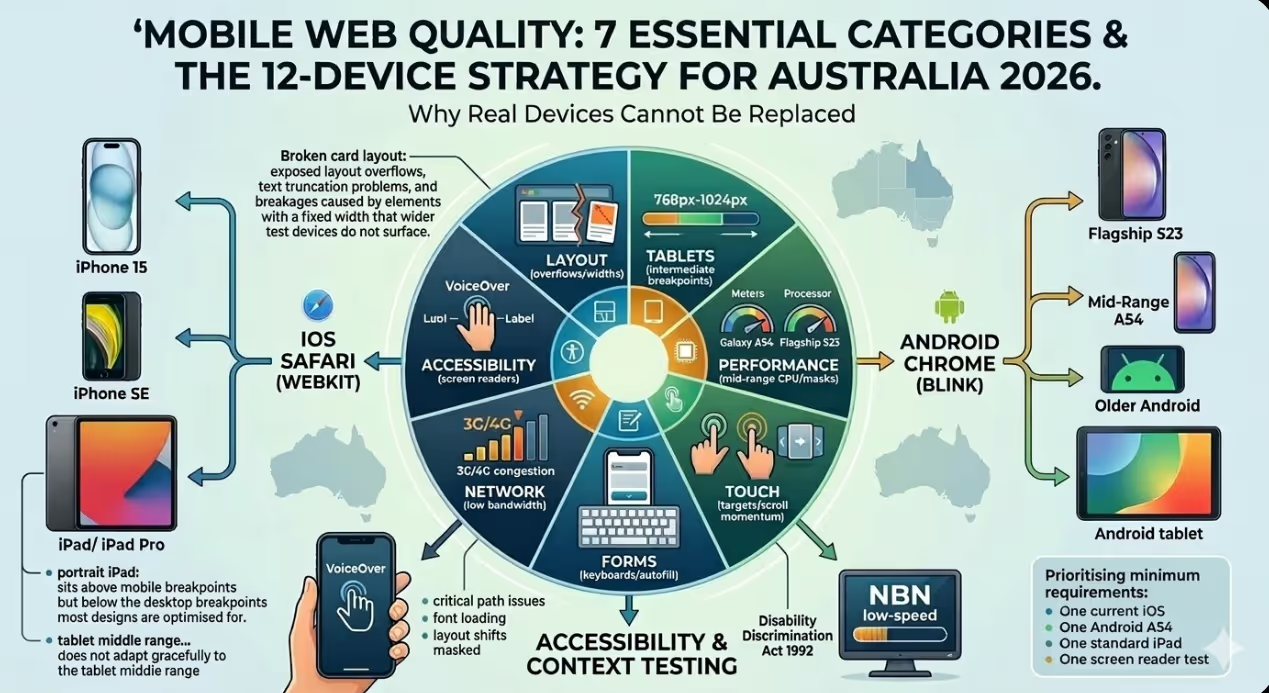
- Small screen devices, those with physical widths below 375 pixels, are still in active use in Australia and commonly expose layout overflows, text truncation problems, and breakages caused by elements with a fixed width that wider test devices do not surface.
- Tablet testing is neglected in most testing processes before launch. The 768-pixel to 1024-pixel range produces layout behaviours that are neither mobile nor desktop and often fall between the breakpoints the design system was built for.
- Performance testing on an Android device in that bracket provides a more representative view of actual performance for Australian website visitors than testing on a flagship device, because the flagship's superior CPU and memory hide performance problems that hardware in that segment exposes.
- Touch interaction testing must go beyond confirming that tappable elements respond to taps. It should verify that tap targets meet the minimum size requirements, that hover states do not create stuck or inaccessible states on touch devices, and that scroll and swipe interactions on carousels and modals behave correctly.
- Form testing on mobile devices deserves dedicated attention. The keyboard type summoned by each input field, the autocomplete and autofill behaviour, the visibility of form fields above the keyboard, and the behaviour of date and select inputs vary significantly across device and OS combinations.
Why Real Device Testing Cannot Be Replaced
The argument for skipping physical device testing almost always comes down to time and cost. Device testing takes longer than emulator checks, requires access to physical hardware, and adds a step to the launch process that feels like it can be deferred until issues emerge in the wild. The argument against skipping it is the cost of those issues: a layout break on a device used by a meaningful percentage of the site's audience, discovered after launch, requires a fix cycle that is slower and more disruptive than catching the same problem before the site goes live.
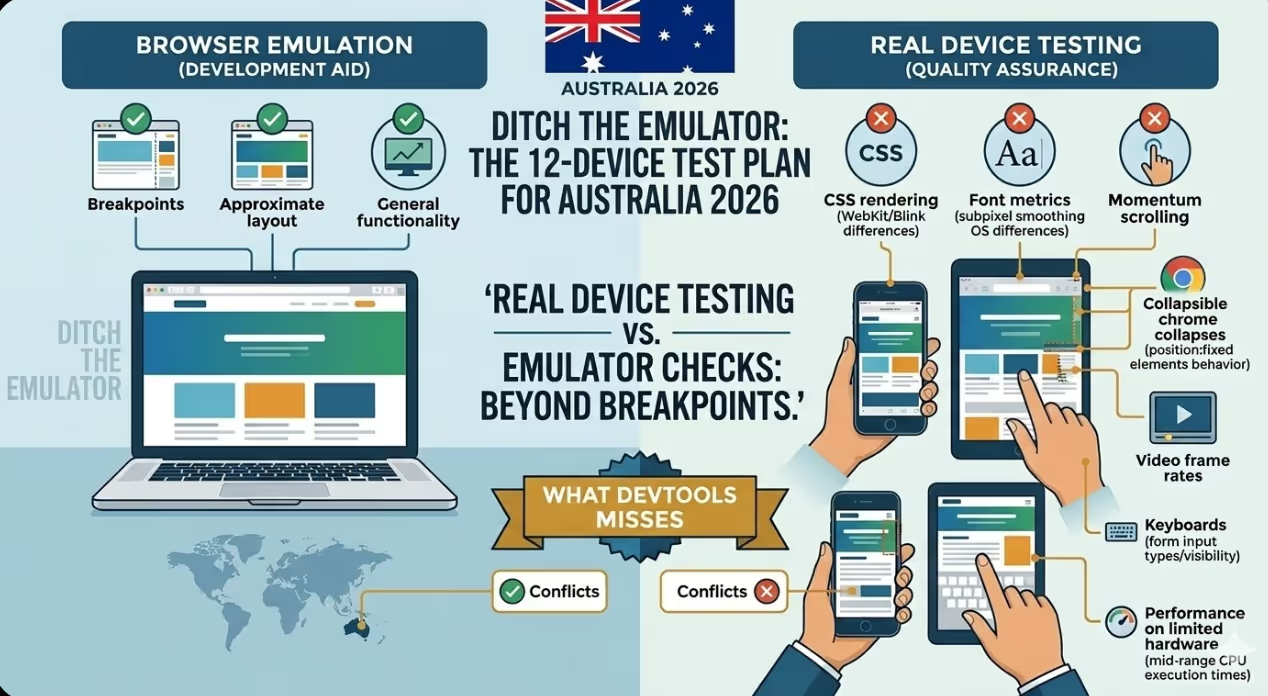
Chrome DevTools device emulation is built into the browser and works well for checking breakpoints and approximate layout during development. What it does not replicate includes the actual CSS rendering behaviour of WebKit (iOS Safari), the font rendering and subpixel smoothing differences between operating systems, the behaviour of position: fixed elements when the browser chrome collapses on scroll, the rendering of videos and animated elements at device frame rates, the behaviour of form inputs including the type of keyboard summoned and the positioning of the viewport above the keyboard, the performance profile of the JavaScript running on limited hardware, and the way the operating system's own UI elements interact with the page content.
These are not edge cases. Every category in the list above contains problems that appear on real devices but not in emulation, and several of them are failures that are immediately visible to users notice immediately.
The 12-Device Testing Set
Device 1: iPhone 15 or iPhone 16 (iOS Safari, Current OS)
The most current flagship iPhone running the most current iOS version tests the reference implementation of WebKit on the most capable hardware in the Apple ecosystem. This device establishes the baseline for iOS Safari behaviour, including the handling of the safe area insets on notch and Dynamic Island models, the behaviour of position: fixed elements when the browser chrome collapses, the rendering of custom fonts at Retina resolution, and the performance characteristics of interactions with heavy JavaScript on Apple Silicon.
Common failures found here: Safe area padding not applied correctly causing content to be obscured by the Dynamic Island or home indicator; CSS min-height: 100vh not accounting for the collapsible Safari chrome correctly; custom scroll behaviour conflicts with Safari's native momentum scrolling.
Device 2: iPhone SE (3rd generation or equivalent small screen iPhone)
The iPhone SE has a 4.7-inch screen with a 375-pixel logical width, the narrowest viewport in the current Apple lineup. Testing on this device surfaces layout problems that do not appear on the 390-pixel and wider viewports of current flagship iPhones. Many responsive layouts are designed and tested primarily at 390 pixels and above, leaving the narrower viewport unvalidated.
Common failures found here: Navigation elements overflowing or wrapping unexpectedly at 375 pixels; hero text that looks correct at 390 pixels becoming uncomfortably large at 375; card and grid layouts that break at the narrower viewport width.
Device 3: Android Flagship (Samsung Galaxy S23 or equivalent — Chrome)
The Android flagship running Chrome tests the Blink engine on capable hardware and provides the reference implementation for Android Chrome behaviour. Chrome on Android handles certain CSS features differently from Safari, including the behaviour of 100svh, the rendering of backdrop filters, and the treatment of some flexbox edge cases.
Common failures found here: CSS features that are supported in Safari but behave differently or not at all in Chrome on Android; video autoplay differences between the two engines; font rendering differences that require size adjustments.
Device 4: Mid-Range Android (Samsung Galaxy A54 or Pixel 6a equivalent)
An Android device in the affordable to mainstream price bracket with a processor of mainstream grade and 4 to 6 gigabytes of RAM provides the most commercially important performance test in the set. Google's own research consistently shows that the median Android device in markets including Australia is not a flagship, and the performance profile of a device in this segment exposes JavaScript execution times, main thread blocking, and Cumulative Layout Shift issues that a flagship masks.
Common failures found here: Slow JavaScript interactions that are imperceptible on flagship hardware but noticeably delayed on CPUs in this device class; animations that run at full frame rate on a flagship but drop frames on a device in this class; layout shifts occurring on slower resource loading.
Device 5: Older Android (Android 11 or 12 on a device 2 to 3 years old)
Australia has a long tail of older Android devices still in active use. Testing on a device running an older Android version and an older Chrome build catches rendering regressions, JavaScript API compatibility issues, and CSS feature support gaps that current hardware and software do not surface.
Common failures found here: CSS properties with insufficient browser support for the installed browser version; JavaScript features not available in older V8 engine versions without polyfills; rendering differences in how older Chrome handles certain animation and transition implementations.
Device 6: iPad (Standard 10th generation — Safari)
The standard iPad running iPadOS Safari tests the tablet viewport, a range that most responsive designs handle awkwardly. At approximately 810 pixels wide in portrait orientation, the iPad sits above mobile breakpoints but below the desktop breakpoints most designs are optimised for. Content that has been designed for a single column on mobile or a layout with multiple columns on desktop often looks unintentionally sparse or cluttered in the tablet range.
Common failures found here: Two-column grid layouts that look too wide at tablet viewport widths; navigation patterns designed for mobile or desktop that do not adapt gracefully to the tablet middle range; typography scales that jump too dramatically between mobile and desktop without a tablet-specific intermediate step.
Device 7: iPad Pro (12.9-inch — Safari)
The large iPad Pro in landscape orientation produces a viewport close to 1366 pixels wide, which falls within the desktop breakpoint range for most responsive designs. This device tests how the site behaves when a mobile browser engine (WebKit) renders what the CSS framework treats as a desktop layout, and it surfaces Safari-specific rendering issues that only appear at wider viewports.
Common failures found here: Desktop layouts that assume a mouse cursor for hover states, creating inaccessible interactions on a touch device at a desktop viewport width; sticky headers that behave differently on large touch screens; complex CSS grid implementations that render incorrectly in Safari at wide viewports.
Device 8: Android Tablet (Samsung Galaxy Tab S8 or equivalent — Chrome)
An Android tablet running Chrome tests the same tablet viewport range as the iPad but with the Blink engine rather than WebKit. Comparing results between Device 6 (iPad Safari) and this device isolates rendering differences specific to each engine at tablet viewports and confirms that layout adaptations at this breakpoint range work correctly across both major mobile engines.
Common failures found here: The same tablet range layout issues as the iPad, plus any Chrome-specific rendering differences at tablet viewports that do not appear on the iPad.
Device 9: iPhone on Low Bandwidth (iPhone with network throttling or on actual 3G/4G network)
Network performance testing on a real device under realistic network conditions is meaningfully different from Lighthouse scores measured on a fast desktop connection. Australian mobile users outside capital cities, in areas with congested networks, or during peak usage periods experience load times that desktop testing does not replicate.
Common failures found here: Critical rendering path issues that are not visible on fast connections; font loading and flash of invisible text problems at lower bandwidth; lazy loading implementations that cause layout shifts or interaction delays that fast connections mask.
Device 10: Samsung Internet Browser (on a Samsung Android device)
Samsung Internet is the default browser that comes installed on Samsung devices and has a meaningful share of Australian mobile browser traffic, particularly among users who have never changed their default browser. It uses its own fork of the Blink engine with some differences in CSS feature support, extension behaviour, and content blocking that produce occasional rendering and functionality differences compared to standard Chrome.
Common failures found here: Extensions and content blocking enabled by default in Samsung Internet affecting loading of scripts from third parties; minor rendering differences in how the Samsung Internet fork handles certain CSS selectors and animations; differences in how the browser handles payment and form autofill APIs.
Device 11: Firefox for Android
Firefox for Android uses the Gecko engine, the only major mobile browser engine that is neither WebKit nor Blink. While Firefox's share of Australian mobile traffic is small, testing on Gecko catches CSS and JavaScript issues specific to that engine and is particularly valuable for sites with a audience focused on technology where Firefox adoption is higher than average.
Common failures found here: CSS features supported in WebKit and Blink but with different behaviour in Gecko; JavaScript APIs with implementation differences specific to each engine; layout discrepancies specific to Gecko's rendering of flexbox, grid, or custom properties in certain configurations.
Device 12: A Device With Accessibility Features Enabled (VoiceOver on iOS or TalkBack on Android)
Testing with a screen reader active on a real device is qualitatively different from running automated accessibility checks or using accessibility inspection tools that run in the browser. It reveals how the site actually sounds and behaves when navigated by a screen reader user: whether interactive elements have meaningful labels, whether the reading order follows the visual layout as expected, whether modals and overlays trap focus correctly, and whether dynamic content updates are announced appropriately.
Common failures found here: Interactive elements with no accessible name; images with missing or meaningless alt text; modals that open but do not trap focus, allowing the screen reader to navigate behind the overlay; tab order that does not match the visual layout; dynamic content updates that are not announced via ARIA live regions.
FAQs
How should the device testing set be prioritised if time constraints require testing on fewer than 12 devices before launch
?If the full set cannot be tested, the prioritisation should be based on the site's likely audience composition and the risk profile of each device category. The mandatory minimum is: one current iOS Safari device (iPhone 15 or equivalent), one Android Chrome device from the affordable to mainstream bracket (the most commercially important performance test), one tablet (iPad standard), and the screen reader test on whichever platform the project team has access to. The iOS Safari and testing on an Android Chrome device from this segment alone will catch the majority of rendering and performance issues, and the tablet test catches the category most commonly skipped by development teams. The screen reader test is essential for any publicly accessible Australian website given the legal obligations under the Disability Discrimination Act 1992 and the technical standard referenced by it.
Are there automated testing tools that can reduce the need for manual physical device testing?
Automated tools including BrowserStack, Sauce Labs, and LambdaTest provide access to real device clouds where tests can be run remotely on physical hardware. For functional and visual regression testing, these platforms can cover a broad device set more efficiently than maintaining a physical device inventory. The limitation is that automated tools are more effective at catching specific known regressions than at discovering the unexpected interaction and rendering issues that manual testing on physical hardware tends to surface. The recommended approach for Australian web development teams is to use automated device cloud testing for regression coverage across a wide device set, supplemented by manual testing on the eight to twelve most important devices for quality assurance aimed at discovering new issues before launch. Manual testing cannot be fully replaced by automation for the screen reader test, for performance assessment under actual network conditions, or for the subjective assessment of interaction feel and visual quality that experienced testers provide.
How should Australian development teams document and track issues found during device testing?
Device testing findings should be logged in the project's issue tracker with the device name, operating system version, browser and version, a clear description of the visual or functional problem, a screenshot or screen recording, and a severity classification that indicates whether the issue is a blocker (preventing the site from launching), a high priority fix to be resolved before launch, or a item to be addressed after launch in the first sprint after going live. Severity classification prevents device testing from becoming a source of endless scope creep before launch: not every rendering difference is a blocker, and the ability to distinguish between a cosmetic inconsistency and a functional failure that impedes user completion of key tasks is an important part of a disciplined testing process before launch. All identified issues should be retested on the same device after the fix is applied, both to confirm resolution and to check that the fix has not introduced new problems on other devices in the set.
The Devices That Matter Are the Ones Your Audience Uses
A testing set is only valuable to the extent that it represents the actual device distribution of the site's audience. The twelve devices described in this article cover the major operating systems, browser engines, screen sizes, performance tiers, and accessibility use cases relevant to the Australian market in 2026. For sites with known audience characteristics that differ significantly from the general Australian market, the testing set should be adjusted accordingly. A government service site may need to add older Windows tablets and devices at the lower end of the market to the set. A luxury ecommerce site may find the flagship device testing more commercially important than the performance typical of more affordable hardware. The principle is the same regardless of the specific devices: test on the hardware and software that the audience actually uses, before launch rather than after.
Maven Marketing Co includes structured physical device testing as part of every web development project, covering the full 12-device set described in this article before every site launch.
Talk to the team at Maven Marketing Co →

Table of contents
read more blogs

Is Google Ads Better Than SEO for My Business
One of the biggest questions business owners ask when they are planning online growth is whether they should invest in Google Ads or SEO. Both are strong marketing plays that help your company show up in Google search results, but they do things in separate lanes. Google Ads gives quicker visibility and can bring in leads fast, whereas SEO more or less focuses on slow, steady organic traffic that tends to grow the longer you keep building it. Picking the right direction depends on what you want to achieve, how much money you can spend, how crowded the market is, and how quickly you need results, like sooner rather than later. The good news is you don’t always have to choose one or the other; it’s not exactly a black-and-white situation. If you take time to understand the strongest points of both, you can put together a more sensible digital marketing plan that supports consistent expansion. In this guide, we’ll compare Google Ads vs SEO, explain the main differences, and help you figure out what option makes the most sense for your business.

When Should I Hire a Digital Marketing Agency
Growing a business today takes more than just having a website or throwing a post on social media; customers usually search around online, compare providers, skim reviews, and basically expect the brand to show up with a solid digital presence before they even think about buying. Many businesses try to run their marketing themselves, but there comes a point when “doing it all in-house” becomes clunky and hard to manage, all at once. Knowing when to hire a digital marketing agency can end up making a big, real difference for your growth. If you’re not getting enough leads, or your online visibility feels stuck, or sales are just not moving, the right agency can bring the know-how, plus a clear plan, to help you get noticeably better outcomes. In this guide, we’ll dig into what a digital marketing agency actually does, the usual signs it’s time to bring one on, and how picking the right marketing partner can help your business move forward at a faster pace.

Why Is My Google Ads Budget Running Out So Quickly
Running a successful Google Ads budget isn’t only about throwing more money at it. It’s more like making every dollar, doing a bit extra. A lot of businesses start a Google Ads campaign with big hopes, then find out their daily budget is gone within a few hours, and that feels weird, right? After that, your ads stop showing effectively, new leads slip away, and your return on investment dips. So if your Google Ads budget is running out too fast, don’t stress. It’s a fairly common issue, and in most situations, it can be repaired with the right approach. There are multiple little things that can drain your advertising money quicker than you expected, from costly keywords to audience targeting that just doesn’t quite fit. In this guide, we’ll walk through why your budget disappears so quickly, how to cut wasteful spend, and the most reliable ways to boost your Google Ads ROI, even if your budget stays the same.


