
.svg)


%201.svg)

Key Takeaways
- Mandrill has fully transitioned into the Mailchimp Transactional API, requiring a standard Mailchimp account for access.
- Transactional emails are distinct from marketing emails, focusing on one-to-one, user-triggered communications like password resets and order confirmations.
- Proper domain authentication using SPF and DKIM is strictly required to ensure your transactional emails reach the inbox rather than the spam folder.
- If the Mailchimp ecosystem no longer suits your budget or technical requirements, several robust Mandrill alternatives offer seamless API integration.
- Partnering with an experienced marketing agency can streamline the technical setup and align your transactional messaging with your broader marketing strategy.
Whether you are running an e-commerce store, managing a custom web application or facilitating an online booking system, reliable email delivery is non-negotiable. For years, developers and marketers relied heavily on Mandrill to handle these critical, automated messages. However, since Mandrill was absorbed into the broader Mailchimp ecosystem and rebranded as the Mailchimp Transactional API, many Australian businesses have had to re-evaluate their technical setups.
This guide provides a comprehensive walkthrough on how to set up the Mailchimp Transactional API. We will also explore the landscape of Mandrill alternatives, ensuring you have the knowledge required to make the best infrastructure choices for your organisation.
Understanding the Shift from Mandrill to Mailchimp Transactional
To fully grasp the current landscape, it is helpful to look back at how Mandrill evolved. Originally, Mandrill operated as a standalone product tailored specifically for developers. It offered a generous free tier and a robust API designed purely for transactional email delivery.
A few years ago, Mailchimp made a strategic decision to consolidate its services. Mandrill was integrated directly into the Mailchimp platform and renamed the Mailchimp Transactional API. This transition meant that users could no longer use Mandrill as an independent service. Instead, access required a paid monthly Mailchimp marketing plan, with transactional email blocks purchased as an add-on.
This structural and pricing shift prompted many developers to search for a Mandrill alternative. However, for businesses already heavily invested in the Mailchimp ecosystem, sticking with the Mailchimp Transactional API remains a logical and powerful choice. It allows for centralised reporting, shared billing and a unified interface for both marketing campaigns and automated system alerts.
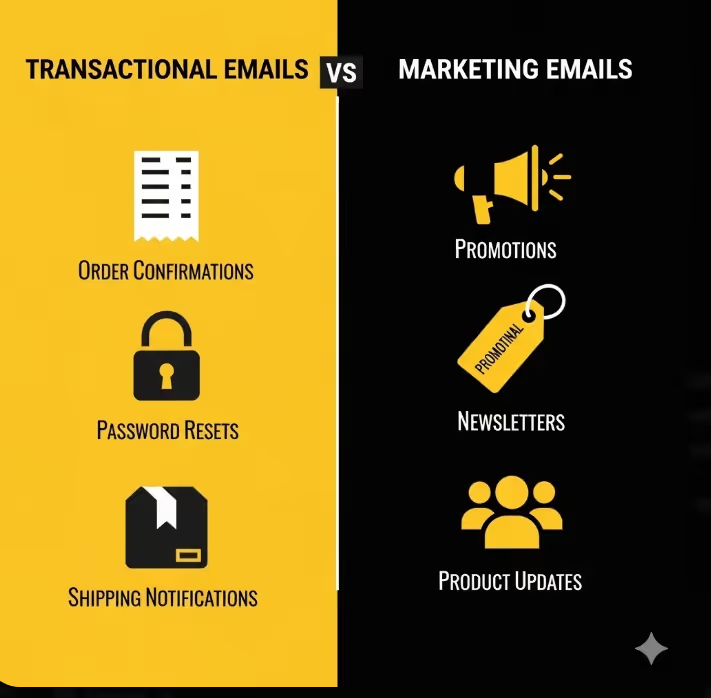
Transactional Emails vs Marketing Emails
Before diving into the technical setup, we need to clarify what qualifies as a transactional email. Understanding this distinction is vital because email service providers and spam filters treat these two categories very differently.
Marketing emails are commercial messages sent to a list of subscribers. These include weekly newsletters, promotional offers and product announcements. The primary goal is to drive sales or engagement, and recipients must explicitly opt-in to receive them under Australian privacy and anti-spam laws.
Transactional emails are one-to-one communications triggered by a specific user action. They contain critical information necessary to complete a transaction or manage an account. Common examples include:
- Order confirmations and digital receipts
- Password reset links
- Shipping notifications and tracking updates
- Account creation verifications
- Multi-factor authentication codes
Because these emails contain vital user information, they generally enjoy much higher open rates than marketing broadcasts. Consequently, ensuring they bypass the spam folder and land directly in the primary inbox is critical for customer satisfaction.
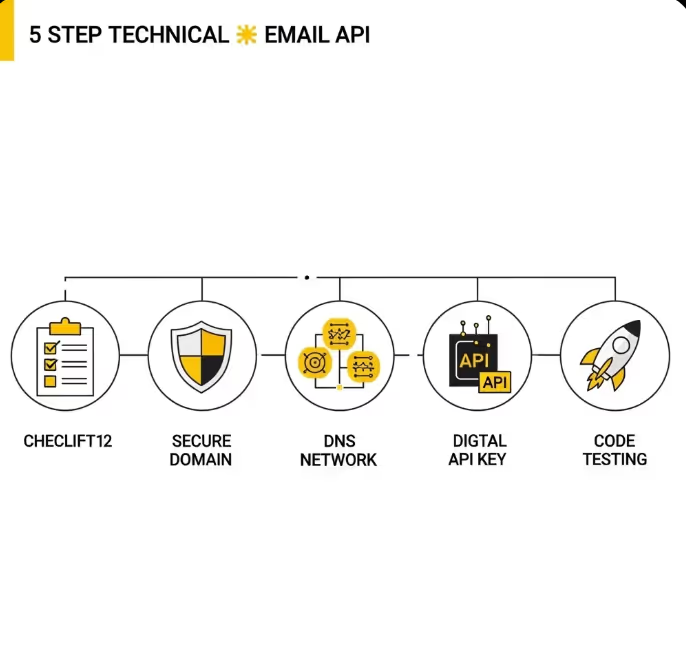
Step-by-Step Guide: Setting Up the Mailchimp Transactional API
If you have decided that the Mailchimp Transactional API is the right fit for your business, the setup process requires careful attention to detail. Skipping steps, particularly around domain authentication, will severely impact your deliverability.
Step 1: Prepare Your Mailchimp Account
Because the Transactional API is an add-on, you must first have an active, paid Mailchimp marketing account. Log into your Mailchimp dashboard and navigate to the monthly plans section to ensure your account meets the prerequisites.
Once your base plan is active, you can add the Transactional Email feature. Mailchimp sells transactional email credits in blocks, so you will need to estimate your monthly sending volume to purchase the correct tier.
Step 2: Add and Authenticate Your Sending Domain
This is the most critical step in the entire process. Internet Service Providers (ISPs) like Google, Microsoft and Yahoo need cryptographic proof that you actually own the domain you are sending emails from. Without this proof, your emails will be flagged as spoofed or fraudulent.
Navigate to the Settings section within your Mailchimp Transactional dashboard and select Domains. Add the domain you intend to send emails from. Mailchimp will then prompt you to authenticate the domain by adding specific records to your Domain Name System (DNS) settings.
Step 3: Configure SPF and DKIM Records
To authenticate your domain, you need to log into the platform where you manage your domain names (such as GoDaddy, Cloudflare or your local Australian web host) and update your DNS records.
You will need to configure two main protocols:
- SPF (Sender Policy Framework): This acts as a public guest list for your domain. It is a simple TXT record that tells the receiving email server which IP addresses and services are officially authorised to send emails on your behalf.
- DKIM (DomainKeys Identified Mail): This adds a digital signature to your emails. Mailchimp will generate a unique public key that you add as a TXT or CNAME record in your DNS. When an email is sent, the receiving server checks this key to ensure the email was not tampered with while in transit.
It is highly recommended to consult resources like the Cloudflare DNS documentation if you are unfamiliar with editing domain records. DNS propagation can take anywhere from a few minutes to 48 hours, so you may need to be patient before Mailchimp verifies the changes.
Step 4: Generate Your API Keys
Once your domain is successfully authenticated and displaying green verification ticks in the Mailchimp dashboard, you can generate your API keys.
Navigate to the Settings menu and select API Keys. Create a new key and give it a descriptive name, such as 'E-commerce Website Production Key'. Treat this API key like a highly sensitive password. If it is exposed in public code repositories, malicious actors can hijack your account to send spam, which will instantly ruin your domain reputation.
Step 5: Integration and Testing
With your API key in hand, you can begin integrating the service into your application. Mailchimp provides extensive official developer documentation with code wrappers for popular programming languages including PHP, Python, Ruby and Node.js.
Before pushing your integration to a live environment, use the test API keys provided by Mailchimp. This allows you to trigger emails and verify the payload structure without consuming your purchased email credits or risking your live sender reputation.
Exploring Mandrill Alternatives
If the requirement to hold a paid marketing plan just to access the API does not align with your business model, there are several dedicated Mandrill alternatives available. These platforms focus exclusively on application-driven email delivery.
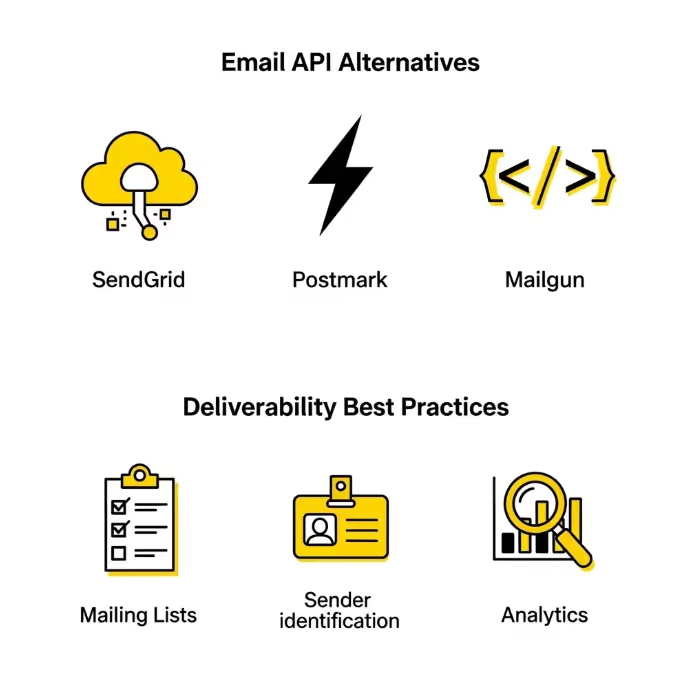
SendGridA massive player in the transactional space, SendGrid offers a highly scalable infrastructure. It provides excellent analytics and a robust set of APIs. It is a popular choice for enterprise-level applications that require sending millions of emails per month.
PostmarkPostmark is widely praised by developers for its incredibly fast delivery times. They enforce strict policies separating transactional and marketing emails into different messaging streams. This rigid separation ensures that marketing blasts never slow down the delivery of critical password resets or receipts.
MailgunDesigned heavily around developer experience, Mailgun offers advanced email routing, parsing and validation features. If your application needs to not only send emails but also receive and process incoming replies automatically, Mailgun provides excellent inbound routing capabilities.
When migrating to an alternative, the setup process is remarkably similar to the one outlined above. You will still need to verify your domain, configure your SPF and DKIM records, generate new API keys and update your application's code to point to the new service endpoint.
Best Practices for Transactional Email Deliverability
Successfully setting up the API is only the first phase. Maintaining high deliverability requires ongoing hygiene and strategic management.
Maintain Clean Mailing ListsEven with transactional emails, you will encounter bounces. Hard bounces occur when an email address no longer exists, while soft bounces happen when an inbox is temporarily full. You must configure your application to listen for these bounce webhooks and automatically remove invalid addresses from your database. Continuing to send emails to dead addresses will alert ISPs that you have poor data hygiene, negatively impacting your sender score.
Provide Clear IdentificationEnsure your 'From' name and address are instantly recognisable to the recipient. If a customer buys a product from 'Australian Surf Gear', the transactional email should come from receipts@australiansurfgear.com.au, not a generic address like noreply@company123.com.
Monitor Your AnalyticsThe Mailchimp Transactional API dashboard provides detailed insights into open rates, click-through rates and bounce metrics. Review these statistics regularly. A sudden drop in open rates for a password reset email usually indicates a deliverability issue that requires immediate technical investigation.
Why Partnering with an Agency Makes Sense
Configuring DNS records, managing API integrations and troubleshooting deliverability issues can quickly consume valuable internal resources. For many businesses, the technical intricacies of email infrastructure detract from their core operational focus.
Partnering with a dedicated marketing agency ensures that your transactional emails are not only technically sound but also aligned with your brand voice. Agencies possess the technical expertise to handle complex migrations between platforms, ensure strict adherence to authentication protocols and design responsive HTML email templates that look professional on any device.
By offloading this technical burden, your team can return their focus to product development and customer service, secure in the knowledge that your automated communications are functioning flawlessly.
Ready to Elevate Your Email Strategy?
Setting up a reliable transactional email system is the backbone of a seamless customer experience. Whether you need assistance configuring the Mailchimp Transactional API, migrating to a new alternative or overhauling your entire email marketing strategy, professional guidance makes all the difference.
Ensure your critical messages always reach the inbox. Partner with the experts at Maven Marketing Co to optimise your digital infrastructure and drive measurable results for your business.
Frequently Asked Questions
Why did Mandrill change its name and pricing structure?
Mailchimp integrated Mandrill into its core platform to offer a unified experience for both marketing and transactional emails. The rebranding to Mailchimp Transactional API and the requirement of a paid Mailchimp plan were introduced to consolidate their service offerings and billing systems under one roof.
Do I absolutely need to set up SPF and DKIM records?
Yes. Major email providers now mandate strict domain authentication to combat spam and phishing. If you fail to configure your SPF and DKIM records correctly, your transactional emails are highly likely to be rejected outright or sent directly to the recipient's junk folder.
Can I send marketing newsletters through the Transactional API?
Technically yes, but it is highly discouraged. Transactional infrastructure is optimised for rapid, one-to-one delivery. Mixing bulk promotional blasts with your critical system alerts can degrade your sender reputation and delay the delivery of important messages like password resets. It is always best to keep marketing and transactional streams separate.

Table of contents
read more blogs

How to Choose the Right Digital Marketing Channels for Your Business
Choosing digital marketing channels is one of the easiest places for businesses to lose clarity. There are more options than ever, every platform promises reach and results, and it is easy to assume that the best strategy is simply to be everywhere. In reality, most businesses do better when they choose channels with intention rather than spreading budget and effort too thinly.The right channel mix depends on where your audience spends time, how they search or discover solutions, what your business is trying to achieve and how much resource you actually have to support execution properly. A channel is only useful if it helps move the right people towards a commercial outcome that matters to the business.This is why strong digital marketing strategy is not really about finding one perfect platform. It is about understanding the role each channel can play across awareness, demand capture, conversion and retention. SEO might build long-term visibility, Google Ads might capture active intent, social media might support familiarity and reach, while email may help nurture prospects and strengthen customer value over time.This guide explains what digital marketing channels are, how to assess them properly and how to build a balanced channel mix for your business. The focus is practical. Rather than chasing every new platform, the goal is to help you choose the channels that fit your audience, goals, budget and internal capability.

How to Build a Customer Journey Map for Your Digital Marketing Strategy
A strong digital marketing strategy is not just about channels, creative or traffic. It is about understanding how real people move from first awareness through to enquiry, purchase and ongoing loyalty. That is exactly why customer journey mapping matters.Without a clear view of the journey, businesses often optimise in fragments. They improve the website without thinking about the ad that drove the visit, produce content without considering where the audience is in the decision process, or judge conversion performance without understanding the friction points that sit earlier in the experience.A customer journey map helps you step back and see the bigger picture. It shows the stages people move through, the touchpoints they interact with, the questions they ask, the barriers they face and the moments where your marketing can either help or lose them.This guide explains how to build a practical customer journey map for your digital marketing strategy, what information to include, how to use the map to improve performance and which common mistakes to avoid. The goal is not to create a pretty workshop artefact that gets forgotten. It is to build a working tool that improves messaging, user experience, channel decisions and conversion outcomes.

Why Your Google Ads Campaign Is Not Getting Results: Common Mistakes and Solutions
If your Google Ads campaign is getting impressions or clicks but not producing enough enquiries, sales, or qualified leads, the problem is usually not Google Ads itself. It is more often a strategy, tracking, or conversion issue somewhere in the system.That matters because paid search can look busy without being commercially effective. You can have traffic coming in, a reasonable click-through rate and money leaving the account every day, yet still have very little to show for it if your keywords are weak, your ad copy is misaligned, your landing pages do not convert or your tracking is incomplete.A strong campaign works as one connected chain. Search intent, keyword targeting, ad relevance, bidding, landing-page experience, and conversion tracking all need to support the same commercial outcome. If one link breaks, results usually suffer quickly.This guide explains the most common reasons a Google Ads campaign is not getting results, what those issues normally look like in practice and how to fix them without relying on guesswork. The focus is not on vanity metrics. It is on improving lead quality, conversion rate, and return on spend.


