
.svg)


%201.svg)

Key Takeaways
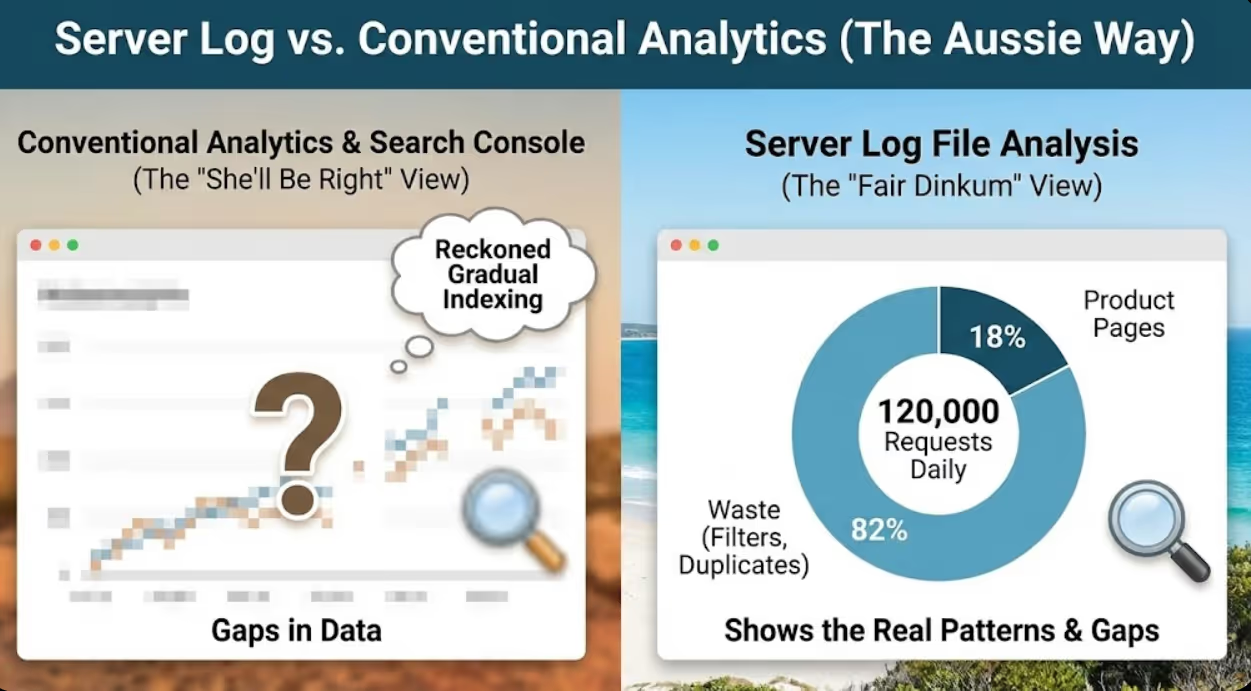
- Log file analysis reveals actual search engine crawling behaviour by examining server records of every Googlebot and Bingbot request, exposing gaps between intended and actual crawling patterns that conventional analytics cannot detect
- Crawl budget waste through excessive crawling of filtered URLs, faceted navigation combinations, session parameters, and duplicate content variations prevents search engines from discovering and indexing high-value product and category pages
- Systematic log analysis identifies specific crawl budget problems including spider traps, infinite crawl spaces, redirect chains, slow-loading pages, and server errors that prevent efficient crawling even when pages are technically accessible
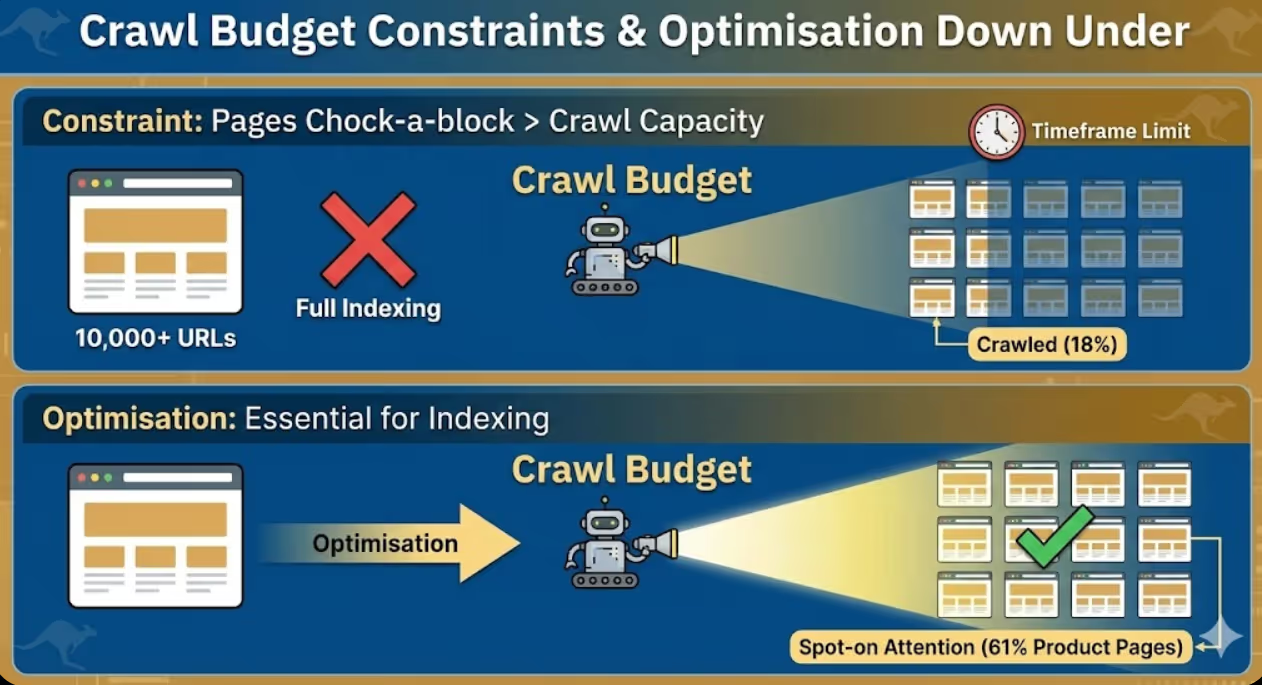
- E-commerce sites with 10,000+ URLs benefit most from log file analysis because crawl budget constraints prevent complete site crawling, making optimisation essential for ensuring important pages receive adequate attention
- Log file analysis complements rather than replaces traditional SEO audits by providing crawling perspective that page-level analysis, link audits, and content reviews don't capture about how search engines actually interact with websites
A fashion e-commerce site with 15,000 product pages experienced frustrating indexing problems despite following SEO best practices. Only 8,000 pages appeared in Google's index according to Search Console despite proper XML sitemaps, clean internal linking, and no obvious technical blocks. The marketing director assumed Google was gradually indexing the remaining catalogue and waited six months without significant improvement.
Log file analysis revealed the actual problem. Googlebot was making 45,000 crawl requests daily to the website but only 12% of those requests targeted actual product or category pages. The remaining 88% crawled faceted navigation URLs with filter combinations creating millions of possible URL variations, paginated archive pages with endless page depth, session parameter variations from improperly configured tracking, and redundant crawls of already-indexed pages. Googlebot exhausted its crawl budget on low-value URLs before adequately crawling the product catalogue.
The analysis identified specific waste patterns including 2,300 URLs with colour and size filter combinations that generated duplicate content, pagination extending to page 847 despite inventory supporting only 12 meaningful pages, session IDs appended to every URL creating infinite variations of identical content, and excessive crawling of old blog archive pages that hadn't updated in years.
Implementation of targeted fixes including robots.txt directives blocking filter parameter crawling, canonical tags on pagination sequences, URL parameter handling in Search Console, and strategic use of noindex on infinite crawl spaces reduced wasteful crawling by 73%. Within four weeks, Googlebot requests shifted toward product pages with 68% of crawls now targeting revenue-generating catalogue pages. Indexed page count increased from 8,000 to 13,200 within eight weeks. Organic traffic increased 34% as previously undiscovered products began ranking.
The transformation didn't require new content, additional links, or complete site rebuilds. It required understanding precisely how search engines were wasting crawl budget and implementing specific technical optimisations that log file analysis revealed.
According to research from Screaming Frog, 47% of URLs crawled by Googlebot on typical e-commerce sites generate no organic traffic, demonstrating substantial crawl budget waste on pages that contribute nothing to search visibility or business outcomes.
Understanding Log Files and Crawl Budget
Log file analysis requires foundational understanding of what server logs contain, what crawl budget means, and why these concepts matter for e-commerce SEO.
Server log files record every HTTP request made to web servers including requests from real users, search engine crawlers, malicious bots, and monitoring services. Log entries typically include timestamp showing exactly when requests occurred, IP address identifying the request source, user agent string identifying the browser or bot making the request, requested URL showing what was accessed, HTTP status code indicating whether requests succeeded or failed, response time revealing how long the server took to respond, and referrer information showing where requests originated from. These records provide complete visibility into server traffic that website analytics platforms like Google Analytics cannot replicate because analytics only tracks visitors who load tracking scripts whilst log files capture all requests including those from bots, failed requests, and visitors with JavaScript disabled.
Crawl budget definition describes the number of pages search engines will crawl on a website within a given timeframe, determined by crawl rate limits preventing server overload and crawl demand reflecting how much search engines want to crawl the site based on perceived quality and update frequency. Google doesn't publish exact crawl budget allocations for specific websites but research indicates that established e-commerce sites might receive 10,000 to 100,000 Googlebot requests daily depending on site size, authority, and update patterns. Crawl budget matters most for large websites where total URL count exceeds what search engines will crawl within reasonable timeframes, creating competition between pages for limited crawling resources. Small websites with fewer than 1,000 pages rarely face crawl budget constraints because search engines can efficiently crawl complete sites regularly without resource limitations.
Googlebot crawling behaviour follows patterns that log analysis reveals. Googlebot typically crawls more frequently during daytime US hours when Google's infrastructure processes most crawling workload, increases crawling when sites publish fresh content or acquire new links signalling value, reduces crawling when sites serve errors or slow responses indicating technical problems, respects robots.txt directives blocking specific URLs or directories from crawling, and follows both discovered links and submitted sitemap URLs with varying priority based on perceived importance. Understanding these patterns enables interpretation of log data revealing whether Googlebot behaviour indicates healthy crawling or problematic patterns requiring intervention.
Crawl efficiency metrics quantify how effectively search engines use crawl budget on your site. Key metrics include percentage of crawls targeting important pages versus low-value URLs, average server response time for bot requests indicating whether performance issues limit crawling, ratio of crawled pages to indexed pages revealing whether crawls lead to indexing, HTTP error rates showing how often bots encounter broken pages, and crawl depth distribution indicating whether bots reach deep catalogue pages or concentrate on shallow site levels. E-commerce sites should aim for 70%+ of crawl budget allocated to revenue-generating product and category pages rather than technical artefacts and duplicate content.
Log file formats vary by web server software with Apache using Common Log Format or Combined Log Format, Nginx using similar formats with minor variations, IIS using W3C Extended Log Format with tab-separated fields, and CDNs including Cloudflare providing logs through dashboards or API access with platform-specific formatting. Understanding your specific log format enables correct parsing and analysis without misinterpreting field meanings that differ between formats.
Crawl budget waste indicators that log analysis identifies include high crawl volume on URLs generating no organic traffic indicating wasted effort on pages that don't rank, excessive crawling of parameter variations creating duplicate content concerns, crawl concentration on non-indexable pages including blocked or noindexed URLs, significant crawls of redirect chains where bots waste requests following multiple redirects, and repeated crawls of unchanged pages without updated content. These patterns reveal specific optimisation opportunities that conventional SEO audits examining only indexable page content cannot identify.
Log File Analysis Tools and Setup
Systematic log analysis requires appropriate tools for processing large log files and extracting meaningful crawling insights.
Screaming Frog Log File Analyser provides the most accessible commercial tool for SEO professionals without requiring programming skills. The tool imports server logs, filters Googlebot and Bingbot requests, visualises crawling patterns through charts and graphs, identifies crawl budget waste through automated analysis, and integrates with Screaming Frog's spider data connecting crawl patterns to site architecture. Pricing starts at approximately $260 AUD annually for the SEO Spider licence including log analysis capabilities. SEO professionals can analyse logs from multiple client sites through single licence, making it cost-effective for agencies serving e-commerce businesses.
Botify offers enterprise-grade log analysis with advanced crawl budget optimisation recommendations, historical trend analysis tracking changes over time, custom segmentation analysing specific site sections independently, and automated alerting when crawl patterns change significantly. Botify pricing is enterprise-focused typically starting around $7,000 USD annually making it appropriate for large retailers with substantial SEO budgets rather than small to medium e-commerce businesses. The platform provides more sophisticated analysis than Screaming Frog but requires proportionally larger investment justifying the additional insight depth.
OnCrawl provides mid-market log analysis balancing sophisticated capabilities with more accessible pricing than enterprise platforms. Features include log file monitoring tracking crawling trends continuously, crawl budget allocation analysis revealing how bots distribute attention, page segmentation understanding crawl patterns by template type, and SEO impact correlation connecting crawl changes to organic traffic shifts. OnCrawl suits e-commerce businesses with 10,000 to 100,000 products requiring professional log analysis without enterprise budget requirements.
Custom Python scripts enable technical SEO specialists to build tailored log analysis workflows processing specific patterns relevant to individual websites. Python libraries including pandas for data manipulation, matplotlib for visualisation, and regex for pattern matching enable custom analysis that commercial tools may not support. Businesses with technical teams can develop internal log analysis capabilities processing logs through custom scripts rather than licensing commercial platforms, though this approach requires substantial technical investment that most e-commerce businesses should avoid unless they have existing Python expertise.
Google BigQuery and Data Studio provide free analysis options for technically capable users willing to invest setup time. BigQuery can import and query large log files using SQL enabling sophisticated analysis without commercial tool costs, whilst Data Studio visualises results through customisable dashboards. This approach requires more technical skill than commercial tools but eliminates software licensing costs for businesses with limited SEO budgets willing to invest technical expertise.
Server log access methods vary by hosting provider with some providing direct FTP or SSH access to raw log files, others offering control panel downloads through cPanel or Plesk interfaces, and CDNs including Cloudflare requiring API calls or dashboard downloads. E-commerce businesses should verify log access and format before selecting analysis tools because not all hosting environments provide easily accessible logs. Managed WordPress hosting platforms sometimes restrict log access requiring coordination with hosting support to obtain necessary files.
Log retention considerations require adequate storage for the 30 to 90 days of historical logs that meaningful trend analysis requires. Large e-commerce sites can generate gigabytes of log data daily making long-term retention expensive without compression and archive strategies. Businesses should implement log rotation policies archiving older logs whilst maintaining recent data accessibility, compress logs reducing storage requirements, and establish clear retention policies balancing analysis needs against storage costs.
Crawl Budget Analysis Methodology
Systematic analysis methodology ensures e-commerce businesses extract actionable insights from log data rather than getting lost in overwhelming raw information.
Step 1: Log file collection involves downloading recent server logs covering at least 30 days to capture complete crawling patterns rather than anomalous single-day snapshots. Longer historical periods enable trend identification revealing whether current crawl patterns represent normal behaviour or recent changes requiring investigation. Businesses should collect logs before beginning analysis rather than attempting real-time analysis that misses historical context essential for pattern interpretation.
Step 2: Bot identification and filtering separates search engine crawler requests from user traffic and other bot types enabling focused analysis of search engine crawling specifically. Key bots to analyse separately include Googlebot for Google search crawling, Bingbot for Microsoft search, and GoogleOther for Google services beyond search including Google AdSense and Merchant Centre. Filter out non-search bots including malicious scrapers, monitoring services, and SEO tools to prevent noise overwhelming search engine crawler analysis. Verify bot identification using reverse DNS lookup because user agents can be spoofed whilst IP addresses are more reliable bot identifiers.
Step 3: Crawl volume segmentation categorises crawled URLs by template type, importance level, and indexability status. Segment product pages separately from category pages, blog posts, filters and faceted navigation, pagination, search results pages, and account or checkout pages. Calculate crawl percentage for each segment revealing whether Googlebot allocates budget proportionally to business value or wastes resources on low-value page types. E-commerce businesses should aim for product pages receiving 40% to 60% of crawl budget, category pages 15% to 25%, and remaining segments consuming less than 40% combined.
Step 4: Response code analysis identifies how frequently bots encounter errors, redirects, and successful responses. High error rates including 404 not found, 410 gone, and 500 server errors indicate technical problems wasting crawl budget on broken pages rather than discovering working content. Excessive redirects including 301 permanent and 302 temporary redirects suggest inefficient crawl paths where bots follow multiple hops rather than reaching destination pages directly. Successful 200 OK responses should represent 85%+ of bot requests with errors and redirects minimised through technical cleanup.
Step 5: Crawl depth analysis reveals how far into site structure search engine bots penetrate. Calculate click depth from homepage for all crawled URLs determining whether deep catalogue pages receive adequate crawling or whether bots concentrate on shallow levels. E-commerce sites with important products buried at depth 5 or 6 clicks from homepage often find those pages receive inadequate crawling compared to shallow pages at depth 2 or 3. Businesses should flatten architecture ensuring all important products reach within 3 clicks from homepage maximising crawl accessibility.
Step 6: Server performance correlation connects crawl patterns to server response times revealing whether performance issues limit crawling. Slow-loading pages may receive less frequent crawling because search engines allocate less time to poorly performing sites. Average response time for bot requests should be under 200 milliseconds for optimal crawling with responses over 500 milliseconds potentially triggering crawl rate reductions. E-commerce sites on shared hosting or underpowered servers may find performance limiting crawl budget more than technical SEO factors.
Step 7: Temporal pattern analysis identifies when crawling occurs revealing whether traffic spikes during bot visits affect site performance or whether scheduling opportunities exist for resource-intensive maintenance. Most sites see increased Googlebot activity during US daytime hours when Google's crawling infrastructure is most active. Businesses can schedule maintenance, backups, and batch processing during low crawl periods minimising interference with search engine access.
Step 8: Change detection compares current crawling patterns to historical baselines identifying significant shifts that may indicate problems or improvements. Sudden crawl volume decreases suggest technical issues, server blocks, or quality concerns reducing Googlebot's interest. Unexpected increases may indicate algorithm updates, penalty recovery, or positive quality signals attracting additional crawling. Businesses should investigate significant changes rather than assuming stable patterns persist indefinitely without monitoring.
Common Crawl Budget Problems for E-commerce
Specific crawl budget problems affect e-commerce sites with patterns that log analysis exposes and targeted optimisations resolve.
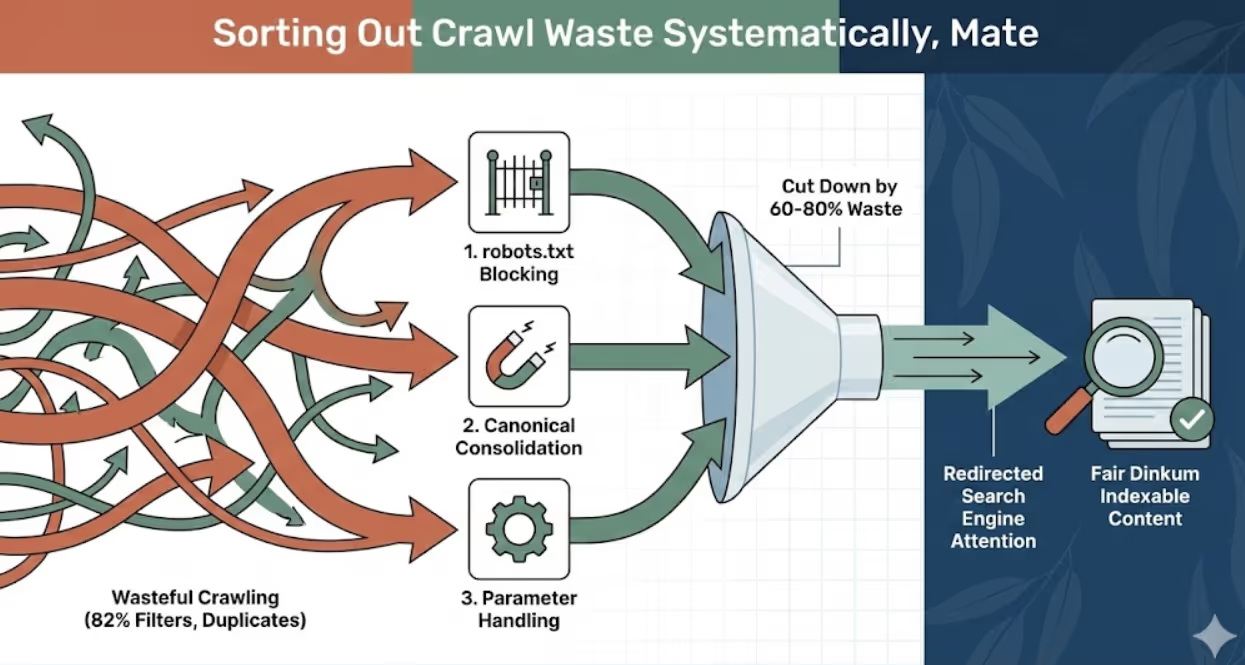
Faceted navigation crawl waste occurs when search engines discover and crawl every possible filter combination creating millions of URLs from thousands of actual products. A catalogue with 5,000 products filtered by brand (50 options), colour (20 options), size (15 options), and price ranges (10 options) creates 75 million possible URL combinations despite containing only 5,000 unique products. Googlebot wastes enormous crawl budget attempting to process these variations rather than focusing on product detail pages. Solutions include robots.txt blocking filter parameter crawling, canonical tags on filtered pages pointing to unfiltered category pages, URL parameter handling in Search Console instructing Google how to handle filters, and noindex meta tags on filtered combinations preventing indexing of duplicate content.
Infinite pagination exhausts crawl budget when archive or category pages paginate indefinitely allowing endless page=N URLs without natural stopping points. E-commerce sites with paginated categories sometimes extend to page 200 or higher despite inventory supporting only 15 meaningful pages when displayed at reasonable products-per-page counts. Googlebot follows pagination discovering progressively less valuable pages until exhausting allocated budget or reaching arbitrary limits. Solutions include rel=next/prev tags indicating pagination relationships, View All pages providing non-paginated alternatives for crawler access, strategic pagination limits preventing infinite sequences, and noindex on deep pagination pages beyond useful content.
Session ID and tracking parameter pollution creates duplicate URLs when session identifiers, analytics parameters, or UTM tags append to every link generating distinct URLs for identical content. Sites with sid=12345 parameters creating separate URLs for each visitor session force search engines to crawl thousands of duplicate variations. Solutions include removing session IDs from URLs using cookies instead, configuring UTM parameters to avoid URL appending, implementing canonical tags self-referencing clean URLs, and using URL parameter handling to instruct search engines which parameters to ignore.
Old blog archive crawl concentration wastes budget when Googlebot repeatedly crawls historical blog posts that haven't updated in years whilst neglecting current product pages. Some e-commerce sites find 30% to 40% of Googlebot requests target blog archives from years earlier despite blogs existing primarily for SEO rather than ongoing reader engagement. Solutions include pruning outdated content that no longer serves SEO or user purposes, consolidating thin blog posts into comprehensive resources, implementing strategic internal linking deemphasising old content, and using crawl directives to deprioritise historical archives that don't warrant continued crawling attention.
Homepage and category overcrawling occurs when search engines repeatedly crawl frequently-changing pages consuming disproportionate budget relative to their inventory of unique content. Homepage crawls make sense for detecting site-wide changes but excessive crawling of unchanged category pages wastes resources better allocated to product pages. Sites sometimes find homepage receiving 8% to 12% of total crawl budget despite representing single page of thousands in the catalogue. Solutions include reducing update frequency signals through appropriate cache headers, serving 304 Not Modified responses when content hasn't changed, and strategic sitemap priorities deemphasising overcrawled pages.
Mobile and desktop duplicate crawling wastes budget when sites maintain separate mobile URLs without proper annotations causing both versions to receive full crawling. Sites using m.example.com mobile subdomains or separate mobile URLs sometimes find Googlebot crawling both versions despite them containing identical content. Solutions include implementing responsive design serving single URLs across devices, adding proper alternate and canonical annotations when separate mobile URLs are necessary, and consolidating to single URL structure eliminating redundant crawling entirely.
Redirect chain inefficiency consumes multiple crawl requests for single destination pages when URLs redirect through multiple intermediates before reaching final content. Sites that have migrated platforms, changed site structures, or accumulated technical debt sometimes have /old-url redirecting to /intermediate-url redirecting to /new-url requiring three bot requests to reach destination that should take one. Solutions include auditing and flattening redirect chains connecting source URLs directly to final destinations, updating internal links to point directly to current URLs rather than redirecting versions, and regular redirect maintenance preventing chain accumulation over time.
Implementing Crawl Budget Optimisations
Translating log analysis insights into specific technical optimisations improves crawl efficiency and ensures search engines prioritise important content.
Robots.txt strategic blocking prevents search engines from wasting resources on administrative pages, filter combinations, and low-value URLs that don't warrant indexing. Blocking patterns should include user account pages and checkout flows not appropriate for public indexing, faceted navigation parameter patterns creating duplicate content, internal search result pages, development and staging directories, and plugin directories for WordPress sites. E-commerce businesses should carefully test robots.txt changes because overly aggressive blocking can accidentally prevent crawling of important pages requiring precise pattern matching rather than broad blocking.
Canonical tag implementation consolidates crawl attention from duplicate variations to preferred canonical versions. Implement self-referencing canonicals on preferred URLs confirming their canonical status, cross-reference canonicals on duplicate variations including filtered, paginated, and parameter versions pointing to canonical versions, and monitor Search Console canonical reporting confirming Google respects declared canonicals rather than selecting different versions. Canonical tags don't prevent crawling of duplicate URLs but indicate which versions deserve indexing attention reducing crawl budget waste on non-canonical variations.
URL parameter handling in Google Search Console instructs Googlebot specifically how to handle query parameters reducing unnecessary crawling of parameter variations. Configure parameters indicating whether they change page content requiring crawling or only affect display without content changes, specify whether parameters narrow, sort, paginate, translate, or track content, and let Search Console representatives crawl example URLs confirming proper parameter handling. This configuration significantly reduces crawl waste from parameter variations that log analysis identifies as consuming disproportionate budget.
Strategic noindex implementation prevents search engines from indexing low-value pages whilst still allowing crawling for link discovery. Apply noindex to filtered category combinations creating duplicate content, thin paginated pages beyond meaningful content depth, tag archives generating minimal unique value, and search result pages from internal site search. Businesses should use noindex rather than robots.txt blocking when pages contain links to important content requiring discovery despite the pages themselves not warranting indexing.
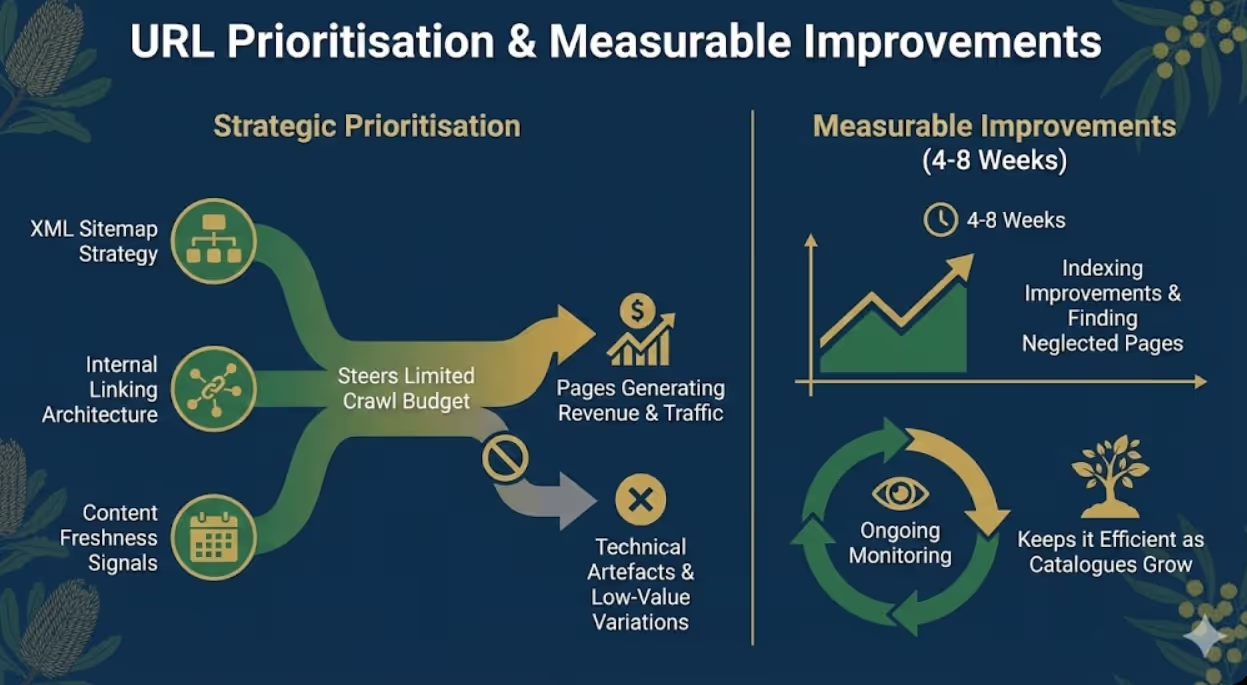
XML sitemap optimisation prioritises important pages through strategic inclusion and priority signals. Include only indexable pages in sitemaps excluding noindexed and blocked URLs, structure sitemaps hierarchically with separate files for products, categories, and other template types, update sitemaps immediately when content changes rather than on fixed schedules, and use lastmod dates accurately reflecting actual content updates rather than irrelevant template changes. Well-optimised sitemaps complement crawl efficiency by directing search engines toward important content rather than leaving discovery to random crawling.
Internal linking architecture improves crawl depth penetration ensuring important deep-catalogue pages receive adequate attention. Implement strategic internal linking from high-crawl pages to important deep pages, create hub pages linking to important product collections requiring visibility, maintain reasonable link counts per page avoiding excessive linking that dilutes value, and audit orphan pages lacking internal links that prevents discovery entirely. E-commerce sites should ensure all important products reach within 3 clicks from homepage through strategic internal linking architecture.
Server performance optimisation increases crawl rate capacity by reducing response times enabling search engines to crawl more pages within allocated timeframes. Optimisations include implementing server-side caching serving frequent requests from cache, upgrading hosting resources when current servers cannot handle load, optimising database queries reducing page generation time, implementing CDN for static assets, and monitoring server response times specifically during crawler visits. Faster-loading sites receive proportionally more crawling attention because search engines can process more URLs within equivalent timeframes.
Monitoring and Ongoing Management
Crawl budget optimisation requires ongoing monitoring rather than one-time analysis because website changes and search engine algorithm updates continuously affect crawling patterns.
Monthly log analysis cadence identifies developing problems before they significantly impact organic visibility. Monthly reviews comparing current crawl patterns to historical baselines reveal whether recent changes affected crawling positively or negatively, whether crawl budget waste increased or decreased, and whether new problem patterns emerged requiring attention. E-commerce businesses should establish regular log review schedules rather than only analysing logs when obvious problems occur.
Search Console crawl stats integration supplements log file analysis with Google's perspective on crawling activity. Search Console crawl stats reporting provides Google's view of crawl requests, response times, and availability issues whilst log analysis provides server-level detail Google doesn't share. Comparing both datasets ensures comprehensive understanding of crawling behaviour from both website and search engine perspectives.
Automated alerting systems notify teams when crawling patterns change significantly without requiring manual monitoring. Alerts for sudden crawl volume decreases, error rate increases, new URL pattern discoveries, or performance degradation enable rapid response rather than delayed problem detection through periodic reviews. Businesses can implement monitoring through custom scripts, commercial tools, or Google Analytics events tracking unusual crawling behaviour.
Seasonal pattern documentation establishes baselines for expected crawling variations during sales periods, holiday seasons, and inventory changes. E-commerce sites typically see crawl pattern changes during major sales when inventory updates frequently and during low seasons when content changes infrequently. Understanding normal seasonal variation prevents misinterpreting expected patterns as problems requiring intervention.
Frequently Asked Questions
How can e-commerce businesses access their server log files if their hosting provider doesn't provide obvious log access?
Log file access methods vary significantly by hosting type with shared hosting typically providing control panel access through cPanel or Plesk where logs appear in "Raw Access Logs" or similar sections, VPS and dedicated servers providing direct file access through SSH or FTP to /var/log/apache2/ or /var/log/nginx/ directories depending on web server software, managed WordPress hosting requiring support ticket requests because many managed hosts restrict direct log access, and CDN-fronted sites including those using Cloudflare requiring CDN dashboard or API access for request logs that may replace or supplement origin server logs. Businesses using hosting without clear log access should contact hosting support requesting log files or log access instructions because most hosts can provide logs even when direct access isn't available through standard interfaces. If current hosting cannot provide logs, businesses should consider hosting migration to providers supporting proper log access because log analysis is essential for technical SEO on large sites.
What minimum website size or page count makes log file analysis worthwhile for e-commerce businesses?
Log file analysis delivers meaningful return on investment for e-commerce websites with approximately 5,000+ pages where crawl budget constraints begin affecting indexing completeness. Sites below this threshold typically achieve complete regular crawling by search engines without optimisation because crawl budget allocations exceed total URL counts. However, exceptions exist where smaller sites experience crawl budget issues including WordPress sites with excessive plugin-generated URLs, sites with significant duplicate content creating crawl waste, sites on slow hosting limiting crawl rate, and sites receiving minimal external links reducing crawl demand. Businesses with 1,000 to 5,000 pages should perform initial log analysis to confirm whether crawl budget issues exist before committing to regular analysis. Sites above 10,000 pages almost certainly benefit from systematic log analysis because crawl budget constraints virtually always affect sites of this scale creating optimisation opportunities that analysis reveals.
How do businesses interpret log file data showing Googlebot crawling thousands of URLs that aren't in their XML sitemap?
Googlebot discovering and crawling URLs not included in XML sitemaps is normal behaviour because sitemaps represent recommended crawl targets whilst search engines also discover URLs through internal links, external backlinks, and previous crawl sessions where discovered links were stored. However, excessive crawling of non-sitemap URLs compared to submitted sitemap URLs suggests crawl budget problems where Googlebot prioritises discovered URLs over sitemap recommendations. Common causes include internal linking to low-value URLs giving them prominence search engines follow, external links to parameter variations or old URLs requiring redirect cleanup, filter and faceted navigation creating discoverable URL combinations, and session parameters or tracking codes creating URL variations through links users share. Businesses should analyse specifically which non-sitemap URLs receive crawling determining whether they represent legitimate pages accidentally excluded from sitemaps requiring inclusion, or low-value variations requiring technical optimisation preventing continued crawling waste.
Should e-commerce sites block Bingbot or other secondary search engine crawlers to preserve crawl budget for Googlebot?
Blocking secondary search engine crawlers to preserve server resources for Googlebot is rarely beneficial and often counterproductive because different search engine crawlers operate independently with separate crawl budgets that don't compete, server resource consumption from multiple bots is typically negligible compared to user traffic, and secondary search engines generate valuable traffic that complete blocking sacrifices unnecessarily. Bing represents approximately 5% to 10% of Australian search traffic making it meaningful supplementary source businesses should not ignore. Rather than blocking secondary crawlers entirely, optimise crawl efficiency for all search engines through technical improvements including robots.txt for low-value content, canonical tags for duplicates, faster server response times, and strategic internal linking. If server resources truly cannot support multiple bots which is rare for modern hosting, prioritise rate limiting rather than complete blocking preserving some secondary search engine access whilst protecting server capacity.
How long after implementing crawl budget optimisations should e-commerce businesses expect to see indexing improvements?
Indexing improvements following crawl budget optimisation typically appear within 4 to 8 weeks as search engines recrawl the site discovering the improved crawl paths and efficiency. The timeline includes immediate crawl pattern changes as bots encounter new robots.txt directives, canonical tags, and parameter handling within days, followed by 2 to 4 weeks for search engines to recrawl significant portions of the catalogue discovering previously unindexed pages, and finally 4 to 8 weeks for indexing status in Google Search Console and organic search results to reflect the improved page discovery. Businesses should not expect instant results from crawl budget optimisation because indexing is iterative process where improvements compound over successive crawl sessions rather than occurring immediately. Monitor crawl volume distribution through continued log analysis to confirm optimisations redirect crawl budget toward important pages, then monitor Search Console index coverage report to track gradually increasing indexed page counts confirming that improved crawling translates to improved indexing.
What should businesses do if log analysis reveals that important product pages receive almost no Googlebot crawling compared to low-value pages?
Systematically address crawl priority imbalance through multiple complementary optimisations rather than expecting single fixes to solve complex crawling distribution problems. First strengthen internal linking to underscrawled products from high-authority pages including homepage, main navigation, category pages, and popular products ensuring discoverable paths exist. Second submit underscrawled URLs prominently in XML sitemaps with daily change frequency and high priority signals. Third request manual indexing through Google Search Console URL Inspection tool for sample underscrawled products to seed initial discovery. Fourth reduce crawl waste on overcrawled low-value pages through robots.txt blocking, noindex directives, and canonical consolidation freeing budget for important products. Fifth improve page load speed for product pages because slow-loading pages receive less frequent crawling than fast-loading alternatives. Sixth acquire external links to important underindexed products because backlinks increase crawl priority. Businesses should implement multiple optimisations simultaneously because crawl distribution problems typically result from accumulated technical issues requiring comprehensive rather than piecemeal solutions.
Can e-commerce businesses use log file analysis to identify and fix Google Search Console indexing errors before they appear in coverage reports?
Log file analysis provides earlier problem detection than Search Console coverage reports because logs show crawling issues immediately whilst coverage reports update only after subsequent indexing attempts process crawled data with delays of days to weeks. Log analysis revealing sudden increases in 404 errors, 500 server errors, or redirect chains signals problems before they accumulate enough to appear prominently in coverage reports. Similarly, analysing response time degradation in logs identifies performance issues before they substantially reduce crawl rate allocation. Businesses should use log analysis as leading indicator system monitoring crawl health continuously whilst treating Search Console coverage reports as lagging indicator confirmation of problems that logs identified earlier. The ideal workflow combines weekly or monthly log analysis for early detection with weekly Search Console monitoring confirming whether early-detected problems resolved successfully or require additional intervention. This combination provides both rapid problem detection through logs and comprehensive indexing status visibility through Search Console that logs alone cannot confirm.
Log File Analysis Reveals Hidden Crawl Opportunities
Log file analysis transforms crawl budget optimisation from theoretical technical SEO principle into actionable data revealing precisely where e-commerce websites waste search engine crawling resources and how specific optimisations redirect attention toward revenue-generating content.
The analysis frameworks outlined in this guide including tool selection, systematic methodology, common e-commerce problem identification, and ongoing monitoring provide comprehensive foundation for businesses to understand and improve how search engines actually crawl their websites rather than how they assume crawling occurs.
E-commerce businesses implementing systematic log file analysis alongside traditional technical SEO consistently discover that crawl budget optimisation delivers meaningful indexing improvements particularly for large catalogues where complete indexing remains elusive without understanding and addressing the crawl patterns that server logs reveal.
Ready to implement log file analysis and optimise crawl budget for your e-commerce website? Maven Marketing Co. provides comprehensive technical SEO services including log file analysis, crawl budget optimisation, indexing strategy, and complete e-commerce SEO programmes ensuring search engines efficiently discover and index your complete product catalogue. Let's uncover the crawl budget issues limiting your organic visibility and implement the technical optimisations that maximise your search engine crawling efficiency.

Table of contents
read more blogs

Why Your Google Ads Campaign Is Not Getting Results: Common Mistakes and Solutions
If your Google Ads campaign is getting impressions or clicks but not producing enough enquiries, sales, or qualified leads, the problem is usually not Google Ads itself. It is more often a strategy, tracking, or conversion issue somewhere in the system.That matters because paid search can look busy without being commercially effective. You can have traffic coming in, a reasonable click-through rate and money leaving the account every day, yet still have very little to show for it if your keywords are weak, your ad copy is misaligned, your landing pages do not convert or your tracking is incomplete.A strong campaign works as one connected chain. Search intent, keyword targeting, ad relevance, bidding, landing-page experience, and conversion tracking all need to support the same commercial outcome. If one link breaks, results usually suffer quickly.This guide explains the most common reasons a Google Ads campaign is not getting results, what those issues normally look like in practice and how to fix them without relying on guesswork. The focus is not on vanity metrics. It is on improving lead quality, conversion rate, and return on spend.

6 Ways Digital Marketing Can Boost B2B Lead Generation
B2B lead generation is not about filling a CRM with as many names as possible. The real objective is to attract businesses that fit your offer, give the right people a reason to engage and create enough confidence for a genuine sales conversation to start.That distinction matters because B2B buying is usually more targeted than consumer marketing and often involves several people influencing the decision. Current LinkedIn lead-generation guidance makes the same point: more leads do not automatically mean better results if only a small proportion are genuinely relevant or likely to progress.Digital marketing helps by creating multiple paths into the business. Search can capture active demand. Paid media can put an offer in front of a tightly defined audience. Content can build authority before a buyer is ready to talk. Social media can keep the brand visible across a long decision cycle. Your website turns interest into action, while email helps nurture that interest over time.The strongest B2B digital marketing strategies do not treat these as six separate activities. They use them as one connected system designed to generate quality B2B leads, support sales and build a more dependable pipeline

How to Build a Brand Positioning Strategy That Sets Your Business Apart
Most businesses can explain what they sell. Far fewer can explain, in a sentence or two, why the right customer should choose them instead of another credible option. That gap is where brand positioning matters.A strong brand positioning strategy gives your business a clear place in the market and a clear place in the customer's mind. It helps your team decide who you are speaking to, what you want to be known for, which benefits deserve the most attention and how your marketing should sound and look across every channel.It is not a slogan exercise and it is not something reserved for large consumer brands. For an Australian service business, e-commerce brand, professional firm, or growing B2B company, positioning can make everyday decisions easier, from website copy and campaign messaging to pricing, sales conversations, and brand identity. The goal is not to look different for the sake of it. The goal is to be meaningfully different in a way the right customers understand and value.


