
.svg)


%201.svg)

Key Takeaways
- Sales Navigator integrated with a CRM creates a shared intelligence layer that survives individual sales rep transitions and supports whole team visibility into prospect relationships.
- Native integrations exist for Salesforce, HubSpot, Microsoft Dynamics, and several other major CRM platforms, reducing the technical complexity of implementation significantly.
- Lead and account recommendations generated by Sales Navigator improve in accuracy over time as the system learns from CRM activity and saved lead behaviour.
- Tracking prospect engagement signals such as job changes, content interactions, and company news within the CRM context enables timely and relevant outreach that cold prospecting cannot match.
- Data hygiene is the most common failure point in Sales Navigator and CRM integrations. Inconsistent contact records and duplicate entries undermine the value of the connection.
- Sales Navigator should be treated as an intelligence layer on top of your CRM, not as a replacement for it. The CRM remains the system of record.
- Australian B2B teams should align on which LinkedIn signals constitute a meaningful buying intent indicator before configuring automation or alert workflows.
The Problem With Using Sales Navigator in Isolation
Sales Navigator without a CRM integration is essentially a very good research tool that generates insights no one else in the organisation can see, in a format that does not connect to any downstream sales process, producing intelligence that evaporates when the browser tab closes.
This is not a hypothetical problem. In most Australian B2B organisations where Sales Navigator is in use, the tool sits in a separate browser window alongside the CRM rather than inside it. Reps manually copy prospect information from Sales Navigator into their CRM records. They take notes in LinkedIn that never make it into the pipeline. They track relationship history in their head rather than in a system. And when that rep moves on, the accumulated relationship intelligence moves with them.
The result is that Sales Navigator becomes a personal productivity tool rather than an organisational asset. That is a significantly smaller return on the considerable subscription investment, and it is a structural problem that integration solves directly.
When Sales Navigator is properly connected to a CRM, prospect research conducted in LinkedIn flows into CRM records automatically or with minimal manual input. Sales activity logged in the CRM provides context for LinkedIn outreach. Account intelligence surfaced by Sales Navigator appears alongside CRM pipeline data in a single view. And the signals that indicate a prospect is moving toward a purchase decision are visible to the whole team, not just the individual managing the relationship.
What the Integration Actually Enables
Before examining the technical specifics, it is worth being concrete about what a properly configured Sales Navigator and CRM integration actually makes possible for Australian B2B teams.
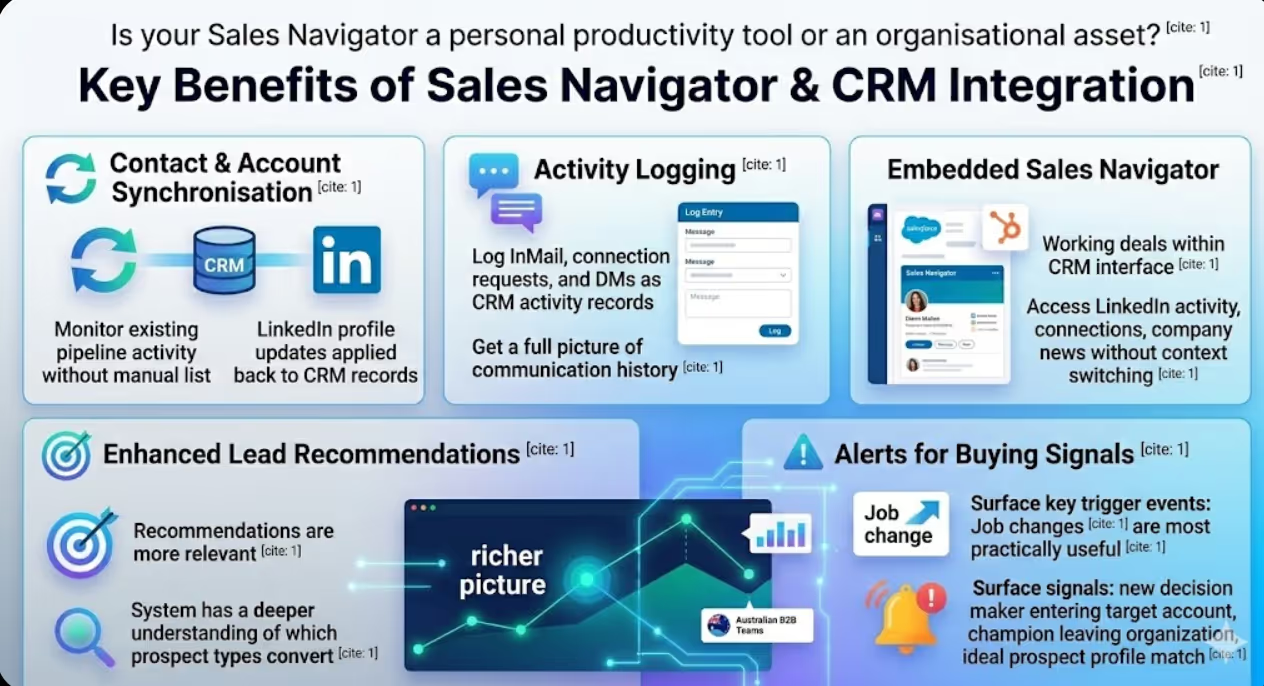
Contact and account synchronisation. CRM contacts and accounts sync into Sales Navigator as saved leads and accounts, allowing reps to monitor LinkedIn activity for their existing pipeline without manually recreating lists. Changes to contact records in the CRM flow through to Sales Navigator, and LinkedIn profile updates can be flagged for review and applied back to CRM contact records.
Activity logging. LinkedIn InMail messages, connection requests, and direct messages can be logged as CRM activity records, giving the full picture of prospect communication history in one place. For sales managers, this visibility into LinkedIn outreach alongside email and call activity provides a more complete picture of pipeline health than CRM data alone.
Sales Navigator embedded in CRM. For Salesforce and HubSpot users, Sales Navigator widgets can be embedded directly within CRM contact and account records. This means a rep working a deal in Salesforce can see the prospect's LinkedIn activity, mutual connections, and company news without leaving the CRM interface. The friction of context switching between tools is eliminated.
Lead recommendations informed by CRM data. Sales Navigator's algorithm generates lead and account recommendations based on your saved leads, your CRM activity patterns, and LinkedIn's broader graph data. When the integration is active, these recommendations become more relevant because the system has a richer picture of which types of prospects are actually converting in your pipeline.
Alerts for buying signals. Job change alerts are among the most practically useful outputs of Sales Navigator for Australian B2B teams. When a contact in your CRM changes roles, that is often a significant trigger event. A new decision maker entering a target account, a champion leaving a current customer's organisation, a prospect moving to a company that fits your ideal customer profile. Each of these signals can be surfaced as a CRM alert and trigger a specific outreach workflow.
Integration Options by CRM Platform
LinkedIn offers native integration support for several major CRM platforms, and the depth of integration available varies by platform.
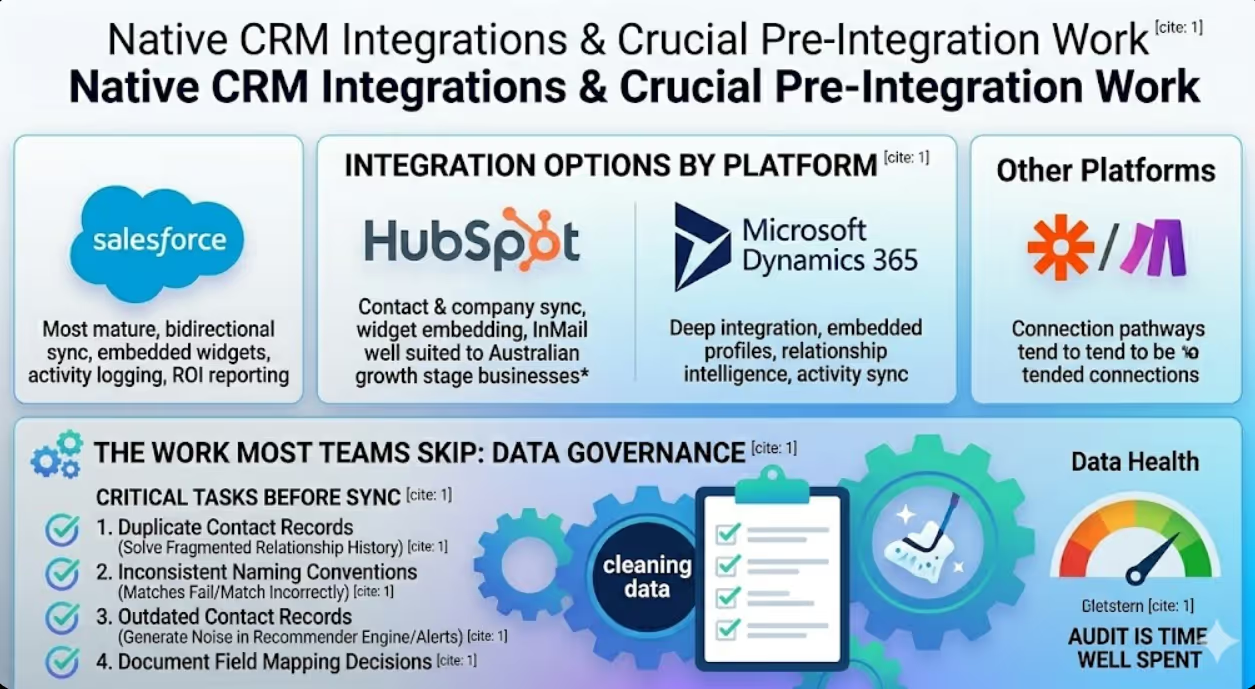
Salesforce has the most mature Sales Navigator integration available. The CRM Sync feature enables bidirectional synchronisation of leads, contacts, and accounts. Sales Navigator widgets are available within Salesforce contact, lead, account, and opportunity records. Activity logging from LinkedIn to Salesforce is supported. And the integration supports the ROI reporting features within Sales Navigator, allowing revenue influenced by Sales Navigator activity to be tracked against CRM pipeline data.
HubSpot offers a native integration that enables contact and company synchronisation, Sales Navigator widget embedding within HubSpot records, and InMail logging as CRM activities. The HubSpot integration is particularly well suited to Australian growth stage B2B businesses given HubSpot's prominence in that segment of the market.
Microsoft Dynamics 365 integrates with Sales Navigator through Microsoft's broader partnership with LinkedIn, which has been a LinkedIn parent company since 2016. The integration is deep and includes embedded profiles, relationship intelligence drawn from the Microsoft relationship graph, and activity synchronisation across both platforms.
For CRM platforms without native LinkedIn integration, tools like Zapier and Make (formerly Integromat) provide connection pathways, though these tend to offer more limited functionality than native integrations and require more maintenance over time.
LinkedIn's official Sales Navigator CRM integration documentation provides a current list of supported CRM platforms and the specific features available within each integration, and this is worth reviewing before committing to an implementation approach as LinkedIn's integration capabilities are updated periodically.
Data Governance: The Work Most Teams Skip
The most technically sound integration in the world will underperform if the underlying CRM data is in poor condition. Data governance is the work most Australian B2B teams skip when implementing Sales Navigator, and it is consistently the reason integrations fail to deliver their promised value.
The specific issues that undermine Sales Navigator and CRM integrations include the following.
Duplicate contact records create confusion about which record Sales Navigator activity should be associated with and result in fragmented relationship history that is difficult to read or act on. Before activating a CRM sync, a deduplication exercise is essential.
Inconsistent naming conventions across company records mean that LinkedIn account matches fail or match incorrectly. A company listed as "Acme Pty Ltd" in your CRM and "Acme Australia" on LinkedIn may not be automatically recognised as the same entity. Standardising company naming conventions before integration reduces these mismatches significantly.
Outdated contact records with incorrect email addresses, obsolete job titles, or former employees still marked as active contacts generate noise in Sales Navigator's recommendation engine and in the alerts it surfaces. A contact audit before integration activation is time well spent.
Field mapping decisions also require deliberate attention. Which LinkedIn data fields map to which CRM fields? How are conflicts handled when LinkedIn data differs from CRM data? What is the source of truth when there is a discrepancy? These decisions should be documented before the integration goes live rather than resolved ad hoc as issues emerge.
Building the Workflow: From LinkedIn Signal to Sales Action
The integration architecture is infrastructure. The workflow built on top of it is where commercial value is generated.
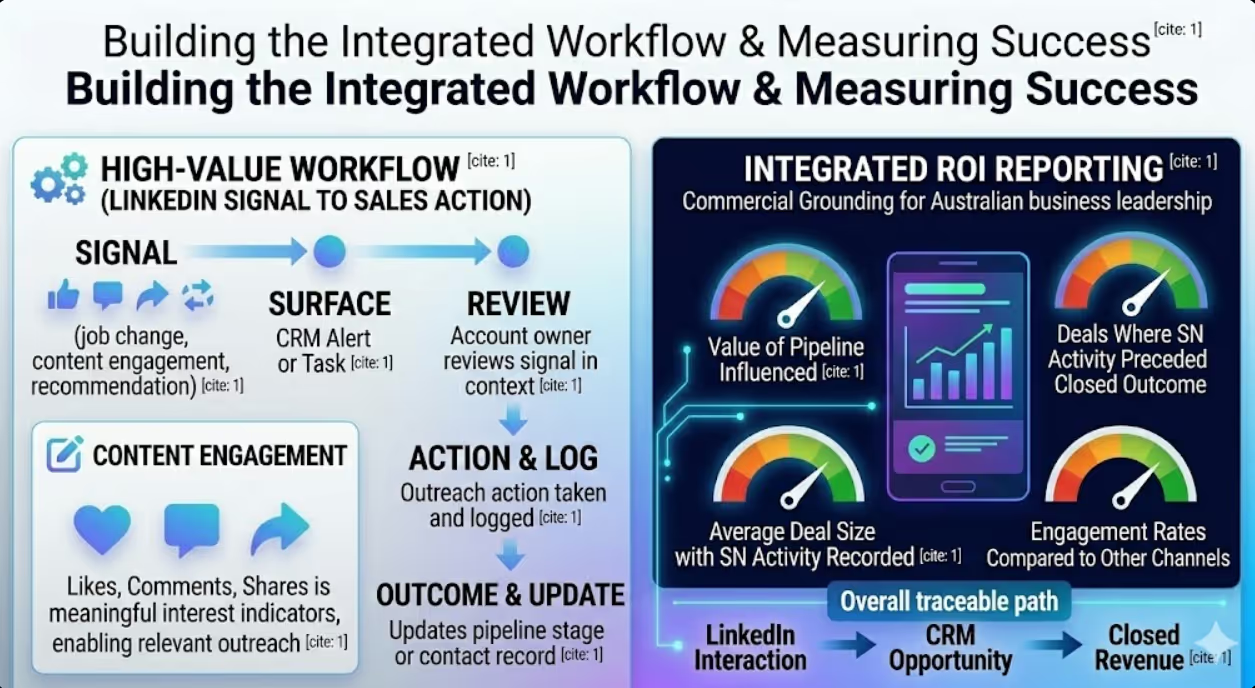
For Australian B2B teams, the highest value workflows connecting Sales Navigator to CRM activity typically follow a pattern. A signal is detected in Sales Navigator such as a prospect changing jobs, engaging with company content, or appearing in a lead recommendation based on recent CRM win patterns. That signal is surfaced as a CRM alert or task assigned to the relevant account owner. The account owner reviews the signal in context of the existing relationship history visible in the CRM. An outreach action is taken and logged as CRM activity. The outcome of that action updates the pipeline stage or contact record.
This loop is simple in principle but requires clear decisions about which signals trigger which actions. Not every job change alert warrants immediate outreach. Not every content engagement is a meaningful buying signal. Teams that define their signal and action mapping before implementation avoid alert fatigue and ensure that the workflow adds value rather than adding noise.
Content engagement through LinkedIn is worth particular attention for Australian B2B marketers. When a prospect engages with content your organisation has published on LinkedIn and that engagement, whether through a like, a comment, or a content share, can be a meaningful indicator of active interest. Sales Navigator surfaces these signals, and when they are visible within the CRM alongside existing relationship context, they enable outreach that feels timely and relevant rather than cold and generic.
Measuring ROI: Connecting LinkedIn Activity to Pipeline
One of the challenges that has historically made it difficult for Australian B2B organisations to justify Sales Navigator investment is the difficulty of connecting LinkedIn activity to revenue outcomes. The integration solves this problem directly by creating a traceable path from LinkedIn interaction to CRM opportunity to closed revenue.
Sales Navigator's native ROI reporting, when connected to a CRM, can show the value of pipeline influenced by Sales Navigator usage, the number of deals where Sales Navigator activity preceded a closed outcome, the average deal size for opportunities with Sales Navigator activity recorded, and the engagement rates of LinkedIn outreach compared to other channels.
For sales leaders presenting the case for continued or expanded Sales Navigator investment to Australian business leadership, this data provides the commercial grounding that anecdotal evidence cannot. And for sales and marketing teams working toward shared pipeline targets, it creates a common language for discussing LinkedIn's contribution to revenue that does not rely on vanity metrics like connection counts or InMail open rates.
FAQs
What CRM platforms have native Sales Navigator integration in Australia?
LinkedIn offers native CRM integration for Salesforce, HubSpot, Microsoft Dynamics 365, Oracle CX Sales, SAP Sales Cloud, and a small number of other enterprise platforms. Salesforce and HubSpot are the most commonly used platforms with native integration among Australian B2B businesses. For CRM platforms not on the native support list, third party automation tools can create connection pathways, though with more limited functionality. LinkedIn updates its integration capabilities regularly, so checking the current list in the Sales Navigator Help Centre before planning your implementation is recommended.
How long does it take to implement a Sales Navigator and CRM integration?
For a native integration on a well maintained CRM with clean data, the technical setup can be completed in a matter of hours. The more demanding elements are the preparatory data governance work, field mapping decisions, and workflow design that should precede technical activation. Australian B2B teams typically find that the implementation project takes one to three weeks from scoping to launch when these preparation steps are taken seriously. Attempting to shortcut the data preparation phase consistently produces integrations that underperform or require significant remediation shortly after launch.
Should every Sales Navigator user in our team have the CRM integration enabled?
Yes, in most cases. The value of the integration compounds with usage. The more consistently Sales Navigator activity is logged to the CRM, the richer the shared relationship intelligence becomes and the more accurately the recommendation engine can identify strong quality prospects. Individual users operating outside the integration create gaps in the shared intelligence layer and reduce the overall quality of the data the organisation is working from. Enabling the integration universally and supporting adoption through brief training is almost always preferable to a selective rollout.
Turn LinkedIn Intelligence Into Pipeline
LinkedIn Sales Navigator is a significant investment for Australian B2B teams. Getting a return that justifies that investment requires treating it as a connected part of your sales and marketing technology stack rather than a standalone tool that individual reps use in isolation.
Maven Marketing Co helps Australian B2B organisations build integrated sales and marketing systems that connect social intelligence to CRM data, content strategy, and pipeline outcomes.
Talk to the team at Maven Marketing Co →

Table of contents
read more blogs

6 Ways Digital Marketing Can Boost B2B Lead Generation
B2B lead generation is not about filling a CRM with as many names as possible. The real objective is to attract businesses that fit your offer, give the right people a reason to engage and create enough confidence for a genuine sales conversation to start.That distinction matters because B2B buying is usually more targeted than consumer marketing and often involves several people influencing the decision. Current LinkedIn lead-generation guidance makes the same point: more leads do not automatically mean better results if only a small proportion are genuinely relevant or likely to progress.Digital marketing helps by creating multiple paths into the business. Search can capture active demand. Paid media can put an offer in front of a tightly defined audience. Content can build authority before a buyer is ready to talk. Social media can keep the brand visible across a long decision cycle. Your website turns interest into action, while email helps nurture that interest over time.The strongest B2B digital marketing strategies do not treat these as six separate activities. They use them as one connected system designed to generate quality B2B leads, support sales and build a more dependable pipeline

How to Build a Brand Positioning Strategy That Sets Your Business Apart
Most businesses can explain what they sell. Far fewer can explain, in a sentence or two, why the right customer should choose them instead of another credible option. That gap is where brand positioning matters.A strong brand positioning strategy gives your business a clear place in the market and a clear place in the customer's mind. It helps your team decide who you are speaking to, what you want to be known for, which benefits deserve the most attention and how your marketing should sound and look across every channel.It is not a slogan exercise and it is not something reserved for large consumer brands. For an Australian service business, e-commerce brand, professional firm, or growing B2B company, positioning can make everyday decisions easier, from website copy and campaign messaging to pricing, sales conversations, and brand identity. The goal is not to look different for the sake of it. The goal is to be meaningfully different in a way the right customers understand and value.

The Role of Digital PR in Long Term SEO Growth
Building a solid online presence is basically more than just posting content now and then or sprinkling keywords across your website. Search engines such as Google tend to point users toward businesses that feel trustworthy, useful, and backed up by others online, even if it’s not always obvious at first. When a company puts together a well-thought-out digital PR strategy, it can bring in solid media mentions, earning high-quality backlinks and stronger brand awareness, all of which feed long-term SEO progress. Rather than obsessing solely over rankings, digital PR helps you build credibility plus authority, so your site looks more appealing to search engines and also to real people who might become customers. In this guide, we’ll walk through how digital PR supports SEO, what makes it such a key part of modern marketing, and the most effective approaches for sustainable growth in search results.


