
.svg)


%201.svg)

Key Takeaways
- Next.js and Nuxt.js both support multiple rendering modes including rendering on the server side, static site generation, and rendering on the client side. The choice of rendering mode is the most consequential SEO decision made in a JavaScript framework project.
- Rendering on the client side, where page content is generated in the browser by JavaScript after the initial HTML is delivered, is the rendering mode most likely to cause SEO problems. Googlebot can process JavaScript, but does so with delays and resource constraints that make content generated in the browser less reliably indexed than content rendered on the server.
- Rendering on the server side generates full HTML on the server for each request, delivering indexable content to crawlers immediately. For pages requiring fresh data on each visit, SSR is the correct rendering mode for SEO.
- Static site generation generates pages ahead of time at build, producing static HTML files that are served instantly and crawled without any rendering dependency. For pages whose content does not change between deployments, SSG produces the best combination of SEO and performance.
- Next.js Metadata API and Nuxt.js useHead composable provide tools built natively into the framework for managing title tags, meta descriptions, Open Graph tags, and structured data, replacing the need for head management through third party libraries in most cases.
- Canonical URLs, hreflang for Australian and international configurations, sitemap generation, and robots.txt management each require specific implementation steps in both frameworks that differ from how they are handled in CMS-based environments.
- Core Web Vitals performance in Next.js and Nuxt.js projects is directly influenced by rendering mode, image optimisation, font loading, and JavaScript bundle size, all of which require deliberate configuration rather than relying on framework defaults.
Rendering Modes and SEO: The Foundational Decision
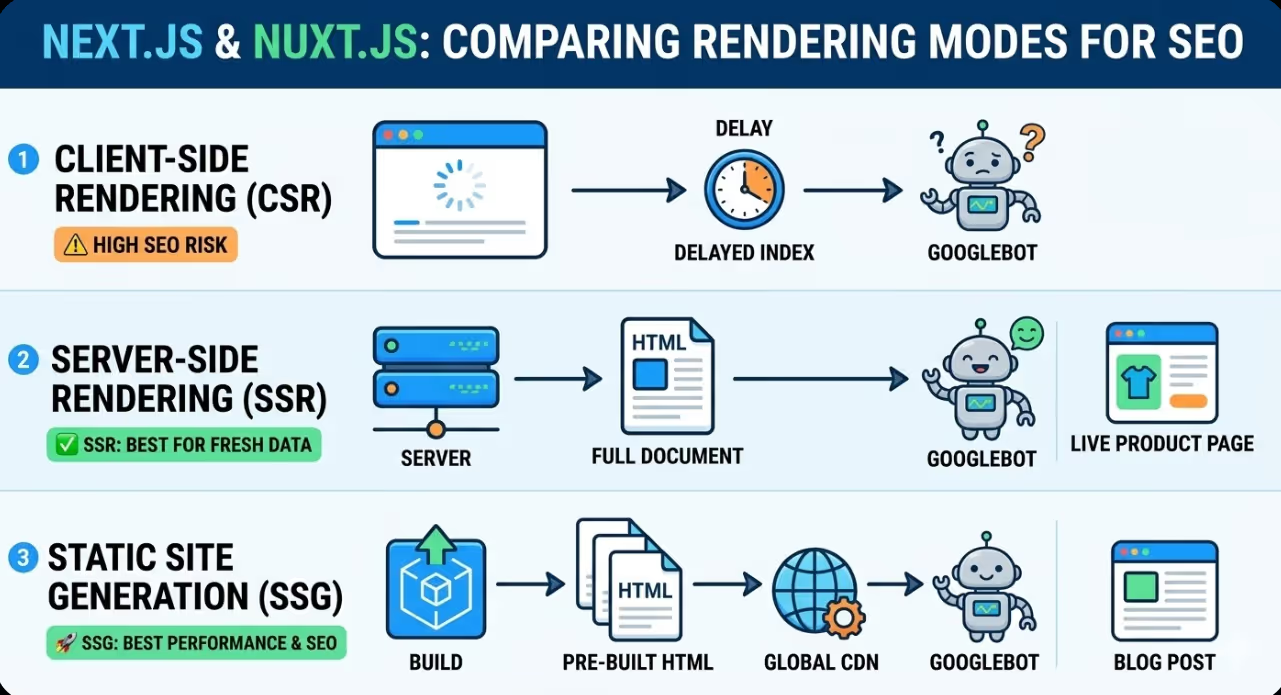
The single most impactful SEO decision in a JavaScript framework project is how page content is rendered. Next.js and Nuxt.js both support three primary rendering modes, and each has distinct implications for how search crawlers access and index the content they produce.
Rendering on the client side generates page content in the browser. The server delivers a minimal HTML shell, and JavaScript running in the browser then fetches data and renders the full page content. From a crawler's perspective, pages rendered this way initially contain very little indexable content. Googlebot has improved its JavaScript processing capabilities significantly over the past several years and can execute JavaScript to render page content, but this rendering happens in a separate queue from the initial crawl, introducing delays of hours to days between when a page is crawled and when its content rendered through JavaScript is processed. For new content that needs to be indexed promptly, for pages where ranking is a priority, and for sites with large numbers of pages where Googlebot's crawl budget is a consideration, rendering on the client side is a poor choice.
Rendering on the server side generates full HTML on the server in response to each request. When Googlebot crawls a page rendered this way, it receives complete HTML containing all the content and metadata immediately, with no JavaScript execution required for content discovery. The tradeoff is server infrastructure cost: every request requires server processing rather than serving a cached static file. For pages displaying personalised content, data that must be current, or states specific to the user, SSR is the appropriate rendering mode and its SEO characteristics are excellent.
Static site generation generates pages ahead of time at build, producing HTML files that are stored and served directly without any server processing on each request. For an Australian marketing site, blog, or product catalogue where content changes are made through deployments rather than on demand, SSG produces the ideal combination of full HTML indexability and response times that are near instantaneous. Pages generated statically score well on Time to First Byte and are crawled efficiently.
Both Next.js and Nuxt.js support mixing rendering modes across different routes within the same application, which is one of the most powerful capabilities they offer for SEO architecture. Product category pages can use SSG for fast delivery of relatively stable content, while individual product pages can use SSR to ensure current pricing and inventory data is always served. User account pages can use rendering on the client side without any SEO impact because they are behind authentication and should not be indexed.
Next.js Metadata API
Next.js 13 introduced the Metadata API as the framework's native solution for managing the content of the HTML head element, replacing the earlier approach of using next/head directly in page components. In the App Router architecture introduced in Next.js 13 and extended in subsequent versions, metadata is defined by exporting a metadata object or a generateMetadata function from any page or layout component.
Static metadata, where the title and description are known at build time, is defined by exporting a plain object:
javascript
export const metadata = {
  title: 'Brand Name | Page Title',
  description: 'Page description for search results and social sharing.',
  openGraph: {
    title: 'Brand Name | Page Title',
    description: 'Page description for social sharing.',
    url: 'https://www.example.com.au/page',
    siteName: 'Brand Name',
    locale: 'en_AU',
  },
  alternates: {
    canonical: 'https://www.example.com.au/page',
  },
};
Dynamic metadata, where titles and descriptions are generated from data fetched at request time or build time, uses the generateMetadata function:
javascript
export async function generateMetadata({ params }) {
  const product = await fetchProduct(params.slug);
  return {
    title: `${product.name} | Brand Name`,
    description: product.seoDescription,
    alternates: {
      canonical: `https://www.example.com.au/products/${params.slug}`,
    },
  };
}
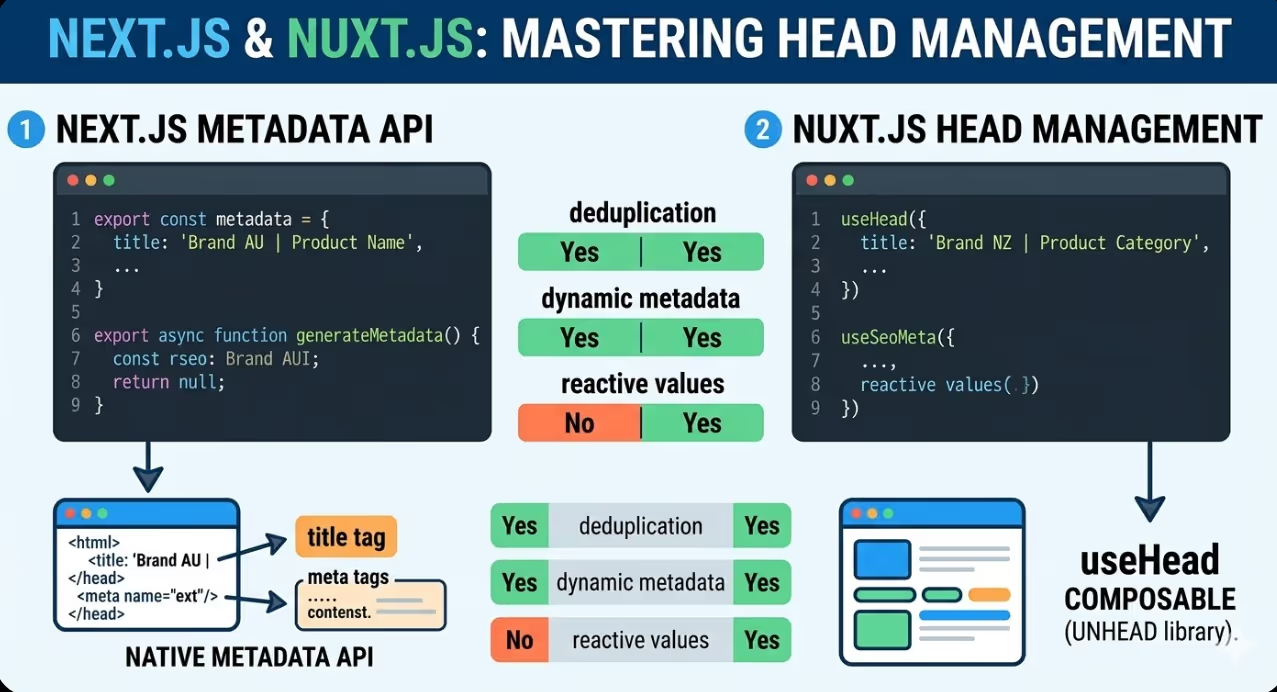
The Metadata API handles deduplication automatically, meaning that if a page component and its parent layout both define a title, the page's title takes precedence. This makes it safe to define default metadata at the layout level and override it at the page level for specific pages, which is the recommended pattern for Australian commercial sites with many pages that share a common structure.
Nuxt.js Head Management
Nuxt.js manages head content through the useHead composable, which is available in all page and component files in the Nuxt 3 architecture. It accepts the same range of properties as the underlying unhead library and handles rendering on the server side of head content so that metadata is present in the HTML delivered to crawlers rather than injected by JavaScript after the initial render.
Metadata at the page level in Nuxt.js is typically defined within the page component using the useHead composable or the useSeoMeta composable, which provides a flatter API specifically designed for common SEO properties:
javascript
useSeoMeta({
  title: 'Brand Name | Page Title',
  description: 'Page description for search results.',
  ogTitle: 'Brand Name | Page Title',
  ogDescription: 'Page description for social sharing.',
  ogUrl: 'https://www.example.com.au/page',
  ogLocale: 'en_AU',
})
Nuxt.js also supports defining default metadata at the application level through the nuxt.config.ts file, which sets values that are applied to every page unless overridden at the page level. This configuration at the application level is the appropriate location for defaults that apply across the entire site such as the Open Graph site name, default Twitter card type, and any head tags that should be present on every page.
For dynamic pages in Nuxt.js, the useSeoMeta composable can accept reactive values, meaning it can be called with data that is fetched asynchronously and the head content will update correctly once the data is available, including during rendering on the server side.
Canonical URLs and Duplicate Content
Canonical URL management is a critical SEO concern in JavaScript framework applications because the same content can frequently be accessible at multiple URLs through query parameters, trailing slashes, uppercase and lowercase path variations, and paginated sequences. Without explicit canonical tags, search engines may split ranking signals across multiple URL variants or choose an unintended canonical that does not match the URL the marketing team wants to rank.
In Next.js, canonical URLs are set through the alternates.canonical property in the metadata object as shown in the examples above. For pages where the canonical URL is the same as the page's own URL, this can be set programmatically based on the request URL, ensuring every page has a canonical tag that correctly identifies itself.
In Nuxt.js, canonical URLs are set through useHead or useSeoMeta:
javascript
useHead({
  link: [
    { rel: 'canonical', href: 'https://www.example.com.au/page' }
  ]
})
Trailing slash consistency is a common source of duplicate content in both frameworks. Next.js and Nuxt.js both provide configuration options that enforce a consistent trailing slash behaviour across all routes. Choosing a convention, enforcing it at the configuration level, and ensuring canonical tags reflect the chosen convention prevents the most common forms of URL duplication in JavaScript framework applications.
For Australian ecommerce sites built on Next.js or Nuxt.js with large product catalogues and faceted filtering, URL parameter management requires particular attention. Filter and sort parameters appended to category page URLs typically create hundreds of URL variants that should either be canonicalised back to the base category URL or excluded from crawling through the robots.txt configuration.
Structured Data Implementation
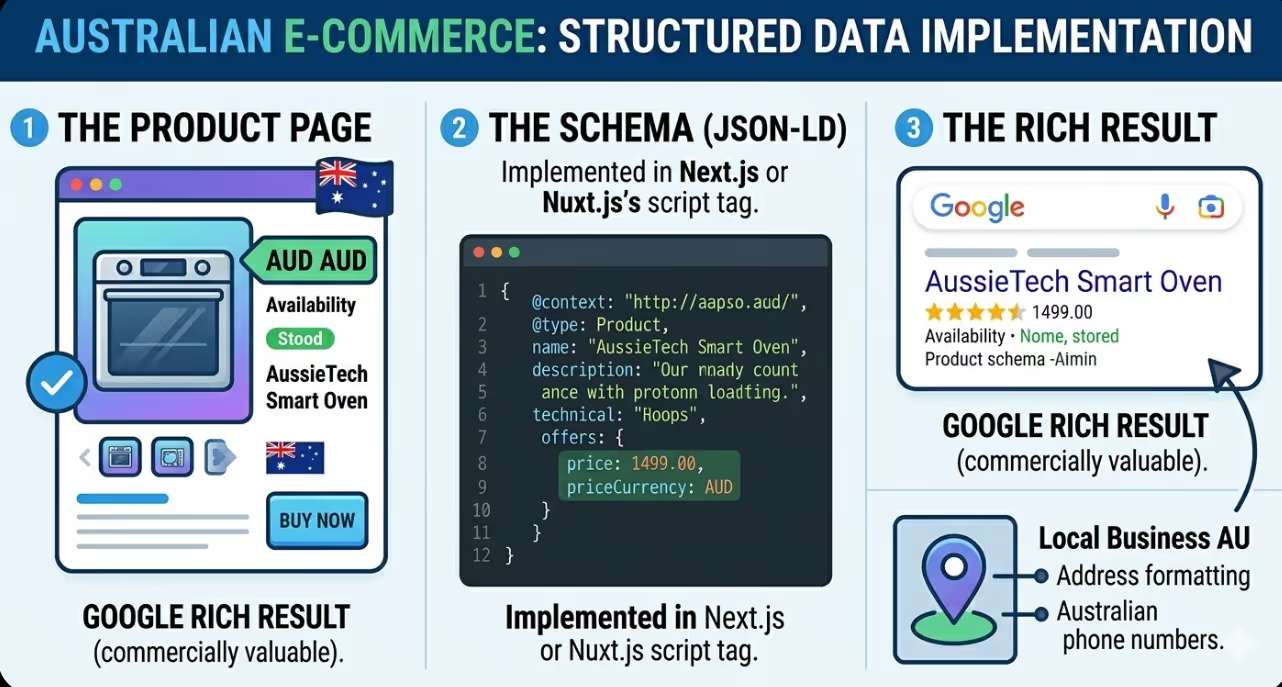
Structured data, delivered as JSON-LD in the page head or body, tells search engines the type and properties of the content on a page, enabling rich results in search including product schema, article schema, FAQ schema, and local business schema that are commercially valuable for Australian websites.
In Next.js, JSON-LD structured data is added to pages using the script tag within the Metadata API or directly within the page component using a script element:
javascript
export default function ProductPage({ product }) {
  const jsonLd = {
    '@context': 'https://schema.org',
    '@type': 'Product',
    name: product.name,
    description: product.description,
    offers: {
      '@type': 'Offer',
      price: product.price,
      priceCurrency: 'AUD',
      availability: 'https://schema.org/InStock',
    },
  };

  return (
    <>
      <script
        type="application/ld+json"
        dangerouslySetInnerHTML={{ __html: JSON.stringify(jsonLd) }}
      />
      {/* page content */}
    </>
  );
}
In Nuxt.js, structured data can be injected through the useHead composable:
javascript
useHead({
  script: [
    {
      type: 'application/ld+json',
      innerHTML: JSON.stringify({
        '@context': 'https://schema.org',
        '@type': 'Product',
        name: product.name,
      })
    }
  ]
})
For Australian ecommerce sites, product schema with pricing in AUD and availability status is among the most important structured data to implement. For local businesses, LocalBusiness schema including Australian address and phone number format contributes to local search visibility. For content sites, Article and BreadcrumbList schema improve how pages are presented in search results.
Sitemap Generation and Robots.txt
Sitemaps and robots.txt files serve as the primary communication channel between a website and search crawlers, telling them what content exists and what should and should not be indexed.
Next.js generates sitemaps through the sitemap.ts file placed in the app directory, which exports a function returning an array of sitemap entries. For large Australian ecommerce sites, this function fetches the full URL list from the database or API at build time and returns them as the sitemap. Dynamic sitemaps can also be generated at request time using the same file convention, which is appropriate for sites where the page inventory changes frequently.
Nuxt.js handles sitemap generation through the nuxt-simple-sitemap module, which is the most widely adopted sitemap solution in the Nuxt ecosystem. It supports automatic route discovery, dynamic URL inclusion through API hooks, and generation of multiple sitemaps for large sites that exceed the 50,000 URL limit of a single sitemap file.
Robots.txt in Next.js is generated through a robots.ts file in the app directory using the same convention as sitemap generation:
javascript
export default function robots() {
  return {
    rules: {
      userAgent: '*',
      allow: '/',
      disallow: ['/account/', '/cart/', '/api/'],
    },
    sitemap: 'https://www.example.com.au/sitemap.xml',
  };
}
In Nuxt.js, robots.txt is managed through the robots configuration in nuxt.config.ts or through the nuxt-robots module, which provides a more flexible configuration API for sites with complex crawling rules.
Core Web Vitals in Next.js and Nuxt.js
JavaScript framework applications tend to carry heavier JavaScript bundles than statically rendered sites, which directly affects Core Web Vitals performance, particularly Largest Contentful Paint and Interaction to Next Paint.
Next.js addresses JavaScript bundle weight through automatic code splitting, which ensures that only the JavaScript required for the current route is loaded, and through the next/image component, which provides automatic image optimisation, responsive sizing, format conversion to WebP and AVIF, and lazy loading with correct width and height attributes that prevent Cumulative Layout Shift.
Next.js also handles font loading optimisation through the next/font package, which automatically hosts Google Fonts on the same server and applies font-display: swap, removing the third party font request and its associated performance overhead with a single import change.
Nuxt.js provides equivalent capabilities through its built-in image optimisation via the @nuxt/image module, which delivers the same automatic format conversion, responsive sizing, and lazy loading behaviour as Next.js's image component. Nuxt's font handling is addressed through the @nuxtjs/google-fonts module, which similarly hosts and optimises font delivery.
For Australian development teams building commercial applications with these frameworks, Google's guidance on JavaScript and SEO remains the authoritative reference for understanding how Googlebot processes JavaScript applications and what configurations are required to ensure content is reliably indexed.
FAQs
Does Googlebot fully support JavaScript in 2026, making SSR unnecessary for SEO?
Googlebot's JavaScript processing capabilities have improved considerably and it does render content produced through JavaScript. However, the rendering happens in a process that occurs in two waves: the initial crawl collects the HTML as delivered, and JavaScript rendering occurs later in a separate processing queue. For content where timing of indexing is critical, for pages where prompt indexing is important, and for large sites where crawl budget is a consideration, relying on JavaScript rendering for SEO-critical content introduces risk that server or statically rendered content avoids entirely. The practical recommendation for Australian commercial sites is to use SSR or SSG for any page where search visibility matters, and reserve rendering on the client side for authenticated pages or those that should not be indexed.
How should hreflang be implemented in Next.js or Nuxt.js for Australian sites targeting multiple markets?
Hreflang implementation in both frameworks uses the alternates property in metadata configuration to declare language and regional variants of each page. In Next.js, the alternates.languages object in the metadata export declares the hreflang relationship:
javascript
alternates: {
  canonical: 'https://www.example.com.au/page',
  languages: {
    'en-AU': 'https://www.example.com.au/page',
    'en-NZ': 'https://www.example.co.nz/page',
    'en-GB': 'https://www.example.co.uk/page',
  },
}
The hreflang annotations must be reciprocal, meaning the NZ and UK page variants must also declare their hreflang relationships back to the AU page. Generating these programmatically at scale requires a URL mapping function that produces the correct alternates configuration for every page in the site, which is typically implemented as a shared utility function called within each page's metadata generation.
Are there SEO differences between the Next.js App Router and the older Pages Router?
Yes. The App Router, introduced in Next.js 13 and the recommended architecture for new Next.js projects in 2026, uses the Metadata API described in this article and has server components by default, meaning components render on the server unless explicitly marked as client components. This default server rendering behaviour is beneficial for SEO because data fetching at the component level happens on the server and the resulting content is included in the HTML delivered to crawlers. The Pages Router uses a different metadata approach through next/head and relies on data fetching functions at the page level such as getServerSideProps and getStaticProps. Australian teams maintaining existing Next.js applications using the Pages Router do not need to migrate to the App Router for SEO purposes, as both architectures support the same rendering modes and produce equivalent SEO outcomes when configured correctly.
Framework Choice Is Not an SEO Risk. Configuration Is.
The Australian development teams choosing Next.js or Nuxt.js for commercial projects are not making an SEO risk decision. They are making a capability decision. The frameworks support every SEO requirement a commercial website has, and in several areas, particularly image optimisation, font loading, and metadata management, they provide better tooling than the alternatives. The SEO risk exists only when the configuration decisions that make those capabilities work are not made deliberately and correctly.
Maven Marketing Co works with Australian businesses and their development teams to ensure that technical SEO requirements are built into the framework configuration from the start, not retrofitted after indexing problems appear.
Talk to the team at Maven Marketing Co →

Table of contents
read more blogs

How to Choose the Right Digital Marketing Channels for Your Business
Choosing digital marketing channels is one of the easiest places for businesses to lose clarity. There are more options than ever, every platform promises reach and results, and it is easy to assume that the best strategy is simply to be everywhere. In reality, most businesses do better when they choose channels with intention rather than spreading budget and effort too thinly.The right channel mix depends on where your audience spends time, how they search or discover solutions, what your business is trying to achieve and how much resource you actually have to support execution properly. A channel is only useful if it helps move the right people towards a commercial outcome that matters to the business.This is why strong digital marketing strategy is not really about finding one perfect platform. It is about understanding the role each channel can play across awareness, demand capture, conversion and retention. SEO might build long-term visibility, Google Ads might capture active intent, social media might support familiarity and reach, while email may help nurture prospects and strengthen customer value over time.This guide explains what digital marketing channels are, how to assess them properly and how to build a balanced channel mix for your business. The focus is practical. Rather than chasing every new platform, the goal is to help you choose the channels that fit your audience, goals, budget and internal capability.

How to Build a Customer Journey Map for Your Digital Marketing Strategy
A strong digital marketing strategy is not just about channels, creative or traffic. It is about understanding how real people move from first awareness through to enquiry, purchase and ongoing loyalty. That is exactly why customer journey mapping matters.Without a clear view of the journey, businesses often optimise in fragments. They improve the website without thinking about the ad that drove the visit, produce content without considering where the audience is in the decision process, or judge conversion performance without understanding the friction points that sit earlier in the experience.A customer journey map helps you step back and see the bigger picture. It shows the stages people move through, the touchpoints they interact with, the questions they ask, the barriers they face and the moments where your marketing can either help or lose them.This guide explains how to build a practical customer journey map for your digital marketing strategy, what information to include, how to use the map to improve performance and which common mistakes to avoid. The goal is not to create a pretty workshop artefact that gets forgotten. It is to build a working tool that improves messaging, user experience, channel decisions and conversion outcomes.

Why Your Google Ads Campaign Is Not Getting Results: Common Mistakes and Solutions
If your Google Ads campaign is getting impressions or clicks but not producing enough enquiries, sales, or qualified leads, the problem is usually not Google Ads itself. It is more often a strategy, tracking, or conversion issue somewhere in the system.That matters because paid search can look busy without being commercially effective. You can have traffic coming in, a reasonable click-through rate and money leaving the account every day, yet still have very little to show for it if your keywords are weak, your ad copy is misaligned, your landing pages do not convert or your tracking is incomplete.A strong campaign works as one connected chain. Search intent, keyword targeting, ad relevance, bidding, landing-page experience, and conversion tracking all need to support the same commercial outcome. If one link breaks, results usually suffer quickly.This guide explains the most common reasons a Google Ads campaign is not getting results, what those issues normally look like in practice and how to fix them without relying on guesswork. The focus is not on vanity metrics. It is on improving lead quality, conversion rate, and return on spend.


