
.svg)


%201.svg)
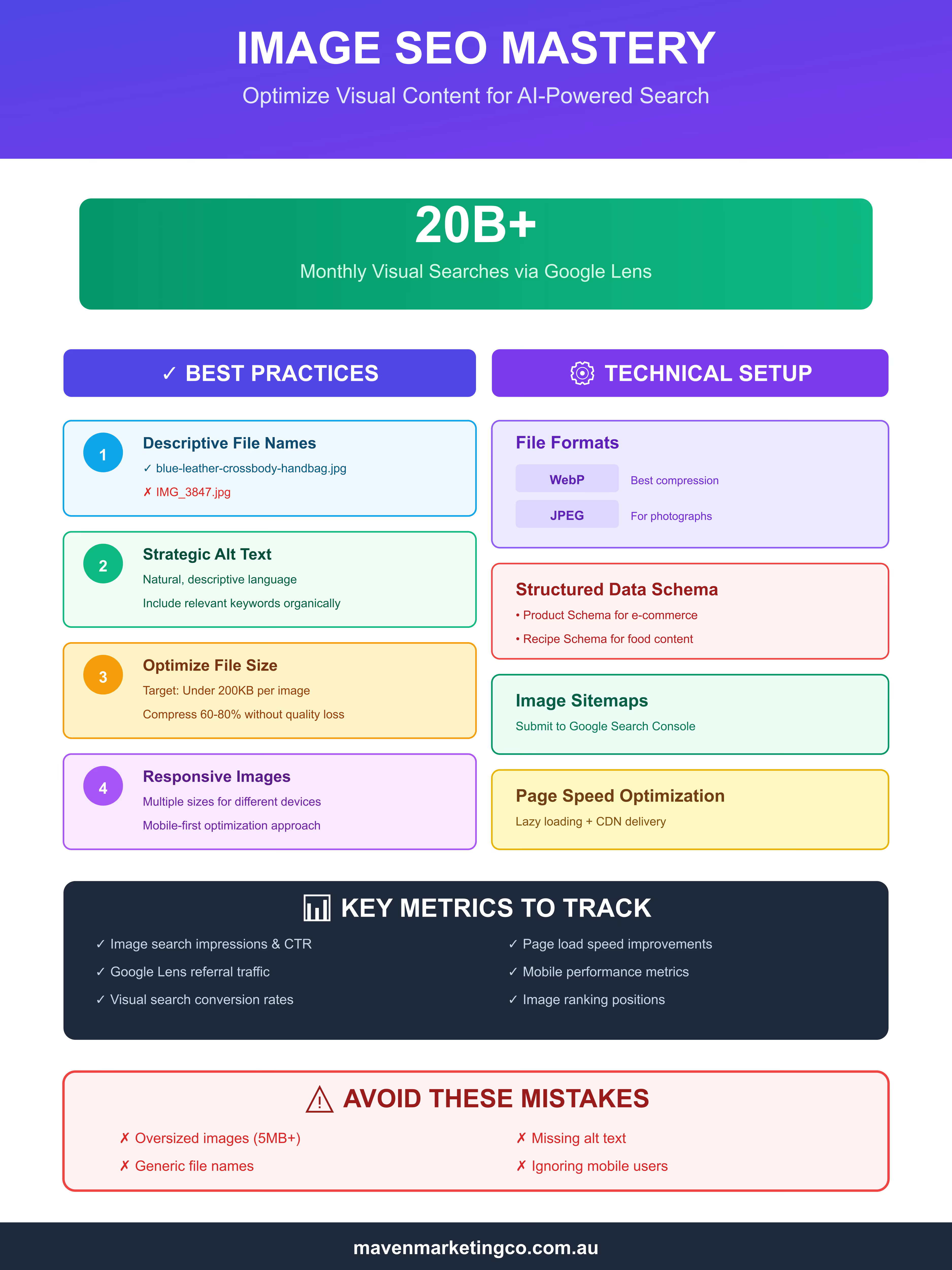
The way people search is evolving. With over 20 billion visual searches happening monthly through Google Lens alone, optimising images is no longer optional—it's essential. As AI-powered visual search becomes mainstream, understanding how to make your images discoverable can dramatically impact your website's visibility and traffic.
The Rise of Visual Search
Visual search technology has matured significantly. Google Lens can now identify objects, translate text, find similar products, and even solve math problems from images. According to research by Backlinko analyzing over 65,000 Google Lens searches, 32.5% of all Google Lens results have matching keywords in their title tags, and approximately one-third of results come from images positioned in the top 25% of web pages.
This shift means your images aren't just decorative elements anymore—they're searchable content that can drive qualified traffic to your site. The implications are clear: if your images aren't optimised for AI-powered search engines, you're missing out on a massive audience actively looking for visual content.
Core Image SEO Fundamentals
1. File Names Matter More Than Ever
Gone are the days of uploading "IMG_3847.jpg" to your website. AI algorithms use file names as crucial context clues. Instead of generic names, use descriptive, keyword-rich file names that accurately describe the image content.
Example: blue-leather-handbag-crossbody-style.jpg instead of product-image-1.jpg
2. Alt Text: Your Image's Voice
Alt text serves dual purposes—accessibility for visually impaired users and context for search engines. According to Google's official documentation, descriptive alt text helps search engines understand image content. Research shows that only 11.4% of Google Lens results contain alt text matching the search term, indicating a significant opportunity for those who optimise properly.
Write natural, descriptive alt text that explains what the image shows. Avoid keyword stuffing, but do include relevant terms that describe the image accurately.
Good alt text: "Woman wearing red running shoes on forest trail during autumn"
Poor alt text: "running shoes, buy running shoes, best running shoes, cheap running shoes"
3. Image Context and Surrounding Content
AI systems analyze the relationship between images and their surrounding text. Ensure your images are placed near relevant content. The heading above an image, the paragraph below it, and even the page title all provide context that helps search engines understand what your image depicts.
Technical Optimisation for AI Search
File Format Selection
Choose the right format for the job:
- WebP: Modern format offering superior compression with quality preservation
- JPEG: Best for photographs and complex images with many colors
- PNG: Ideal for graphics, logos, and images requiring transparency
- SVG: Perfect for scalable icons and simple graphics
Responsive Images and Mobile Optimisation
With mobile devices dominating visual searches, responsive images are critical. Implement srcset attributes to serve appropriate image sizes based on device capabilities. Google Lens is predominantly used on mobile devices, making mobile optimisation paramount.
Structured Data for Images
Implement schema markup to provide explicit signals about your images. Product schema, recipe schema, and image schema all help search engines understand and categorize your visual content more effectively.
Optimising for Google Lens Specifically
High-Quality, Clear Images
Google Lens performs best with high-resolution, well-lit images that clearly show the subject. Blurry, dark, or cluttered images make object recognition difficult. Aim for crisp, focused visuals that showcase your products or content clearly.
Multiple Angles and Contexts
For product pages, provide multiple images showing different angles, scales, and contexts. This helps Google Lens understand the complete nature of what you're displaying and increases the chances of matching user queries.
Background Considerations
Clean, uncluttered backgrounds help AI systems isolate and identify the main subject. While lifestyle images have their place, consider including some shots with neutral backgrounds for better recognition.
Advanced Strategies
Image Sitemaps
Create and submit an image sitemap to Google Search Console. This ensures all your images are discovered and indexed, including those loaded dynamically or embedded in JavaScript.
Content Delivery Networks (CDNs)
Use a CDN to serve images quickly regardless of user location. Page speed impacts rankings, and fast-loading images improve both user experience and SEO performance.
Lazy Loading Implementation
Implement lazy loading for images below the fold to improve initial page load times. However, ensure this is done correctly so search engines can still discover and index your images.
Measuring Success
Track these metrics to gauge your image SEO performance:
- Image search impressions and clicks in Google Search Console
- Traffic from Google Images and Lens
- Engagement metrics for pages with optimised images
- Conversion rates from visual search traffic
Monitor which images drive the most traffic and analyze what makes them successful. Use these insights to refine your image optimisation strategy.

Looking Forward
As AI continues to advance, visual search will become increasingly sophisticated. Features like visual shopping, augmented reality integration, and multimodal search (combining text and images) are already emerging. Staying ahead means adopting image SEO best practices now.
The businesses that treat images as first-class content—optimising them thoughtfully for both users and AI systems—will capture the growing wave of visual search traffic. Start by auditing your existing images, implementing these optimisation techniques, and monitoring your results. The visual search revolution is here, and properly optimised images are your ticket to visibility in this new landscape.
Action Steps:
- Audit your website's current images for proper file names and alt text
- Implement responsive image solutions using srcset
- Add structured data markup to key images
- Create and submit an image sitemap
- Monitor performance through Google Search Console's image search reports
The future of search is visual. Make sure your images are ready.
Common Image SEO Mistakes to Avoid
Even experienced marketers make critical errors that undermine their image SEO efforts. Here are the most common pitfalls and how to avoid them.
Using Stock Photos Without Customisation
While stock photos are convenient, they appear on hundreds of other websites. Google's AI can identify duplicate images across the web, potentially reducing their value. When you must use stock photos, customise them with overlays, filters, or cropping to create unique versions.
Image Compression
Large image files devastate page speed, one of Google's key ranking factors. Studies show that images make up approximately 21% of a total web page's weight. A beautiful 5MB hero image might look stunning, but it's costing you visitors who bounce before it loads. Use tools like TinyPNG, ImageOptim, or built-in CMS compression to reduce file sizes by 60-80% without noticeable quality loss.
Forgetting Mobile Users
Desktop images don't always translate well to mobile screens. With younger users aged 18-24 engaging most with Google Lens, and mobile search dominating visual queries, mobile optimisation is critical. Test how your images appear on various devices. Ensure text in images remains readable, important elements stay visible, and aspect ratios work across screen sizes.
Neglecting Image Captions
While not always necessary, captions can provide valuable context that both users and search engines appreciate. They're particularly effective for infographics, data visualisations, and educational content. Captions give you another opportunity to include relevant keywords naturally.
Industry-Specific Image SEO Strategies
E-commerce and Product Photography
For online retailers, image optimisation can directly impact sales. Implement these specific tactics:
- 360-degree product views: These enhance user experience and provide comprehensive visual information for AI systems
- Zoom functionality: High-resolution images that allow zooming help both users and image recognition algorithms
- Product variations: Show all colour options, sizes, and configurations with properly tagged images
- Lifestyle and context shots: Include images showing products in use, which helps Google Lens understand product applications
Use Product schema markup to connect images with pricing, availability, and review data, creating rich results in search.
Food and Recipe Blogs
Recipe content thrives on visual appeal. Optimise food photography by:
- Capturing the finished dish from multiple angles
- Including step-by-step process photos with descriptive file names like "mixing-chocolate-cake-batter.jpg"
- Implementing Recipe schema that links images with ingredients and instructions
- Ensuring food photos are well-lit and appetising (Google's AI can assess image quality)

Travel and Tourism
Travel imagery needs to inspire while remaining discoverable:
- Tag images with specific locations in file names and alt text
- Include recognisable landmarks that Google Lens can identify
- Add geolocation metadata when appropriate
- Create destination guides with optimised images of attractions, hotels, and experiences
Real Estate and Property
Property listings depend heavily on visual content:
- Use descriptive file names: "modern-kitchen-marble-countertops-listing-456.jpg"
- Include both exterior and interior shots with proper labelling
- Add virtual tour images optimised for visual search
- Implement LocalBusiness or RealEstateListing schema
Emerging Trends in Visual Search
Multimodal Search Integration
Google is increasingly combining text and visual queries. Users might search for "dresses like this" while uploading an image. Optimise for this by ensuring your images have strong textual context and semantic connections to related content on your site.
AI-Generated Content Detection
As AI-generated images become more common, search engines are developing ways to identify and potentially flag them. If you use AI-generated visuals, be transparent about it and ensure they're high-quality and relevant to your content.
Shoppable Images and Visual Commerce
Pinterest's visual search, Instagram Shopping, and Google's Shopping Graph are making images directly shoppable. Integrate your product feeds with these platforms and ensure consistent image optimisation across all channels.
Augmented Reality (AR) Integration
Google Lens now supports AR try-on features for products like shoes, makeup, and furniture. If relevant to your industry, explore AR-compatible image formats and 3D models that enhance the visual search experience.

Tools and Resources for Image SEO
Essential Tools
- Google Search Console: Track image search performance and identify opportunities
- Screaming Frog: Audit images across your entire site for missing alt text and oversized files
- Google Lens: Test how your images appear in visual search results
- PageSpeed Insights: Identify image-related performance issues
- Ahrefs or SEMrush: Analyze competitors' image strategies and discover image backlink opportunities
Image Optimisation Tools
- Squoosh (web-based): Free tool from Google for advanced image compression
- ImageOptim (Mac) or FileOptimizer (Windows): Desktop applications for batch processing
- Cloudinary or Imgix: Automated image optimisation and delivery platforms
- WordPress plugins: ShortPixel, Smush, or Imagify for automated optimisation
Testing and Validation
- Google's Rich Results Test: Verify structured data implementation
- Mobile-Friendly Test: Ensure images display correctly on mobile devices
- Chrome DevTools: Inspect image loading behavior and identify issues
- GTmetrix or WebPageTest: Comprehensive performance analysis including image metrics
Building an Image SEO Workflow
For New Content
- Pre-Upload: Rename files descriptively and compress images
- Upload: Use your CMS's image management features properly
- Optimisation: Add alt text, captions, and surrounding context
- Technical: Implement responsive images and lazy loading
- Validation: Test visual appearance and performance
- Indexing: Submit to Google via sitemap or URL inspection tool
For Existing Content
- Audit: Identify images lacking optimisation using Screaming Frog or similar tools
- Prioritise: Focus on high-traffic pages and conversion-critical images first
- Batch Update: Process similar images together for efficiency
- Re-compress: Update older images with modern compression techniques
- Monitor: Track improvements in impressions and clicks
The Competitive Advantage
Most websites still treat image SEO as an afterthought. This represents a massive opportunity. By implementing comprehensive image optimisation now, you can capture visual search traffic your competitors are missing.
Consider that visual searches often indicate high purchase intent. Someone using Google Lens to identify a product is typically further along the buying journey than someone conducting a text search. These are valuable visitors worth optimising for.
Final Thoughts
Image SEO in the AI era requires a holistic approach—combining technical excellence, creative strategy, and user-focused optimisation. As visual search continues to grow and AI becomes more sophisticated at understanding images, the websites that prioritise image optimisation will see significant advantages in visibility, traffic, and conversions.
Start small if needed. Even basic optimisations like proper file names and alt text can yield measurable improvements. As you see results, expand your efforts to include advanced techniques like structured data, responsive images, and industry-specific strategies.
The visual web is here to stay, and it's only getting bigger. Position your content to thrive in this new landscape by treating every image as an opportunity to be discovered, understood, and valued by both users and AI systems alike.
Implementing Responsive Images: Best Practices

Responsive images ensure optimal performance across devices. Here are the key strategies to implement them effectively:
Basic Responsive Images with srcset
The srcset attribute allows browsers to choose the most appropriate image size based on the user's device. By providing multiple image sizes (like 400px, 800px, and 1200px versions), you ensure mobile users don't download unnecessarily large files while desktop users get high-quality visuals. This technique can reduce mobile data usage by 60-70% while maintaining image quality.
Using the Picture Element for Art Direction
The picture element gives you precise control over which image displays at different screen sizes. This is particularly useful when you need different crops or compositions—for example, showing a landscape-oriented hero image on desktop but a portrait crop on mobile that keeps the focal point centered.
Modern Formats with Fallbacks
Serve modern formats like WebP to supported browsers while maintaining JPEG fallbacks for older browsers. WebP typically provides 25-35% better compression than JPEG at the same quality level, significantly improving page load times without sacrificing visual appeal.
Structured Data Examples for Images
Implementing structured data helps search engines understand your images better and can lead to rich results in search. Here are the key types to implement:
Product Images
For e-commerce sites, Product schema connects your images with pricing, availability, and review data. This markup helps your product images appear in Google Shopping results and rich snippets. Include multiple image URLs to show different angles and contexts of your products.
Recipe Images
Recipe schema links your food photography with cooking instructions, ingredients, and timing information. This is essential for appearing in recipe carousels and getting featured snippets. Always include high-quality images of both the finished dish and key preparation steps.
ImageObject Schema
For standalone images, photo galleries, or when you want to specify licensing information, ImageObject schema provides explicit details about copyright, attribution, and usage rights. This is particularly important for photographers and content creators who want to protect their work while making it discoverable.
International Image SEO Considerations
Multilingual Alt Text and File Names
For international audiences, adapt your image optimisation strategy to each language and market. Use native language keywords in both file names and alt text. For example, an English site might use "red-running-shoes-women.jpg" with English alt text, while the Spanish version would use "zapatos-correr-rojos-mujer.jpg" with Spanish alt text. This localisation helps your images appear in region-specific visual searches.
Using hreflang with Images
When the same image appears across multiple language versions of your site, proper hreflang implementation in your image sitemaps ensures search engines understand the relationship between these versions and serve the correct language variant to users in different regions.

Cultural Considerations
Visual content resonates differently across cultures. What works in one market may not translate effectively elsewhere:
- Colour symbolism varies (white represents purity in Western cultures but mourning in some Asian cultures)
- Hand gestures and body language can have different meanings
- Product usage contexts may differ regionally
- Seasonal imagery needs adjustment for different hemispheres
Test your images with local audiences and adapt accordingly.
Advanced Analytics and Reporting
Setting Up Image Tracking in Google Analytics 4
Track how users interact with your images by setting up event tracking in Google Analytics 4. Monitor image clicks, zoom interactions, and load errors to understand which visual elements engage users most effectively. This data helps you identify which images drive engagement and which may need optimisation or replacement.
Key Performance Indicators (KPIs) to Monitor
Discovery Metrics:
- Image search impressions (Google Search Console)
- Image-specific click-through rates
- Google Lens referral traffic
- Position in image search results
Engagement Metrics:
- Time on page for image-rich content
- Scroll depth on image galleries
- Image zoom/expand interactions
- Social shares of image content
Conversion Metrics:
- Conversion rate from image search traffic
- Revenue attributed to visual search
- Product page engagement following image clicks
- Cart additions from shoppable images
Creating Custom Reports
In Google Search Console, filter by:
- Search type: "Image"
- Date range: Last 3 months for trend analysis
- Compare queries driving image vs. web search traffic
Identify which images attract the most qualified traffic and replicate their optimisation patterns.
Case Studies: Real Results from Image SEO
E-commerce Success Story
A mid-sized online furniture retailer implemented comprehensive image SEO:
Actions taken:
- Renamed 2,000+ product images with descriptive file names
- Added detailed alt text to all product photography
- Implemented WebP format with JPEG fallbacks
- Created room-scene lifestyle images with multiple products tagged
- Added Product schema to all listings
Results after 6 months:
- 145% increase in traffic from Google Images
- 67% increase in mobile visual search traffic
- 34% improvement in conversion rate from image search visitors
- 23% reduction in bounce rate on product pages
Food Blog Transformation
A recipe blog overhauled their image strategy:
Changes implemented:
- Hired food photographer for consistent, high-quality imagery
- Created step-by-step process images for top 50 recipes
- Implemented Recipe schema with properly linked images
- Optimised all images under 200KB without quality loss
- Added keyword-rich captions to all recipe photos
Results after 4 months:
- 210% increase in Pinterest referral traffic
- 89% increase in image search impressions
- Featured snippets achieved for 12 high-volume recipe queries
- 156% growth in email subscribers from visual content
Travel Blog Growth
A destination travel blog focused on visual search optimisation:
Strategy:
- Created ultimate destination guides with 20-30 optimised images each
- Geotagged all location photos with specific landmarks
- Built image galleries optimised for Google Discover
- Implemented breadcrumb navigation with proper schema
- Created infographics with embeddable code for backlinks
Results after 8 months:
- 278% increase in organic traffic from new visitors
- 45 featured images in Google Travel search results
- 8 destination guides ranking in top 3 for competitive keywords
- Secured partnerships with 3 tourism boards through visual content
Future-Proofing Your Image SEO Strategy
Prepare for AI Advancements
AI image recognition is rapidly improving. Position yourself for future developments:
Object Detection Evolution: Train your image library now with proper labeling so AI can better categorise your content as recognition becomes more sophisticated.
Sentiment Analysis: AI is beginning to understand emotional context in images. Use images that align with user intent—inspirational for aspirational products, trustworthy for professional services.
Contextual Understanding: Future algorithms will better understand relationships between multiple images on a page. Create cohesive visual narratives rather than isolated images.
Voice Search Integration
As voice assistants become more visual, optimise for multimodal queries:
- "Show me blue dresses like this" (voice + image)
- "Find similar restaurants nearby" (voice + photo)
- "What plant is this?" (voice + camera)
Ensure your images have conversational, natural-language alt text that matches how people speak.

Sustainable Image Practices
As environmental concerns grow, efficient images matter:
- Use next-gen formats (WebP, AVIF) that reduce bandwidth
- Implement aggressive caching strategies
- Consider dark mode alternatives that consume less power on OLED screens
- Optimise for Core Web Vitals to reduce server load
Blockchain and Image Attribution
NFTs and blockchain technology may revolutionise image attribution and licensing. Stay informed about:
- Content authenticity initiatives
- Decentralised image licensing
- Creator attribution systems
- Digital provenance tracking
Your 90-Day Image SEO Action Plan
Month 1: Foundation and Audit
Week 1-2:
- Audit current image library using Screaming Frog
- Identify high-priority pages (high traffic, low optimisation)
- Document current performance metrics in Google Search Console
- Assess technical infrastructure (CDN, compression, lazy loading)
Week 3-4:
- Rename top 100 most-viewed images with descriptive file names
- Add or improve alt text for priority pages
- Compress oversized images (target under 200KB)
- Fix broken images and update dead image links
Month 2: Enhancement and Implementation
Week 5-6:
- Implement responsive images on key landing pages
- Add structured data to product/recipe/article images
- Create and submit image sitemap
- Set up image-specific tracking in analytics
Week 7-8:
- Develop image creation guidelines for future content
- Create templates for consistent image optimisation
- Train content team on image SEO best practices
- Optimise image galleries and portfolio pages
Month 3: Expansion and Refinement
Week 9-10:
- Expand optimisation to secondary pages
- Create new visual content based on keyword research
- Build image backlinks through infographics and shareable visuals
- Test images in Google Lens to verify recognition
Week 11-12:
- Analyse performance data and identify wins
- Refine strategy based on what's working
- Scale successful tactics across entire site
- Document results and ROI for stakeholders
Conclusion: The Visual Advantage
Image SEO is no longer a nice-to-have—it's essential infrastructure for modern websites. As visual search grows and AI becomes more sophisticated, the gap between optimised and unoptimised sites will widen dramatically.
The businesses winning in visual search aren't necessarily those with the biggest budgets. They're the ones who understand that every image is a ranking opportunity, every alt text is a potential answer to a search query, and every visual element is a chance to connect with users at the exact moment they're looking for solutions.
Start today. Pick your five most important pages and optimise every image on them perfectly. Measure the results. Then expand. The visual revolution isn't coming—it's already here. The only question is whether you'll be visible in it.
Ready to Dominate Visual Search?
At Maven Marketing, we specialise in cutting-edge SEO strategies that put your business ahead of the competition. Our team of digital marketing experts understands the complexities of image SEO and can help you:
- Audit and optimise your existing image library for maximum search visibility
- Implement advanced technical SEO including structured data and responsive images
- Develop a comprehensive visual content strategy tailored to your industry
- Track and measure your visual search performance with detailed analytics
- Stay ahead of algorithm updates and emerging visual search trends
Don't let your competitors capture the growing wave of visual search traffic. Whether you're an e-commerce store, service business, or content publisher, our proven strategies can help you rank higher in Google Images and Google Lens.
Contact Maven Marketing today for a free image SEO audit and discover how much traffic you're missing from unoptimised visual content.
Transform your images from static content into powerful traffic-driving assets. Let's make your business unmissable in the age of visual search.

Table of contents
read more blogs

Is Google Ads Better Than SEO for My Business
One of the biggest questions business owners ask when they are planning online growth is whether they should invest in Google Ads or SEO. Both are strong marketing plays that help your company show up in Google search results, but they do things in separate lanes. Google Ads gives quicker visibility and can bring in leads fast, whereas SEO more or less focuses on slow, steady organic traffic that tends to grow the longer you keep building it. Picking the right direction depends on what you want to achieve, how much money you can spend, how crowded the market is, and how quickly you need results, like sooner rather than later. The good news is you don’t always have to choose one or the other; it’s not exactly a black-and-white situation. If you take time to understand the strongest points of both, you can put together a more sensible digital marketing plan that supports consistent expansion. In this guide, we’ll compare Google Ads vs SEO, explain the main differences, and help you figure out what option makes the most sense for your business.

When Should I Hire a Digital Marketing Agency
Growing a business today takes more than just having a website or throwing a post on social media; customers usually search around online, compare providers, skim reviews, and basically expect the brand to show up with a solid digital presence before they even think about buying. Many businesses try to run their marketing themselves, but there comes a point when “doing it all in-house” becomes clunky and hard to manage, all at once. Knowing when to hire a digital marketing agency can end up making a big, real difference for your growth. If you’re not getting enough leads, or your online visibility feels stuck, or sales are just not moving, the right agency can bring the know-how, plus a clear plan, to help you get noticeably better outcomes. In this guide, we’ll dig into what a digital marketing agency actually does, the usual signs it’s time to bring one on, and how picking the right marketing partner can help your business move forward at a faster pace.

Why Is My Google Ads Budget Running Out So Quickly
Running a successful Google Ads budget isn’t only about throwing more money at it. It’s more like making every dollar, doing a bit extra. A lot of businesses start a Google Ads campaign with big hopes, then find out their daily budget is gone within a few hours, and that feels weird, right? After that, your ads stop showing effectively, new leads slip away, and your return on investment dips. So if your Google Ads budget is running out too fast, don’t stress. It’s a fairly common issue, and in most situations, it can be repaired with the right approach. There are multiple little things that can drain your advertising money quicker than you expected, from costly keywords to audience targeting that just doesn’t quite fit. In this guide, we’ll walk through why your budget disappears so quickly, how to cut wasteful spend, and the most reliable ways to boost your Google Ads ROI, even if your budget stays the same.


