
.svg)


%201.svg)

Quick Answers
What are the most common technical SEO issues affecting rankings in 2026?
The critical technical issues impacting SEO include:
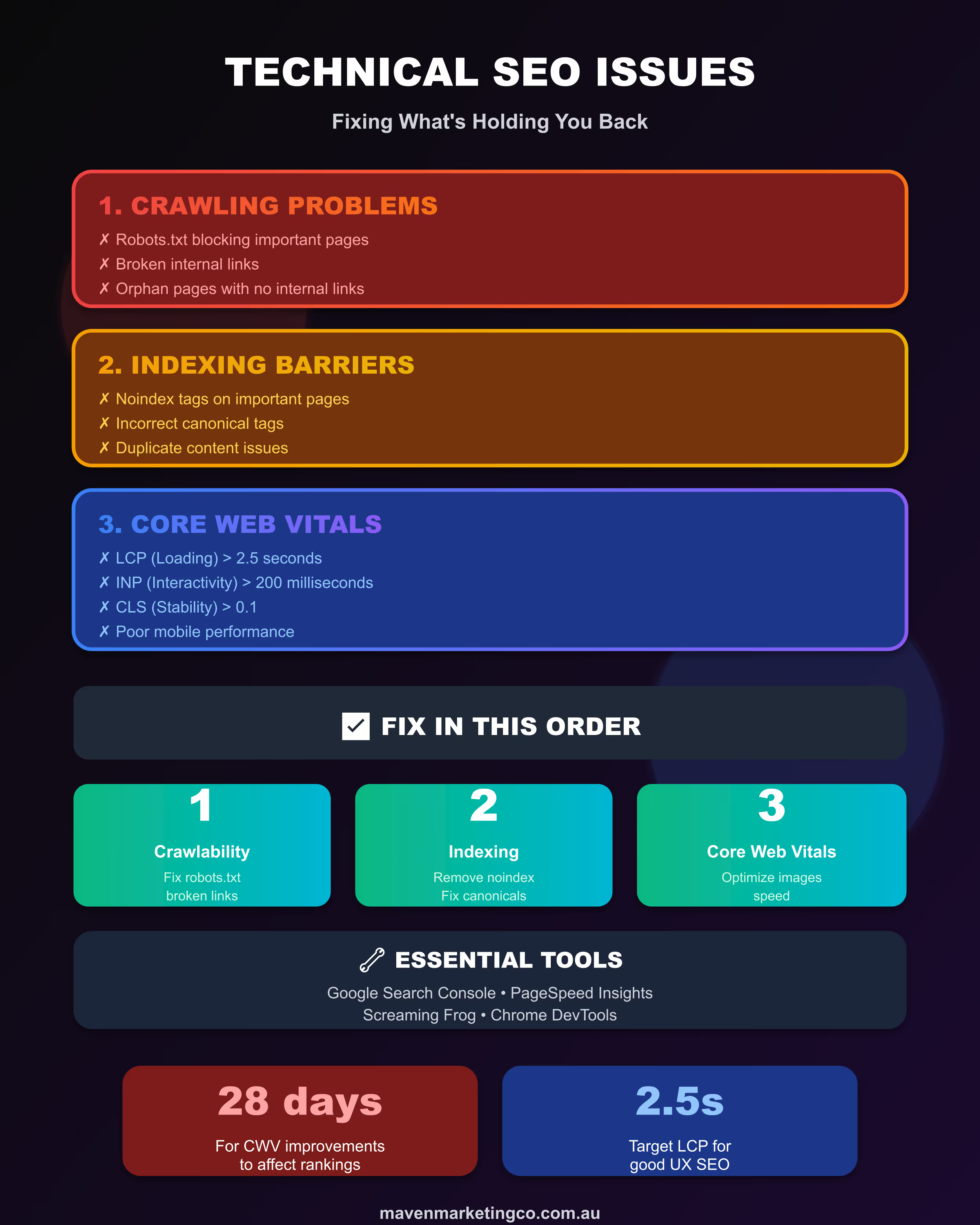
Crawlability problems where search engines cannot access pages due to robots.txt misconfiguration, broken internal links creating dead ends, orphan pages with no internal linking, redirect chains slowing crawler progress, and server errors preventing access. These stop search engines from even discovering your content.
Indexing barriers including noindex tags accidentally left on important pages, canonical tags pointing to wrong URLs, duplicate content confusing search engines about which version to rank, thin content not meeting quality thresholds, and crawled but not indexed pages that Google deems low value.
Core Web Vitals failures with poor Largest Contentful Paint scores above 2.5 seconds, slow Interaction to Next Paint exceeding 200 milliseconds, unstable Cumulative Layout Shift above 0.1, and mobile performance significantly worse than desktop, all contributing to page experience penalties.
Mobile usability issues given mobile first indexing, including text too small to read, content wider than screen, clickable elements too close together, and flash or other non mobile compatible technologies blocking content.
Structured data errors preventing rich results from displaying, incorrect schema implementation causing validation failures, and missing markup for important content types limiting SERP visibility.
How do you fix Core Web Vitals to improve SEO rankings?
Core Web Vitals fixes target three specific metrics:
For Largest Contentful Paint under 2.5 seconds: Optimize and compress images using WebP or AVIF formats, implement lazy loading for below fold images but never above fold content, reduce server response times through better hosting or caching, remove render blocking resources by deferring non critical CSS and JavaScript, use content delivery networks to serve assets from locations closer to users.
For Interaction to Next Paint under 200 milliseconds: Minimize JavaScript execution time by breaking up long tasks, limit third party scripts that delay responsiveness, optimize JavaScript frameworks and reduce bundle sizes, defer non essential scripts to load after initial page render, use web workers for complex computations off the main thread.
For Cumulative Layout Shift under 0.1: Set explicit width and height attributes for all images and videos, reserve space for dynamic content like ads with minimum height values, use font display swap to prevent invisible text while custom fonts load, avoid inserting content above existing content after initial render, ensure pages are eligible for back forward cache to prevent shifts on navigation.
Testing and monitoring: Use Google Search Console Core Web Vitals report for real user data from Chrome users, test with PageSpeed Insights for both lab and field data, monitor regularly as performance changes with code deployments, prioritize mobile optimization given mobile first indexing, and expect 28 day delays between improvements and seeing full ranking impact as Google uses rolling averages.
The Full Guide
You've done everything right, or so you think. Content answers user questions thoroughly. Keywords are strategically placed. Backlinks are building. Yet organic traffic remains stagnant, and rankings refuse to budge beyond page three.
The frustration is real. You've invested time, money, and energy into content that should be working. The problem often isn't your strategy at all.
It's what's happening underneath. Search engines might not even be seeing your brilliant content because technical barriers prevent proper crawling. Or they're seeing it but deprioritising it because performance issues signal poor user experience. These aren't mysterious problems. They're specific issues with concrete solutions, and you can fix them.
The Crawling Foundation

Before search engines can rank your content, they must first discover and access it. This happens through crawling, where bots systematically follow links across the web. When crawling fails, everything else becomes irrelevant because search engines never see your content to begin with.
Your robots.txt file is both incredibly powerful and potentially disastrous. A single misplaced line can block your entire blog from being crawled. Block your CSS and JavaScript files, and Google cannot properly render pages to understand their content. Accidentally block your XML sitemap location, and you've made discovery of your important pages substantially harder.
These mistakes accumulate over time. Someone blocks a staging directory years ago, then the live site's structure changes to include a similar path that now gets blocked unintentionally. A developer adds a disallow rule without understanding the full implications. Or conversely, someone blocks "/temp" intending to hide temporary files but accidentally blocks legitimate pages ending in "temp."
Start by auditing your current robots.txt thoroughly. Use Google Search Console's robots.txt tester to check whether important pages are being blocked. Review every disallow rule and understand exactly what it blocks. For larger sites, test sample URLs from each major section to ensure they're accessible.
Here's something that confuses many people: robots.txt prevents crawling, not indexing. If Google already knows about a URL through external links, it can still appear in results even when blocked, showing "No information is available for this page." Frustrating, right? This creates situations where pages appear in search results but cannot be clicked effectively, hurting user experience and your credibility.
Beyond robots.txt, watch for server errors returning 500 status codes, timeout issues where pages take too long to respond, redirect chains where multiple redirects slow crawlers, and broken internal links creating dead ends. Each wastes your limited crawl budget.
For most small to medium Australian businesses, crawl budget isn't a major concern. Sites under 10,000 pages rarely face limitations. But for larger sites, particularly e-commerce platforms with thousands of product variations or media sites with extensive archives, ensuring crawlers focus on important pages becomes critical.
Internal linking structure dramatically affects crawlability. Pages with no internal links pointing to them might never be discovered unless they appear in your XML sitemap, and even then, Google may not prioritise them. Conversely, pages receiving many internal links from important pages get crawled more frequently and often rank better.
Think about your site architecture. Can users reach your most important content within two to three clicks from the homepage? If it takes five, six, or seven clicks, you're making life harder for both crawlers and users. This doesn't mean flattening everything artificially, but it does mean ensuring valuable content doesn't get buried.
The Indexing Challenge
Crawling discovers pages. Indexing determines whether they get stored in search engine databases for potential display in results. Not everything crawled gets indexed, and this distinction trips up many business owners who assume crawled pages automatically appear in search.
The most straightforward barrier is the noindex meta tag, which explicitly tells search engines not to include the page in their index. This is useful for thank you pages, staging environments, and pages you want accessible but not searchable. Problems arise when these tags get left on pages accidentally.
I've seen entire site launches fail because a developer set up staging with noindex on all pages, then migrated to production without removing those tags. Weeks of wondering why nothing ranks, only to discover this single oversight. It's more common than you'd think.
Canonical tags create another layer of complexity. These tell search engines which version of a page to treat as the original when multiple similar versions exist. Used correctly, they consolidate ranking signals. Used incorrectly, they can tell Google to index a different page than you intended or even a page that doesn't exist anymore.
Check that canonical tags on each page point to either that page itself or the correct alternative version you want indexed. It's tedious work, especially on large sites, but catching these errors early prevents months of ranking struggles.
Duplicate content confuses search engines about which version to rank. This includes obvious duplication like the same article on multiple URLs, but also subtler issues. Similar product pages, printer-friendly versions, mobile-specific URLs, parameter variations creating functionally identical pages. The solution involves canonicalisation, consolidation where possible, and strategic noindex usage for duplicates that must exist separately.

Content quality thresholds have risen substantially. Pages with minimal unique content, thin affiliate content, auto-generated text, or content duplicated from other sites often get crawled but not indexed. Google's helpful content update specifically targets this, attempting to surface content created to serve users rather than manipulate rankings.
If you're seeing "Crawled, currently not indexed" in Search Console for pages you consider important, content quality is often the culprit. Hard truth? Sometimes the content simply isn't good enough, unique enough, or valuable enough to warrant indexing. Adding more of the same won't help. You need to genuinely improve what you're offering.
The XML sitemap functions as your suggested priority list for search engines. It doesn't guarantee indexing but helps with discovery, particularly for pages deep in site architecture or recently published. Best practices include only listing indexable URLs, excluding redirects and noindex pages, keeping files under 50 MB and 50,000 URLs, updating as your site changes, and submitting via both Search Console and robots.txt reference.
Mobile-first indexing means Google now predominantly uses the mobile version of your content for indexing and ranking. If your mobile site differs significantly from desktop, or if content appears differently on mobile, this directly affects rankings. Ensure critical content appears on both versions, metadata matches across versions, and structured data exists on mobile pages just as it does on desktop.
Core Web Vitals Impact
Core Web Vitals measure real user experience through three specific metrics: Largest Contentful Paint for loading speed, Interaction to Next Paint for responsiveness, and Cumulative Layout Shift for visual stability. Together, they form part of Google's page experience ranking factor.
The relationship between Core Web Vitals and rankings is nuanced, and understanding this nuance matters. They're not the strongest ranking factor. Great content with poor vitals can still rank. But when two pages offer similar content quality, authority, and relevance, better Core Web Vitals often determine which ranks higher. For competitive keywords where multiple pages thoroughly address the query, vitals function as the tiebreaker.
The impact shows most clearly when moving from poor to good scores. Fixing major performance issues produces noticeable ranking improvements. Once you reach "good" thresholds, further optimisation brings diminishing returns from an SEO perspective, though user experience continues benefiting.
Here's what actually matters: performance improvements drive conversion increases even when rankings stay constant. Users complete actions more readily on fast, stable sites. So even if SEO benefits plateau, the business case for performance remains strong.
Largest Contentful Paint measures how long it takes for the main content element to become visible. Google wants this under 2.5 seconds. Common causes of slow LCP include unoptimised images that are too large, slow server response times, render-blocking CSS and JavaScript, and inefficient resource loading.
Fixes involve image compression and modern formats like WebP, content delivery networks reducing geographic latency, lazy loading for images below the fold, and removing or deferring non-critical resources. These aren't exotic solutions. They're established best practices that work reliably when implemented correctly.
Interaction to Next Paint replaced First Input Delay in 2024 and measures all user interactions, scoring the longest one. Google wants this under 200 milliseconds. Poor INP typically stems from heavy JavaScript execution, long-running tasks blocking the main thread, inefficient event handlers, and excessive third-party scripts.

Solutions include breaking up long tasks, optimising JavaScript frameworks, deferring non-essential scripts, and using web workers to move complex computations off the main thread. If this sounds technical, that's because it is. Many businesses need developer help for meaningful INP improvements, and that's perfectly normal.
Cumulative Layout Shift measures visual stability by tracking how much page elements shift during loading. Google wants this below 0.1. We've all experienced this frustration: you're about to click a button, the page shifts, and you accidentally click something else entirely. Annoying for users, and Google knows it.
Common causes include images and videos without dimensions specified, ads and embeds loading late without reserved space, dynamically injected content pushing existing content down, and fonts loading late causing text reflow.
Prevention involves always setting width and height attributes on images, reserving space for dynamic content with minimum height values, using font-display swap for custom fonts, and avoiding content insertion above the fold after initial render. These are straightforward fixes that often deliver immediate CLS improvements.
Mobile performance typically scores worse than desktop because mobile devices have slower processors, weaker connections, and Google applies stricter benchmarks. Since Google predominantly uses mobile indexing, mobile Core Web Vitals directly impact rankings even for searches performed on desktop. This makes mobile optimisation non-negotiable.
Testing and Monitoring Approach
Fixing technical SEO requires first understanding what's broken. Systematic testing reveals issues that guessing misses, saving time and preventing fixes that address symptoms rather than root causes.
Google Search Console provides the authoritative view of how Google sees your site. The Coverage report shows which pages are indexed, which are excluded, and why. The Core Web Vitals report displays real user data on your site's performance. The Mobile Usability report identifies mobile-specific problems. Check these regularly rather than waiting for problems to accumulate.
The URL Inspection Tool lets you test individual URLs to see how Google crawled them, whether they're indexed, any issues encountered, and how the page renders. When troubleshooting specific pages, this tool provides detailed diagnostic information unavailable through broader reports. Use it liberally when investigating problems.
Third-party crawlers like Screaming Frog simulate how search engines crawl your site, revealing broken links, redirect chains, missing metadata, duplicate content, and orphan pages. These tools help you see your site as search engines see it, identifying structural issues that hurt crawlability and indexing. Regular crawls, particularly after major site changes, catch problems before they impact rankings.

PageSpeed Insights provides both lab data and field data for Core Web Vitals. Lab data comes from controlled tests and helps diagnose issues. Field data reflects actual user experiences from Chrome users visiting your site over the past 28 days. This field data is what Google uses for rankings, making it more important than lab scores.
The tool also provides specific recommendations for improvement, though not all recommendations impact Core Web Vitals equally. Focus on the suggestions that actually address your failing metrics rather than trying to implement everything simultaneously.
For Australian businesses, testing from Australian locations matters. Performance can vary significantly based on geography due to server locations, CDN configurations, and network infrastructure. Tools that let you test from Sydney or Melbourne provide more relevant data than tests run from US data centres.
Continuous monitoring beats one-time audits. Technical SEO isn't set-and-forget. Code deployments change performance. Plugin updates introduce new issues. Content additions affect crawlability. Regular monitoring catches problems quickly, preventing small issues from becoming big ones.
The Australian Business Context
Australian hosting typically provides better local server response times than offshore hosting, improving Core Web Vitals for Australian users. However, if your business targets international audiences alongside domestic ones, CDN implementation becomes more important to serve global visitors efficiently without sacrificing local performance.
Mobile usage patterns in Australia skew heavily toward mobile devices for local searches, making mobile-first indexing especially relevant. Businesses with significant foot traffic or local service areas cannot afford mobile usability problems. These directly impact the local searches driving walk-in customers and service inquiries.
Resource constraints at many Australian SMEs make prioritising technical fixes critical. You likely cannot address everything simultaneously, and that's fine. Focus first on issues affecting your most valuable pages, those driving the most traffic or conversions. Address critical crawlability problems before optimising Core Web Vitals. Ensure indexing works properly before refining page experience signals.
This staged approach delivers returns faster while making efficient use of limited resources. You don't need perfection. You need systematic improvement toward thresholds that prevent your technical foundation from handicapping your content.
Competitive intensity varies significantly across Australian markets. In less competitive niches, technical SEO problems might be forgiven more easily because competitors face similar issues. In highly competitive spaces like real estate, finance, and legal services, technical optimisation becomes a differentiating factor. Understanding your competitive landscape helps calibrate how aggressive your investment needs to be.
Making Progress Systematically

Technical SEO improvement follows a logical sequence. Address fundamental issues before refining advanced optimisations. This prevents wasting effort optimising pages that aren't even crawlable or refining Core Web Vitals for pages that won't be indexed anyway.
Start with a crawlability audit. Verify robots.txt allows access to all important pages. Check that XML sitemaps are submitted and contain only indexable URLs. Identify and fix broken internal links. Resolve redirect chains. Ensure server stability. These fixes often produce quick wins as previously hidden content becomes discoverable.
Move to indexing verification. Review Coverage reports in Search Console for excluded pages. Investigate why important pages show "Crawled, currently not indexed" status. Check for accidental noindex tags. Verify canonical tags point correctly. Address duplicate content through consolidation or canonicalisation. Improve content quality on thin pages.
Then tackle Core Web Vitals systematically. Measure current performance using real user data from Search Console. Identify which metric needs most attention. Implement fixes for your biggest problem first rather than trying to optimise everything simultaneously. Test after changes. Monitor for regressions as you deploy new code or content.
Throughout this process, document what you change and when. Technical issues sometimes interact in unexpected ways. Changes that seem unrelated can affect each other. Good documentation helps you understand cause-and-effect relationships, making troubleshooting faster when new problems emerge.
The goal isn't perfection. It's continuous improvement toward thresholds that remove technical barriers so your content and authority can drive rankings as they should. Once you've cleared these hurdles, you'll finally see whether your content strategy actually works or needs refinement.
And honestly? That clarity alone makes the technical work worthwhile.
Ready to Fix Your Technical SEO Foundation?
At Maven Marketing Co, we help Australian businesses identify and resolve the technical SEO issues preventing them from ranking. Our team combines strategic SEO expertise with technical implementation experience to diagnose problems accurately and implement fixes that actually work.
Whether you need a comprehensive technical audit, help prioritising which issues to address first, or hands on implementation support for fixes your team cannot handle internally, we're here to ensure your technical foundation supports rather than undermines your organic visibility.
Let's uncover what's holding your rankings back

Table of contents
read more blogs

Is Google Ads Better Than SEO for My Business
One of the biggest questions business owners ask when they are planning online growth is whether they should invest in Google Ads or SEO. Both are strong marketing plays that help your company show up in Google search results, but they do things in separate lanes. Google Ads gives quicker visibility and can bring in leads fast, whereas SEO more or less focuses on slow, steady organic traffic that tends to grow the longer you keep building it. Picking the right direction depends on what you want to achieve, how much money you can spend, how crowded the market is, and how quickly you need results, like sooner rather than later. The good news is you don’t always have to choose one or the other; it’s not exactly a black-and-white situation. If you take time to understand the strongest points of both, you can put together a more sensible digital marketing plan that supports consistent expansion. In this guide, we’ll compare Google Ads vs SEO, explain the main differences, and help you figure out what option makes the most sense for your business.

When Should I Hire a Digital Marketing Agency
Growing a business today takes more than just having a website or throwing a post on social media; customers usually search around online, compare providers, skim reviews, and basically expect the brand to show up with a solid digital presence before they even think about buying. Many businesses try to run their marketing themselves, but there comes a point when “doing it all in-house” becomes clunky and hard to manage, all at once. Knowing when to hire a digital marketing agency can end up making a big, real difference for your growth. If you’re not getting enough leads, or your online visibility feels stuck, or sales are just not moving, the right agency can bring the know-how, plus a clear plan, to help you get noticeably better outcomes. In this guide, we’ll dig into what a digital marketing agency actually does, the usual signs it’s time to bring one on, and how picking the right marketing partner can help your business move forward at a faster pace.

Why Is My Google Ads Budget Running Out So Quickly
Running a successful Google Ads budget isn’t only about throwing more money at it. It’s more like making every dollar, doing a bit extra. A lot of businesses start a Google Ads campaign with big hopes, then find out their daily budget is gone within a few hours, and that feels weird, right? After that, your ads stop showing effectively, new leads slip away, and your return on investment dips. So if your Google Ads budget is running out too fast, don’t stress. It’s a fairly common issue, and in most situations, it can be repaired with the right approach. There are multiple little things that can drain your advertising money quicker than you expected, from costly keywords to audience targeting that just doesn’t quite fit. In this guide, we’ll walk through why your budget disappears so quickly, how to cut wasteful spend, and the most reliable ways to boost your Google Ads ROI, even if your budget stays the same.


