
.svg)


%201.svg)

Key Takeaways
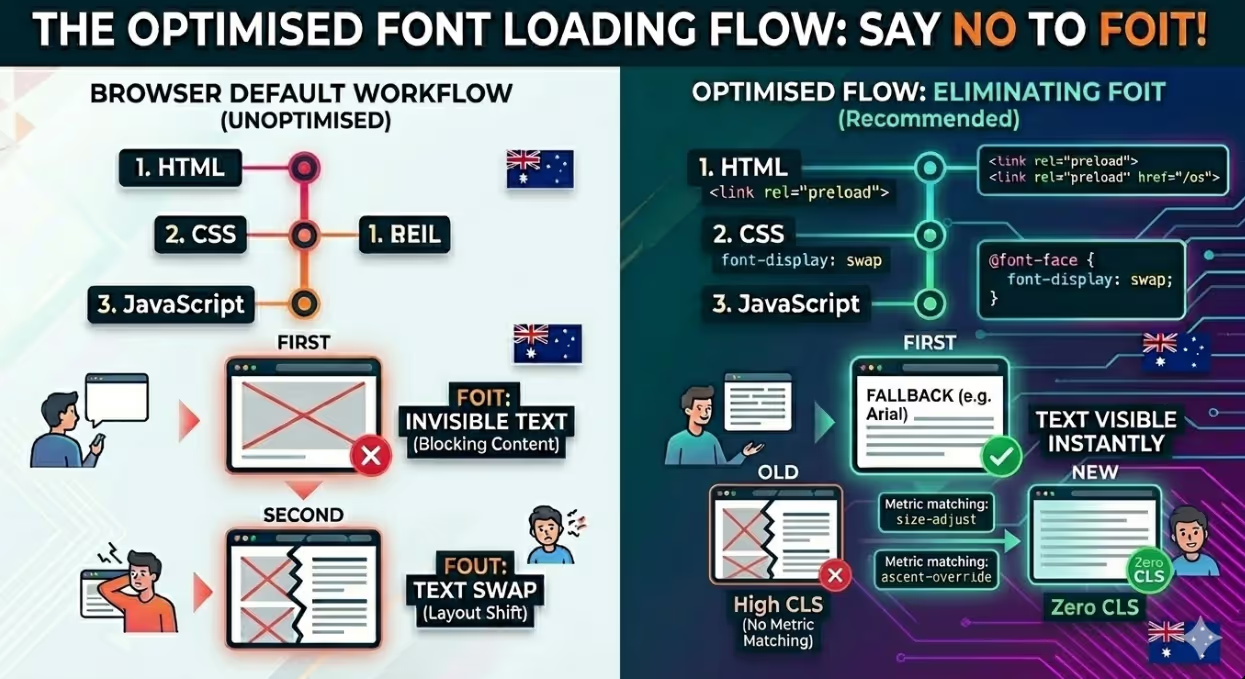
- FOUT (Flash of Unstyled Text) occurs when a browser renders text in a fallback font before the custom font loads, then swaps it, causing a visible layout change that can contribute to Cumulative Layout Shift.
- FOIT (Flash of Invisible Text) occurs when a browser hides text entirely while the custom font loads, blocking readable content from the user for the duration of the font download.
- The CSS font-display property is the primary tool for controlling font loading behaviour, with values including swap, optional, fallback, and block, each producing different tradeoffs between text visibility and layout stability.
- font-display: swap is the most widely recommended default for Australian websites, ensuring text is always visible while the custom font loads, but requires fallback font metrics to be tuned to minimise layout shift.
- Preloading critical fonts using the link rel="preload" attribute prevents font download delay by telling the browser to fetch the font file as early as possible, before it would otherwise discover it in the CSS.
- Variable fonts consolidate multiple font weights and styles into a single file, reducing HTTP requests and total font payload for websites using multiple weights of the same typeface.
- Self-hosting fonts rather than loading them from Google Fonts or Adobe Fonts gives Australian websites full control over caching, loading priority, and font-display behaviour without depending on third party infrastructure.
What Browsers Do With Custom Fonts by Default
When a browser encounters a CSS rule referencing a custom font face, it initiates a request to download that font file. The font file is separate from the HTML and CSS: it must be downloaded, processed, and applied before text using it can be rendered in the intended typeface.
The default browser behaviour while waiting for a font is not consistent across browsers and has changed over time. Chrome, Firefox, and most modern browsers implement a behaviour that roughly corresponds to a brief waiting period of up to three seconds, during which text using the font is invisible (FOIT). If the font has not loaded within that window, the browser falls back to the system font and renders the text visibly, then swaps in the custom font when it finally arrives (FOUT). Safari's default behaviour leans more heavily toward indefinite FOIT on slower connections.
Neither of these defaults serves users or brand presentation well. Invisible text is immediately jarring. Users arrive expecting to read content and find blank space. Visible text that jumps and shifts as the custom font loads is disruptive and measurably contributes to a poor Cumulative Layout Shift score.
The practical consequence is that font loading behaviour should never be left to browser defaults. Every custom font on an Australian commercial website should have an explicit loading strategy defined through CSS and, where necessary, HTML preloading.
The CSS font-display Property
The font-display property is the most direct and most widely supported tool for controlling how a browser handles the period between when a font is requested and when it is available. It is applied within the @font-face rule in CSS and takes one of five values: auto, block, swap, fallback, and optional.
font-display: block instructs the browser to show invisible text (FOIT) for a short period, typically three seconds, and then swap in the custom font when it loads. If the font does not load within the block period, the fallback font is used for the remainder of the page load. This is the closest to legacy browser defaults and is generally the least desirable option for user experience or performance.
font-display: swap instructs the browser to immediately render text in the fallback font and swap in the custom font as soon as it is available, with no invisible period. This eliminates FOIT entirely. The tradeoff is a visible swap event when the font loads, and potential Cumulative Layout Shift if the fallback and custom font metrics differ significantly. Despite this tradeoff, font-display: swap is the default recommendation for most Australian websites because visible text is preferable to invisible text, and the layout shift can be minimised through fallback font tuning.
font-display: fallback provides a brief invisible period (approximately 100 milliseconds), then shows the fallback font if the custom font has not loaded, and swaps in the custom font if it arrives within a three-second window. After that window, the custom font is no longer applied on the current page load even if it arrives later. This is a more conservative version of swap for situations where layout stability is a priority.
font-display: optional gives the browser the shortest possible invisible period and then uses whatever is available. If the font is already in the browser cache, it is used. If it is not available immediately, the fallback font is used for the entire page load and the custom font is not swapped in at all. The custom font is cached for subsequent visits. This is the most performance-conservative option and produces the best Core Web Vitals scores for users on slow connections, at the cost of the custom font not being visible on the first visit for users whose cache does not already contain it.
Eliminating FOIT: The Practical Priority
For most Australian commercial websites, eliminating FOIT is the more urgent priority between the two problems. Invisible text directly blocks users from accessing content, and for pages where text is the primary value, even an invisible period of one second creates a poor first impression and a higher likelihood of the user leaving before the content becomes readable.
The most effective immediate intervention is adding font-display: swap to the @font-face declarations for all custom fonts used on the site.
For fonts loaded from Google Fonts, this is achievable by appending the display parameter to the Google Fonts URL:
https://fonts.googleapis.com/css2?family=Inter:wght@400;700&display=swap
Google Fonts has supported the display parameter since 2019, and adding it to the URL is the minimum change Australian websites using Google Fonts should make if they have not already done so.
For fonts loaded via fonts loaded through a locally hosted @font-face declarations, the font-display property is added directly to the rule:
css
@font-face {
  font-family: 'BrandFont';
  src: url('/fonts/brandfont.woff2') format('woff2');
  font-display: swap;
}
Addressing FOUT: Fallback Font Metric Matching
Choosing font-display: swap resolves the invisible text problem but introduces the visible swap problem. When the custom font loads and replaces the fallback font, the differences in letter spacing, line height, and character width between the two fonts can cause text blocks to reflow, pushing other page elements up or down. This reflow is a source of Cumulative Layout Shift and will be measured and reported as such in Core Web Vitals data.
The solution is to make the fallback font metrics as close as possible to the custom font metrics, so the visual change when the swap occurs is minimal or imperceptible. This is achieved through the size-adjust, ascent-override, descent-override, and line-gap-override CSS descriptors within the @font-face rule for the fallback font.
css
@font-face {
  font-family: 'BrandFont-Fallback';
  src: local('Arial');
  size-adjust: 104%;
  ascent-override: 90%;
  descent-override: normal;
  line-gap-override: normal;
}
The specific values for these descriptors vary by typeface and must be calculated by comparing the metrics of the custom font against those of the fallback. Tools such as the Fallback Font Generator available at screenspan.net/fallback automate this calculation, accepting a custom font file and a fallback font name and outputting the adjusted @font-face declaration with the correct override values.
When the fallback font metrics are closely matched to the custom font, the visual swap becomes nearly undetectable and the Cumulative Layout Shift contribution from font swapping drops to near zero. This technique combined with font-display: swap produces an experience where text is always visible and the custom font transition is smooth.
Preloading Critical Fonts
Font discovery is one of the later events in the browser's resource loading sequence. The browser must first download the HTML, then download and parse the CSS, then identify @font-face declarations, and only then request the font files. On a page with a stylesheet that is itself deferred or complex to parse, font requests may not begin until several seconds into the page load.
The link rel="preload" attribute tells the browser to begin fetching a resource as early as possible, during the initial HTML parse, before it would otherwise discover the resource in the CSS. For fonts that appear in the initial viewport, preloading eliminates the discovery delay and gets the font download started at the earliest possible moment.
html
<link rel="preload" href="/fonts/brandfont.woff2" as="font" type="font/woff2" crossorigin>
The crossorigin attribute is required on font preloads even for fonts hosted on the same domain, because browsers fetch fonts using anonymous CORS requests. Omitting it causes the browser to ignore the preload hint.
Preloading is most valuable for the primary typeface used for body text or headings in the initial viewport. Preloading every font variant on the site is counterproductive: it adds resource contention during the initial load and can delay other critical resources. The practical recommendation is to preload only the one or two font files that affect text visible without scrolling on the most important pages of the Australian website.
Variable Fonts: Fewer Files, Less Weight
Traditional font delivery involves a separate file for each weight and style variant: regular, bold, italic, bold italic, and any other weights the design uses. A site using four weights of a typeface across desktop and mobile loads four separate font files, each requiring its own HTTP request and contributing to total page weight.
Variable fonts consolidate all weights, styles, and potentially widths of a typeface into a single file. Instead of separate files for 300 weight, 400 weight, 600 weight, and 700 weight, a single variable font file contains all of them, with weight controlled through the font-weight CSS property in the normal way.
The file size of a variable font is larger than any single traditional font weight but typically smaller than two or three traditional weights combined. For a site loading four or more traditional font weights, switching to the variable font equivalent typically reduces total font payload and eliminates three or more HTTP requests, both of which improve loading performance.
Browser support for variable fonts is comprehensive in 2026. All major browsers have supported them for several years. For Australian websites with design systems using multiple weights of a single typeface, investigating whether a variable font version is available and switching to it is a straightforward performance improvement.
Google Fonts supports variable fonts across a significant and growing proportion of its library. For Australian websites using Google Fonts, checking whether the typefaces in use have variable font versions available and migrating to them is a recommended optimisation that reduces font payload without requiring any design changes.
Self-Hosting vs Google Fonts
The question of whether to load fonts from Google Fonts or host them directly on the website's own server has performance, privacy, and control dimensions that are worth understanding for Australian website owners.
Google Fonts serves font files from Google's CDN infrastructure, which has excellent global availability and cache behaviour across browsers with large user bases. For a user whose browser has already cached a Google Font from a previous visit to any site using the same font, the font loads instantly from cache with no download required. This benefit has diminished in recent years as browsers have moved toward partitioned caches that isolate cached resources by the site that loaded them, meaning the cache sharing across sites that made Google Fonts CDN delivery attractive is no longer reliable.
The performance argument for hosting fonts on your own server has become more compelling as a result. When fonts are hosted on the same server as the website, they are served from the same domain as the rest of the website, eliminating the DNS lookup and connection establishment overhead required to connect to fonts.googleapis.com and fonts.gstatic.com. They are also subject to the site's own caching headers, which can be set for long durations appropriate for font files that rarely change. Full control over font-display values, preloading, and loading order is retained.
For Australian websites where user privacy and data residency are considerations, hosting fonts on the same server eliminates the transmission of user request data to Google's infrastructure, which may be relevant for sites subject to specific privacy requirements under the Australian Privacy Act.
The practical path to self-hosting Google Fonts is straightforward. The google-webfonts-helper tool at gwfh.mranftl.com generates the @font-face CSS and downloadable font files for any Google Font, ready to be uploaded to the website's server and referenced in the stylesheet.
FAQs
Does font loading affect SEO and Core Web Vitals for Australian websites?
Yes, directly. Cumulative Layout Shift, one of Google's three Core Web Vitals, is frequently caused or worsened by font swap events where the custom font loading causes text blocks to reflow and shift page elements. Improving font loading through font-display: swap combined with fallback font metric matching reduces CLS scores. Largest Contentful Paint can also be affected when the largest element in the initial viewport contains text that is rendered in a custom font, because the LCP clock does not stop until that text is visible in its final state. Preloading the relevant font ensures the LCP element renders as early as possible. Australian websites with custom typography and poor Core Web Vitals scores should audit font loading behaviour as one of the first diagnostic steps.
How many custom fonts should an Australian website use?
From a performance standpoint, fewer is always better. Each font family typically requires at least one file download, and each additional weight or style variant requires an additional file. A common performance recommendation is to limit custom font usage to two families at most, with a maximum of three or four total font files. Beyond this, the cumulative loading overhead outweighs the typographic benefit for most users, particularly on mobile connections. For Australian ecommerce and service businesses where load speed directly affects conversion rates, auditing total font payload as part of a broader performance review often reveals significant savings available from rationalising the font stack.
What is the best font format for Australian websites in 2026?
WOFF2 is the recommended format for all modern web font delivery. It provides superior compression compared to WOFF, TTF, and OTF, resulting in smaller file sizes and faster downloads. Browser support for WOFF2 is comprehensive across all browsers currently in active use by Australian audiences. Serving fonts in multiple formats for legacy browser fallback is no longer necessary in 2026 for the vast majority of Australian websites: a single WOFF2 source in the @font-face declaration is sufficient. Sites still serving TTF or OTF font files as primary sources should convert them to WOFF2 to achieve the available file size savings.
Typography Should Be Seen, Not Waited For
Every second a user spends looking at invisible text or watching content shift as a font loads in is a second of friction between them and the information or experience the website is meant to deliver. Font loading optimisation is not an abstract technical concern. For Australian websites where typography is integral to brand expression and where search performance depends on Core Web Vitals scores, it is a practical commercial priority with thoroughly understood and achievable solutions.
Maven Marketing Co helps Australian businesses identify and resolve the web performance issues that are holding back their search rankings, user experience, and conversion rates.
Talk to the team at Maven Marketing Co →

Table of contents
read more blogs

How to Choose the Right Digital Marketing Channels for Your Business
Choosing digital marketing channels is one of the easiest places for businesses to lose clarity. There are more options than ever, every platform promises reach and results, and it is easy to assume that the best strategy is simply to be everywhere. In reality, most businesses do better when they choose channels with intention rather than spreading budget and effort too thinly.The right channel mix depends on where your audience spends time, how they search or discover solutions, what your business is trying to achieve and how much resource you actually have to support execution properly. A channel is only useful if it helps move the right people towards a commercial outcome that matters to the business.This is why strong digital marketing strategy is not really about finding one perfect platform. It is about understanding the role each channel can play across awareness, demand capture, conversion and retention. SEO might build long-term visibility, Google Ads might capture active intent, social media might support familiarity and reach, while email may help nurture prospects and strengthen customer value over time.This guide explains what digital marketing channels are, how to assess them properly and how to build a balanced channel mix for your business. The focus is practical. Rather than chasing every new platform, the goal is to help you choose the channels that fit your audience, goals, budget and internal capability.

How to Build a Customer Journey Map for Your Digital Marketing Strategy
A strong digital marketing strategy is not just about channels, creative or traffic. It is about understanding how real people move from first awareness through to enquiry, purchase and ongoing loyalty. That is exactly why customer journey mapping matters.Without a clear view of the journey, businesses often optimise in fragments. They improve the website without thinking about the ad that drove the visit, produce content without considering where the audience is in the decision process, or judge conversion performance without understanding the friction points that sit earlier in the experience.A customer journey map helps you step back and see the bigger picture. It shows the stages people move through, the touchpoints they interact with, the questions they ask, the barriers they face and the moments where your marketing can either help or lose them.This guide explains how to build a practical customer journey map for your digital marketing strategy, what information to include, how to use the map to improve performance and which common mistakes to avoid. The goal is not to create a pretty workshop artefact that gets forgotten. It is to build a working tool that improves messaging, user experience, channel decisions and conversion outcomes.

Why Your Google Ads Campaign Is Not Getting Results: Common Mistakes and Solutions
If your Google Ads campaign is getting impressions or clicks but not producing enough enquiries, sales, or qualified leads, the problem is usually not Google Ads itself. It is more often a strategy, tracking, or conversion issue somewhere in the system.That matters because paid search can look busy without being commercially effective. You can have traffic coming in, a reasonable click-through rate and money leaving the account every day, yet still have very little to show for it if your keywords are weak, your ad copy is misaligned, your landing pages do not convert or your tracking is incomplete.A strong campaign works as one connected chain. Search intent, keyword targeting, ad relevance, bidding, landing-page experience, and conversion tracking all need to support the same commercial outcome. If one link breaks, results usually suffer quickly.This guide explains the most common reasons a Google Ads campaign is not getting results, what those issues normally look like in practice and how to fix them without relying on guesswork. The focus is not on vanity metrics. It is on improving lead quality, conversion rate, and return on spend.


