
.svg)


%201.svg)

Key Takeaways
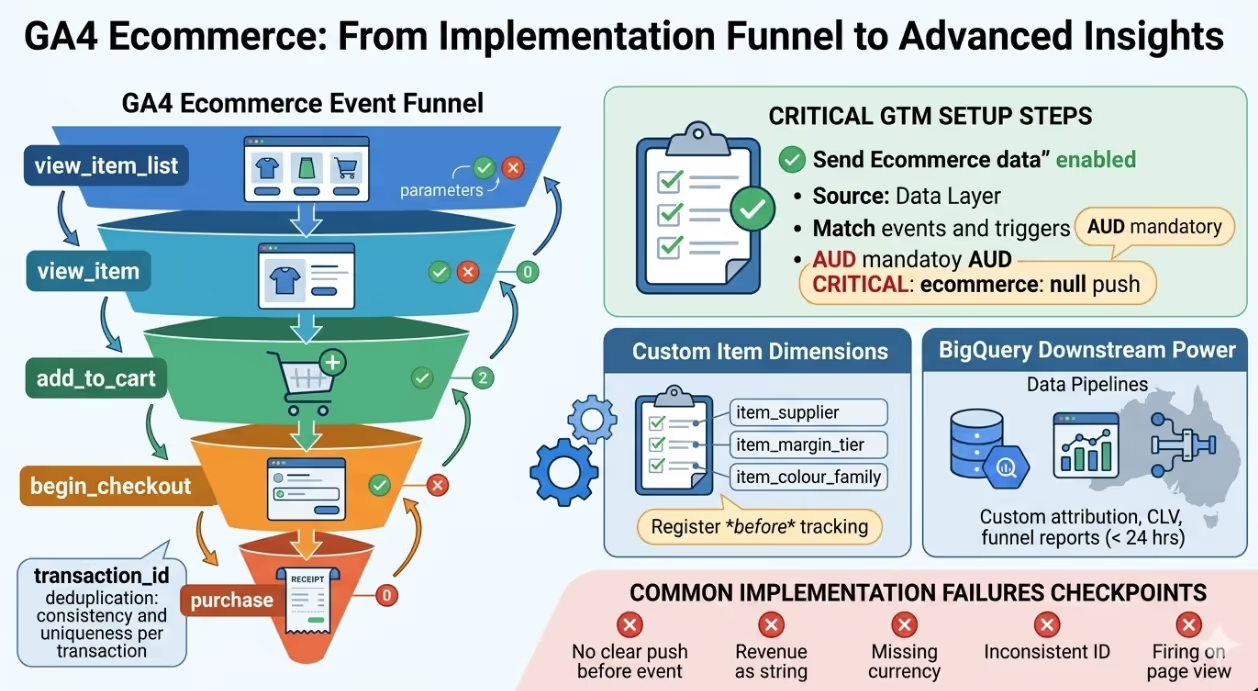
- GA4 ecommerce uses a completely different event schema from Universal Analytics Enhanced Ecommerce. The UA events (
ec:addToCart,ec:purchase) do not translate to GA4 events (add_to_cart,purchase), and the product data structure differs in both field names and nesting. - The GA4 ecommerce data layer must be rebuilt from scratch when migrating from UA. There is no upgrade path or compatibility layer that converts UA Enhanced Ecommerce dataLayer pushes into valid GA4 ecommerce events.
- Every ecommerce event in GA4 requires an
itemsarray containing the product data. The structure, field names, and required versus optional parameters of this array differ significantly from the UAproductsarray that Enhanced Ecommerce used. - GA4 introduces the concept of custom dimensions scoped to the item level and custom metrics scoped to the item level, which allow attributes at the product level beyond the standard GA4 product fields to be tracked and reported. These require explicit configuration in the GA4 interface before they will populate in reports.
- Funnel analysis in GA4 uses a dedicated Funnel Exploration in the Explore section rather than the Funnel Reports available in UA, and requires the correct event sequence to be configured against the GA4 events present in the implementation.
- Purchase deduplication in GA4 is handled by the
transaction_idparameter. Duplicate purchase events with the sametransaction_idare filtered automatically, but this relies on thetransaction_idbeing consistently populated and unique per transaction. - GA4's ecommerce data is available in the BigQuery export within 24 hours of events firing, enabling Australian analytics teams to build custom purchase attribution models, customer lifetime value analyses, and funnel reports beyond what the GA4 interface provides.
The Structural Differences Between Enhanced Ecommerce and GA4
Understanding why a direct migration is not possible requires understanding how the two measurement models differ at a structural level. The differences are not superficial naming changes. They reflect a fundamentally different approach to event measurement.
Universal Analytics Enhanced Ecommerce used a plugin model where ecommerce data was pushed to the dataLayer using a specific object structure, and the UA tag in Google Tag Manager read this structure and sent it to Google Analytics as part of the hit. The central concept was the "product impression" and the "product action" — you would push product data to the dataLayer and then specify an action (add, remove, purchase) that determined how the data was recorded.
javascript
// UA Enhanced Ecommerce dataLayer push example
dataLayer.push({
  'ecommerce': {
    'purchase': {
      'actionField': {
        'id': 'ORDER-12345',
        'revenue': '149.00',
        'tax': '13.55',
        'shipping': '9.95'
      },
      'products': [{
        'id': 'SKU-001',
        'name': 'Product Name',
        'price': '149.00',
        'quantity': 1,
        'category': 'Category Name'
      }]
    }
  }
});
GA4 ecommerce uses a flat event model where each ecommerce action is its own named event with parameters, and product data is passed in an items array directly within the event's parameters object:
javascript
// GA4 ecommerce dataLayer push example
dataLayer.push({ ecommerce: null }); // Clear previous ecommerce object
dataLayer.push({
  event: 'purchase',
  ecommerce: {
    transaction_id: 'ORDER-12345',
    value: 149.00,
    tax: 13.55,
    shipping: 9.95,
    currency: 'AUD',
    items: [{
      item_id: 'SKU-001',
      item_name: 'Product Name',
      price: 149.00,
      quantity: 1,
      item_category: 'Category Name'
    }]
  }
});
The structural differences visible in these examples include: the event is named explicitly (event: 'purchase') rather than being inferred from the ecommerce action type; product data uses items rather than products; product fields use item_id, item_name, and item_category rather than id, name, and category; revenue is replaced by value; and the field values are numbers rather than strings for numeric fields.
The Complete GA4 Ecommerce Event Set
GA4 defines a standard set of ecommerce events that correspond to the key moments in a shopper's journey. Each event has required and recommended parameters that determine how the data populates in GA4 reports.
View Item List
Fired when a product listing page, search results page, or category page is displayed:
javascript
dataLayer.push({ ecommerce: null });
dataLayer.push({
  event: 'view_item_list',
  ecommerce: {
    item_list_id: 'category_womens_tops',
    item_list_name: "Women's Tops",
    items: [{
      item_id: 'SKU-001',
      item_name: 'Linen Shirt',
      item_category: "Women's Tops",
      price: 79.00,
      index: 1
    }]
  }
});
View Item
Fired when a product detail page is displayed:
javascript
dataLayer.push({ ecommerce: null });
dataLayer.push({
  event: 'view_item',
  ecommerce: {
    currency: 'AUD',
    value: 79.00,
    items: [{
      item_id: 'SKU-001',
      item_name: 'Linen Shirt',
      item_category: "Women's Tops",
      price: 79.00,
      quantity: 1
    }]
  }
});
Add to Cart and Remove from Cart
javascript
dataLayer.push({ ecommerce: null });
dataLayer.push({
  event: 'add_to_cart', // or 'remove_from_cart'
  ecommerce: {
    currency: 'AUD',
    value: 79.00,
    items: [{
      item_id: 'SKU-001',
      item_name: 'Linen Shirt',
      item_category: "Women's Tops",
      price: 79.00,
      quantity: 1
    }]
  }
});
Begin Checkout
Fired when the customer initiates the checkout process:
javascript
dataLayer.push({ ecommerce: null });
dataLayer.push({
  event: 'begin_checkout',
  ecommerce: {
    currency: 'AUD',
    value: 79.00,
    coupon: 'SUMMER10',
    items: [{ /* full items array */ }]
  }
});
Purchase
The most critical event in the ecommerce implementation. All required parameters must be populated:
javascript
dataLayer.push({ ecommerce: null });
dataLayer.push({
  event: 'purchase',
  ecommerce: {
    transaction_id: 'ORDER-12345',
    value: 79.00,
    tax: 7.18,
    shipping: 9.95,
    currency: 'AUD',
    coupon: 'SUMMER10',
    items: [{
      item_id: 'SKU-001',
      item_name: 'Linen Shirt',
      item_brand: 'Brand Name',
      item_category: "Women's Tops",
      item_variant: 'White / L',
      price: 79.00,
      quantity: 1
    }]
  }
});
Configuring GA4 Tags in Google Tag Manager
With the data layer events in place, the GA4 tags in Google Tag Manager must be configured to read the ecommerce data and send it to the GA4 property.
The recommended approach in GTM is to use GA4 Event tags with the "Send Ecommerce data" option enabled and set to "Data Layer" as the source. This configuration tells the GA4 tag to automatically read the ecommerce object from the dataLayer when the specified event trigger fires.
For each ecommerce event, a corresponding GA4 Event tag is required:
- Trigger: Custom Event firing on
view_item_list→ GA4 Event tag with event nameview_item_list - Trigger: Custom Event firing on
view_item→ GA4 Event tag with event nameview_item - Trigger: Custom Event firing on
add_to_cart→ GA4 Event tag with event nameadd_to_cart - Trigger: Custom Event firing on
remove_from_cart→ GA4 Event tag with event nameremove_from_cart - Trigger: Custom Event firing on
begin_checkout→ GA4 Event tag with event namebegin_checkout - Trigger: Custom Event firing on
purchase→ GA4 Event tag with event namepurchase
The currency parameter must be present in every event that includes a value parameter, and must be a valid ISO 4217 currency code. For Australian ecommerce businesses, this is AUD.
The ecommerce: null push before each ecommerce event is essential. Without it, properties from a previous ecommerce push can persist in the dataLayer and contaminate the next event's data, producing incorrect item attribution.
Item-Scoped Custom Dimensions
GA4's standard item fields cover the most common product attributes, but Australian ecommerce businesses frequently need to track additional product-level attributes: supplier, margin tier, promotional label, availability zone, colour family, or any other attribute that supports their reporting and optimisation needs.
These additional attributes are passed as custom parameters in the items array alongside the standard fields:
javascript
items: [{
  item_id: 'SKU-001',
  item_name: 'Linen Shirt',
  item_category: "Women's Tops",
  price: 79.00,
  quantity: 1,
  // Custom item parameters
  item_supplier: 'Supplier Co',
  item_margin_tier: 'high',
  item_colour_family: 'neutrals'
}]
For these custom parameters to populate in GA4 reports, they must be registered as custom dimensions in the GA4 interface under Configure → Custom Definitions → Create Custom Dimensions, with the scope set to Item and the event parameter name matching exactly the parameter name used in the items array.
Custom dimensions that are registered after events have already been sent will not backfill the historical data. Australian implementation teams should register all anticipated custom item dimensions before activating the tracking, or as early as possible in the implementation cycle.
Configuring Ecommerce Reports in GA4
GA4's ecommerce reporting is found in Reports → Monetisation. The standard reports available include:
Ecommerce Purchases shows purchases by item, including item name, item category, item revenue, item purchases, and quantity. This is the equivalent of the UA Product Performance report.
Purchase Journey shows a funnel representation of sessions progressing from sessions to product views, to add-to-carts, to checkout begins, and to purchases. The funnel requires all of the relevant events to be firing correctly to populate each step.
Checkout Journey shows the progression through checkout steps, populated by the begin_checkout and purchase events and any additional checkout step events configured between them.
For reporting that goes beyond these standard reports, the Explore section provides Funnel Exploration and Path Exploration tools that can be configured against GA4 events, and the BigQuery export provides the raw event data for custom SQL analysis.
Common Implementation Failures
Several recurring implementation failures appear in GA4 ecommerce accounts migrated from UA:
Not clearing the ecommerce object before each push. Without dataLayer.push({ ecommerce: null }) before each event push, item data from previous events can persist and combine with the current event's data, producing incorrect item attribution and inflated item counts.
Sending revenue as a string rather than a number. GA4 requires numeric fields to be passed as numbers, not strings. value: '79.00' will cause the value to be ignored or misinterpreted. value: 79.00 is correct.
Missing the currency parameter. GA4 does not assume a default currency. Every event with a value or price at the item level must include currency: 'AUD' or the revenue data will not populate correctly in reports.
Inconsistent transaction_id format. If the transaction_id is sometimes a number and sometimes a string, or if the same order produces different ID formats depending on the payment pathway, the deduplication mechanism may fail to catch duplicate purchase events from both the tag running in the browser and an implementation sending events from the server.
Firing purchase on page view rather than on form submission success. The purchase event should fire only when the order has been successfully placed. Firing on page view of the confirmation URL can produce duplicate conversions if the URL is revisited, bookmarked, or shared.
FAQs
Can GA4 ecommerce data be compared directly with historical Universal Analytics Enhanced Ecommerce data?
Direct comparison between UA Enhanced Ecommerce data and GA4 ecommerce data is not reliable for several structural reasons. GA4 uses a different session model (sessions in GA4 do not time out in the same way as UA sessions), a different default attribution model (data driven attribution in GA4 versus the last click model (excluding direct) in UA), and different definitions for some core metrics (engaged sessions in GA4 versus sessions in UA, for example). Additionally, if the GA4 implementation captures events that the UA implementation missed, or vice versa, the discrepancy in raw numbers reflects implementation differences rather than measurement changes. The most reliable approach is to identify a set of metrics that can be validated against a source of truth independent of analytics (order management system revenue, for example) for both implementations, and to treat the two data sets as parallel measurements rather than directly comparable figures. Over time, as the GA4 data set grows, the UA historical data becomes less operationally relevant and the comparison question becomes less important.
What is the minimum viable GA4 ecommerce implementation for an Australian business that cannot invest in a full data layer rebuild immediately?
The absolute minimum that produces commercially useful GA4 ecommerce data is the purchase event with correct transaction_id, value, currency, and at least item_id or item_name for each item in the items array. This minimum implementation populates revenue data, transaction counts, and basic product purchase reports in GA4 without the full funnel visibility that view_item_list, view_item, add_to_cart, and begin_checkout provide. For most Australian ecommerce businesses, this minimum can be implemented within a few hours by a developer familiar with GTM and the checkout platform, and it provides enough data to begin optimising the paid and organic traffic driving revenue. The full funnel implementation should be added as a subsequent phase, prioritising add_to_cart and begin_checkout for the checkout funnel analysis that informs abandonment recovery strategies.
How does GA4 ecommerce implementation differ between Shopify, WooCommerce, and Magento for Australian ecommerce businesses?
The implementation pathway varies significantly across platforms. Shopify's native Google channel integration pushes GA4 ecommerce events automatically for most standard ecommerce events, but the automatic implementation often lacks some of the custom item parameters, correct currency codes, or variant-level detail that Australian businesses need for precise reporting. WooCommerce requires either a paid plugin (the Google Analytics for WooCommerce plugin or similar) or a custom implementation, with the plugin approach producing adequate standard ecommerce coverage and the custom approach enabling the full parameter set. Magento requires a custom implementation in most cases, as the available extensions vary significantly in implementation quality and completeness. Regardless of platform, the implementation should be validated in GA4's DebugView before going live, confirming that purchase events arrive with correct item data, that transaction_id values are unique and consistently formatted, and that currency is set to AUD for all events. Platform-specific implementations that have not been validated against these criteria frequently produce revenue data in the wrong currency, missing items, or duplicated purchase events.
Measure the Transaction, Not the Page
Universal Analytics measured page views and sessions, and ecommerce events were layered on top of that session model. GA4 measures events, and ecommerce is simply a standardised set of event names and parameter structures within the event model. The migration from Enhanced Ecommerce to GA4 ecommerce is therefore not a configuration change. It is a rebuild of the measurement layer that captures commerce data, aligned with GA4's event model rather than UA's hit model. Australian ecommerce businesses that have completed this rebuild correctly have a measurement foundation that supports purchase attribution, funnel analysis, product performance reporting, and BigQuery integration at a depth that UA with Enhanced Ecommerce never fully enabled.
Maven Marketing Co implements GA4 ecommerce tracking for Australian businesses, including full data layer architecture, GTM configuration, custom dimension setup, and DebugView validation before the site goes live.
Talk to the team at Maven Marketing Co →

Table of contents
read more blogs

Is Google Ads Better Than SEO for My Business
One of the biggest questions business owners ask when they are planning online growth is whether they should invest in Google Ads or SEO. Both are strong marketing plays that help your company show up in Google search results, but they do things in separate lanes. Google Ads gives quicker visibility and can bring in leads fast, whereas SEO more or less focuses on slow, steady organic traffic that tends to grow the longer you keep building it. Picking the right direction depends on what you want to achieve, how much money you can spend, how crowded the market is, and how quickly you need results, like sooner rather than later. The good news is you don’t always have to choose one or the other; it’s not exactly a black-and-white situation. If you take time to understand the strongest points of both, you can put together a more sensible digital marketing plan that supports consistent expansion. In this guide, we’ll compare Google Ads vs SEO, explain the main differences, and help you figure out what option makes the most sense for your business.

When Should I Hire a Digital Marketing Agency
Growing a business today takes more than just having a website or throwing a post on social media; customers usually search around online, compare providers, skim reviews, and basically expect the brand to show up with a solid digital presence before they even think about buying. Many businesses try to run their marketing themselves, but there comes a point when “doing it all in-house” becomes clunky and hard to manage, all at once. Knowing when to hire a digital marketing agency can end up making a big, real difference for your growth. If you’re not getting enough leads, or your online visibility feels stuck, or sales are just not moving, the right agency can bring the know-how, plus a clear plan, to help you get noticeably better outcomes. In this guide, we’ll dig into what a digital marketing agency actually does, the usual signs it’s time to bring one on, and how picking the right marketing partner can help your business move forward at a faster pace.

Why Is My Google Ads Budget Running Out So Quickly
Running a successful Google Ads budget isn’t only about throwing more money at it. It’s more like making every dollar, doing a bit extra. A lot of businesses start a Google Ads campaign with big hopes, then find out their daily budget is gone within a few hours, and that feels weird, right? After that, your ads stop showing effectively, new leads slip away, and your return on investment dips. So if your Google Ads budget is running out too fast, don’t stress. It’s a fairly common issue, and in most situations, it can be repaired with the right approach. There are multiple little things that can drain your advertising money quicker than you expected, from costly keywords to audience targeting that just doesn’t quite fit. In this guide, we’ll walk through why your budget disappears so quickly, how to cut wasteful spend, and the most reliable ways to boost your Google Ads ROI, even if your budget stays the same.


