
.svg)


%201.svg)
.png)
Key Takeaways
- Only 3% of the web meets accessibility standards, with average pages containing 37 WCAG failures creating barriers for 16% of global population
- Accessible design improves usability by 30% for ALL users, not just those with disabilities, delivering $100 ROI for every $1 invested
- WCAG 2.2 Level AA represents the recommended standard most organizations target, with legal compliance deadlines in April 2026 (US) and June 2025 (EU)
- Common accessibility failures include 60% of images lacking alt text, unclear links, unlabeled forms, and insufficient color contrast
- Four core principles guide accessible design: Perceivable, Operable, Understandable, and Robust (POUR framework)
- Accessibility benefits everyone through temporary injuries, situational limitations, aging, and improved overall user experience regardless of ability
Your beautiful design is invisible to millions of potential customers. Not because your aesthetics failed. Because your accessibility did.
According to comprehensive 2024 research, a scan of nearly two million web pages found that only 3% of the web is considered accessible, and each page had on average 37 elements failing at least one WCAG success criterion. Common failures include images without alt text (60% of images lack descriptive alt text), unclear links, and forms without labels.
For Australian businesses, this represents both risk and opportunity. The risk: non compliance can result in lawsuits and fines starting from $55,000 to $150,000. The opportunity: 16% of the global population lives with disabilities, representing enormous market most businesses ignore through inaccessible design.
But here's what makes accessibility truly compelling beyond compliance. Research from Microsoft found that applying inclusive design principles can boost usability by 30% for all users. A Forrester report noted that investments in accessibility and user experience produce a $100 return for every $1 invested.
Accessibility isn't just about ethics or compliance. It's strategic business decision improving experiences for everyone while opening markets competitors can't reach.
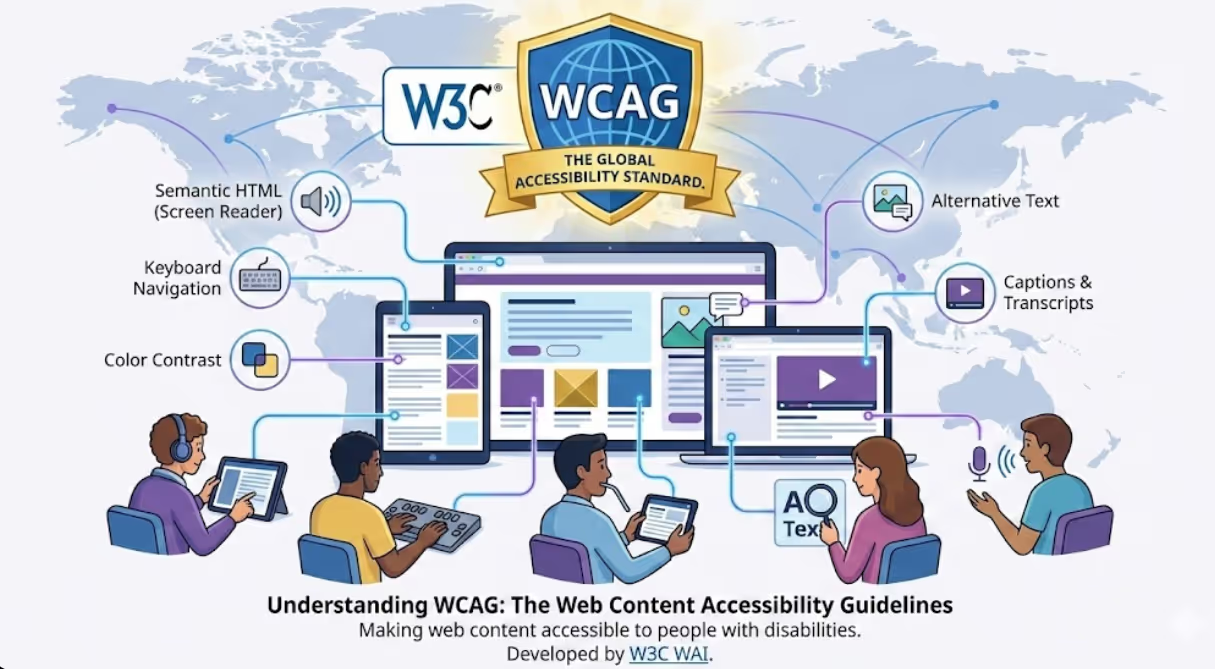
Understanding WCAG: The Global Accessibility Standard
The Web Content Accessibility Guidelines (WCAG) are a set of recommendations for making web content more accessible to people with disabilities. Developed by the World Wide Web Consortium (W3C) through the Web Accessibility Initiative (WAI), WCAG serves as global standard and gold standard for digital accessibility.
WCAG isn't just theoretical framework. It's the foundation global accessibility laws reference. The Americans with Disabilities Act, European Accessibility Act, Accessibility for Ontarians with Disabilities Act, and similar legislation worldwide all point to WCAG as their technical standard.
WCAG Version Evolution: WCAG 2.2 represents the current version, released in October 2023 with latest updates in December 2024. This version builds on WCAG 2.0 (2008) and WCAG 2.1 (2018), maintaining backwards compatibility. Content conforming to WCAG 2.2 automatically conforms to previous versions.
WCAG 2.2 addresses specific needs for people with motor disabilities, cognitive and learning disabilities, and low vision. It introduces success criteria for simplified navigation and easy to understand text while refining existing guidelines for clearer implementation.
The Three Conformance Levels: WCAG organizes accessibility into three levels:
Level A: Minimum baseline conformance addressing most critical barriers. This level includes basic features but is often insufficient for comprehensive accessibility.
Level AA: Mid range level representing recommended target for most organizations. This addresses wider range of accessibility issues providing more comprehensive accessibility. Most legal frameworks require Level AA compliance.
Level AAA: Enhanced level with strictest criteria. Rarely mandated by law, this represents highest accessibility tier but isn't always achievable for all content types.
For Australian businesses, Level AA represents the practical sweet spot balancing comprehensive accessibility with achievable implementation.
The Four Principles: POUR Framework

WCAG organizes 13 guidelines under four core principles ensuring content remains accessible. Understanding these principles helps designers make decisions benefiting all users.
Perceivable: Information and user interface components must be presentable to users in ways they can perceive. Visual content needs text alternatives. Audio content needs captions or transcripts. Content must be adaptable to different presentations without losing information.
This means providing alt text for images enabling screen readers to describe visual content. Adding captions to videos helping deaf or hard of hearing users access audio information. Ensuring colour isn't the only method conveying information, as colour blind users might miss critical details.
Operable: User interface components and navigation must be operable. All functionality must be available from keyboard for users who can't use mice. Users need enough time to read and use content. Nothing should trigger seizures through flashing. Users should easily navigate, find content, and determine their location.
This translates to ensuring every interactive element keyboard accessible. Providing skip navigation links helping keyboard users bypass repetitive content. Avoiding flashing content that could trigger photosensitive epilepsy. Creating clear, logical navigation structures.
Understandable: Information and user interface operation must be understandable. Text content must be readable and understandable. Web pages must appear and operate in predictable ways. Users should receive help avoiding and correcting mistakes.
Practical implementation includes writing clear, concise content at appropriate reading levels. Maintaining consistent navigation across pages. Labeling form inputs clearly with helpful error messages guiding users to corrections.
Robust: Content must be robust enough to work with current and future technologies including assistive technologies. As technologies evolve, content should remain accessible.
This requires using valid, clean code following web standards. Testing with actual assistive technologies like screen readers. Ensuring compatibility across different browsers and devices.
Common Accessibility Failures and How to Fix Them
Understanding where most websites fail helps prioritize fixes delivering biggest accessibility improvements.
Missing Alt Text: 60% of images lack descriptive alt text, the single most common accessibility failure. Screen reader users encounter images described only as "image" or filenames like "IMG_2847.jpg" providing zero context.
Fix: Write descriptive alt text conveying image content and purpose. For decorative images, use empty alt text (alt="") so screen readers skip them. For complex images like charts, provide detailed descriptions in surrounding text or extended descriptions.
Insufficient Color Contrast: Text difficult to read for users with low vision or color blindness. WCAG 2.2 requires minimum contrast ratios: 4.5:1 for normal text, 3:1 for large text.
Fix: Use color contrast checking tools during design. Don't rely on color alone to convey information. Add icons, patterns, or text labels alongside color coding.
Unlabeled Form Fields: Forms without proper labels confuse screen reader users who can't associate input fields with their purposes. Placeholder text disappearing when users start typing provides insufficient guidance.
Fix: Use proper <label> elements associated with form inputs. Provide clear instructions before forms. Offer helpful error messages specific to each field's requirements.
Unclear Link Text: Links saying "click here" or "read more" without context become meaningless when screen readers list all links on page.
Fix: Write descriptive link text conveying destination or purpose. "Download 2024 annual report" beats "click here." If visual design requires generic link text, use aria-label providing descriptive text for screen readers.
Keyboard Navigation Barriers: Interactive elements inaccessible via keyboard trap users who can't use mice. This includes dropdown menus, modal dialogs, and custom widgets built without keyboard support.
Fix: Ensure all interactive elements receive keyboard focus in logical order. Implement keyboard shortcuts for complex interactions. Test entire site using only keyboard. Ensure focus indicators clearly visible showing users where they are.
Video Without Captions: Videos lacking captions exclude deaf and hard of hearing users while frustrating anyone in sound sensitive environments.
Fix: Provide accurate synchronized captions for all video content. Consider audio descriptions for visual information not conveyed through dialogue. Provide transcripts offering text version of all audio and visual information.
Practical Implementation: Building Accessibility Into Your Process
Retrofitting accessibility after design completion costs far more than building it in from start. Integrate these practices throughout your design process.
Research and Planning Phase:
Involve users with disabilities in research. Their perspectives reveal barriers designers without disabilities miss. 77% of organizations now have a person or group responsible for ensuring digital products are accessible. Nominate an accessibility champion within your team.
Document accessibility requirements alongside functional requirements. Create accessibility persona representing diverse disability types your design should accommodate.
Design Phase:
Choose accessible color palettes from start. Use typography ensuring readability at different sizes and zooms. Design clear, logical layouts supporting multiple ways to navigate content.
Create design systems including accessible components. Document how to use each component accessibly. Provide clear guidelines for color contrast, type sizes, spacing, and interaction patterns.
Development Phase:
Use semantic HTML providing inherent accessibility. Implement ARIA (Accessible Rich Internet Applications) attributes only when semantic HTML insufficient. Test with keyboard navigation throughout development, not just at the end.
Validate code against accessibility standards. Use automated tools like Axe, WAVE, and Lighthouse detecting technical issues. Remember automated tools find only some issues requiring manual testing.
Testing Phase:
Conduct manual audits checking keyboard navigation, screen reader behaviour, focus order, and more aspects automated tools miss. Involve people who use assistive technologies in testing. Their feedback reveals real world barriers.
Test on actual devices with actual assistive technologies. Desktop screen reader experience differs from mobile. Keyboard navigation behaviour varies across browsers.
Maintenance Phase:
Accessibility requires ongoing commitment, not one time fix. Making a product accessible is not a one time task; it's discipline woven through design, development, and content creation.
Conduct regular accessibility audits. Train new team members on accessible design principles. Review third party components and plugins for accessibility before integration. Monitor user feedback identifying barriers you missed.
The Business Case: Why Accessibility Delivers ROI

Beyond legal compliance and moral imperatives, accessibility delivers measurable business value.
Market Expansion: 16% of global population lives with disabilities. That's over one billion potential customers. In Australia alone, 4.4 million people live with disability. Inaccessible design locks these consumers out completely.
Accessible design also serves people experiencing temporary disabilities (broken arms, eye infections), situational limitations (bright sunlight making screens difficult to read), and age related changes affecting vision, hearing, and motor control. As population ages, accessibility benefits growing demographic.
Improved SEO: Search engines and screen readers process content similarly. Descriptive alt text, clear headings, logical structure, and meaningful link text that help users with disabilities also help search engines understand and rank your content.
Reduced Support Costs: Clear labels, helpful error messages, and intuitive navigation reduce confusion and support requests. After implementing WCAG improvements, one company saw support tickets related to usability drop 15%.
Better Conversion Rates: When everyone can complete forms, navigate checkout processes, and access product information, conversion rates improve. The same company implementing accessibility saw trial to paid conversion increase 20%.
Legal Risk Mitigation: Accessibility lawsuits continue rising. Courts increasingly rule websites must be accessible, using WCAG as compliance benchmark. Proactive accessibility implementation prevents costly legal battles.
Enhanced Brand Reputation: Demonstrating commitment to inclusion builds positive brand perception. Organizations valuing all customers earn loyalty and advocacy impossible to buy through advertising.
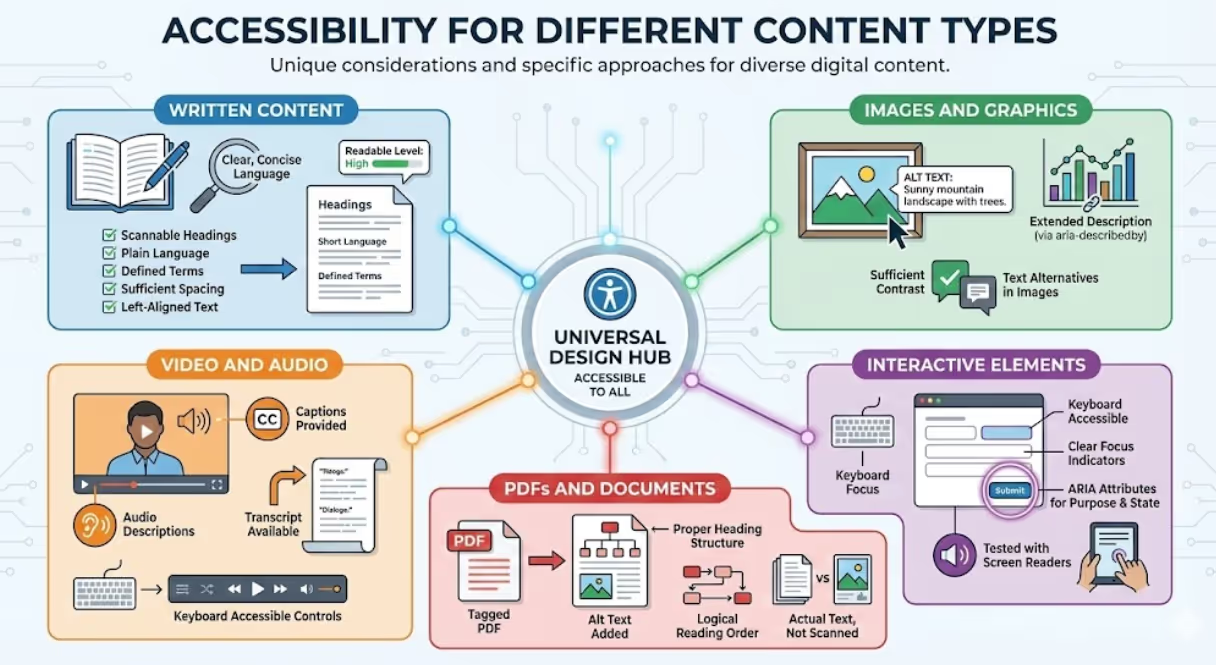
Accessibility for Different Content Types
Different content types present unique accessibility considerations requiring specific approaches.
Written Content: Use clear, concise language at appropriate reading levels. Break long content into scannable sections with descriptive headings. Avoid jargon or define technical terms. Ensure sufficient line spacing and left aligned text improving readability.
Images and Graphics: Provide meaningful alt text. For complex graphics like infographics or charts, provide extended descriptions in surrounding text or use aria-describedby linking to detailed explanations. Ensure text within images maintains sufficient contrast and includes text alternatives.
Video and Audio: Provide captions for all video content. Include audio descriptions for visual information not conveyed through dialogue. Offer transcripts providing text versions of all audio and visual content. Ensure media players keyboard accessible with clear controls.
Interactive Elements: Ensure all interactive elements keyboard accessible. Provide clear focus indicators. Use ARIA attributes clarifying element purposes and states. Test all interactions with screen readers.
PDFs and Documents: Create accessible source documents before converting to PDF. Use proper heading structures. Add alt text to images. Ensure reading order logical. Use actual text rather than scanned images when possible.
The Legal Landscape: Compliance Deadlines Approaching
Multiple jurisdictions now mandate digital accessibility with specific deadlines.
United States: In April 2024, the Department of Justice updated Title II regulations publishing the Web & Mobile Application Accessibility Rule setting technical requirements for state and local governments. The compliance deadline is April 24, 2026, requiring websites, mobile apps, course content, and digital platforms meet WCAG 2.1 Level AA standards.
European Union: The European Accessibility Act became legally applicable in EU member states on June 28, 2025. The Act requires websites, apps, ebooks, ecommerce platforms, PDFs and others conform to WCAG 2.1 AA criteria within the EU.
Australia: While Australia doesn't mandate WCAG compliance for all websites, Disability Discrimination Act 1992 prohibits discrimination including digital discrimination. Courts have ruled websites must be accessible. Government websites must meet WCAG 2.0 Level AA at minimum.
For Australian businesses selling to global markets, WCAG compliance isn't just local concern. It's requirement for serving international customers in regions with mandatory accessibility laws.
The Bottom Line
Accessible design isn't accommodation or compliance exercise. It's fundamental design quality improving experiences for everyone while opening markets to all potential customers.
When developers and designers adhere to WCAG, they're not just following rules. They're demonstrating their company's commitment to creating inclusive and equitable experiences. "Inclusive" doesn't mean it only benefits users with disabilities. It enhances overall user experience for everyone, regardless of abilities.
The businesses dominating markets in 2026 won't be those with prettiest designs accessible only to fully abled users. They'll be those creating beautiful, functional experiences everyone can use regardless of disability, temporary limitation, situational constraint, or age-related change.
Your competitors are either building accessibility into everything they create, or watching legal penalties pile up while missing entire market segments. The gap between inclusive businesses and those still treating accessibility as afterthought isn't closing. It's widening as awareness grows and enforcement increases.
Which position will your business occupy? The inclusive one reaching everyone, or the inaccessible one wondering why customers can't interact with your beautiful designs?
Create Inclusive Designs That Reach Everyone
Stop losing customers and risking legal penalties through inaccessible design. At Maven Marketing Co., we help Australian businesses create visually stunning, fully accessible content that works for everyone while exceeding WCAG 2.2 Level AA standards.
Our approach integrates accessibility throughout the design process, combining beautiful aesthetics with universal usability, WCAG compliance verification, assistive technology testing, and ongoing accessibility training ensuring your team maintains accessible practices.
We don't bolt accessibility onto finished designs. We build inclusive experiences from conception through launch, ensuring your content reaches all potential customers while avoiding legal risk.
Contact Maven Marketing Co. today for an accessibility audit revealing where your current designs exclude users, which improvements deliver biggest impact, and the strategic roadmap creating inclusive visual content that works for everyone while strengthening your business.

Table of contents
read more blogs

How to Build a Brand Positioning Strategy That Sets Your Business Apart
Most businesses can explain what they sell. Far fewer can explain, in a sentence or two, why the right customer should choose them instead of another credible option. That gap is where brand positioning matters.A strong brand positioning strategy gives your business a clear place in the market and a clear place in the customer's mind. It helps your team decide who you are speaking to, what you want to be known for, which benefits deserve the most attention and how your marketing should sound and look across every channel.It is not a slogan exercise and it is not something reserved for large consumer brands. For an Australian service business, e-commerce brand, professional firm, or growing B2B company, positioning can make everyday decisions easier, from website copy and campaign messaging to pricing, sales conversations, and brand identity. The goal is not to look different for the sake of it. The goal is to be meaningfully different in a way the right customers understand and value.

The Role of Digital PR in Long Term SEO Growth
Building a solid online presence is basically more than just posting content now and then or sprinkling keywords across your website. Search engines such as Google tend to point users toward businesses that feel trustworthy, useful, and backed up by others online, even if it’s not always obvious at first. When a company puts together a well-thought-out digital PR strategy, it can bring in solid media mentions, earning high-quality backlinks and stronger brand awareness, all of which feed long-term SEO progress. Rather than obsessing solely over rankings, digital PR helps you build credibility plus authority, so your site looks more appealing to search engines and also to real people who might become customers. In this guide, we’ll walk through how digital PR supports SEO, what makes it such a key part of modern marketing, and the most effective approaches for sustainable growth in search results.

Is Google Ads Better Than SEO for My Business
One of the biggest questions business owners ask when they are planning online growth is whether they should invest in Google Ads or SEO. Both are strong marketing plays that help your company show up in Google search results, but they do things in separate lanes. Google Ads gives quicker visibility and can bring in leads fast, whereas SEO more or less focuses on slow, steady organic traffic that tends to grow the longer you keep building it. Picking the right direction depends on what you want to achieve, how much money you can spend, how crowded the market is, and how quickly you need results, like sooner rather than later. The good news is you don’t always have to choose one or the other; it’s not exactly a black-and-white situation. If you take time to understand the strongest points of both, you can put together a more sensible digital marketing plan that supports consistent expansion. In this guide, we’ll compare Google Ads vs SEO, explain the main differences, and help you figure out what option makes the most sense for your business.


