
.svg)


%201.svg)

Running a successful Google Ads budget isn’t only about throwing more money at it. It’s more like making every dollar, doing a bit extra. A lot of businesses start a Google Ads campaign with big hopes, then find out their daily budget is gone within a few hours, and that feels weird, right? After that, your ads stop showing effectively, new leads slip away, and your return on investment dips.
So if your Google Ads budget is running out too fast, don’t stress. It’s a fairly common issue, and in most situations, it can be repaired with the right approach. There are multiple little things that can drain your advertising money quicker than you expected, from costly keywords to audience targeting that just doesn’t quite fit.
In this guide, we’ll walk through why your budget disappears so quickly, how to cut wasteful spend, and the most reliable ways to boost your Google Ads ROI, even if your budget stays the same.
What Is a Google Ads Budget?
A Google Ads budget is, basically, the amount you’re willing to pour into your advertising campaigns. You can set a daily budget, or you can handle your spending across the month. Google then uses what you set to figure out how often your ads pop up during the day.
This budget also works side by side with your bidding strategy. If lots of advertisers are chasing the very same keywords, or if your ads aren’t well optimized, that daily budget can burn out way quicker than you’d expect.
And the point isn’t only to spend the budget. But the real intention is quality clicks, worthwhile leads, and profitable conversions.
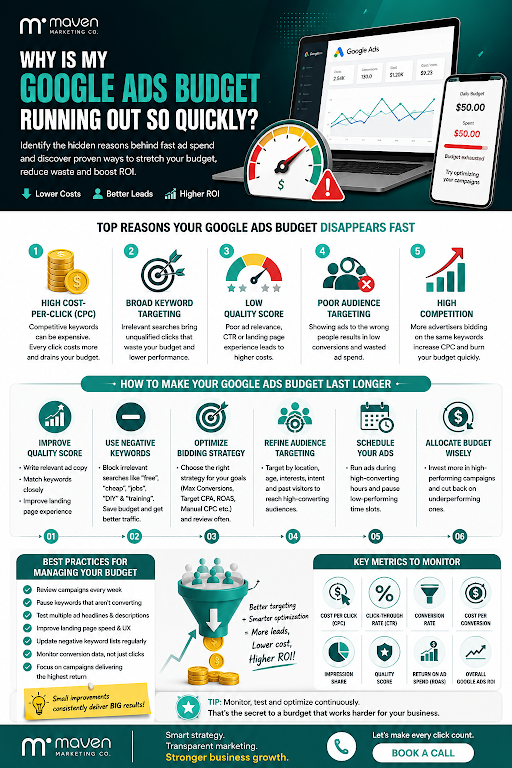
Common Reasons Your Google Ads Budget Runs Out Quickly
High Cost-Per-Click (CPC)
One of the biggest reasons your budget just vanishes pretty fast is a high Google Ads cost per click. Like, every time someone actually clicks on your ad, Google takes money from you. If you’re going after competitive keywords, then each click can get way more expensive than you expect, and it adds up real quick.
For instance, fields such as legal services, finance, insurance, and healthcare usually have pricey keywords because a lot of companies are all competing in the same little space.
Now, high CPC isn’t automatically a bad thing, not even close, but it turns into a real headache when those clicks don’t turn into customers.
Broad Keyword Targeting
Using broad keywords might boost traffic, but it also tends to pull in folks who aren’t actually seeking the exact thing that you provide. Like, if you bid on “marketing services,” your ads can show up when people search for marketing courses, or marketing jobs, or even free marketing advice. Those off-target clicks rack up wasted ad spend pretty fast, and they lower overall campaign efficiency. On the other hand, picking narrower keywords helps your ads land in front of users with stronger buying intent, so the results feel more on point.
Low Quality Score
Google rewards relevant ads with a higher Quality Score. This score is based on several factors, including:
- Ad relevance
- Expected click-through rate
- Landing page experience
A low Quality Score usually means Google charges more per click, so your PPC budget is chewed up way faster while you get fewer results overall.
Poor Audience Targeting
Even the best ads will still struggle if they somehow land in the wrong audience.
If your campaign tries to target everyone, instead of your ideal customers, you will end up with clicks from people who have very little interest in what you sell or the services you offer.
With better audience targeting, Google Ads can perform stronger, while cutting down the unnecessary advertising spend.
High Competition
Some industries can be naturally more competitive than others. And when a bunch of businesses start bidding on the same keywords, usually the bid amounts go up, like pretty quickly.
Higher competition often leads to:
- Higher CPC
- Faster budget depletion
- Lower visibility later in the day
While you can't eliminate competition, you can optimize your campaigns to compete more effectively.
How to Make Your Google Ads Budget Last Longer
Improve Quality Score
One of the better ways to reduce advertising expenses is by doing more careful Google Ads optimization.
You can raise your Quality Score by:
- Writing relevant ad copy.
- Match keywords closely with your ads.
- Making sure landing pages load fast.
- Offering useful information for visitors.
Higher Quality Scores often reduce CPC while improving ad rankings.
Use Negative Keywords
Negative keywords prevent your ads from appearing in irrelevant searches.
For example, if you only sell premium products, you may want to exclude searches containing words like:
- Free
- Cheap
- DIY
- Jobs
- Training
This simple strategy helps reduce Google Ads cost while improving the quality of incoming traffic.
Optimize Bidding Strategy
Google offers several bidding options depending on your goals.
These include:
- Maximise Conversions
- Target CPA
- Target ROAS
- Manual CPC
- Maximise Clicks
Choosing the right bidding strategy plays a major role in Google Ads campaign optimization. Regularly reviewing your bidding approach helps prevent overspending, especially when it's aligned with a well-planned Google Ads account structure.
Refine Audience Targeting
Target users based on factors such as:
- Location
- Age
- Interests
- Purchase intent
- Previous website visitors
Audience segmentation ensures your ads reach people who are more likely to convert instead of wasting your budget on low-value clicks.
Schedule Your Ads
Your customers might not be browsing for your services 24 hours per day.
Think about ad scheduling so your ads show up only when conversions are at their strongest, because that timing can matter a lot.
Like if most inquiries land during office hours, you can lower the bids or even pause ads overnight, so you don’t waste your PPC budget.
Best Practices for Managing Your Google Ads Budget
Managing your advertising budget requires ongoing attention rather than a one-time setup.
Some proven best practices include:
- Review campaigns every week.
- Pause keywords that aren't converting.
- Test multiple ad headlines and descriptions.
- Improve landing page speed and user experience.
- Regularly update negative keyword lists.
- Monitor conversion data instead of focusing only on clicks.
- Allocate more budget to campaigns producing the highest return.
Small improvements made consistently often produce better long-term results than making major changes all at once.
Key Metrics to Monitor
Monitoring the right data helps you understand where your budget is going.
Pay close attention to these metrics:
- Cost Per Click (CPC)
- Click-Through Rate (CTR)
- Conversion Rate
- Cost Per Conversion
- Impression Share
- Quality Score
- Return on Ad Spend (ROAS)
- Overall, Google Ads ROI
Looking at these numbers regularly allows you to identify problems before they become expensive.
Conclusion
A fast-draining Google Ads budget doesn’t always mean you just have to spend more; it usually means your campaigns need better optimization. When you work on your Quality Score, refine audience targeting, add negative keywords, pick the right bidding strategy, and check performance consistently, you can stretch every advertising dollar and end up with stronger outcomes overall.
At Maven Marketing Co. we think that good advertising is made from strategy, transparency, and ongoing refinement, not guesswork. Our Brisbane-based crew builds data-driven Google Ads campaigns that help companies cut down wasted spend, boost Google Ads performance, and lift Google Ads ROI. Whether you’re rolling out your first campaign or trying to tighten up an existing one, we’re here to support you so every click matters, and your advertising budget turns into measurable business growth.
Frequently Asked Questions
1. Why is my Google Ads budget running out so quickly?
Your budget can disappear pretty quickly because of high CPC, overly broad keyword choices, weaker targeting, a low Quality Score, or just tougher competition.
2. How can I make my Google Ads budget last longer?
Work on your Quality Score, toss in a few negative keywords, and then adjust who you reach a bit more precisely, refining that audience targeting until it feels right. After that, optimize bidding strategy so you’re not overpaying, and make sure ad scheduling happens during your top-performing hours.
3. What is a good daily Google Ads budget?
There isn't a single answer. Your daily budget depends on your industry, the competition, your business goals, and the return you expect. I’d start with a number you feel ok testing, then tweak it as campaign performance changes.
4. Does Quality Score affect my Google Ads budget?
Yes. A higher Quality Score usually lowers your cost per click, so your Google Ads budget can haul in more clicks and better results, pretty quickly.
5. How do negative keywords help save my Google Ads budget?
Negative keywords work like a filter, so your ads don't show up for those unrelated searches. That means fewer wasted clicks, less wasted ad spend, and, in the end, you can aim your budget more narrowly at people who are more likely to become customers.

Table of contents
read more blogs

How to Build a Customer Journey Map for Your Digital Marketing Strategy
A strong digital marketing strategy is not just about channels, creative or traffic. It is about understanding how real people move from first awareness through to enquiry, purchase and ongoing loyalty. That is exactly why customer journey mapping matters.Without a clear view of the journey, businesses often optimise in fragments. They improve the website without thinking about the ad that drove the visit, produce content without considering where the audience is in the decision process, or judge conversion performance without understanding the friction points that sit earlier in the experience.A customer journey map helps you step back and see the bigger picture. It shows the stages people move through, the touchpoints they interact with, the questions they ask, the barriers they face and the moments where your marketing can either help or lose them.This guide explains how to build a practical customer journey map for your digital marketing strategy, what information to include, how to use the map to improve performance and which common mistakes to avoid. The goal is not to create a pretty workshop artefact that gets forgotten. It is to build a working tool that improves messaging, user experience, channel decisions and conversion outcomes.

Why Your Google Ads Campaign Is Not Getting Results: Common Mistakes and Solutions
If your Google Ads campaign is getting impressions or clicks but not producing enough enquiries, sales, or qualified leads, the problem is usually not Google Ads itself. It is more often a strategy, tracking, or conversion issue somewhere in the system.That matters because paid search can look busy without being commercially effective. You can have traffic coming in, a reasonable click-through rate and money leaving the account every day, yet still have very little to show for it if your keywords are weak, your ad copy is misaligned, your landing pages do not convert or your tracking is incomplete.A strong campaign works as one connected chain. Search intent, keyword targeting, ad relevance, bidding, landing-page experience, and conversion tracking all need to support the same commercial outcome. If one link breaks, results usually suffer quickly.This guide explains the most common reasons a Google Ads campaign is not getting results, what those issues normally look like in practice and how to fix them without relying on guesswork. The focus is not on vanity metrics. It is on improving lead quality, conversion rate, and return on spend.

6 Ways Digital Marketing Can Boost B2B Lead Generation
B2B lead generation is not about filling a CRM with as many names as possible. The real objective is to attract businesses that fit your offer, give the right people a reason to engage and create enough confidence for a genuine sales conversation to start.That distinction matters because B2B buying is usually more targeted than consumer marketing and often involves several people influencing the decision. Current LinkedIn lead-generation guidance makes the same point: more leads do not automatically mean better results if only a small proportion are genuinely relevant or likely to progress.Digital marketing helps by creating multiple paths into the business. Search can capture active demand. Paid media can put an offer in front of a tightly defined audience. Content can build authority before a buyer is ready to talk. Social media can keep the brand visible across a long decision cycle. Your website turns interest into action, while email helps nurture that interest over time.The strongest B2B digital marketing strategies do not treat these as six separate activities. They use them as one connected system designed to generate quality B2B leads, support sales and build a more dependable pipeline


